Your video holds together. The visuals are there, the edit works, and yet something feels off from the very first line: the narration. No decent microphone, no quiet room, no appetite for hearing your own voice for ten minutes straight. An AI voice generator solves that in seconds, provided you know what you are feeding it.
The term covers three quite different things, and that is where most people get lost. Having a stock voice read a script. Building a faithful copy of your own voice. Taking an existing video into another language. This guide covers all three, with what actually works and what listeners catch immediately when a step gets rushed.
AI voice generator: the short answer
An AI voice generator turns written text into spoken narration using a speech synthesis model. You paste the script, pick a voice, and get an audio file you can drop onto your timeline. How natural it sounds has almost nothing to do with the engine you picked: it comes down to how the text is written, punctuated and split. The voice is one brick in a larger chain, laid out in our guide to AI video generators. One habit saves more time than any other: preview a voice before you generate anything, because it costs nothing and it stops you producing ten minutes of audio in the wrong timbre.
How text becomes a voice
Modern engines no longer stitch together pre recorded syllables the way the metallic systems everyone remembers used to. They generate the audio signal directly, predicting intonation, pace and breathing from the sentence itself. That difference has one enormous practical consequence: the engine interprets your text, it does not recite it.
Which means it reads your punctuation the way an actor reads a score. A full stop creates a clean silence, a comma a short breath, a question mark a rising ending. A script delivered without punctuation gives the engine nothing to work with, so it produces a flat, evenly paced delivery. That is exactly what people mean when they call a voice robotic.
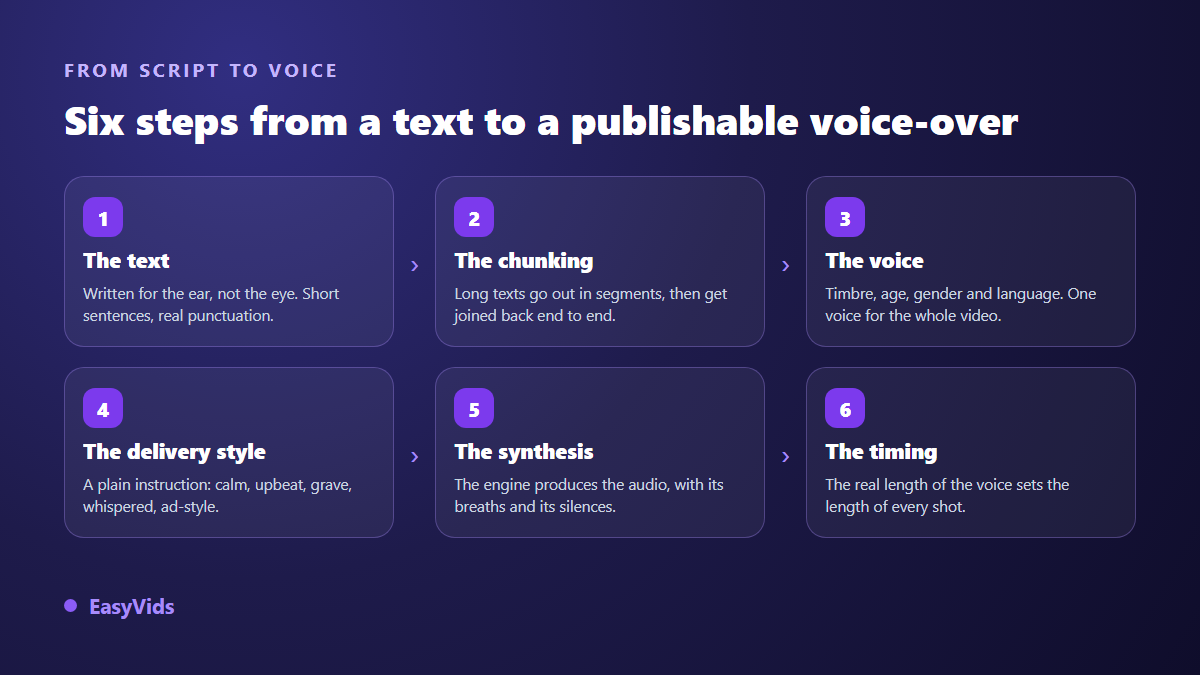
Every one of those steps is reversible. Change the voice without rewriting the script, change the reading style without changing the voice, regenerate a single segment without redoing the whole narration. A tool that forces a full restart on every correction costs you far more time than it saves.
What makes a voice sound real, and what gives it away
AI narration sounds artificial for three reasons, almost always the same ones. The script was written to be read with the eyes, full of long sentences and asides. The punctuation is missing or purely decorative. And no interpretation instruction was given, so the engine falls back on its neutral default delivery.
We collected the sentence level fixes in our practical tips for a natural sounding AI voice over. This guide stays one level above that: understanding why those fixes work, so you can adapt them to your own writing instead of applying them by rote.
Here is the takeaway. Give two different engines the same sentence and the results will be close. Give one engine two different versions of the same sentence and the results will be unrecognisable. The quality gap lives in the script, not in the technology.
Reading style, the instruction almost nobody gives
Recent engines accept a plain language instruction alongside the script: a sentence describing how to read, not what to read. It is never spoken aloud. It shapes the whole narration, first word to last. It is the most powerful control available, and the one most often left empty.
The same voice moves from intimate storytelling to newsroom delivery without a single comma changing in your script. Five instructions cover most needs.
- Read like a captivating storyteller, warm and measured for narrative pieces and anything that has to hold attention for several minutes.
- Read like a news anchor, serious and well paced for explainers and informational content.
- Read with energy, like an upbeat commercial for short ads and anything under thirty seconds.
- Read in a soft, soothing voice, like a meditation for relaxation, bedtime stories and calm content.
- Read like a wildlife documentary narrator, deep and mysterious for suspense and slow burn storytelling.
Two limits are worth knowing. Not every voice accepts this kind of instruction: some voice families read the same way whatever you ask. And an instruction does not transform a voice. A voice built for calm narration will never become an aggressive advertising read, it will simply be calm narration with a bit more lift.
Write for the ear: the script outweighs the engine
One minute of narration runs roughly 150 words, about 1,000 characters. That reference point changes how you work: think in minutes of video, not in character counts. A script sized correctly from the start spares you cuts at the edit stage, which always break a text's rhythm.
The rest is writing habits. One idea per sentence. No parenthetical asides, which the engine reads without shifting tone and which lose the listener. Numbers written out when pronunciation matters. Acronyms spaced out if you want them spelled. And awkward proper nouns written phonetically, even if the source text ends up ugly: nobody reads it, only the audio counts.
Long scripts: why splitting changes everything
Speech engines handle a limited amount of text per request. Beyond that, the script has to be split, generated piece by piece and reassembled. That technical detail has very audible consequences, and it explains a good share of long narrations that feel choppy.
The sensitive part is where the cut lands. A split falling at the end of a sentence reassembles without the ear noticing anything. A split falling mid clause produces an audible break in intonation, because the engine restarts each segment with a fresh attack. Across our own generations, the rule is to cut only at sentence boundaries, and never inside a word.
That gives you a simple test for any tool. Feed it several thousand characters and listen to the joins. On our side, a long script is split into segments generated in parallel then reassembled, which lets a full chapter, up to roughly an hour and a half of narration, run as a single job. The trade off is that your script has to be punctuated: with no full stops, there is no good place to cut.
Voice cloning: what you actually need to supply
Cloning a voice is not replaying a recording. The system builds a model of your timbre, which can then speak any text at all, including words you have never said. That is what makes it useful, and also what makes it sensitive.
Clone quality depends almost entirely on the sample. Fifteen seconds of clean audio is enough to get started, and a few minutes gives a more stable result. Past that, the returns fade fast. What does not fade is every flaw in the recording: a fan humming, an empty room's reverb, background music, a second person talking somewhere behind you.
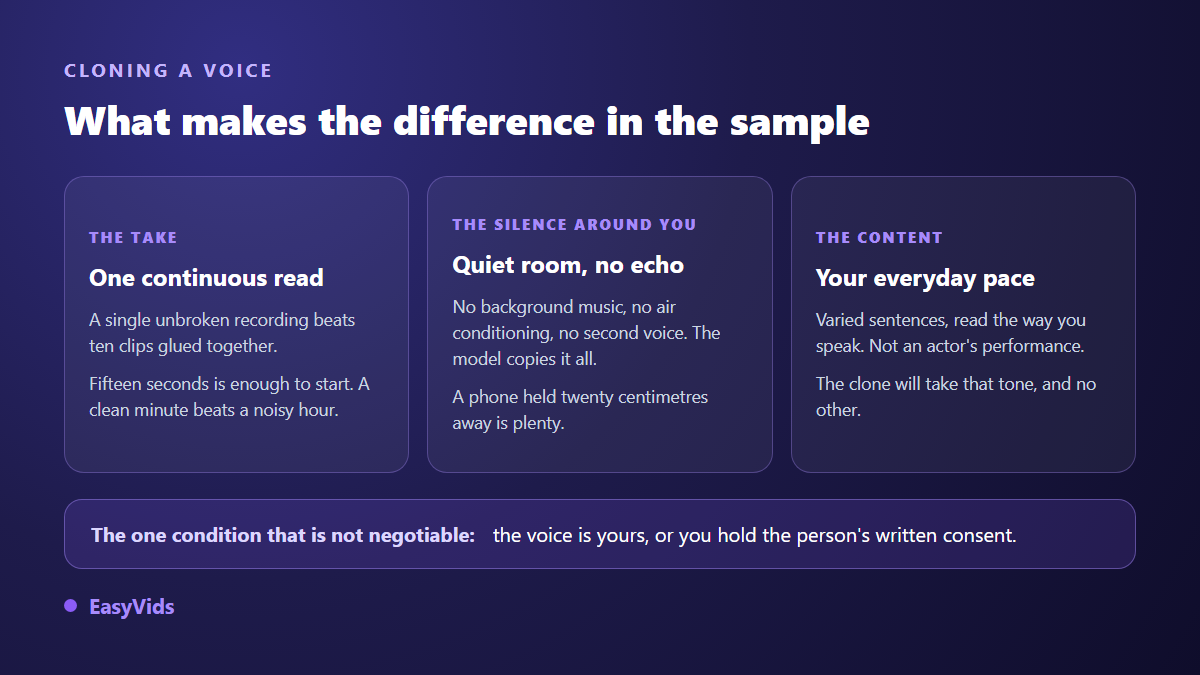
One detail catches people out: the clone copies how you read, not just how you sound. Record your sample in a monotone because you are carefully reading unfamiliar text, and the clone inherits that monotone. Read the way you speak, at your usual pace, with your normal energy.
Consent: the one question you cannot route around
The rule is short. You may clone your own voice. You may clone someone else's if you hold their explicit permission, ideally in writing. You may not clone a public figure, an actor, a journalist or a recording artist, however harmless the use may seem to you. The edge cases of that ban, parody and tribute included, are examined one by one in our article on celebrity AI voices.
The legal ground has hardened considerably. Tennessee's ELVIS Act made voice a protected attribute in 2024, covering imitations and not only recordings. California has regulated digital replicas of performers since 2025, including deceased ones. The European AI Act requires machine readable marking of synthetic audio. At US federal level the NO FAKES Act is still a bill rather than law, but the direction of travel is unmistakable.
Treat consent as a document, not a formality. A dated written message stating the intended use and its duration protects you far better than a verbal agreement. Reputable services request the certification again at every single cloning and never remember it, deliberately, because a box ticked six months ago proves nothing.
Dubbing and multilingual versions
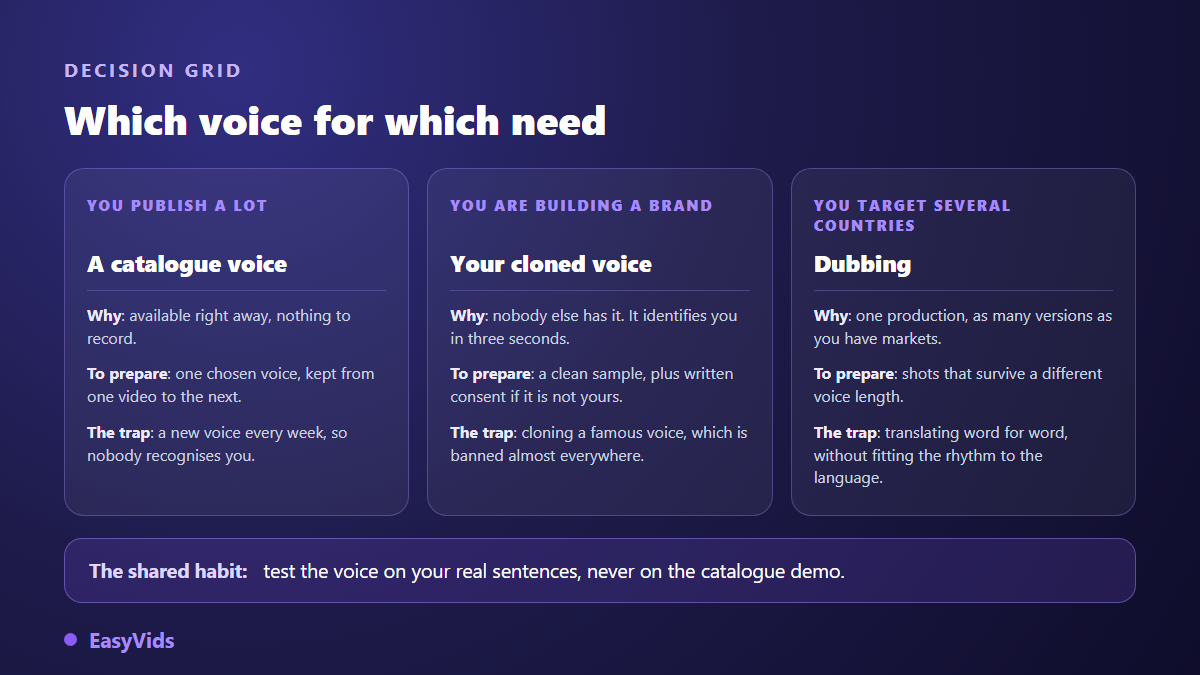
Publishing one video in several languages has become a standard growth move, and the voice is half the work. Two routes exist. The first translates the script, then regenerates the narration in the target language over the same edit. The second uses a dubbing tool that takes the existing track and returns it translated. The first route takes longer to set up and gives you far more control, because you proofread the translated text before anyone speaks it.
The obstacle everyone hits on the first attempt is identical: languages are not the same length. A French sentence typically runs a quarter longer than its English equivalent, and Spanish stretches further still. If your shots are cut to the tenth of a second against the original voice, the translated version will not fit. Build slack into the original edit, or accept recutting shots per language.
Subtitles are the natural companion to all this. Automatic transcription produces a synced caption file you can then translate, which gives you an accessible version even when you skip dubbing. A large share of viewers watch with the sound off, and that habit alone usually justifies the effort.
Choosing your brand voice
Beyond any single video, a voice over is a signature. Viewers recognise a timbre before they recognise a logo, and far faster than they recognise a visual style. Switching voices every time you publish is close to switching names every time you publish.
- Does the timbre hold up on your own sentences, not just on the catalogue demo?
- Does the voice accept a reading style instruction, or does it always read the same way?
- Does it stay stable from the first segment to the last on a long script?
- Does it pronounce your product names and industry vocabulary correctly?
- Will it still be there in six months, for the next video and the whole series?
- Is commercial use covered, with no audio watermark and no mandatory credit?
The selection method is one gesture. Never judge a voice on the catalogue demo, which was chosen to flatter it. Have it read three of your real sentences, with your proper nouns and your jargon, then compare blind. A voice that stumbles on your product name will annoy you every single week.
What drives the cost of a voice over
Speech synthesis is billed on the amount of text read rather than the length of the resulting file, which amounts to much the same thing since one follows from the other. The practical consequence is simple: proofread before you generate, not after. Regenerating the same paragraph three times because of a typo costs three readings.
Two easy savings exist. Previewing a voice before any production consumes nothing, so use it to choose between timbres. And keep the most refined engines for the final pass, drafting with a fast one. We broke down the orders of magnitude for a full production in our analysis of what an AI video really costs, and the plans are laid out on the pricing page.
Frequently asked questions
Can I use an AI voice over commercially?
In most cases yes, but always check two points in the terms of the service you use: whether rights to the generated audio transfer to you, and whether any credit is mandatory. Both vary widely between tools, especially on free tiers, where use is sometimes restricted to non commercial projects.
How much audio do I need to clone a voice?
About fifteen seconds of clean recording is enough for a recognisable clone. A few minutes improves stability on long scripts. Beyond that, recording quality matters far more than duration: one minute captured in a quiet room beats ten minutes recorded in a noisy office.
Can a video with an AI voice over be monetised on YouTube?
Yes, as long as the video contributes something of its own: an original scenario, a deliberate edit, considered narration. Platforms penalise repetitive mass produced content with no editorial input, not the use of speech synthesis. The full workflow is covered in our step by step guide to an AI generated YouTube video.
How do I fix a mispronounced name?
Rewrite it phonetically in the source text, breaking the syllables apart with spaces or hyphens until the pronunciation lands. The source text is never displayed, only the narration matters. The same trick works for acronyms, foreign brand names and words the engine reads in the wrong language.
Can several voices hold a conversation in one video?
Yes. Assign a distinct voice to each character and write the script as named lines. Each speaker can carry their own reading style, and a cloned voice can play one of the parts. That is the difference between plain narration and a played scene, and it changes viewer attention noticeably on longer formats.
A good AI voice over is not picked from a catalogue, it is built: a script written for the ear, punctuation that works as a score, an explicit reading instruction, clean splits at sentence boundaries, and one voice you keep from video to video. Cloning and dubbing come later, once that base is solid. To hear the difference on your own text rather than on a demo, creating an account opens the full studio and the voice previews, no bank card required.