Your edit holds up, your visuals are clean, and the first sentence ruins everything. When you look for an AI voice generator for YouTube videos, the narration is the first thing your viewer judges, often before the picture registers at all. A flat read, and the progress bar stops at fifteen seconds. The right voice, and the same video gets watched to the end.
The engine is rarely the problem. The problem is a timbre picked at random from a list, a reading instruction left blank, and a script written for the eye instead of the ear. This article reviews nine voices available in our studio, says which format each one suits, and gives you a method to decide by ear. If the topic is new to you, our complete guide to AI voice over covers the groundwork first.
The short answer
There is no best AI voice for YouTube in the abstract. There is a voice that fits your format. A long story wants a deep, slow timbre. A tutorial wants a clear, warm one. A Short wants a sharp attack on the very first word. Then pick one voice and keep it across the channel: viewers recognise a timbre long before they recognise a logo. Everything else comes down to your script and your reading instruction, not to the size of the catalogue.
A channel voice is not a demo voice
Catalogue demos last ten seconds and are chosen to flatter the voice. Your video runs eight minutes, and your viewer hears it through a phone speaker, often on a train or in a kitchen. Those two conditions reshuffle the ranking completely. A slightly sibilant voice goes unnoticed in a short sample and becomes unbearable over a long format. A very deep voice impresses on headphones and vanishes on a phone speaker.
The second point is YouTube itself. The platform rewards watch time, not the beauty of a timbre. A voice that holds attention over the length beats a spectacular voice that only works for thirty seconds. That is why the choice follows the format rather than personal taste, and why narration is built alongside the rest of the video, as our step by step guide to an AI made YouTube video shows.
Nine voices reviewed, and the format each one fits
These are the nine voices we reach for most often in our studio, with the character each one is described by and the use it suits. The first seven belong to Model V1, which accepts a reading instruction. The last two belong to Model V2.5, built for long narration.
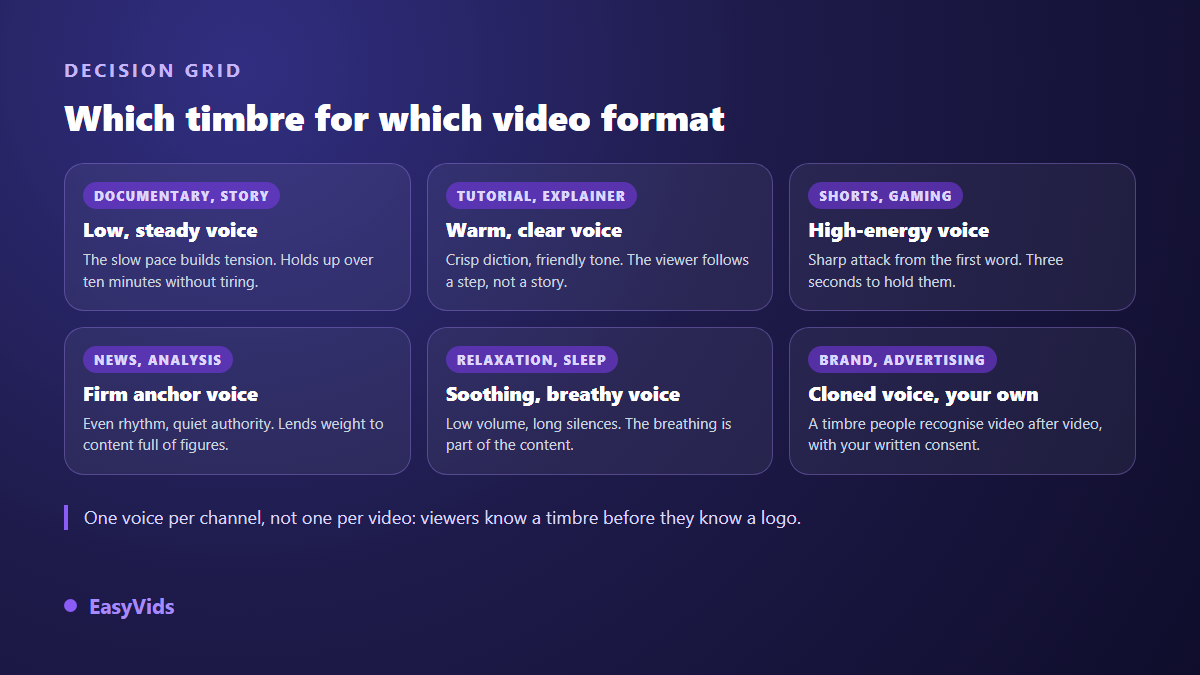
- Charon, deep and steady: documentary, true crime, long form storytelling. The slow delivery builds tension and holds for ten minutes without tiring the ear.
- Sulafat, warm: tutorials, advice channels, narrated vlogs. The friendly tone carries a technical instruction without sounding like a manual read aloud.
- Kore, firm: analysis, news, data driven content. The quiet authority makes a fact based argument land.
- Fenrir, energetic: Shorts, gaming, announcements. The sharp attack on the first word matches formats where three seconds decide everything.
- Vindemiatrix, soothing: sleep stories, meditation, relaxation content. Low volume, long silences, breathing as part of the content.
- Achird, friendly: product reviews, direct address, talking head formats. It sounds like someone speaking to you, not reciting at you.
- Leda, young: content for children, characters, light formats. Use it sparingly on a serious subject, where it quickly feels off.
- Narrator (male) on Model V2.5: long narration, full chapters, audiobooks. Our default when a reading instruction is not needed.
- News anchor (female) on Model V2.5: news formats, press reviews, weekly recaps. The rhythm is steady, almost metronomic.
We deliberately publish no scored ranking of these voices. A ranking would assume one voice beats another regardless of the content, which is false: the most pleasant voice on the list wrecks a horror video, and the deepest one puts a teenage audience to sleep. The only ranking that matters is yours, on your own sentences. For short selling formats, tone matters even more than timbre, a point we cover in our method for finding an advertising voice over tone.
The reading instruction changes everything without changing the voice
Model V1 voices accept a plain language instruction written next to the text: a sentence describing how to read, not what to read. It is never spoken aloud. It steers the whole narration from first word to last. It is the most powerful setting in the studio, and the one almost nobody fills in.
The same voice moves from intimate storytelling to a TV news register without a single comma changing in your script. In our studio the instruction is saved on your account and applied to every voice over you generate afterwards, so you never retype it. Five formulations cover most channels.
- Read like a captivating storyteller, in a warm and steady voice.
- Read like a TV news anchor, serious and brisk.
- Read with enthusiasm, like a high energy ad.
- Read in a soft, soothing voice, like a meditation.
- Read like a wildlife documentary narrator, deep and mysterious.
Two limits are worth knowing. Not every voice family accepts this kind of instruction: some always read the same way whatever you write. And an instruction does not transform a voice: a calm narration becomes a slightly livelier calm narration, never an aggressive ad read. When the result still sounds metallic, the cause lies elsewhere, and our fixes for a robotic AI voice work through them one by one.
Writing for the ear matters more than choosing the voice
Current engines read your punctuation the way an actor reads a score. A full stop creates a clean silence, a comma a short breath, a question mark a rising end. A text delivered as long unpunctuated sentences gives the engine nothing to work with, so it produces the flat, even delivery viewers call a robotic voice.
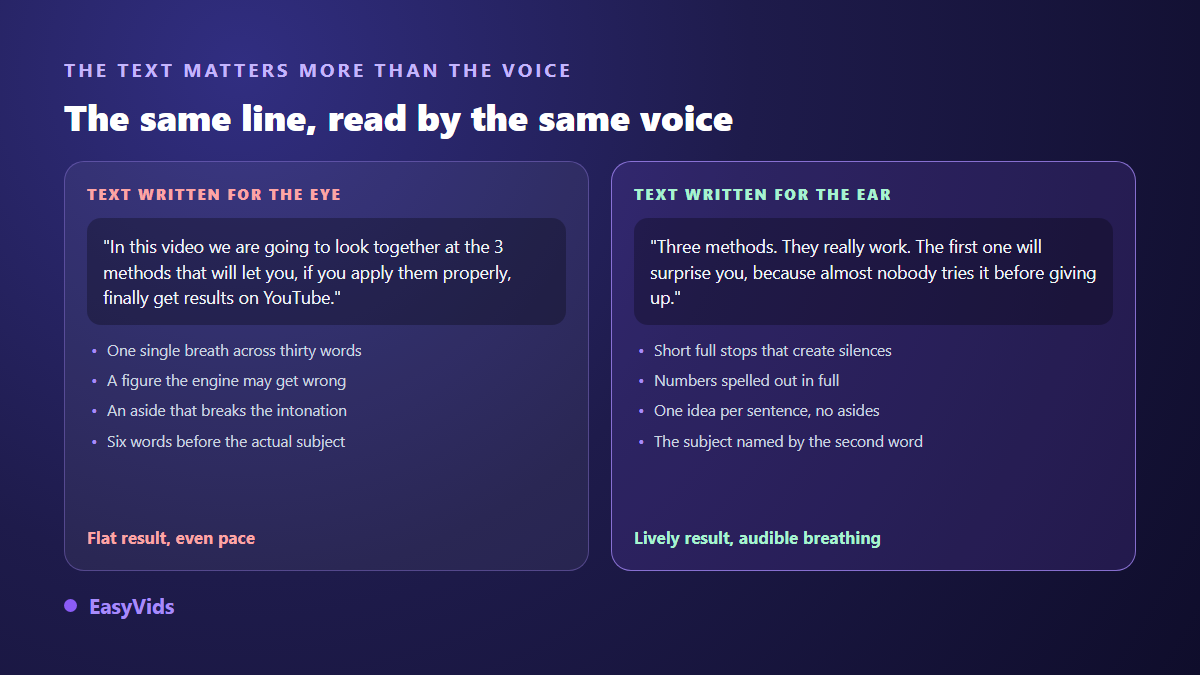
Three habits transform a script. One idea per sentence. Numbers spelled out when pronunciation matters. No parenthetical asides, which the engine reads without changing tone and which lose the listener. A useful benchmark: one minute of narration is roughly 150 words, about 1,000 characters. Think in minutes of video rather than in characters and you will stop cutting at the edit.
Compare by ear before you produce anything
The most common mistake is generating a full narration only to discover the voice does not fit. In our studio, previewing a voice sample consumes nothing, so you can settle between several timbres before launching anything. Test on your own sentences, with your own product names and vocabulary: a voice that stumbles over your brand name will annoy you every single week.
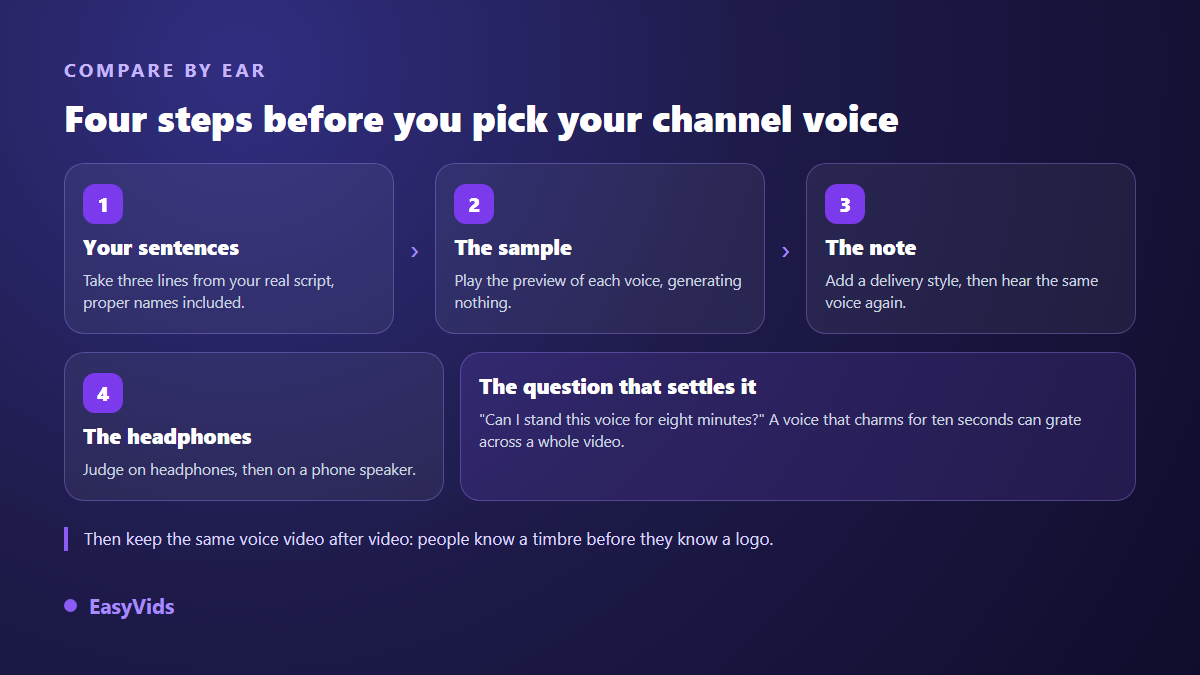
Listen on headphones first, then through a phone speaker, because that is how most of your audience will hear you. On cost, speech synthesis is billed on the amount of text read rather than on the length of the file produced, which gives one simple rule: proofread before you generate, never after. Our plans are laid out on the pricing page.
Long videos: a full chapter in one command
Synthesis engines handle a limited amount of text per request. Beyond that, the text has to be split, generated piece by piece, then glued back together. Where the cut falls decides everything. A cut at the end of a sentence rejoins invisibly. A cut in the middle of a clause produces an audible break in intonation, because the engine restarts each segment with a fresh attack.
In our studio a script can reach 100,000 characters in a single command, roughly one hour and forty minutes of audio. Past 3,000 characters the split happens automatically at sentence boundaries, the pieces are generated in parallel, and the whole thing is assembled into one MP3. A narration interrupted by a technical incident resumes where it stopped instead of redoing finished pieces. That is what makes a full podcast episode practical, a case covered in our guide to AI voices for podcasts.
Cloning your own voice to sign your channel
A catalogue voice stays a voice other channels also use. Cloning yours solves that: a cloning tool builds a model of your timbre, able to pronounce any text afterwards, including words you never said. Fifteen seconds of clean audio is enough to start, and a few minutes give a steadier result. Every flaw in the recording is copied, though: fan noise, room reverb, background music.
One thing surprises most people: the clone also copies how you read. Record your sample in a monotone, because you are concentrating on an unfamiliar text, and the clone inherits that monotone. Read the way you speak. On the legal side the rule is short: your voice, yes; someone else's, only with explicit permission; a public figure's, never. Reputable services ask for that certification at every single clone and never store it, and the legal limits of voice cloning set out the edge cases.
What YouTube expects from a synthetic narration
According to the YouTube help centre, creators must disclose at upload time any realistic content that has been altered or synthetically generated, and the page explicitly lists synthetically generating a person's voice to narrate a video among its examples. The disclosure is a checkbox in the upload tool, and YouTube then adds a note in the description. A clearly artificial catalogue voice is not the same case as a realistic imitation of an identifiable person, but when in doubt, ticking the box costs less than a dispute.
Monetisation is governed elsewhere. The YouTube Partner Programme conditions require original and authentic content, and the relevant section was renamed in July 2025 to speak of inauthentic content. Nothing on that page forbids speech synthesis: what it penalises is mass production with no contribution of your own. Our analysis of monetising an AI produced channel works through those conditions.
Frequently asked questions
Which AI voice should I choose for a faceless channel?
A deep, steady voice for stories, a warm one for explainers. The deciding factor is not timbre but consistency: keep the same voice across every episode. On a faceless channel the voice replaces the presenter, and swapping it mid season reads exactly like swapping presenters.
Does an AI voice over hurt watch time?
Not by itself. What loses viewers is a flat delivery, long sentences and missing silences. A synthetic narration that is well written and well punctuated holds attention as well as a microphone recording, and most viewers never try to work out how the voice was produced.
Do I have to disclose an AI voice over on YouTube?
The YouTube help centre requires disclosure for realistic altered or generated content, and lists a synthetically generated human voice among its examples. A clearly artificial catalogue voice is not in the same bracket as an imitation of a real person. When in doubt, disclose: the note appears in the description and the video stays up.
Can several voices speak in the same video?
Yes. Assign a distinct voice to each character and write the script as named lines. Each speaker can carry their own reading instruction, and a cloned voice can take one of the roles. On a long format, two timbres noticeably revive attention.
How long does the narration of a ten minute video take?
A few minutes, since long text is split and generated in parallel before being assembled into a single file. Most of the time goes into proofreading the script, not into compute. Allow half an hour overall if you want to adjust punctuation and listen back to the joins.
Your channel voice gets decided in one listening session, then stays put for months. Take three sentences from your next script, play the previews, add a reading instruction, decide, and write the voice name down somewhere: you have just fixed your sonic identity. To produce it straight away, create your account and try the voices inside the EasyVids studio, where script, narration and editing live in one place.