The footage is ready, the music is picked, and the one piece holding it all together is still missing: the voice over script. You open a blank document, write three sentences, read them out loud, and they sound like a press release. Your writing is not the problem. A script written to be heard simply does not work like a text written to be read.
The fastest shortcut is to start from voice over script examples that already work, then fill them with your own subject. Below are nine complete scripts, ready to read, sorted by use case: advertising, tutorial, documentary and narration. Each one is timed for a specific length, with the tone to ask for and the way to adapt it. If you are starting from nothing at all, our guide to writing a video script sets the structure before narration even enters the picture.
The short answer
A working voice over script has four beats: a hook that gives a reason to stay, a stake stated from the viewer's side, a concrete proof, then a single action. Timing runs on one simple base: around 150 words per minute of reading, roughly 1,000 characters. A 15 second spot is therefore 35 to 40 words, not one line more. Write sentences under fifteen words, one idea per sentence, and read everything out loud before you generate anything.
A voice over script is not a written text
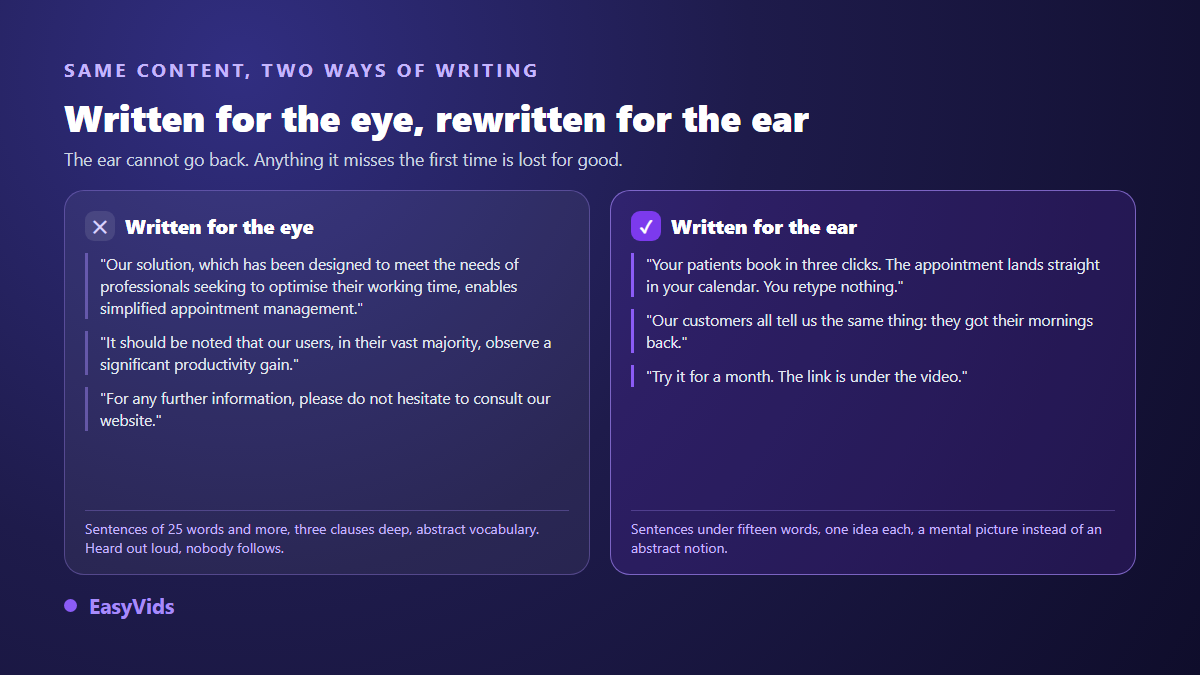
The eye can go back, the ear cannot. A sentence missed on first listen is gone, and the viewer drops off without knowing why. That is what kills most scripts recycled from a brochure or a web page: grammatically flawless, completely unlistenable.
Three habits fix it. Cut subordinate clauses, because two short sentences beat one long one. Swap abstract nouns for gestures and objects, because the ear keeps images and drops concepts. And lead with the subject, the way people actually talk, instead of opening on a long piece of context.
The four beats behind every voice over
This structure carries a fifteen second spot and a three minute narration alike. Only the proportions move. What barely changes is the weight of the proof: it takes about half the speaking time, and it is almost always the part an amateur script drops in favour of introducing itself.
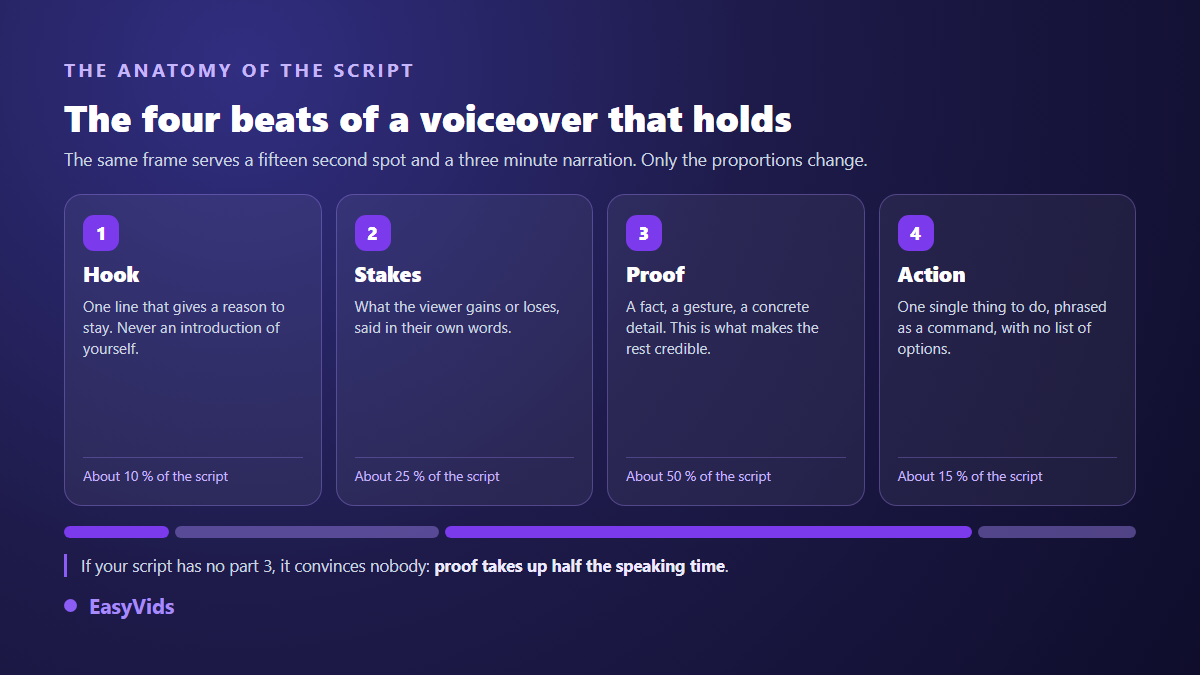
The last beat deserves special care. A voice over offering three different actions gets none of them. Pick the simplest move, phrase it as an instruction, then stop. One extra sentence after the call to action almost always cancels it.
Set the length before writing the first line
Writing long and cutting later is the surest way to lose your best sentences. Fix the target duration first, convert it into a word count, and write to that length. A word counter open next to the document saves a lot of time, especially on ad formats where two seconds over means starting again.
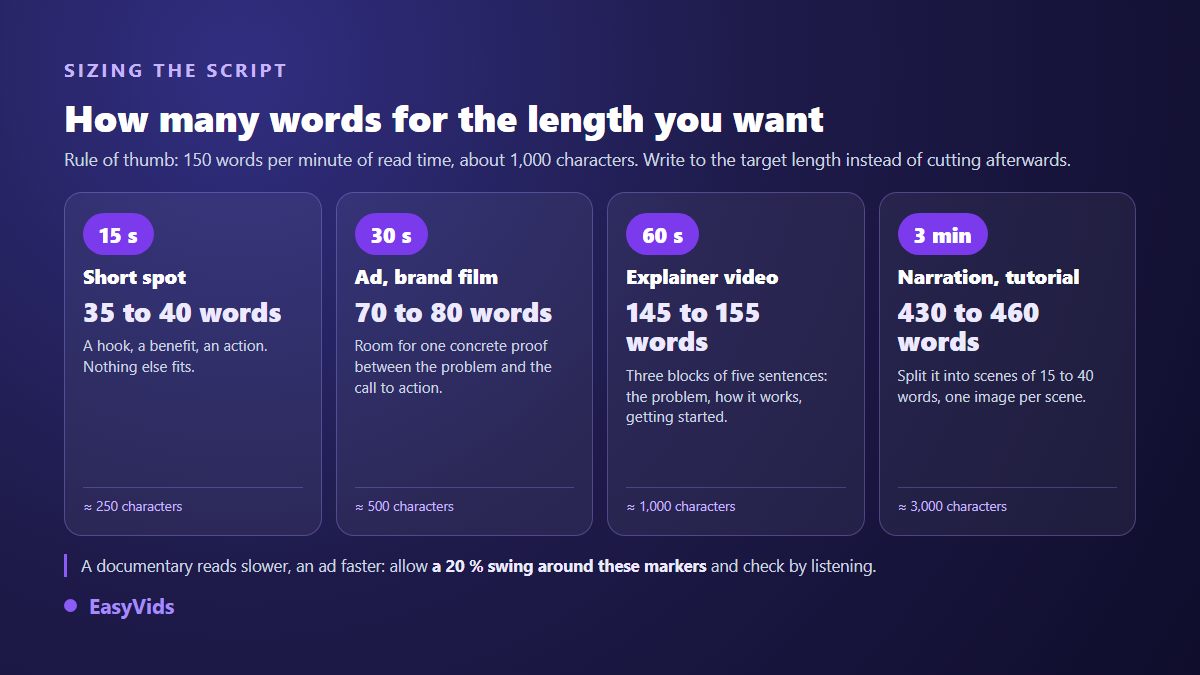
- 15 seconds: 35 to 40 words. One hook, one benefit, one action, nothing else fits.
- 30 seconds: 70 to 80 words. The standard length for an ad or a brand film.
- 60 seconds: 145 to 155 words. The comfortable length for an explainer.
- 3 minutes: 430 to 460 words, split into scenes of 15 to 40 words, one visual per scene.
- Documentaries read slower and ads read faster: allow 20 % either side of these markers and always check by listening.
Three advertising voice over scripts
Advertising is the tightest format: every word costs a fraction of a second. The three scripts below can be read as they stand, replacing the bracketed elements. If you are still hunting for the right register, the tone that sells in fifteen seconds breaks down what works depending on the product.
Example 1. Fifteen second product spot
37 words, direct tone, fast delivery. « You lose an hour a day hunting for files. [Product] files them for you, automatically, the moment they land. Nothing to sort. Nothing to rename. Start today and your first folder is ready in two minutes. »
Example 2. Thirty second brand film
78 words, warm tone, steady delivery. « Ten years ago we fixed bikes in a garage. One rule: every bike leaves better than it arrived. The workshop has grown, the team too, and the rule has not moved. We strip it, we clean it, we tune it, and we tell you exactly what we did. Because a well tuned bike is not something you explain. You feel it on the first pedal stroke. Come and see us. »
Example 3. Twenty second limited offer
48 words, urgent without shouting. « Three days. That is what is left before the collection goes. The most wanted sizes always run out first, the same way they do every year. Pick yours now: shipping is tracked, and returns stay free for thirty days. » Urgency is described, never announced. To vary that closing line without sounding desperate, our call to action formulas offer a full set.
Three scripts for a tutorial or an explainer
Here the constraint flips. Viewers want to understand and agree to stay, but they leave at the first wobble. The script needs mechanical clarity and has to state the payoff in the first second, before any introduction.
Example 4. Ten second tutorial opening
26 words, clear tone, audible smile. « In three minutes you will learn how to cut out an image without installing a thing. No account needed. Open your browser and let us start. »
Example 5. Twenty second tutorial step
52 words, steady tone, even pace. « Open the Settings tab, top right. A column slides out. Scroll down to Export quality and pick the high value. If that line is missing, your project is still a draft: save it and the line appears. » Note how the likely mistake is handled in the same breath. That is what empties the comment section.
Example 6. Sixty second service explainer
Around 150 words, teaching tone, three blocks. « You run a clinic, and appointments come in by phone. Every missed call is a patient calling somewhere else. Here is how we fix that. Your patients open your page, see your real availability and book in three clicks. The appointment lands straight in your calendar, with no double entry. A reminder goes out the day before, and no shows drop on their own. You stay in control. Block a morning and it disappears from the open slots. Set the minimum notice you accept. Export your list whenever you need it. Setup takes an afternoon: import your calendar, check your hours, publish the link. From then on, your front desk only answers the calls worth answering. Try it for a month, no commitment. »
Three narration and documentary scripts
Narration allows what advertising forbids: silence, sentence fragments, slowness. For the same duration the script is shorter, because the reading slows down and the pauses count inside the minute. Write fewer words than the standard calculation suggests.
Example 7. Thirty second wildlife documentary
60 words, deep tone, slow delivery. « At dusk, the savannah changes its rules. Predators wake, herds close ranks, and every sound turns into information. The lioness is not hunting yet. She is watching. She counts the young, she marks the ones that limp, she measures the distance to the river. What we take for patience is arithmetic. »
Example 8. Thirty second corporate film
63 words, plain tone, no emphasis. « Nobody notices a bridge while it holds. That is the job: disappearing behind the thing that works. Our teams check the cables, the bearings and the joints, one by one, on structures you cross without a thought. When all is well, nothing happens. That is exactly the result we are after. »
Example 9. Twenty five second story opening
58 words, confidential tone, almost whispered. « The parcel arrived on a Tuesday, with no sender. Inside, a key and an address written by hand. The address was real. So was the house. What was not real was the person supposed to have lived there for twenty years. Here is what I found when I pushed the door open. »
Reading direction, the setting that changes everything
The same script gives two different videos depending on how it is read. That is why every example above states a tone. In EasyVids that tone is requested in plain words, in a field made for it: Read like a captivating storyteller, in a warm and steady voice, or Read like a TV news anchor, serious and brisk. The direction is never spoken out loud, it shapes the delivery, and it stays saved on your account so you do not retype it for every scene. The remaining settings that matter are covered in our five tips for a genuinely natural AI voice over.
Two useful details. Reading direction is only honoured by the voice model that supports it, while the others stick to the timbre you picked from the catalogue. And you can preview a voice before generating anything, which spares you a full reading to find out the timbre does not suit your script.
Adapting an example to your subject in five minutes
None of these scripts will work untouched for your business, and that is the point: they are moulds, not campaigns. Adapting one takes five moves, in this order.
- Replace the proof before anything else: it carries what is specific to you, while the hook and the action are largely interchangeable.
- Reuse your customers' own words, taken from their messages and reviews, rather than your internal vocabulary.
- Recount the words after rewriting: two added sentences are enough to blow past the target length.
- Read it out loud with a timer running. Wherever you stumble, a synthetic voice will stumble too.
- Punctuate for breathing rather than grammar: a full stop where you take a breath, a comma where you slow down.
From script to audio file, then to video
Once the script is ready, three moves are left: paste the text, pick a voice and a reading direction, download the MP3. Long scripts are not a problem in themselves. Past 3,000 characters the text is split, the parts are generated in parallel and assembled into a single file, up to 100,000 characters at once, close to an hour and forty minutes of audio. The full workflow sits in our complete AI voice over guide.
Two special cases are worth knowing. For an exchange between characters, write one line per turn as Name: what they say and assign a voice to each name: the reading comes out as one file, with the right voice in the right place. And for a video split into scenes, each scene carries its own text, so you can redo the voice of a single shot without touching the rest.
Frequently asked questions
How long should a voice over script be?
It follows from the duration you want, on a base of about 150 words per minute. For 30 seconds, aim for 70 to 80 words. That base assumes a normal delivery: documentaries often drop towards 120 words per minute, while a punchy ad climbs past 170.
Can I use these examples for a commercial video?
Yes. The nine scripts here are templates meant to be filled in. Replace the bracketed elements, the proof and the product name, and the script becomes yours. None of them reproduces an existing campaign.
How do I keep a voice over script from sounding robotic?
Robotic delivery comes from the script more often than from the engine. Short sentences, punctuation placed where you breathe, concrete words and an explicit reading direction fix most cases. Always read it out loud before generating.
Do I need a microphone to record a voice over?
Not with a synthetic voice: the script is enough. A microphone only matters in one case, cloning your own voice, which needs a short sample recorded somewhere quiet and your explicit agreement on how it will be used.
A good voice over script is not a brilliant text, it is a text understood on first listen. Start from the example closest to your format, keep the structure, swap the proof, time it. The rest comes down to the voice and the tone you ask for. To write your first script and hear it straight away, create your account: the EasyVids studio brings writing, voice and editing together in one place.