You shot the video, the idea is good, and it still falls flat because nobody speaks. An AI voice for TikTok changes that in seconds: it sets a rhythm, it says what the image cannot show, and it holds the viewer past the third second. The trouble starts right after, when you open the built in text to speech tool and your video suddenly sounds like the fifty clips before it.
Three questions follow, in this order. Which voice. What it should say. How to place the file under the footage without breaking your edit. This guide answers them with numbers you can reuse, for the short vertical format specifically. If you want the mechanics of speech engines first, our complete guide to AI voice over covers them in depth.
AI voice for TikTok: the short answer
There are three routes, and only one truly suits an account that posts often. The built in voice is two taps away, but it offers few options, all of them already familiar, and it leaves you no file. Your own voice at a microphone is the most engaging, at the cost of a new take for every correction. A voice generated in a studio, exported as MP3 and imported into your edit, gives you a precise tone, a text you can fix, and continuity from one video to the next. Whichever route you pick, the calibration rule stays the same: a steady narration runs at roughly 150 words per minute, so about 75 words for a thirty second video.
Three ways to make a vertical video speak
The decision has less to do with raw voice quality than with what you plan to produce. A one off video does not need the same chain as a daily account, and a faceless channel does not carry the same constraints as a creator who appears on camera.
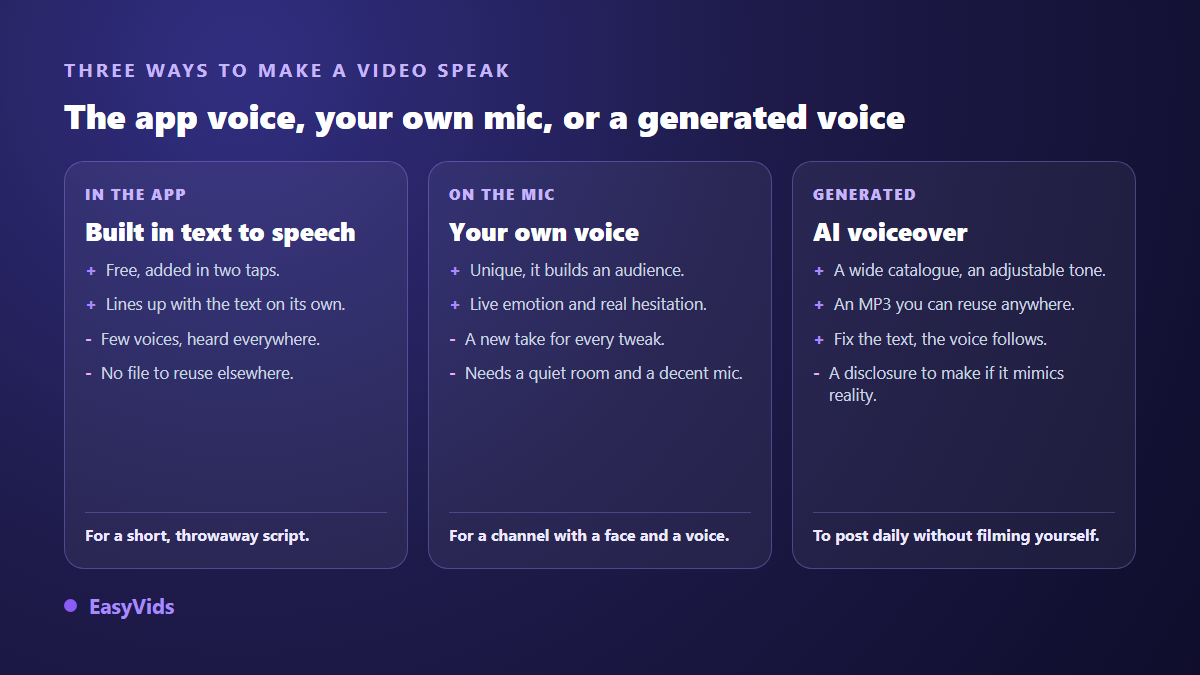
One detail usually decides it: the file. The native voice lives inside the app, while an MP3 can be dropped into an edit, reused in a longer cut, recycled into a podcast episode or an ad. As soon as the same voice has to work somewhere else, external generation wins.
What the built in voice cannot do
It delivers what it promises: you type your text, open the layer options, ask for automatic reading, and the voice lines up on its own. The list is short, it changes by country, and it belongs to the platform. It is also everywhere, so it sets you apart from nobody. On where those voices come from, one episode is worth knowing: in 2021, Canadian voice actor Bev Standing sued ByteDance, claiming her recordings had been used for the app's text to speech without her consent, and the case was settled after the voice in question was replaced.
The second limit is tone. The native engine reads, it does not perform. It cannot slow down on a punchline, whisper a confidence or carry the energy of an ad. An external engine accepts a direction instead, and that setting is what separates flat reading from narration: the settings that pull an AI voice out of its robotic delivery are worth knowing before you generate anything.
Pick the voice for the format, not for your taste
No voice is good or bad on its own, it either fits the content it carries or it does not. The habit that wastes hours is auditioning a whole catalogue looking for the prettiest one. Start from the format and the shortlist writes itself.
- Personal story or plot twist storytime: a close, mid range voice that takes its time on the silences.
- Tutorial and explainer: a clear, even voice, well articulated, with no styling.
- Product demo: energetic but controlled, faster on the benefits, slower on the closing line.
- Motivation and quotes: deep, steady, almost solemn, carried by discreet music.
- Calm content and bedtime stories: soft, audible breath, slow delivery.
- News and recaps: an anchor voice, brisk, without emphasis.
The same logic applies to paid formats, where fifteen seconds rarely fit two ideas. We covered that constraint in our method for finding the right tone in an ad voice over, and it transfers directly to sponsored vertical videos.
The word budget of a thirty second video
Voice over is measured in seconds, not characters. A steady narration moves at around 150 words per minute, about two and a half words per second. Thirty seconds of video is therefore roughly 75 words, and sixty seconds around 150. Writing 120 words for thirty seconds does not make a dense video, it makes a rushed one whose last sentence never lands.
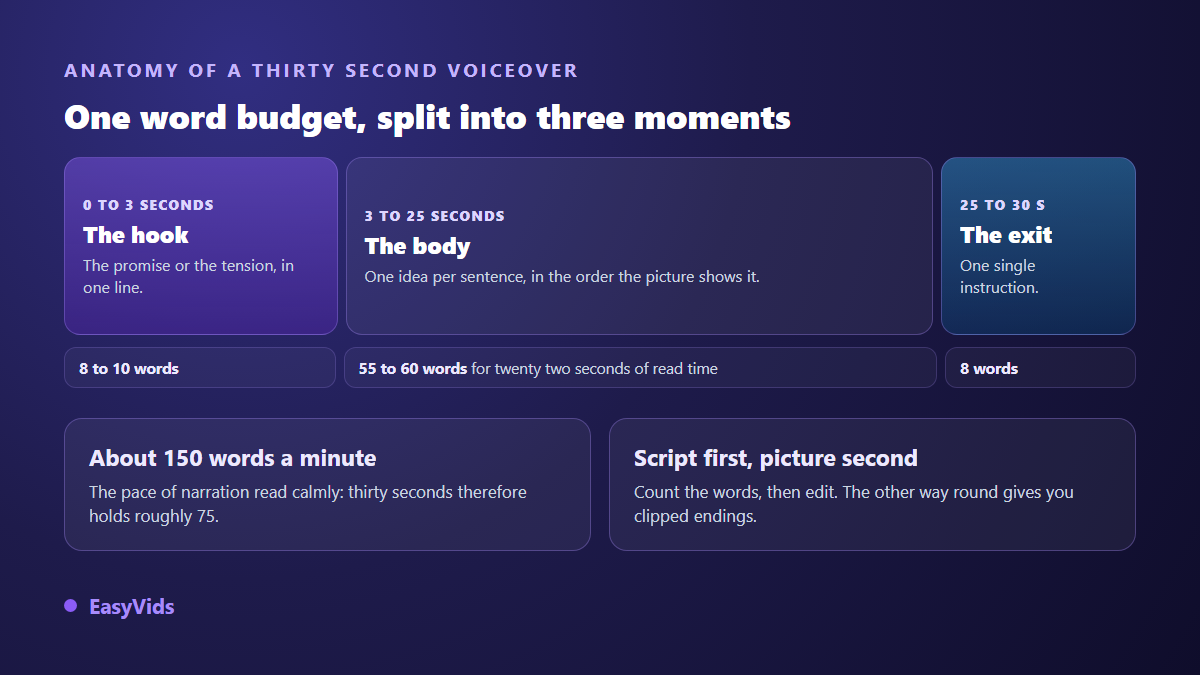
How the words split matters as much as the total. The first three seconds carry the promise, so eight to ten words at most. The closing line holds a single instruction. In between, one idea per sentence, in the order the footage shows them. To open several versions of the same video, these hooks sorted by niche give you options without rewriting the whole script.
Write for the ear, not for the screen
Text written to be read with the eyes is instantly audible when a machine speaks it: long sentences, stacked clauses, numbers dropped in the wrong place. Speech engines read punctuation the way an actor reads a score. They breathe where you place a full stop, and run on where you leave none.
- One idea per sentence, fifteen words on average, never more than twenty five.
- A full stop wherever you want a breath, even where a comma would be acceptable.
- Numbers written the way they are said, to avoid approximate readings.
- Acronyms spaced out or spelled phonetically when automatic reading swallows them.
- No stage directions inside the text: they would be read out loud.
- A read through out loud before generating: whatever leaves you breathless will do the same to the voice.
Generate the voice and get the file
The rest is mechanical. In the EasyVids studio, voice over is generated from the voice mode: paste the text, pick a voice range, listen to a sample of the one you have in mind, then download the MP3. The field takes up to 100,000 characters at once; past three thousand, the text is split, generated in parallel and merged back into a single file, which mostly helps with long formats you later cut into vertical clips.
Several ranges sit side by side and serve different purposes. The first accepts a reading direction in plain language and offers the widest choice of timbres. The second lines up narration voices built for long reads. Generating the same text in two ranges takes less time than auditioning an entire catalogue by ear.
Reading direction, the setting that builds the tone
This is the most neglected control. Instead of hunting for a cheerful voice in a list, you write the direction: Read like a captivating storyteller, in a warm and steady voice, or Read like a TV news anchor, serious and brisk. The engine applies it to the whole text. The same voice becomes two different voices depending on the direction, and a channel keeps its sonic identity by reusing the same line every time.
One caution: the direction describes the performance, not the content. Read with enthusiasm works. Talk about the product with enthusiasm often ends up read out loud inside the file.
Two characters answering each other
Conversation works remarkably well in vertical: one voice asks, another answers, and the viewer stays to hear the end of the exchange. A dialogue mode lets you write that exchange line by line, character name then line, and cast up to five different voices. You get a single audio file, already in order, instead of aligning five exports by hand on a timeline.
Place the voice without breaking the edit
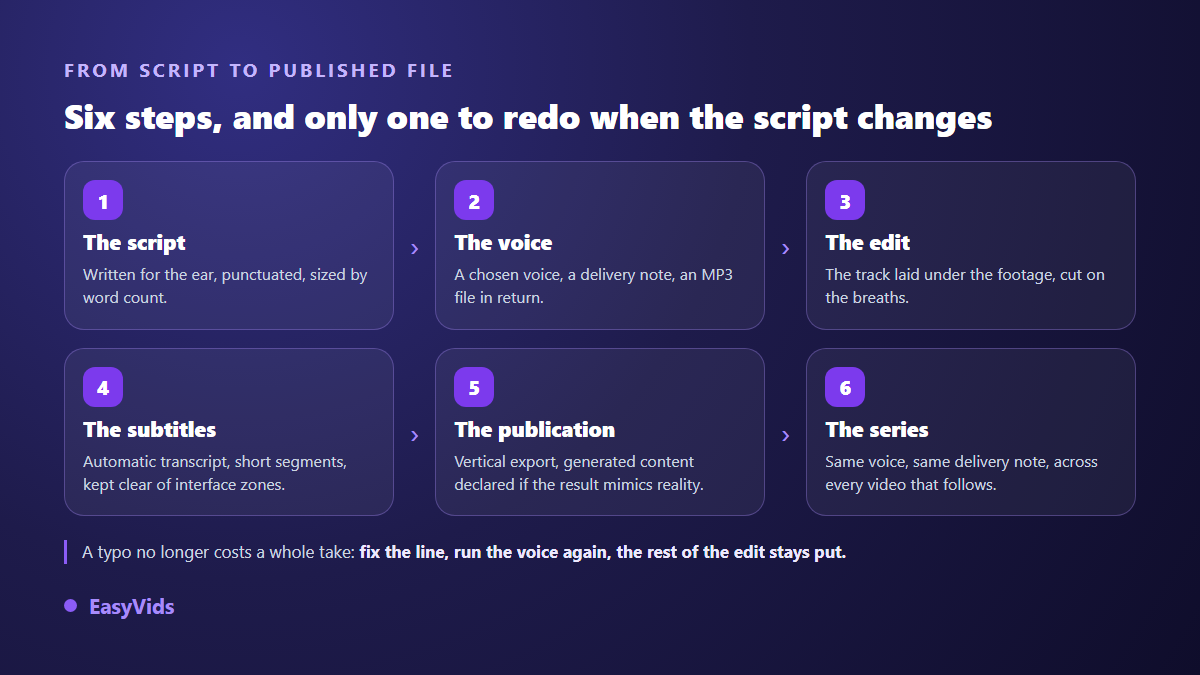
Two methods coexist. The simplest is to import the MP3 at publishing time as an added sound, then lower the original audio of the clip. The safest goes through an editor: drop the track, trim the silence at both ends, and cut the shots on the breaths rather than the other way round. That second method is what makes the cuts land, because the voice sets the length of every shot.
For the mix, one rule is enough. The voice always stays in front. Music sits well below it, around a fifth of its level, and only rises in the silences. Music that is too loud remains the most ordinary reason people leave at the fifth second, before the words have had a chance to convince anyone.
Captions do half the work
A large share of views happen with the sound off, on public transport or in a shared room. Voice over without captions loses those viewers no matter how good it sounds. Automatic transcription solves it in one step: the audio becomes a caption file with short segments, seven words at most, which matches what the eye reads effortlessly in vertical.
Two details change the outcome. Keep the text centred, away from the bottom and side areas taken by the interface and its buttons. Never show more than two lines at a time. The word by word animated style described in our guide to captions that hold attention is still the most effective here, as long as you do not overdo the effect.
What the platform expects from a generated voice
TikTok's community guidelines require creators to clearly indicate when content is generated or edited with artificial intelligence and shows realistic scenes or people, and the app offers a dedicated label at publishing time. TikTok also announced in May 2024 that it was adopting Content Credentials from the C2PA standard, which allow certain generated content to be recognised and labelled automatically. A synthetic narration over footage you filmed yourself is not the same case as a fully fabricated face, but the label costs nothing and keeps you clear of a misleading information report.
Cloning calls for more care. Cloning your own voice raises no issue; cloning someone else's requires their explicit consent; cloning a public figure is off limits in almost every case. The European Union's artificial intelligence regulation has required, since 2 August 2026, that the public be informed when audio or video content has been artificially generated or manipulated, and several other jurisdictions have adopted comparable rules. Our article on the legality of voice cloning walks through the cases.
Mistakes that make people scroll away
- A text too long for the duration: the ending is cut and the call to action disappears.
- A different voice on every post: the audience stops recognising the channel.
- No breathing room: thirty seconds without a single silence tires the ear.
- Music level with the voice, which blurs the words on a phone speaker.
- Captions stuck at the bottom of the screen, hidden by the interface.
- Proper nouns whose pronunciation was never checked before publishing.
Frequently asked questions
Can I add a voice over to a video that is already published?
No. The audio of a published video cannot be swapped afterwards: you have to take the post down, rebuild the video with its new track and publish again. One more reason to prepare the voice before export rather than at posting time.
Is a generated voice over free?
The built in voice costs nothing. An external studio usually runs on a free trial, then a credit system proportional to the length of the text, which stays very economical on thirty second formats. Our plans are laid out on the pricing page.
Does a generated voice reduce reach?
Nothing suggests synthetic speech is penalised as such. What platforms act on is repetitive mass produced content with no contribution, and missing disclosure when realistic content has been fabricated. A carefully written narration over an original edit sits within the rules.
How many words for a one minute video?
Around 150 words for a steady read, slightly fewer if your voice speeds up or if you leave real silences. The reliable method is to generate the voice, read its actual duration, then adjust the text rather than the reading speed.
Can I use my own cloned voice on my videos?
Yes. With a cloning tool, a clean audio sample of about fifteen seconds is usually enough to create a voice you can reuse from one project to the next, and a reputable service keeps it visible to you alone. Consent stays your responsibility: cloning someone else's voice without explicit permission is prohibited and gets accounts closed on most services.
Voice over is not a finishing touch. It sets the length, the rhythm and the tone of the video, and the edit follows it. Write the text first, calibrate the word count, keep the same voice from one post to the next, and your channel becomes recognisable before the first frame. To try a voice on your next script, creating an account opens the full studio, and the EasyVids studio brings writing, voice, captions and editing together in one place.