Your manuscript is finished. The text holds together, you have read it back, and now the real question arrives: how to put it on sale without waiting for a publisher to answer. Knowing how to self publish a book is less about tools than about sequence, and that is exactly where most authors get stuck.
This guide walks the whole route in order, with what actually gets decided at each stage. You will see why the file comes before the cover, why the book identifier commits you further than it looks, and what the three usual paths really change: Amazon KDP, ebook retailers such as Kobo, and direct sales from your own page. If the book is not written yet, our complete guide to creating an ebook with AI covers the step before this one.
Self-publishing: the short answer
Self-publishing a book means taking on six steps: lock the manuscript, build the right file, design a cover that survives as a thumbnail, fill in the listing, choose your channels, then trigger publication. None of them needs a rare skill. What trips people up is the order. A cover designed before you know whether the book will also be printed gets redone, a file built before the final proofread gets rebuilt, and an exclusivity accepted too early blocks everything else for months.
What self-publishing actually means
Self-publishing does not mean doing everything alone. It means keeping the decisions. In traditional publishing, a publisher picks the title, the cover, the release date, the positioning and the distribution. Self-published, those choices come back to you, and you buy in the skills you lack one at a time: copy editing, layout, illustration. The practical consequence is that nothing happens on its own. Nobody will remind you that the cover must exist before you upload, or that the file an e-reader accepts is not the one a printer wants.
The full route, in order
Six steps, always the same ones, whatever channel you aim at. They chain together because each one feeds the next. You can read the chain in both directions: deciding your channels early saves you from rebuilding the file, but nothing stops you starting with one channel and widening later.
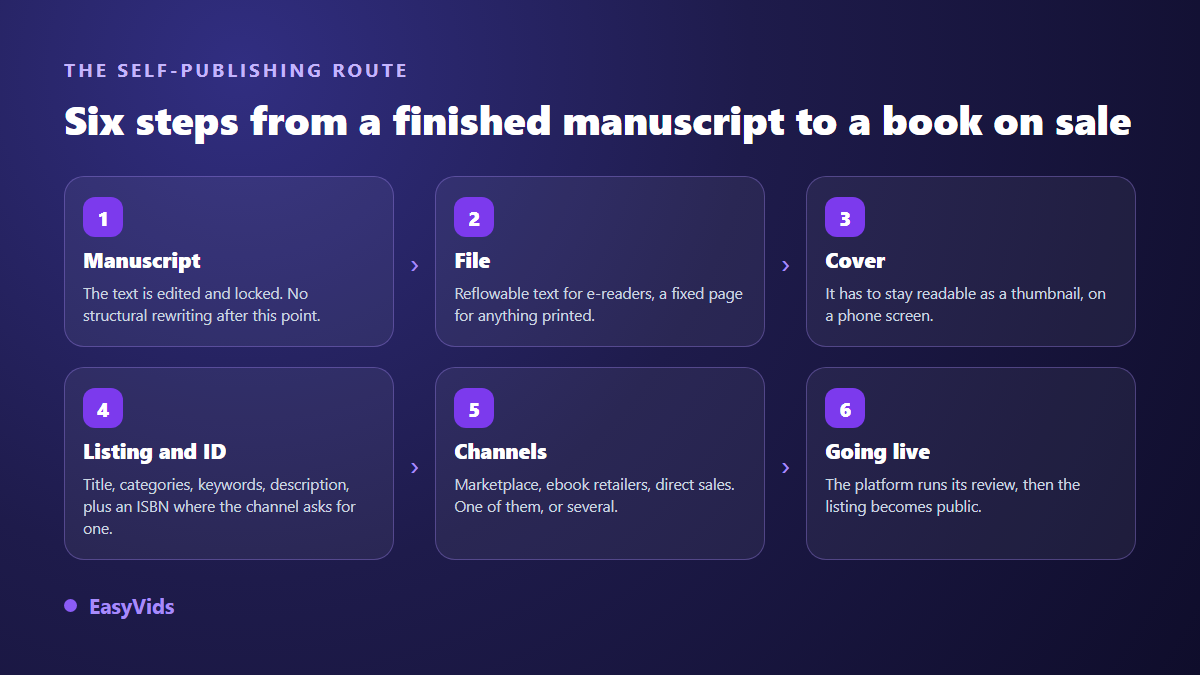
One rule removes half the back and forth: do not move to the next step until the previous one has stopped changing. A manuscript still in correction produces a file you will rebuild, and a file that changes forces you to re-check the table of contents, the running heads and the chapter breaks.
Step 1: lock the manuscript before anything else
Self-publishing starts when writing stops. As long as you are adding chapters, everything downstream is provisional. Set a freeze date, do the final read aloud or hand it to someone else, then treat the manuscript as closed. Corrections after publication are possible on most channels, but each one triggers a fresh platform review. Use this moment to settle two things authors often leave open: the final title, and the promise of the book in one sentence. Both will feed the cover, the description, the categories and every launch post.
Step 2: build the right file, not the other one
An ebook is not a printable document. Two families of file exist and they do not substitute for each other. The first reflows: the reader picks the font and size, and the text rearranges itself. The second keeps a fixed page, exactly like a printed sheet. According to the Kindle Direct Publishing help page on supported manuscript file formats, consulted on 2 September 2026, an ebook is uploaded as a Word document, as EPUB, or in the format produced by Amazon's own layout tool. The interior formatting then follows its own rules, covered in our guide to ebook layout.
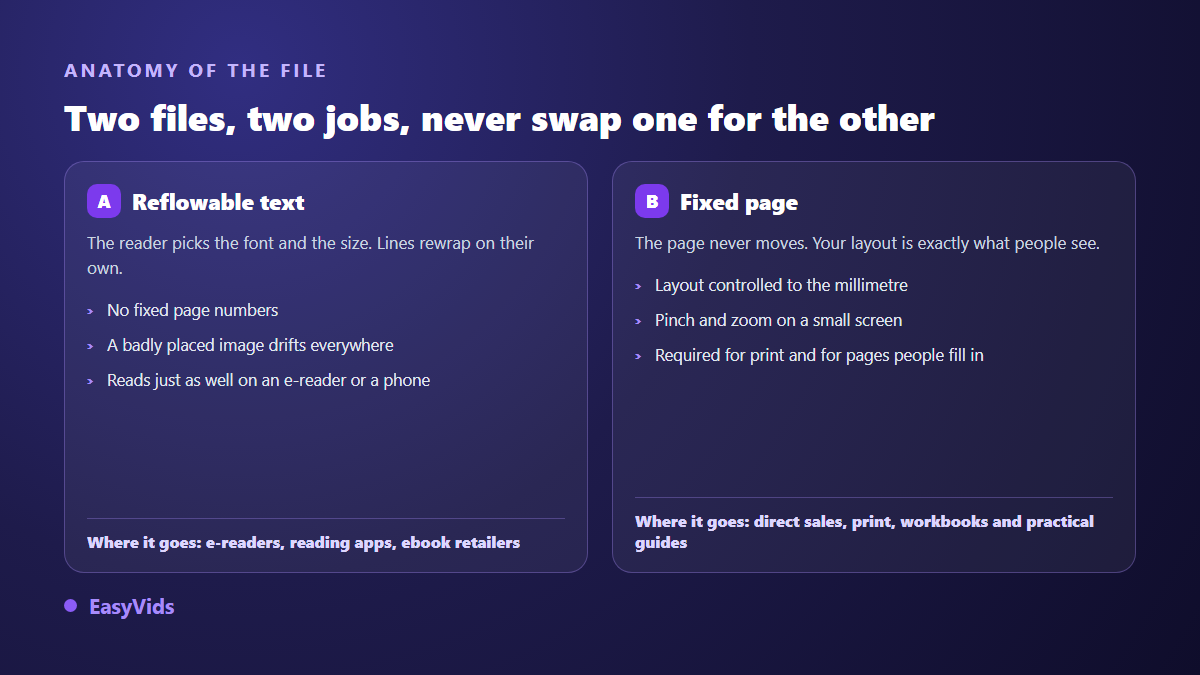
Fixed pages stay essential for anything printed and for workbooks people write in, but they read badly on a small screen. Accepted formats also move: the same KDP documentation states that MOBI has not been accepted for fixed-layout books since 18 March 2025, having already disappeared from reflowable ones. Always keep the source file, the one you can regenerate everything from without rewriting a line.
Step 3: a cover judged as a thumbnail
Your cover will almost never be seen large. It shows up in a results list, at stamp size, on a phone. The test is one gesture: shrink it to the width of a thumb and check whether the title stays readable and the genre is still obvious. If not, that is not a matter of taste, it is a commercial problem. Genre conventions and the production method are gathered in our guide to book cover design. Watch the format trap too: an ebook cover is a single image, while a printed cover is a template covering the back and the spine, whose thickness depends on the page count and the paper.
Step 4: the listing is your only salesperson
On a marketplace nobody browses the shelves. A reader reads a title, looks at a thumbnail, scans three lines of description, then decides. Every field counts, and many authors fill them in ten minutes after months on the text.
- Title and subtitle: the first carries the promise, the second says who the book is for.
- Description: the first two lines show before the expand button, so put the benefit there, not your biography.
- Categories: aim where your book can actually be noticed, not at the widest shelf.
- Keywords: phrases someone would really type, not seven synonyms of the same word.
- The free sample: check what it shows, it often starts before your first chapter.
- The AI content declaration, where the platform asks for one at upload.
Write these fields in a separate document before you open the upload form. Publishing interfaces time out, sometimes lose pasted text, and push you to rush. A prepared listing gives you a clean upload first time, and it carries over unchanged to the next channel.
The ISBN: what it really decides
An ISBN identifies one specific edition of a book. It is not paperwork: it decides who appears as the publisher and where the file is allowed to travel. According to the KDP help page on ISBNs and imprints, consulted on 2 September 2026, ebooks and low-content books are the only formats where an ISBN stays optional, while a print edition requires one. Amazon supplies one at no charge, with two consequences written on that same page: it can only be used to publish on KDP, and the imprint shown becomes Independently published.
The general rule is easy to remember: an identifier supplied by a platform ties you to that platform. The Kobo Writing Life help centre, on its page about ISBNs consulted on 2 September 2026, describes the same mechanism from the other side: if you bring no ISBN, the portal assigns its own number, and that number is not accepted by every partner retailer. If you plan to be on several stores, an ISBN registered in your own name with your country's agency settles the question for good.
Step 5: choosing your channels, KDP, Kobo or direct
Three paths, and they are not mutually exclusive. A marketplace such as Amazon KDP, ebook retailers such as Kobo Writing Life, Apple Books or Google Play Books, and direct sales from your own page. The useful question is not which pays best, but which matches what you already have: an audience, or no audience.
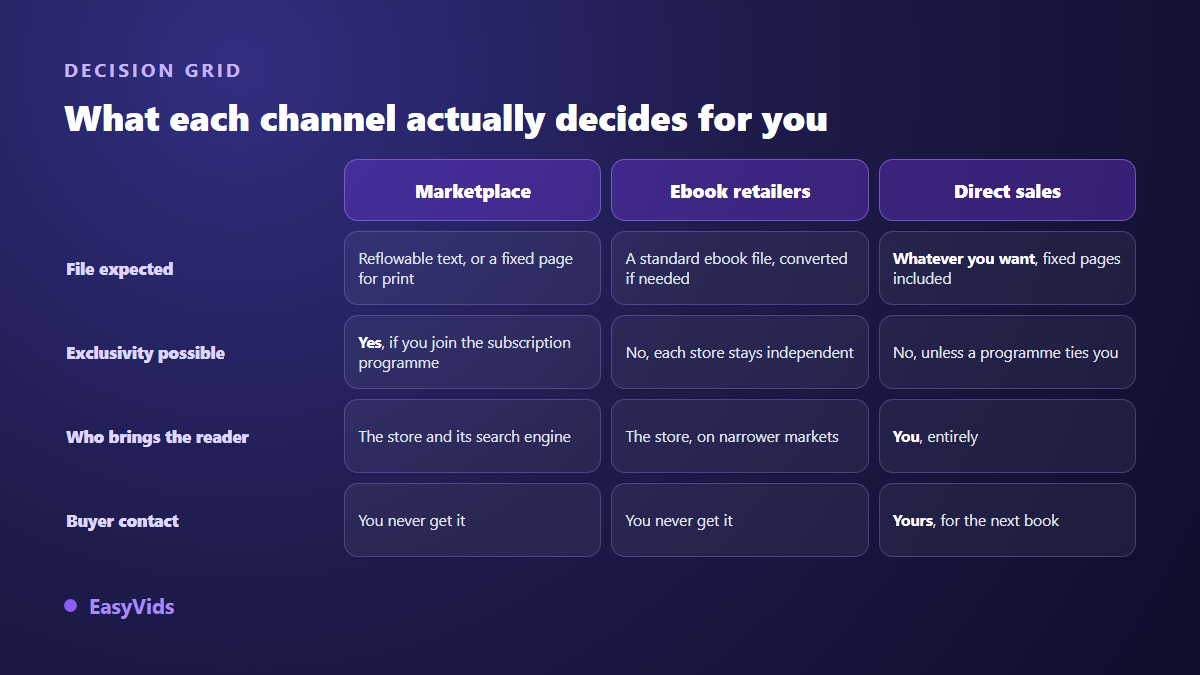
A marketplace brings you readers. That is its one advantage and it is a large one: people are already searching there, ready to buy, without knowing you. In exchange you accept its formats, its rules and its recommendation engine, and you will never know who bought. For a first book with no audience, it is the rational starting point.
Ebook retailers work the same way on narrower markets, with a device-reading audience that tends to be loyal. They take independent authors directly, each through its own portal. According to the Kobo Writing Life help centre, on its page about setting up a new ebook consulted on 2 September 2026, the portal accepts a standard ebook file and converts a word-processing document itself. An aggregator can cover several stores in a single upload, at the cost of one more intermediary between you and the reader.
Direct sales invert everything. You choose the file, the page, the reading order, you get the buyer's address, and you can offer them the next book without going through anyone. In return, no reader arrives on their own: the traffic is your job. The channels that actually hold up are compared in our overview of where to sell an ebook online.
Exclusivity, the one decision that is hard to undo
Only one decision on this route is hard to reverse, and it has a name: exclusivity. Amazon runs a subscription programme an ebook can be enrolled in. According to the Kindle Direct Publishing terms and conditions published by Amazon, in the section covering that programme and consulted on 2 September 2026, enrolment grants Amazon the exclusive right to sell and distribute the digital book: during that period you cannot sell it, or let anyone else sell it, in digital form anywhere else, including from your own site. The commitment runs in 90-day terms that renew automatically unless you opt out before renewal.
The rule applies only to the digital version of the enrolled title. It does not block the print edition, another book, or a free sample. If you hesitate, a simple order works: publish without exclusivity first, measure what comes from elsewhere, and only enrol if nothing does. Where the manuscript was written with AI, a declaration is requested at upload, and our article on Amazon KDP and AI-written books sets out what has to be declared and what does not.
Step 6: going live, and the delays to plan for
Uploading is not publishing. Each platform reviews the file, the cover and the listing before opening sales. According to the KDP help page titled Timelines, consulted on 2 September 2026, allow three business days for a book or an update to be live on Amazon, and the detail page can take up to another 72 hours to appear on Amazon.com, longer on the other stores. Plan that window into your launch calendar, and never announce a release date before you have seen the public page with your own eyes.
After publication: making the book known
A published book is not a sold book. This is where the author's job becomes a publisher's job, and where many self-publishing projects stop for lack of preparation. The useful minimum is three pieces: a page or a message presenting the book, a set of visuals sized for social platforms, and a short video showing the cover, the promise and the reader it is for. That is what the EasyVids studio produces in one session: the book text and its illustrations on one side, then the cover variations, the announcement script and the video trailer on the other. A free trial lets you see the result on your own subject, and what each plan opens is set out on the pricing page.
Frequently asked questions
Do I need an ISBN to self-publish?
Not always. According to the KDP help page on ISBNs and imprints, consulted on 2 September 2026, ebooks and low-content books are the only formats where it stays optional, while a print edition requires one. The trade-off matters more than the rule: an identifier supplied by a platform only works for publishing on that platform.
Can I publish the same book on KDP and Kobo at the same time?
Yes, unless you enrolled the digital version in Amazon's subscription programme. According to the Kindle Direct Publishing terms and conditions published by Amazon and consulted on 2 September 2026, that enrolment reserves digital distribution of the title to Amazon in 90-day terms that renew automatically. Outside the programme, nothing stops you being on several stores and on your own page.
How long between upload and going on sale?
According to the KDP help page on timelines, consulted on 2 September 2026, allow three business days for a book to be live, plus up to 72 hours for the detail page to appear on Amazon.com. Other stores publish their own timings in their help centres, so check them before you announce a date.
Should I start with direct sales or with a marketplace?
It comes down to one thing: whether you already have an audience. Without a mailing list or a community, a marketplace brings you readers you could not reach otherwise. With an audience, direct sales leave you the file, the page and the buyer's contact, and therefore the chance to sell them the next book.
Can I fix a book that is already published?
Yes, on most channels: you upload a corrected file and it replaces the old one. Two caveats. The update goes back through the platform review, with the same delays as a first publication. And previous buyers do not automatically receive the new version. Correct before, not after.
Self-publishing does not reward speed, it rewards order. Lock the text, build the right file, design a cover that survives as a thumbnail, write the listing properly, choose your channels knowingly, then publish. The launch itself gets prepared while the platform reviews your upload. To write, illustrate and dress your book in one place, creating an account opens the full studio, and EasyVids brings the ebook workshop and the launch visuals together.