You search for a free AI avatar generator, click the first result, upload a photo. Thirty seconds later a face is talking on screen and you think the camera problem is solved. Then you hit Download. An animated logo sweeps across the frame, the clip stops after a few seconds, and a window invites you to upgrade for a clean file.
None of that is a trap. It is the normal economics of a tool running graphics cards on your behalf. The real problem is that nobody tells you beforehand where free stops, or why. This article does that inventory: what each kind of tool actually gives you, what it holds back, and how to decide with your eyes open. If the category is new to you, our guide to AI avatars and UGC videos sets the scene first.
The short answer
A free AI avatar generator almost always lets you test, and rarely lets you publish. Still portraits built from a photo often come out unrestricted. As soon as the face moves and speaks, five ceilings appear: an export watermark, a clip length of a few seconds, capped resolution, a slower queue, and above all usage rights that exclude advertising and resale. The first thing to check is neither quality nor speed. It is the commercial usage clause.
Three different products share one word
The word avatar covers three things with nothing technical in common, and that confusion explains half the disappointments. A portrait generator turns a photo into a stylised image: no motion, no voice, light compute. A talking avatar animates a still face over an audio track, with synced lips and a body that barely moves. A UGC creator produces real video scenes where a character moves, looks into the lens and holds an object.
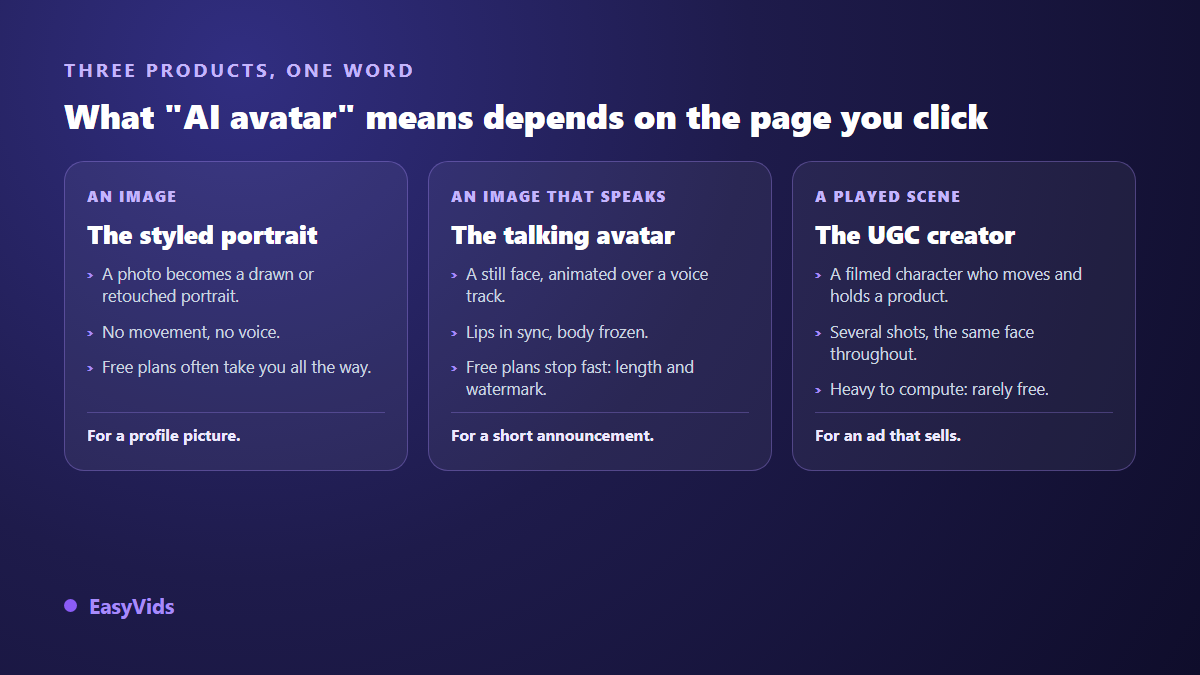
That scale explains everything else. A still image takes seconds of compute. A ten second shot of a character speaking and gesturing takes hundreds of times more. A service that gives away the first cannot give away the second, and no marketing line changes that arithmetic.
The five ceilings of a free plan
Restrictions look alike across services because they answer the same equation. Knowing them upfront stops you building a whole project on ground that will not hold at export.
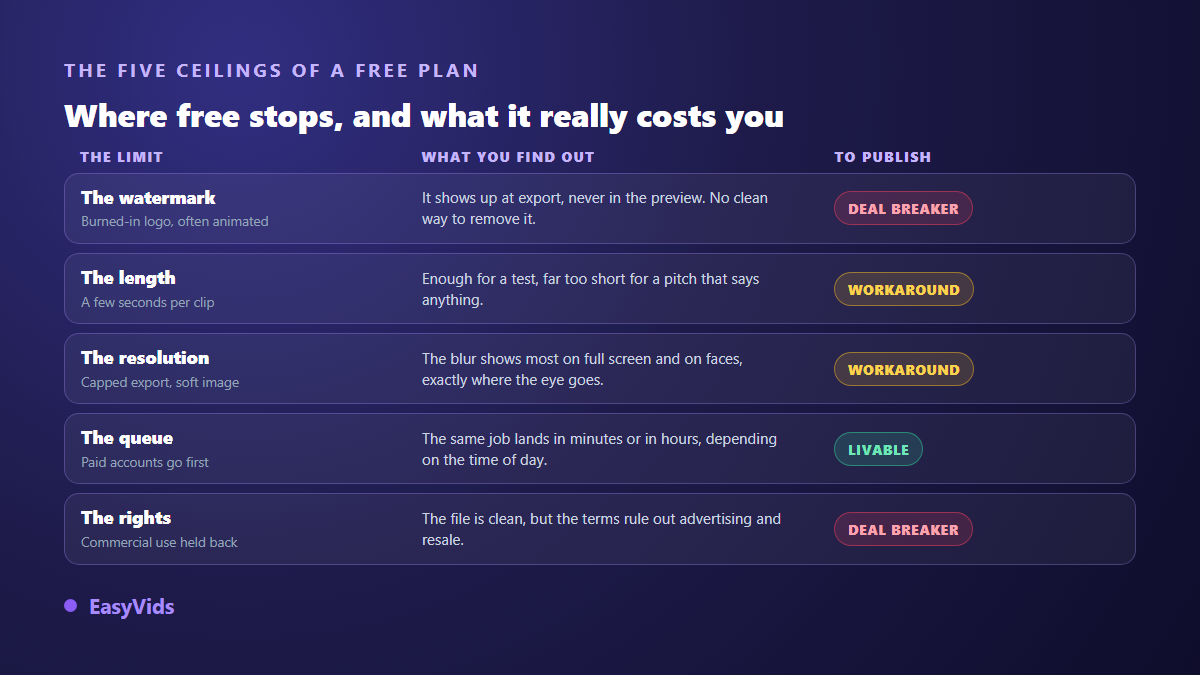
One note on resolution: capped exports show up on faces first. Human eyes read a face with a precision they grant no other subject, so a little smoothing on a cheek reads as an error where it would pass unnoticed on a landscape.
The watermark you see is not the only one
The visible watermark is the best known and the least interesting: a logo laid over the image, often animated so cropping cannot remove it. It goes away when you change plan, never when you crop. Two other markings exist, and neither is visible.
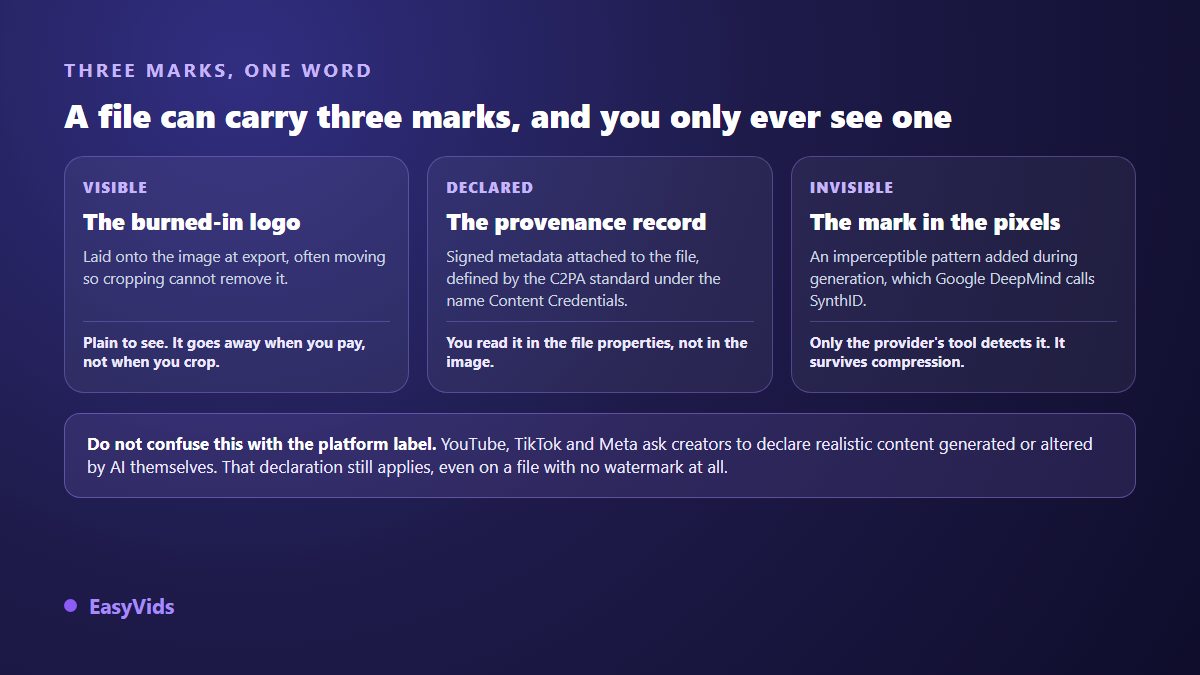
The first is declarative: the C2PA standard defines signed metadata, presented as Content Credentials, that travels with the file and describes how it was produced. The second is statistical: Google DeepMind describes, under the name SynthID, an imperceptible pattern embedded in the pixels at generation time, designed to survive compression or cropping. Neither degrades your image, and neither comes off in a photo editor. The point is not to remove them but to know your file carries them. If the visible logo is what blocks you, our article on exporting AI video without a watermark covers which fixes hold up.
Usage rights, the limit that costs the most
Almost nobody reads this clause, and it does the most damage. Many free plans hand over a technically clean file while reserving commercial use for paying accounts. You may show the video, share it, post it personally, but not run it as an ad or sell it to a client. An agency that discovers the clause after delivery is in an awkward place.
The check takes two minutes: open the terms and search for commercial, redistribution and attribution. Those three words carry most of the answer. Also check what happens to your files if you stop using the service, and whether the photo you uploaded trains their models. A serious provider answers all three plainly, and an answer you cannot find is already an answer.
Disclosing synthetic content is not optional
An avatar that resembles a real person falls under specific rules, and producing it for free changes nothing. According to the YouTube Help Centre, creators must flag realistic altered or synthetically generated content in YouTube Studio, and the platform then shows a notice to viewers. TikTok community guidelines similarly require realistic AI generated content to be labelled. Meta applies its own AI information label to content it identifies as AI generated. These disclosures are owed even on a file with no watermark at all.
Regulation points the same way. The European AI Act, whose Article 50 transparency obligations apply from 2 August 2026, requires generated or manipulated audio, image and video content to be identified as such. The YouTube Help Centre also describes a removal request process open to anyone whose face or voice is reproduced by synthetic content without consent. In practice: your own face, yes. A colleague's face, only with written consent. A public figure's face, never.
The source photo decides the likeness
Avatar quality depends less on the model than on the image you feed it. Across our generations, a sharp front facing photo under soft, wide light gives a far more stable face than a three quarter shot taken in a dim room. The model can only reproduce what it sees, and it invents the rest. What it invents is exactly what shifts from scene to scene.
- Face on, both eyes visible, looking into the lens.
- Soft, wide light with no hard shadow across one side of the face.
- Framing down to the shoulders: the model needs the neck and upper chest.
- A plain background that does not compete with the face.
- No beauty filter: smoothing removes the detail the model needs to hold the likeness.
Getting the most out of a free trial
A free trial is not there to produce your final video. It is there to answer one question: can this tool do the thing I actually need? Treated as a test, it teaches you a lot in fifteen minutes.
- Start with the hardest shot in your project, not the easiest: a long line, an accent, a product held in hand.
- Generate the same shot twice without changing anything: face stability between two runs tells you everything about consistency.
- Export straight away, before polishing: watermark, resolution and duration only reveal themselves at export.
- Watch the result on a phone, full screen, with the sound off. That is how your audience will see it.
- Read the commercial usage terms before you upload a second photo.
When free stops being enough
The tipping point is always the same: the moment the video stops being a test and becomes content someone else will see. An ad, a product page, a sales page, a regular channel. At that stage a watermark and a commercial clause are no longer annoyances, they are blockers. Compare the time you spend working around limits with the cost of full access, and the comparison rarely favours the workaround. Our plans are on the pricing page.
At EasyVids the position is explicit: no watermark is added to your exports, and the timeline editor comes with the account. The Character studio produces scenes where your creator speaks to camera, built from a photo so the same face carries across every scene, or without a photo if you would rather let the AI define a consistent character itself. It can also hold a real product from its photo. Signing up opens free credits, no bank card, enough to produce a first complete sequence and judge for yourself.
Frequently asked questions
Is there a genuinely free AI avatar with no watermark?
For a still image, yes, several portrait generators return a clean file. For video where the face speaks, it is rare, and it almost always comes with another constraint: very short clips, reduced resolution or personal use only. A service giving away the heaviest compute on the market without limits would not last.
Can I remove the watermark from a free generation?
Cropping or blurring damages the image without cleanly removing an animated logo, and it usually breaches the service terms. Provenance metadata and the invisible pixel mark cannot be removed at all. The only clean route is to produce the file with a tool that adds none.
Can I use a free AI avatar in an advertisement?
Only if the terms explicitly allow commercial use, which free plans rarely do. Check before you produce, not after. An ad running on an unlicensed file exposes you to takedown and, if you work for a client, to redoing everything.
Do I have to disclose that a video was AI generated?
Yes, as soon as the result is realistic enough to mislead a viewer. The YouTube Help Centre asks for that disclosure in YouTube Studio, TikTok community guidelines require it for realistic content, and the European AI Act sets a transparency obligation for manipulated content. Disclosing does not hurt reach. Failing to disclose invites a penalty.
Will a free avatar keep the same face across several videos?
Rarely. Most free tools regenerate the character each session and the face drifts. For a series or a channel you need a tool that works from a stable visual reference reused in every scene, otherwise your creator changes face between episodes and the audience notices before you do.
Treat a free AI avatar generator for what it is: a test bench. Run the hardest shot, export immediately, read the terms, then decide. When your need moves from testing to publishing, creating an account opens the full studio with free credits and no bank card, and the EasyVids studio keeps the character, the voice, the edit and the export in one place, with no logo stamped on your videos.