You want videos where somebody talks straight to camera. You have no studio, no lighting kit, and no appetite for filming yourself three times a week. You also do not want to hire a different creator for every variation of the same message. That is the gap AI UGC fills: a person who was never filmed, delivering your script on screen.
The topic is technical and sensitive at once. Technical, because a talking character follows precise rules and one flaw gives the whole thing away. Sensitive, because a face belongs to someone. This guide covers both: how these videos are really made, with their honest limits, and the legal line you never cross.
The short answer
An AI avatar is a character built from a reference image, then animated by a video model that shows them speaking. You supply a photo or a description, you supply the text, and each sentence becomes a short shot where the character says it. The advertising format built on top of this is UGC, short for user generated content: a testimonial style clip framed as if a real customer shot it on their phone. One rule outranks everything else: never use a real person's face without written consent, and disclose synthetic content wherever platforms require it.
What the word avatar actually covers
Two very different products hide behind the same word. The first is a catalogue of pre recorded presenters: actors filmed in a studio, replayed with your script and a synthetic voice. Output is stable, but you share that face with every other customer and you never leave the set they were shot on.
The second approach starts from a single reference image, yours or a generated one, and lets a video model build every shot around it. Your character can walk down a street, cook, hold an object, change lighting. That is the path our AI video studio follows, and it is what stops every clip from looking like the same clip.
How a talking character is built
The chain has five links, and each one decides the quality of the next. Knowing the sequence lets you fix the right step instead of regenerating everything and hoping.
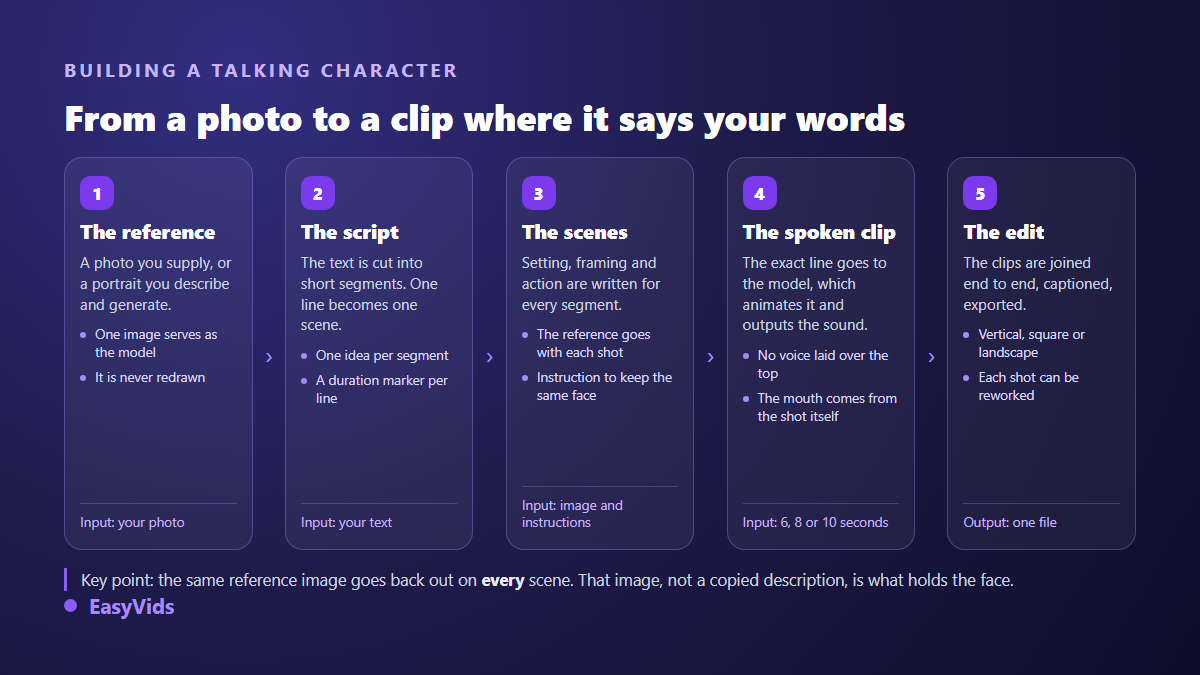
Step three is where it is won or lost. Character consistency does not come from repeating a description in every prompt, which is what most beginners try. It comes from the image itself, attached to each scene with an explicit instruction to keep the same face, hair and outfit from the first frame to the last. A repeated description gives you a convincing cousin, never the same person twice.
In our character workflow, the photo you upload is never redrawn: it is used as the reference exactly as provided, and the exact text of each segment is passed to the video model, which renders the shot along with its audio. No separate voice track is laid over the picture in that mode. The character carries the speech.
Building an avatar from a photo
One photo is enough, and its quality matters more than every setting that follows. The model cannot invent what it cannot see: a blurry, cropped or heavily shadowed face gives you an unstable character by the second scene. You do not need professional gear, you need a readable image.
- A sharp face, front on or slightly angled, eyes open and visible.
- Soft even light, no backlight, no hard shadow across half the face.
- Framed to the shoulders at minimum: a tight crop hides the build and the clothing.
- A simple background so the subject separates cleanly.
- No beauty filter and no skin smoothing: they erase the detail that makes a face believable.
- A neutral expression, easier to move away from than a frozen smile.
One point deserves to be stated plainly, because it sets your expectations: the character rests on one reference image, not a multi angle photo shoot. You are not training anything and you are not building a model of your face. You are handing over a visual target that the generator tries to respect, shot after shot. That distinction explains several of the imperfections below. If all you need is to give a still image some movement, with no speech and no recurring character, our rundown of ways to animate a photo covers lighter methods than building an avatar.
Lip sync, and what it really is
Many articles describe lip sync as a layer applied to an existing video, the way dubbing works. In a modern generation chain the mechanism is different and simpler: the exact sentence from your script is written into the instruction sent to the video model, which then produces a shot where the person says those precise words, with sound. Mouth movement is not added afterwards, it is part of the generated image.
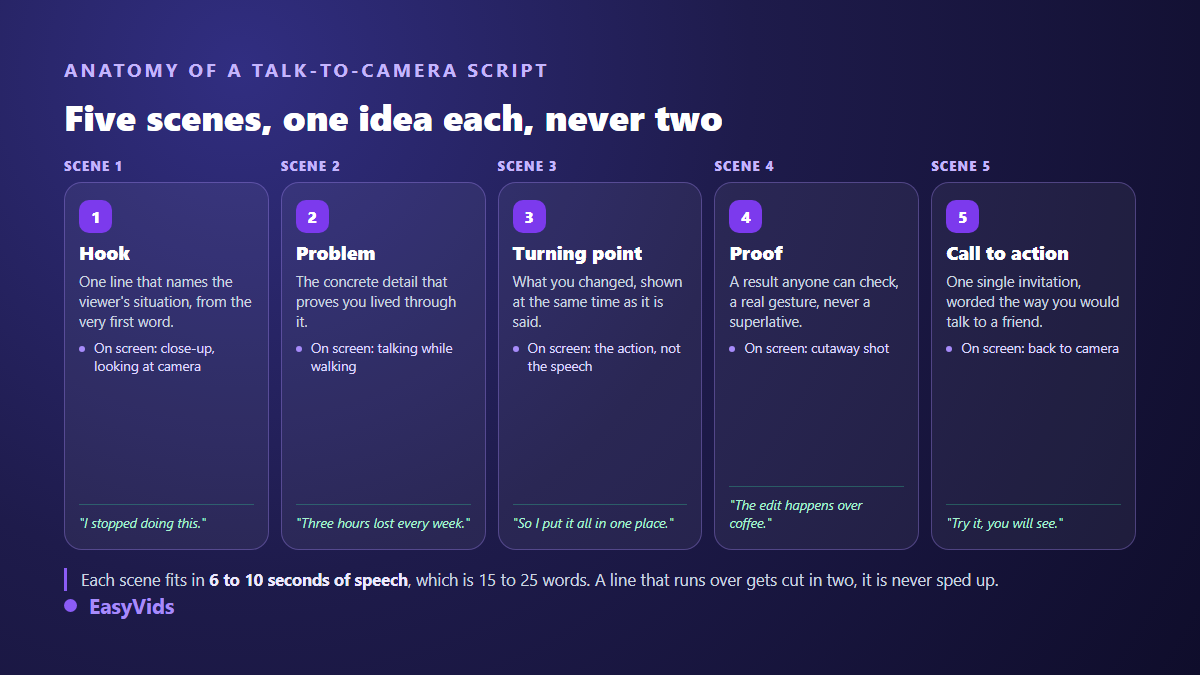
That has a very practical consequence. Because speech and picture are born together, a line has to fit inside a single shot. A generated clip runs a few seconds, rarely beyond fifteen. In our workflow each scene is locked to 6, 8 or 10 seconds of speech, roughly fifteen to twenty five words. A sentence that runs long is not sped up, it is split into two scenes. It is a writing constraint, and it quietly makes scripts sharper. A story longer than one line does not vanish for that, it spreads across a run of shots tied together by the same references, and our guide to turning a written story into an animated film shows how that continuity is held beyond a talking head.
What still gives an AI avatar away
Precision beats enthusiasm here. Trained viewers spot a synthetic presenter within seconds, and always through the same signs.
- The mouth on sentence endings: sync holds better on the first words than the last ones.
- Hands, especially crossing the face or handling a small object quickly.
- Face drift between shots: the character stays similar without being quite the same person.
- The gaze, locked too perfectly on the lens where a human blinks, drifts and returns.
- A flat delivery with no hesitation and no breath, which reads as recitation.
- Text and logos baked into the generated image, usually distorted past a few letters.
- Transitions that are too clean, when a genuine phone recording is slightly ragged.
Three habits push back. Favour shots where the character moves naturally over static close ups. Cut in illustration shots between spoken beats, which breaks monotony and reduces face exposure time. And add captions: a large share of your audience watches muted, and attention shifts to the words rather than the lips. When it is the likeness that slips between scenes rather than the sync, the causes and the fixes are laid out in our article on the AI character whose face keeps changing.
Why AI UGC took over social advertising
The format looks like an ordinary creator post rather than a brand ad: vertical framing, everyday light, one person talking to their phone about something they experienced. It works because it does not read as an interruption in the feed, it reads as more of what the viewer was already watching. That vertical framing is also the native shape of short form, and our method for publishing YouTube Shorts without filming shows how to hold a steady pace with the same presenter.
Avatars make that format repeatable. The same hook can exist in five versions with five different presenters, without booking five creators. You test, you keep what performs, you drop the rest. The real economic value sits there, far more than in the saving made on any single video. Once those variations turn into connected episodes with the same character from one video to the next, you move into the logic described in our method for building a series with AI.
Writing a script that does not sound fake
The most common failure is textual, not visual. Copy written to be read becomes instantly suspect once a person says it out loud. Sentences run long, connectors turn formal, superlatives pile up. Viewers do not always conclude it is AI, but they do conclude it is not sincere, which lands the same way.
- One idea per scene, never two: the second one is not heard.
- Sentences of fifteen to twenty five words, read aloud before you approve them.
- The words you would use on the phone, not the ones from a sales deck.
- A concrete checkable detail instead of an adjective: a measured number, a gesture, a duration.
- A single ask at the end, phrased as a suggestion rather than an order.
- No claim your product cannot back, not even by implication.
If you start from a landing page, rewrite before you generate. We covered that rewrite for the ear in our guide to natural sounding AI voice over, and it applies here with one difference: the words are carried by a face, so every clumsy phrase is twice as visible.
Limits to know before you sell avatar videos
An honest guide states what does not work yet, especially if you invoice these videos to clients.
- Shot length stays short. A two minute monologue is not one take, it is a sequence of scenes.
- Likeness is requested, never guaranteed: the instruction to hold the face reduces drift without removing it.
- Not every model reads reference images, and those that do accept different numbers of them.
- Each model imposes its own durations and aspect ratios, so a model that cannot produce your setting is ruled out.
- Provider safety filters reject some shots, particularly anything resembling a public figure.
- Human review is still required: a failed scene regenerates on its own, but somebody has to notice it.
Ethics and law: a face is not yours to use
Here is the section most guides handle in two lines, and it belongs at the top. Making a real person's face speak without their agreement is not a grey area. Most legal systems protect image and voice, and that protection does not vanish because the picture was regenerated by software. A photo found online, a customer, an employee, a relative who signed nothing: the answer is no every time.
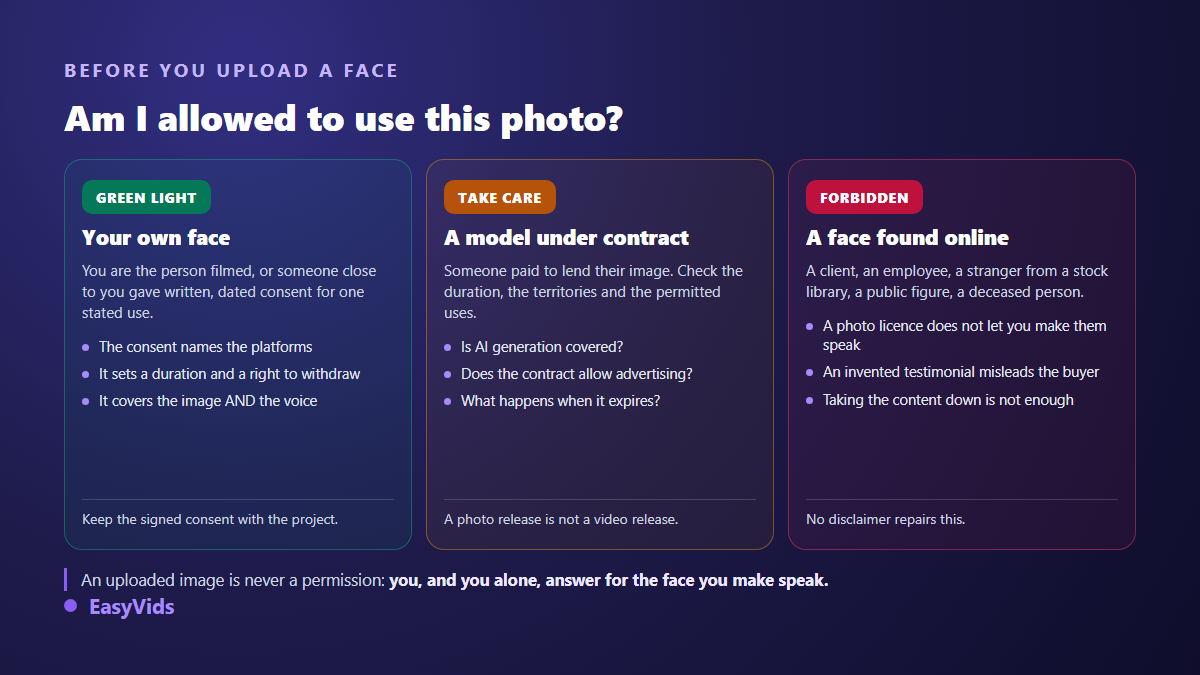
- Written, dated consent signed before the first generation.
- A named scope: which platforms, which countries, how long, what kind of message.
- Image and voice covered separately, since a photo release is not a speech release.
- A withdrawal right, with a takedown deadline you commit to.
- An explicit ban on sensitive subjects: health, politics, finance, religion, sexual content.
- The signed agreement archived alongside the project, retrievable years later.
No tool checks these rights for you. An uploaded image is treated as a visual reference, never as permission. Two bans are worth repeating: never build an avatar resembling a public figure, however loose or humorous, and never present a synthetic character as a genuine customer testimonial. An invented testimonial misleads the buyer, and advertising rules treat that as a deceptive practice regardless of the technology behind it.
Disclosing synthetic content
Major platforms have converged on the same requirement: realistic content generated or altered by AI must be flagged. On YouTube the declaration happens at upload, inside the video settings, and a label can be surfaced to viewers. On Instagram and Facebook a label is applied automatically when provenance markers are detected in the file, and a manual declaration is expected otherwise. On TikTok any realistic AI generated content must carry a label. Regulation points the same way, starting with the European AI act and its transparency duty on content imitating real people. Ticking the box costs nothing; skipping it can cost you the video or the account.
Frequently asked questions
Can I create an AI avatar from a single photo?
Yes, and that is the normal mode: one reference image is enough and it is reused for every scene. The quality of that image drives the stability of the character. One sharp, well lit, shoulders up photo beats a series of mediocre ones.
Can an AI avatar speak several languages?
Yes. The character speaks the language of the script you provide, with no change of face. In practice you produce one version per language by swapping the text, which makes international rollouts far cheaper than a multilingual shoot.
Is AI UGC allowed in paid advertising?
Yes, provided three conditions hold: you own the rights to the face, you do not present a synthetic character as an authentic testimonial, and you disclose the content where the platform requires it. Regulators target deception, not the tool.
How do I stop the face changing between scenes?
Work from a stable reference image attached to every shot rather than a description copied into each prompt. Also limit abrupt lighting and framing changes between neighbouring scenes: the wider the gap, the more visible the drift becomes.
Should I use an avatar or film myself?
If your personal presence is the asset, film yourself. Avatars win on volume and testing: twenty variations of one message, a language you do not speak, or publishing without showing your face. Our step by step guide to a published YouTube video shows how both approaches share a single channel.
An AI avatar is neither magic nor a threat. It is a production tool that moves the effort from filming to writing and reviewing. The videos that work are the ones with a script that stands up, scenes that stay short, and an author who owns what is on screen. Start with your own face or a fully generated character, keep your consent paperwork current, disclose what needs disclosing. Creating an account opens the studio so you can test your first talking script today.