You want a video where someone looks into the camera and speaks for you. Not a voice over stock footage, not animated text: a person, a face, a gaze that holds attention. You have no studio, no lighting kit, and no appetite for filming yourself three times a week. That gap is exactly what a talking avatar AI fills: a spokesperson built once, who then says whatever you write.
The trouble never shows up on the first video. It shows up on the third, when the face has drifted, the voice sounds slightly different, and nobody recognises your presenter any more. Getting one talking shot is easy now. Keeping the same one for six months takes method, and that is what this guide is about. For the wider picture of face to camera content, our guide to AI avatars and UGC videos maps the ground around it.
The short answer
A talking avatar comes down to three moves. Lock a face, from a real photo or a portrait generated once, and reuse it as a reference on every later shot. Lock a voice, either the character speaking inside the shot or a single narration laid over the edit. Then cut your script into short lines, one idea per shot, each fitting inside six to ten seconds of speech. On the EasyVids studio this path is called Character mode: you paste the script, upload the photo, and every scene comes back with the person saying that exact segment.
A talking avatar is not an animated photo
The two look alike on screen and behave nothing alike in practice. Animating a photo gives you one shot, once, for a one off need. A talking avatar is an identity you reuse: the same face returns next week, with the same voice, on a different script. The whole difference sits in what you keep between two projects.
That distinction has very concrete consequences. A one off animation is judged on a single render, a spokesperson is judged on the series. So you accept a slightly less spectacular face if it holds steady, and a slightly less impressive voice if it survives a hundred videos. When the need really is one off, making an existing photo talk takes far less preparation and does the job.
The two halves: the face and the voice
A convincing talking avatar rests on two independent pillars, and most failures come from polishing only one. The face carries recognition: it is what people spot in a crowded feed. The voice carries credibility: it decides whether anyone is still there after three seconds. Those halves are locked separately, tuned separately, and broken separately.
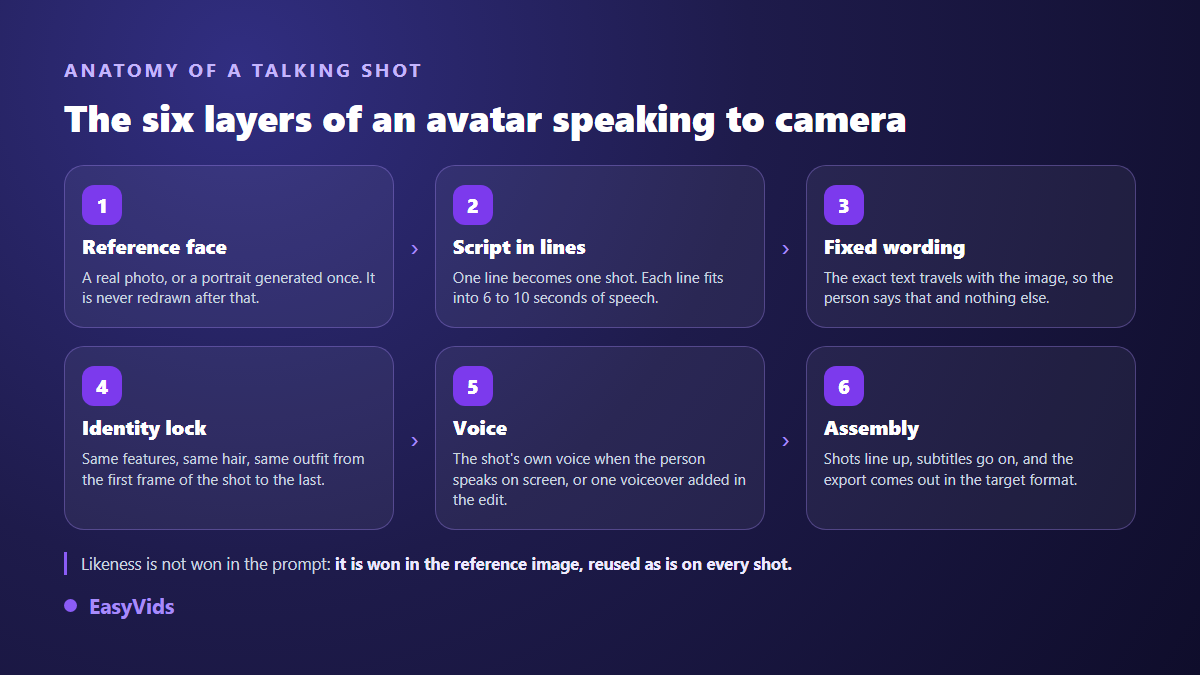
None of these layers is left to luck. The face comes from an image, not from a sentence. The cutting comes from your script. Forced speech guarantees the person says your line and nothing else. The identity lock stops the features drifting while the shot is animated, the moment image to video models happily take liberties.
The face is a reference, never a description
The costliest habit is describing the character in the prompt, scene after scene. A written description produces a plausible face, never twice the same one. The working method fits in one line: generate or upload an image once, then attach it to every generation as a reference. The studio then treats it as data rather than as a suggestion, and the full method for consistent characters covers the checkpoints that go with it.
Your starting photo matters more than the model behind it. A sharp portrait, framed at chest height, on a plain background, face well lit and turned towards the lens, is far more stable than a cropped group shot or a backlit selfie. Skip sunglasses, hands across the face and extreme expressions: every ambiguous area is an invitation to invent.
Two ways to give it a voice
First route, the person speaks on screen: the video model builds the image and the speech in the same pass, and the mouth follows what is said without a separate sync step. Second route, one voice over reads the whole script and is laid over the edit, across shots of the presenter and cutaway shots. Both hold up, and our guide to AI voice over covers the settings that make narration believable.
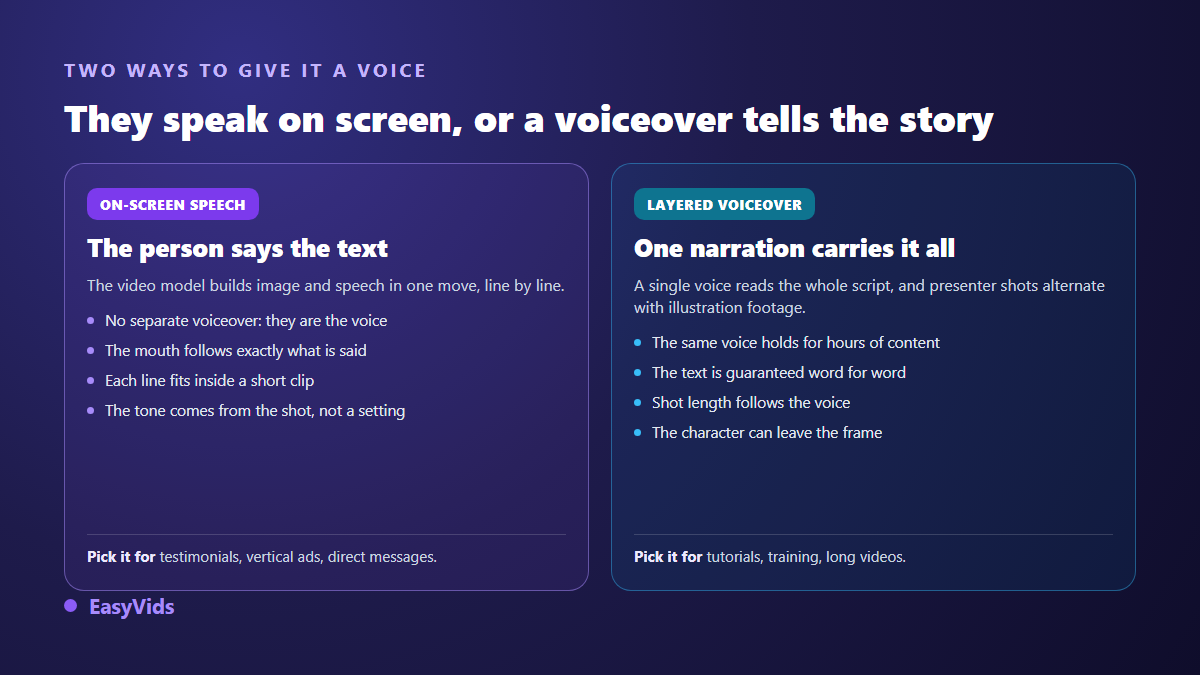
Length is the real deciding factor. Under a minute, speech on screen wins, because it delivers the direct presence that makes the format work. Past three minutes, voice over takes back the advantage: it holds over time, it can be fixed sentence by sentence, and it does not force a face on screen while you explain an abstract point. Plenty of channels run both, the first for the hook, the second for the body.
Cutting a script into lines a shot can hold
A talking shot is produced in short segments, and that technical limit doubles as a writing rule. Video models render a few seconds at a time. Your script therefore needs to arrive already cut, one line per shot, each calibrated for the length of that shot. Across our French productions, a segment of roughly 110 characters lands near six seconds of speech, which is quicker to apply than counting words.
- One idea per line. Two ideas in the same shot always sound rushed.
- Every sentence should be sayable in one breath: read it aloud before you generate.
- Write numbers the way they are spoken, or the delivery stumbles on them.
- Spell tricky proper nouns phonetically when the pronunciation matters.
- Punctuation is a score, not layout: it drives the breathing.
- Keep stage directions out of the spoken text, or you will hear them read.
Automatic splitting does most of the work, and the gain comes from reviewing where the cuts fall. That is where rhythm is won. A line that overruns gets split in two rather than sped up, exactly as you never fix an editing problem by raising the playback speed.
The identity sheet that makes an avatar last
A spokesperson you intend to keep deserves a written sheet, held in a plain document. It is useless on day one and it saves the following quarter, when nobody remembers which setting produced that result.
- The reference image, in its original version, with its date.
- The character name, apparent age, assumed job, usual surroundings.
- The default outfit, the one that keeps coming back, and the variants you allow.
- The chosen voice, its exact identifier, and the reading style when the platform offers one.
- The usual output format, vertical or horizontal, decided once and for all.
- Three sample lines that set the tone, to be reread before writing a new script.
That sheet has a second merit: it makes the character transferable. A team of two then produces videos nobody can tell apart, which is precisely the point of a brand spokesperson.
What still gives a talking avatar away
Audiences spot an unprepared synthetic presenter fast, and almost never for the reason people expect. Skin texture is not the tell. Rhythm is: a line packed too tight, a missing breath, a shot that runs three seconds long.
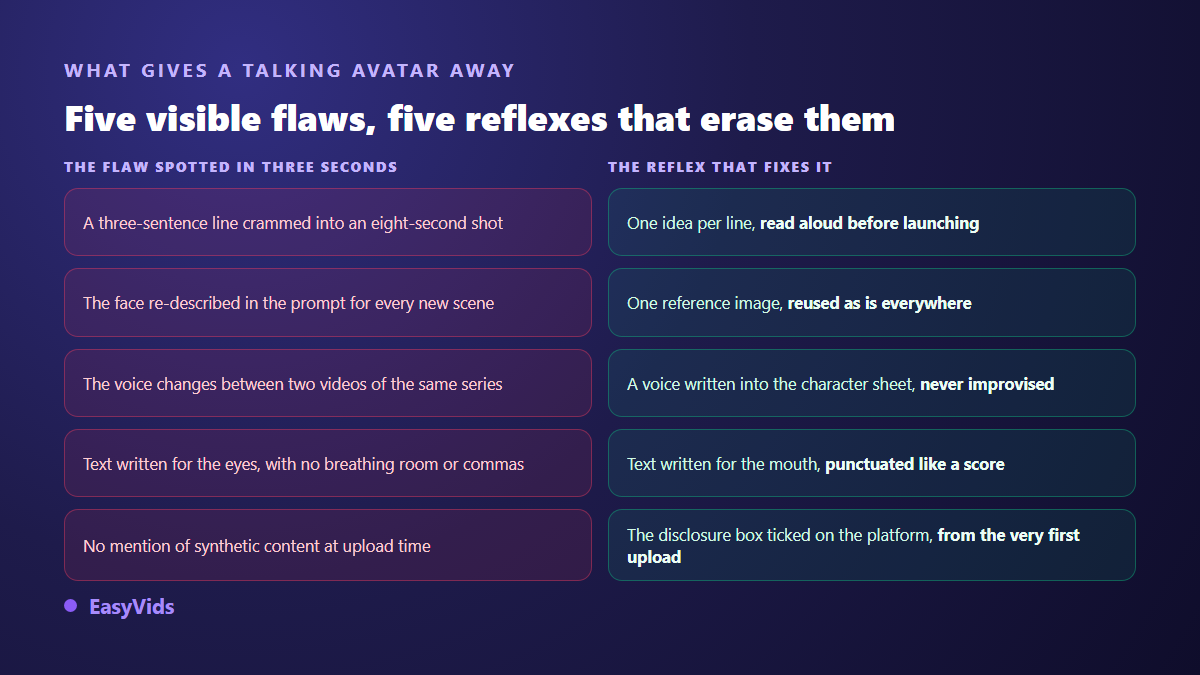
Two flaws deserve extra care. The gaze first: a character staring into the lens without ever blinking makes viewers uneasy, and a slightly shorter shot solves it better than any setting. Hands second, still the most fragile area for video models. Framing at chest height, with no complicated gesture, avoids most of the accidents.
Making it speak another language
A talking avatar has no native language. The same face can carry an English, a French and a Spanish version of the same message, provided the script is translated before generation rather than after. The rule applies to both routes. With speech on screen, the line forced into the shot must already be in the target language, otherwise the mouth shapes a different sound. With voice over, you swap the voice and the script while keeping the same footage, which cuts the work sharply when you serve several markets.
Consent, likeness and disclosure
A face is not raw material. As long as you are the one speaking, the matter stays between you and the tool. The moment it belongs to somebody else, you need written, dated permission that names the intended uses and platforms, and that covers likeness as well as voice. In France, article 9 of the Civil Code protects everyone's right over their own image, and article 226-8 of the Penal Code punishes publishing a montage made with a person's words or image without consent, unless it is obvious that it is a montage or unless this is expressly stated. Wording differs between countries, caution does not, and our review of voice cloning and the law applies the same reasoning to the voice itself.
Platforms have set their own requirements. According to the YouTube help centre, creators have had to disclose since 2024, at upload time, that a video contains realistic synthetic or altered content. TikTok community guidelines call for a comparable declaration, and the platform relies on the C2PA provenance standard, carried by the Coalition for Content Provenance and Authenticity, which attaches origin metadata to the file. Meta announced in 2024 that it was extending its labelling of AI generated content across Facebook and Instagram. Ticking the box costs your video nothing, skipping it puts your channel at risk.
Choosing a talking avatar tool
Every demo looks the same. Differences surface on the tenth project, when a shot has to be redone or a character created last month has to be found again. Six criteria hold up over time.
- Being able to regenerate a single line without relaunching the whole video.
- A reference face supplied by you, rather than a catalogue of characters shared with everyone.
- A guarantee that the spoken text is yours, word for word, and not the model improvising.
- Vertical and horizontal formats chosen at the writing stage, never obtained by cropping.
- Voices available in your language, with the option to add a cloned one.
- Watermark free exports, and commercial usage terms written in plain language.
One last criterion rarely appears in a demo: how the tool charges for work you redo. A credit system lets you test on a fast model, then produce the final version on a more careful one, which changes the economics of a series. Our plans are detailed on the pricing page, and nothing stops you judging on your own scripts first.
Frequently asked questions
Do I need a photo to create a talking avatar?
No. A photo guarantees a likeness to a specific person, but a studio can also define a believable presenter itself and then hold it steady through the same reference mechanism. That is often the simplest route for a brand unwilling to commit anyone's face.
Can a talking avatar say my exact words?
Yes, provided the tool passes your sentence to the video model. Without that explicit instruction, the character improvises plausible words that are not yours. It is the first test to run on any demo: ask for a specific line, then compare what comes back word by word.
Why does the face change between two scenes?
Because a description replaced the reference. If every shot starts from text, every shot invents a face. Reuse the same reference image across all scenes, and make sure the features stay locked while the shot is animated, from the first frame to the last.
Can I use a talking avatar in advertising?
Yes, with two precautions. The face must be yours or covered by written permission that includes advertising use. And the message must not present itself as a real customer testimonial when it is not, which would count as a misleading commercial practice in most jurisdictions.
How long can an avatar speak in one take?
A shot lasts a few seconds, ten at most on most video models. A video of several minutes comes from chaining shots, not from producing a single file. Viewers never notice the constraint as long as the cutting is regular and the voice does not break between lines.
A synthetic spokesperson is judged on consistency, not on its first shot. Lock the face once, lock the voice once, write for the mouth instead of the eye, and the rest turns into plain production. To build yours and find it unchanged on the tenth script, create your account and launch a first character on a short script: watching it speak is what tells you where to adjust.