Sunday night. You open the app, you look for an idea, you find nothing, and you do not post. Monday goes the same way. A content calendar exists to delete that exact moment: you decide once for the whole month, calmly, instead of deciding thirty times under pressure.
That single decision fits in one afternoon, not one week. The wrong move is opening an empty spreadsheet and hunting for thirty topics in a row: inspiration dries up around the twelfth. What actually works rests on four pillars, a six column grid and one grouped production session. If topics are your real bottleneck, our list of video ideas that need no camera fills the first column in minutes.
The short answer
A content calendar is a table that pairs, for every planned post, a date, a platform, a format, a pillar, an angle and a hook. Its job is not to discipline you. It separates thinking from doing. You think for one afternoon, then execute for the rest of the month without ever facing a blank page. Budget around three hours for thirty rows: half an hour of topics, forty five minutes of angles, half an hour of hooks, one hour of batch writing.
Why the blank page comes back every week
Posting on a schedule asks for two very different things: deciding what to say, and building the video. As long as both live in the same day, the fragile one gets crushed. Finding an angle needs calm and perspective. Building needs repetition and automatic habits. Mixed together, they produce a lukewarm video written in ten minutes because everything else was waiting.
A content calendar solves that conflict by moving all the thinking into one slot in the month. On every other day you have no creative decision left to make: the row tells you what to build, from which angle, with which opening line. Seeing the whole month at once also exposes the repetitions, the gaps, and the three videos that say the same thing under three different titles.
The template: six columns, no more
A fifteen column calendar gets abandoned within ten days. Six are enough, and each one answers a question you would face anyway on production day. Copy them into any spreadsheet, one row per post.
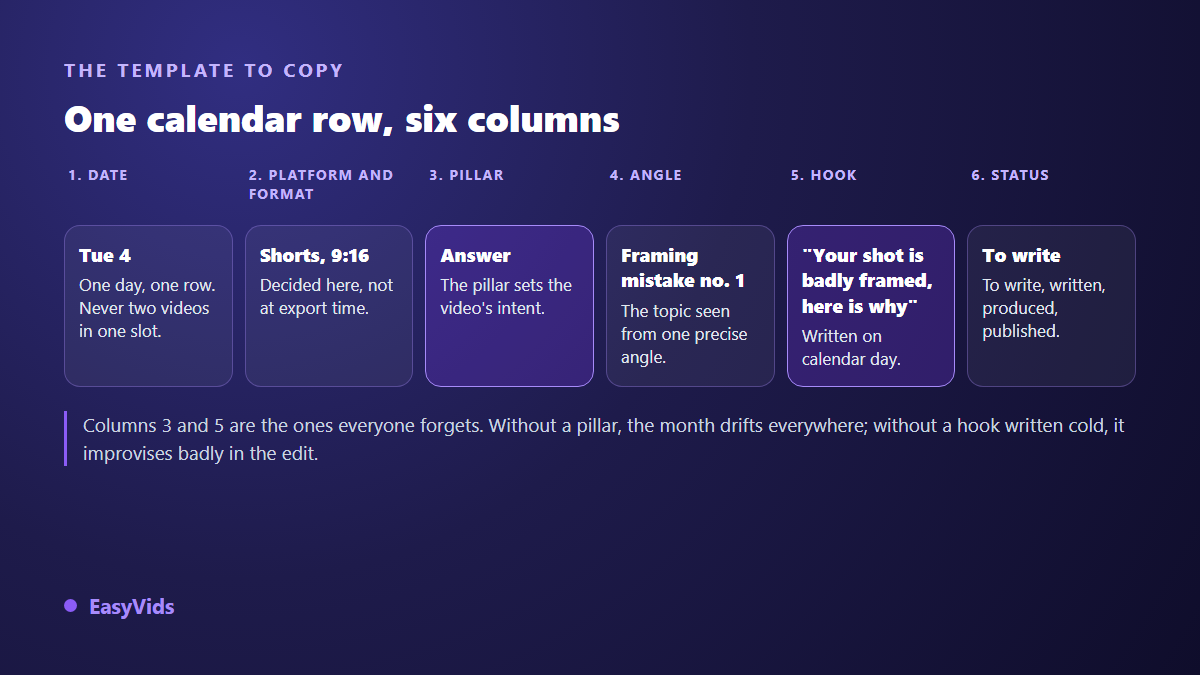
- Date: one day, one row. Two videos on the same slot means you are already behind.
- Platform and format: vertical, square or horizontal, decided here and not at export time.
- Pillar: the intent of the video, picked from four options only.
- Angle: the topic seen from one precise side, written as a sentence you could say out loud.
- Hook: the first line of the video, written on calendar day, not on editing day.
- Status: to write, written, produced, published. A dull column that stops you redoing finished work.
Two columns carry most of the value. The pillar keeps the month from drifting and shows at a glance that you circled the same kind of video eight times. The hook written in advance almost always beats the one improvised in front of the timeline, because in advance you think about the viewer rather than about finishing the file. If that column stalls you, our library of hooks sorted by niche gives shapes to adapt rather than copy.
The four pillars that fill a whole month
A pillar is not a theme, it is an intent. Four are enough for a month, and rotating them avoids two opposite traps: the channel that only teaches and that nobody follows, and the channel that only talks about itself and that nobody finds.
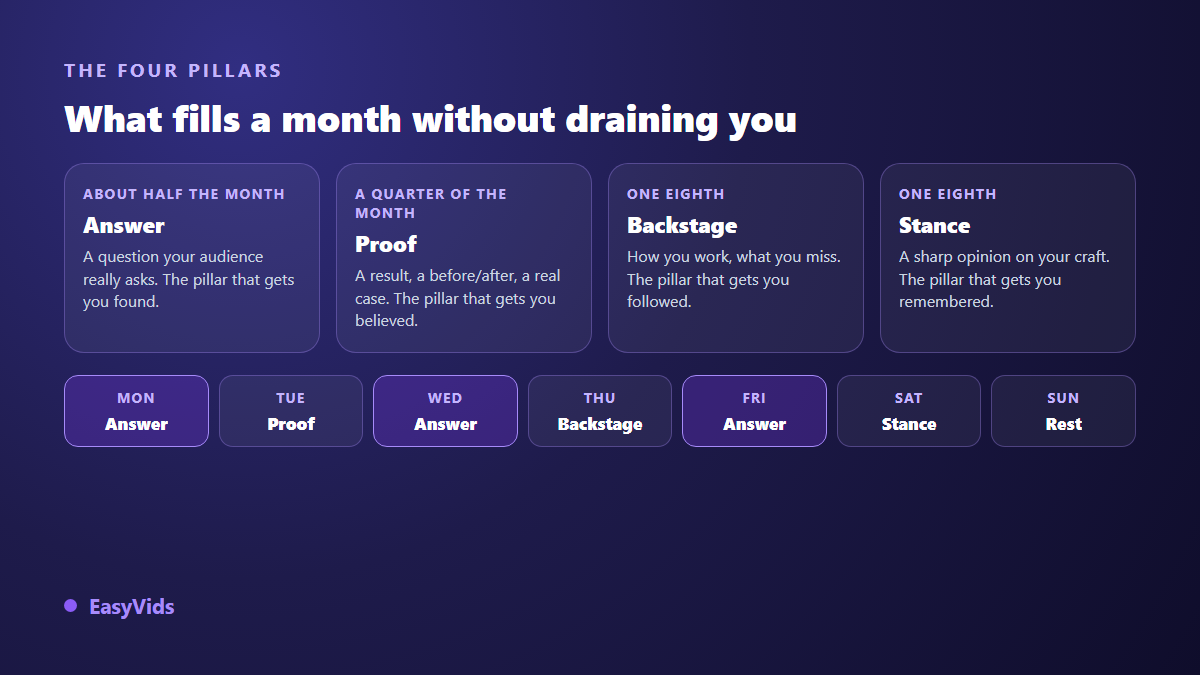
The answer pillar takes about half the month. Those videos reply to a question people genuinely ask, and they get you discovered by strangers. The proof pillar shows a result, a before and after, a real case. The behind the scenes pillar shows how you work, including what you get wrong. The opinion pillar takes a clear stance on your field: it is the one people remember, and the one to use sparingly.
Rotation matters more than exact ratios. Alternate deliberately instead of grouping five behind the scenes videos because they were easier to shoot. A typical week can run answer, proof, answer, behind the scenes, answer, opinion, rest. That already gives you twenty six rows in a month, before writing a single word.
Thirty angles from ten topics
Here is the mistake that wrecks most planning sessions: hunting for thirty topics. Find ten, then split them. And those ten are not invented, they are collected. Your comments, your direct messages, the questions people ask you in person, your site search queries, the objections you hear before a sale. Write them down word for word, clumsy phrasing included: that phrasing makes the best hooks.
Each topic then yields three angles, always the same three, which makes the exercise mechanical and therefore fast.
- The mistake: what nearly everyone gets wrong on this topic, and what it costs them.
- The method: the steps to follow, numbered, with no theory.
- The case: one precise example followed from start to finish, with the result.
Ten topics times three angles gives thirty rows. Treating the same topic three times bores nobody, because three angles produce three videos that neither look alike nor target the same moment of the journey.
The afternoon, block by block
Block three uninterrupted hours. The session produces no video at all: it produces a filled file. That separation is the heart of the method, and it is also what makes the habit survive month after month.
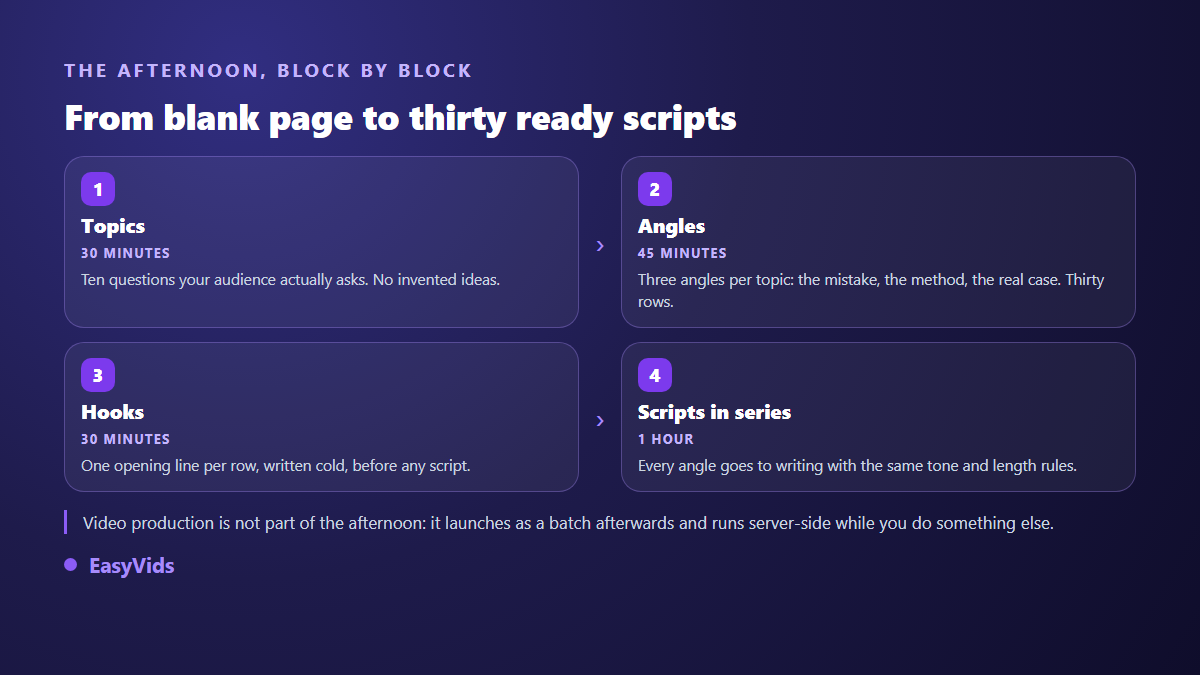
The fourth block surprises creators used to writing one video at a time. Writing thirty scripts back to back is faster and far more consistent than writing one script a day for thirty days, for a simple reason: you do not relearn your own voice every morning. Tone, target length and instructions stay identical from row to row, only the angle changes. The outline is better left fixed too: the hook, body and call to action template carries all thirty rows without making you rethink the structure for every script.
Write the scripts in batch, not one by one
In the EasyVids studio, writing starts from an idea rather than from a finished text. You paste the angle from the row, pick a tone, a language and a length expressed in minutes of voice over rather than in words, which returns a text already calibrated for the duration you want. On our generations, one minute of voice over runs to roughly 150 words.
Two settings matter when writing in batch. Personal instructions saved on your account apply to every piece: you describe your vocabulary, your bans and your way of closing once, and thirty scripts come back in the same voice. A multi pass critical review can then reread the text, list its weaknesses and correct them before delivery. For the structure of a script that holds, our video writing guide covers the frame, and writing a week of content in one session shows the same flow at a smaller scale.
Produce in one batch, the only step that must be grouped
Once the scripts exist, production needs no further decisions, which makes it the right thing to run as a block. The studio automatic mode works server side: you set models, voice and style once, you start, and you can close the page. The batch keeps going, a counter in the header shows what the server is preparing for you, and a batch interrupted by a restart resumes where it stopped without charging finished scenes twice.
That reshapes your week. You launch the batch at the end of the session, come back the next day, and review thirty videos instead of waiting for one. It is what makes a daily rhythm sustainable on short formats, as our method for publishing several Shorts a week explains.
Keep one rule: never launch the full batch before producing one test video, from script to export. If the tone, the pace or the visual style bother you, fix the settings before the other twenty nine, not after.
Format belongs in the calendar, not in the export dialog
This is the most expensive mistake and the easiest to avoid. A video designed horizontally then cropped vertically always loses something: a face leaves the frame, on screen text gets cut, a composition collapses. Decide the format on the calendar row, before writing. The studio lets you lock vertical, square or horizontal at project creation, and it holds all the way to export. Sizes and durations expected by each platform are gathered in our video format reference.
Scheduling: what the platforms actually offer
A content calendar does not post for you, but platforms do. According to the YouTube help centre, on its upload page, a video can be uploaded as private and switch to public automatically at a date and time you set. The same help centre describes, in the Audience tab of the analytics, a chart of when your viewers are on the platform: that is a far better basis for choosing publishing times than the universal best hours you read everywhere.
On social platforms, Meta help states that Meta Business Suite can schedule Facebook and Instagram posts from a computer, and the TikTok help centre describes a scheduling option in its desktop upload tool, several days ahead. Those functions live with the platforms, not in your spreadsheet: the calendar holds the decision, scheduling is only the execution.
The column you fill afterwards
Add a seventh column at the end of the month, once: the result. Not ten metrics, one, the one that matters to you. Retention at three seconds if you work on hooks, comments if you want a community, clicks to your offer if you sell. Next month, that column becomes your starting point: take the three best rows and split them again into three angles.
Frequently asked questions
Do I need a content calendar if I post twice a week?
Yes, and that is where it pays the most. At two posts a week every video carries weight, and one skipped week shows immediately. The calendar fits on eight to ten rows a month and takes about an hour, with the same method scaled down to three topics and three angles.
How far ahead should I plan?
One month suits most creators. Beyond that your topics age and you plan for an audience you do not know yet. Below it you fall back into weekly decisions, which is exactly where people give up. One session a month, always on the same day, is enough.
What happens when news breaks the plan?
Nothing, if you left two or three empty rows in the month. That is their only purpose. A reaction video takes an empty slot and the planned row slides by one day. A rigid calendar snaps; a calendar that plans for its own disorder survives.
Is a spreadsheet enough, or do I need a dedicated tool?
A spreadsheet is plenty, and it has a rare advantage: it imposes no workflow on you. The six columns fit in any sheet, free or paid. A dedicated tool only becomes worthwhile with a team, when several people need to see the same status at the same time.
What does producing thirty planned videos cost?
It depends on three things only: the length of each video, the share of animated stills versus generated video shots, and the model range you pick. A credit system lets you arbitrate row by row, fast models for drafts and a stronger one for the posts that matter. The details sit on the pricing page.
Block three hours, bring ten questions people genuinely ask you, and leave the session with thirty filled rows. Next month is decided there, not by your gear. To go straight from planning to writing and batch production, create your account and take one calendar row all the way from script to exported video.