You are looking for a CapCut review for a very practical reason: the app you used to open without thinking now asks you to pay for features that were free not long ago. Auto captions, background removal, anything labelled AI. The question has changed shape. It is no longer whether the app is good, it is whether it is still worth it, and for which job exactly.
This is not a stopwatch benchmark full of numbers nobody could reproduce at home. It is a working read: what this editor still does better than most, what shifted between free and paid, what you should read before you drop a client project into it, and the line past which no editor can help you. If you are weighing several options at once, our comparison of AI tools for content creators covers a wider landscape than editing alone.
The short answer
CapCut is still one of the fastest editors on the market for cutting, dressing up and publishing, vertical formats above all. What changed is not the quality of the tool, it is the border between what is given and what is billed. If you film and you edit, it still does the job, and the decision comes down to a subscription call. If you do not film, no subscription tier fixes your problem: an editor reshapes existing material, it does not create it.
What CapCut is, and who owns it
CapCut is a video editor published by ByteDance, the company behind TikTok, as stated on the app store listings and on the company's own site. That lineage explains much of its success. The tool was built for vertical video, instant publishing and thumb driven editing, at a time when traditional editing software still treated landscape as the default. It runs as a mobile app, as desktop software and as a browser version.
The word editor carries the rest of the analysis, and it explains half the contradictory reviews you will read. An editor transforms material you bring: footage, a screen recording, photos, an audio track. A generator produces that material from text. The two families have borrowed features from each other, which muddies comparisons, but their core has not moved an inch. CapCut sits firmly in the first camp.
What actually changed: the line moved, it did not vanish
The word free never described a whole app, it describes a zone. That zone has been narrowing across consumer editors for two years, and CapCut is no exception. The company publishes its own page comparing the standard tier and the Pro tier: that page is the only document that counts, and it is where you should look on the day you sign up, rather than in a review written a year ago.
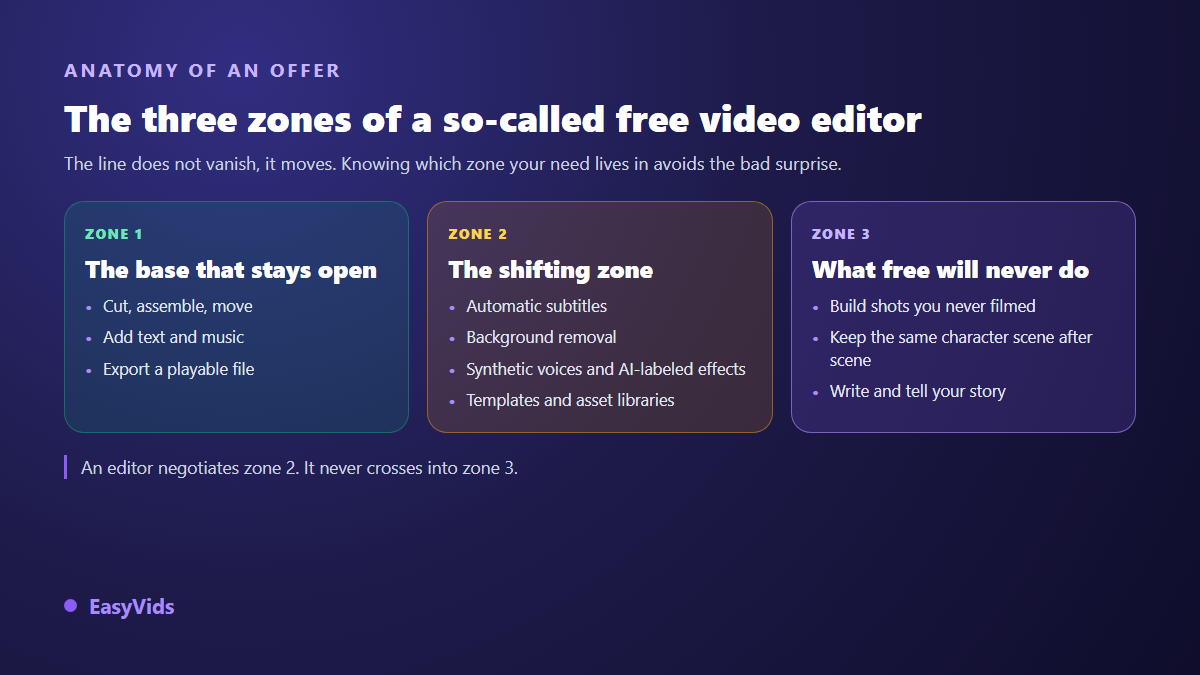
One detail explains a lot of the disagreement between users: the middle zone is not identical everywhere. Available features vary by app version, by operating system and by account country. Two people opening the same screen on the same day may not see the same thing, and both of them are right. In our own keyword tracking, run in July 2026, searches around CapCut replacements are driven by exactly that question: what moved behind the subscription, and can I live without it?
What CapCut still does very well
An honest review starts with what works, and there is plenty. On everyday editing gestures few tools do better, and on mobile almost none. The complaints aimed at the app target its business model, not its ergonomics.
- Thumb editing. Cutting, moving clips, snapping music to a beat: the gestures are direct and you learn them in minutes.
- Vertical treated as a first class format, not as a last minute crop forced onto a landscape project.
- The template library, brutally effective on repetitive formats: clips, announcements, music driven edits.
- Continuity between phone and computer, so you can start an edit on the move and finish it on a large screen.
- Export speed, badly underrated once you publish several times a week and every wait repeats itself.
What a soft review leaves out
These are the points on which an editor choice turns against you months later, once production is running and switching has become expensive. None of them is about editing quality.
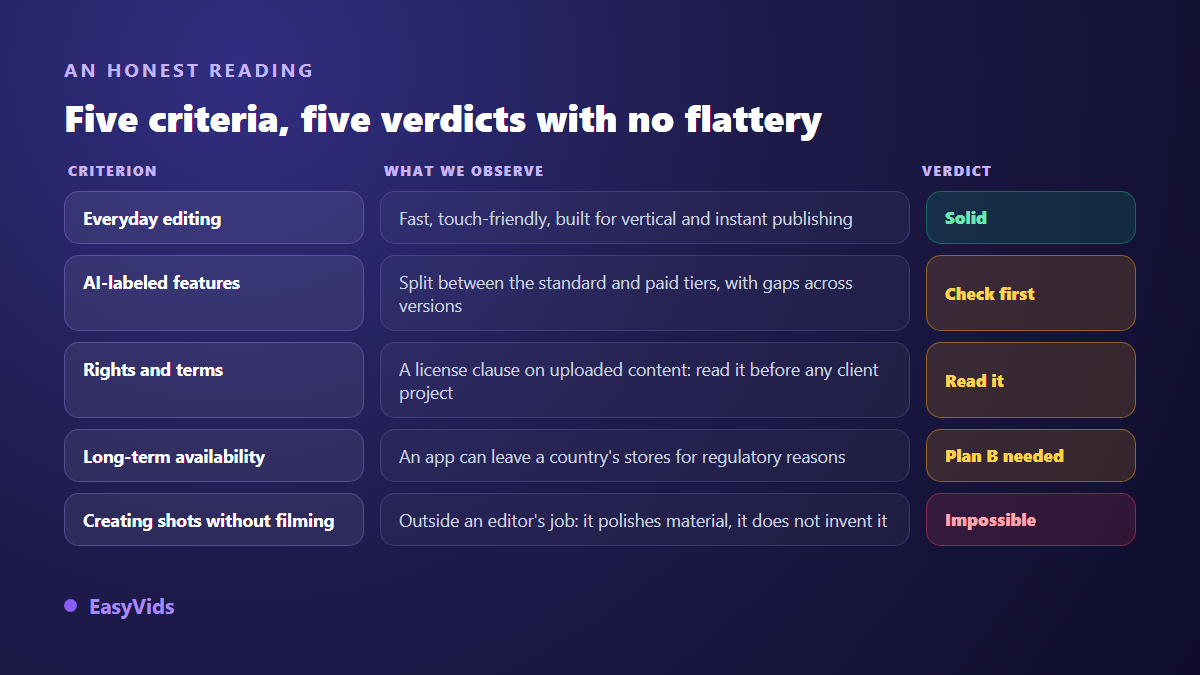
The first one deserves a pause. CapCut's terms of service went through a widely discussed update in 2024, covering among other things the licence granted to the company over uploaded content. Do not trust any summary, including this one: open the terms page, find the licence clause and read it in full. It matters little for a holiday video. It matters enormously the day you edit a client's footage, a brand asset, or the face of someone who trusted you.
The second point is about durability. An app can leave a store for reasons that have nothing to do with its quality: the 2024 United States federal law on applications controlled by a foreign adversary, applied from January 2025, made apps from that group temporarily unavailable for download in the country. This is not an accusation, it is a robustness criterion. Keep your exports on your own drive, and know in advance which tool you would carry on with tomorrow.
Auto captions: the feature that decides the subscription
This is the feature most creators end up paying for, far ahead of effects and transitions. The mechanism is identical everywhere: the tool listens to the audio, produces a timed transcript, splits it into segments, then you style the result. The first lesson holds for every tool on the market, whatever it costs: transcription is rarely the weak link, proofreading and syncing are. If short form is your main ground, our caption settings for TikTok apply whichever editor you use.
On our own projects, proofreading consistently takes longer than transcription, especially on proper nouns, acronyms and foreign words dropped mid sentence. So the criterion to watch during a trial is not the advertised speed but how easily you can fix things: can you shift a whole line back into sync, change one word without breaking the timing, restyle every segment at once? One technical point is worth knowing because no feature sheet mentions it: transcription either runs on the company's servers or directly in your browser. In ours it runs on your machine once the model has loaded, and the audio track never leaves it.
Editing solves nothing when there is nothing to edit
This is the structural limit of the whole category, and no serious review can dodge it. Every editor has added a shelf of AI tools: background removal, silence trimming, synthetic voices, noise cleanup, auto reframing. Each of them applies to a file you already own. The day you start from an idea and nothing else, they do nothing for you. The tools that create the material are not interchangeable either, and the seven families of AI video generators and how to pick yours set out the bearings worth having before you subscribe elsewhere. To see what the other family of tools does, our guide to AI video generators walks the full chain from script to final cut.
The example is ordinary. You want to publish a three minute story, without filming and without a stock library. With an editor alone you have to source thirty consistent shots somewhere else, plus a voice over and music, then import them one by one. With a generation studio those elements come out of the text itself, inside one account, already matched to the length of the narration. Editing is still needed, but it goes back to being finishing work rather than scavenging. On browser editing itself, our guide to editing video online covers what the approach allows and what it asks of your machine.
Stay free, subscribe, or switch: the grid that settles it
The real question is not whether CapCut is worth its subscription in the abstract. It is which side of this line your actual need sits on. Plenty of creators end up with two tools rather than one, and that is a perfectly valid answer.
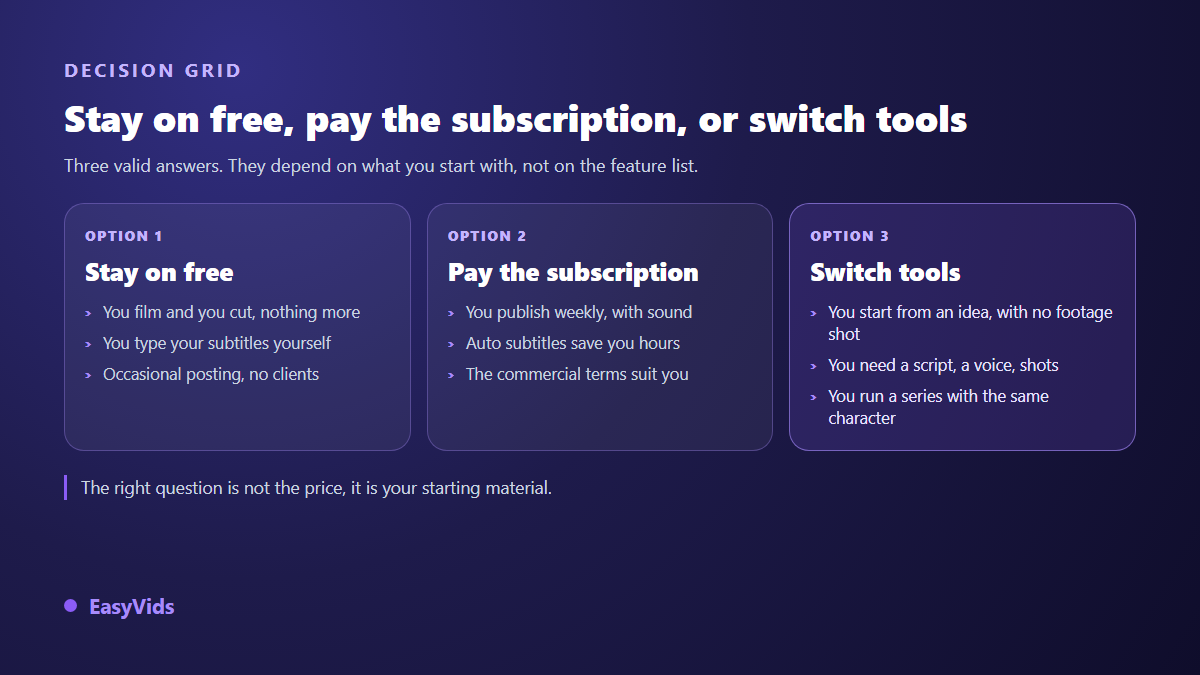
Our own stance is to put both in one place: generation upstream, then a full browser editor for finishing, with tracks, text, transitions, stickers and importable SRT captions. On budget we detail nothing here because offers change constantly: the pricing page is the only current reference, and our analysis of what a video really costs compares the orders of magnitude between traditional and assisted production.
How to decide in one hour, with your own project
Never judge an editor on its home page, or on a review, this one included. Take a real project, not a supplied sample, and run this sequence in order.
- Open the plan comparison page and list, one by one, the features you actually use.
- Run auto captions on one minute of your own voice, then count the corrections needed.
- Change a word in the middle of a segment and check that the following timings hold.
- Switch the project from landscape to vertical and watch what auto reframing sacrifices.
- Export, open the resulting file, look for the mark, the real resolution and the audio quality.
- Read the licence clause in the terms of service, in full, before importing any client footage.
- Time how long you spend sourcing visuals elsewhere: that number tells you whether you need an editor or a studio.
Frequently asked questions
Is CapCut still free in 2026?
A free tier still exists and covers the essentials: cutting, assembling, adding text and music, exporting a file. What sits behind the subscription are the AI labelled features and part of the asset library. The exact split varies by version and by country, so the only reliable answer is the company's plan comparison page, read on the day you sign up.
Does CapCut watermark exported videos?
An edit you build yourself generally exports without a mark. Marks mostly appear when you use certain library assets, ready made templates in particular. The habit that avoids a bad surprise is to export a ten second test and open the file before producing anything serious. We devoted a whole article to clean exports, getting video exports without a watermark.
Can CapCut be used for commercial content?
In most cases yes, on two conditions you verify in the terms rather than in a review: the rights attached to the assets the tool supplies, music and effects first of all, and the licence clause covering the content you upload. Files you import stay yours. It is the built in assets and the licence clauses that carry the restrictions.
What is the best CapCut alternative?
It depends entirely on your starting material. If you film, compare other editors on caption quality, export terms and support language: our VEED review walks through that family of browser editors. If you do not film, switching editors fixes nothing, because editing was never the problem: you need a studio that writes, illustrates, narrates and edits.
Do I need a powerful computer to replace CapCut on desktop?
No, as long as the tool works in the browser: generation runs on servers and your machine only displays the interface. For editing, memory matters more than the processor, because playback happens inside the tab. On a modest machine, edit with lower resolution files and export at the quality you want.
A useful review does not tell you which tool to install, it tells you which question to ask. It fits in one sentence: does your video already exist somewhere, or does it have to be brought into existence? In the first case CapCut remains an excellent tool and the decision is only about its subscription. In the second, you are better off inside a complete creation studio that writes, illustrates, narrates and edits in one place. To compare on evidence rather than promises, create an account and test it with your own project.