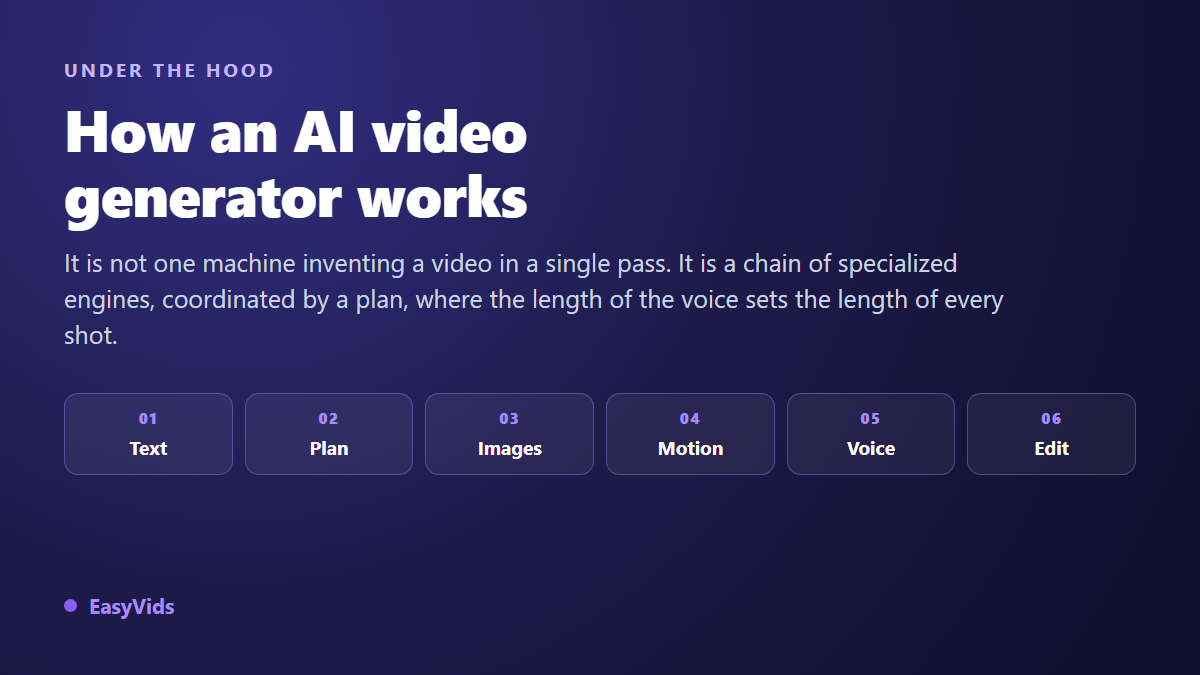
You type a sentence, you wait, and a video comes out. The result surprises you, then a question settles in: how does AI video generation work, exactly? As long as the answer stays vague, the tool runs you. You regenerate at random when a shot disappoints, you accept a face that changes between two scenes, and you never know where to step in.
This page opens the hood, without the maths. What follows describes what actually happens between your sentence and the exported file, engine by engine, with the practical consequence of each mechanism. If you want the how to rather than the mechanics, our complete guide to AI video generators walks the same path from the user side.
The short answer
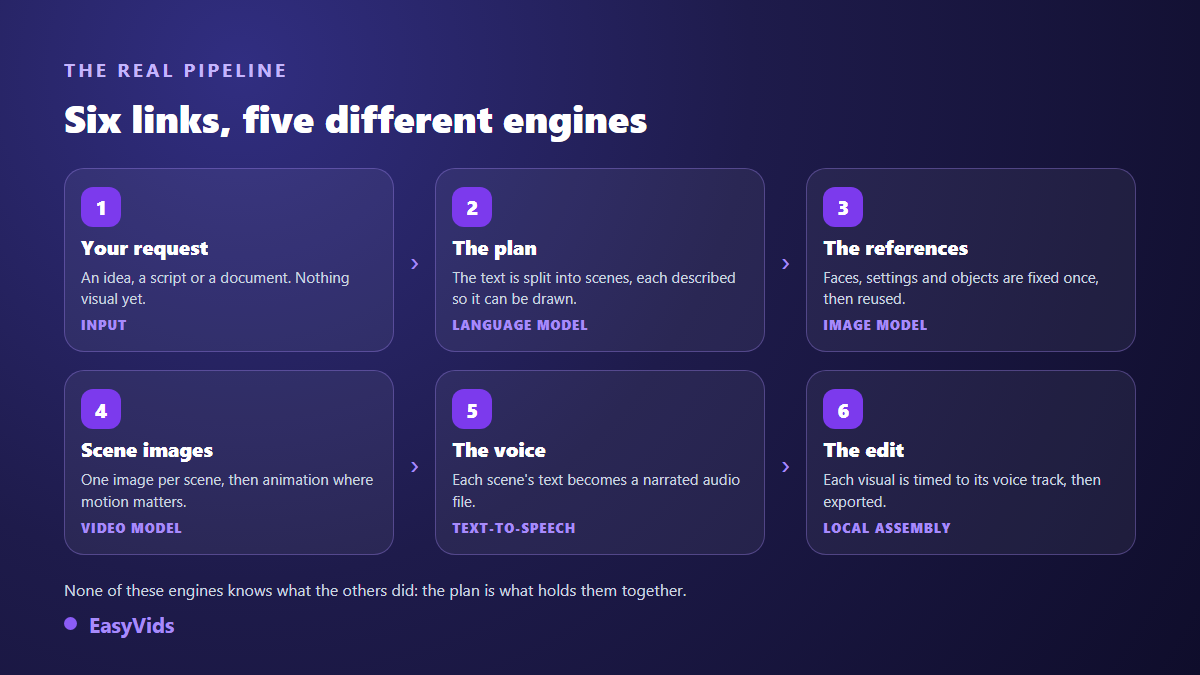
An AI video generator is not a single model dreaming up a video in one piece. It is a chain of specialised engines held together by a plan. A language model reads your request and turns it into scenes, described one by one. An image model builds the visual for each scene by starting from random noise and cleaning it pass after pass. A video model gives that visual a few seconds of motion. A speech engine speaks the text. Finally, an editing program trims every shot to the exact length of its voice track and exports the file. None of these engines sees what the others are doing, and that is where most flaws come from.
One word, two very different things
The same term covers two objects that do not compare. On one side, a video generation model that produces a few animated seconds from a prompt. On the other, a complete studio that orchestrates writing, visuals, voice, music and editing to deliver a publishable file. The first is a component. The second is a factory that drives that component among others.
That distinction changes how you work. When a video produced by a studio disappoints you, the model is rarely at fault. It is almost always an earlier step, decided before a single image was computed.
Step 1: your idea becomes a plan, not a video
The first engine is a language model, the same kind of system that writes text. It produces no image at all. It writes a structured document: the list of scenes, the words to be spoken in each one, and a written description of the expected visual. On a narrative project it also builds a sheet of recurring elements, characters, sets and objects, described once and given a stable identifier.
That sheet carries the consistency of the whole film. Every scene featuring the same character points to the same identifier, therefore to the same reference image. In our director engine, those references are produced before the scenes, and production pauses so you can approve them. It is the one point in the chain where a correction costs almost nothing.
Step 2: what the model understands of your prompt
An image model does not read your text the way you do. It converts it into numbers, then places your request inside a space of concepts learned from vast collections of images and their captions. It has no dictionary, it has associations. The word kitchen activates everything that looked like a kitchen in its training data, biases included.
Hence a rule that surprises beginners: precision beats length. A man gives you an average, statistical man with no character. A man in his fifties, dark jacket, low late afternoon light, narrows the search space and gives you a shot that matches your intent. Our five block prompt method sets out the order in which to lay those elements down.
Step 3: the image is born from noise the model removes
This is the least intuitive mechanism, and the most useful one to grasp. Most image models rest on a principle called diffusion. During training they are shown pictures with noise added step by step, until nothing readable is left, and they learn to walk that path backwards. When generating, the model starts from a rectangle of random dots and removes noise, pass after pass. Your prompt is not a drawing to execute: it is the compass for every removal.
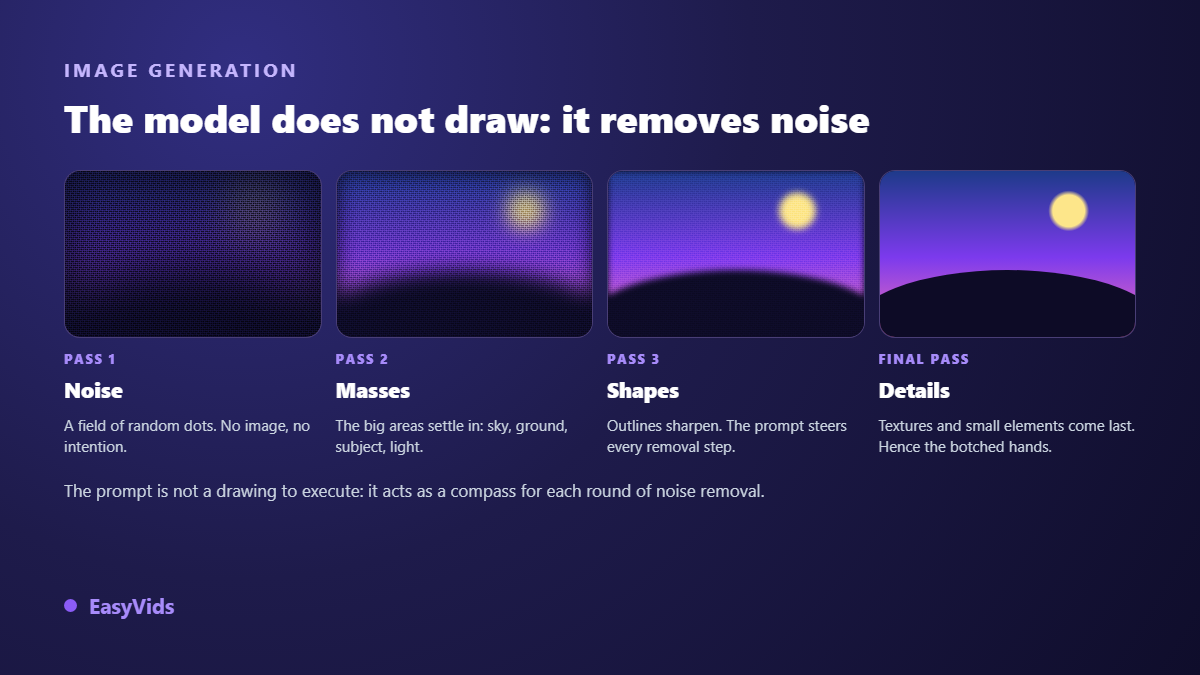
Three very concrete consequences follow. First, since the starting point is random, the same prompt never gives the same image twice. Second, large masses settle early and fine detail last, which is why hands, small text and logos are the first things to fall apart. Third, adding passes improves detail and lengthens the compute, which is exactly the trade you make when you pick a fast model over a careful one.
Step 4: motion, where the real difficulty starts
Animating is not producing twenty five pictures in a row. Every frame has to stay compatible with the one before: same face, same jacket, same light, a camera that moves without jumps. Video models therefore work on a compressed representation of the whole clip, across space and time, rather than frame by frame. That is what makes this step far heavier than generating a still.
There are two entry points. In text to video, the model invents the shot from scratch. In image to video, you hand it the first frame and it animates that. The second route gives far more control: you approve the visual, its framing and its style before paying for motion. Our production follows that order by default, scene image first, motion second, and you decide shot by shot what genuinely needs to move.
Why clips only last a few seconds
Every extra second multiplies the number of frames that must stay consistent, and the memory required climbs faster than the duration. These models were also trained on short sequences. That is why the durations on offer sit around five to ten seconds across most providers, including the ones we expose in the studio.
A long video is therefore always an assembly of short shots, exactly as in cinema. The right question is not how to stretch a clip, but how to cut cleanly between them, which is the starting point of our method for longer AI videos. And since compute is billed by the generated second everywhere, picking a model and a duration is also a budget decision. Our plans live on the pricing page.
Step 5: the voice, an engine blind to the picture
Speech synthesis follows a completely separate path. The text is converted into elementary sounds, then into an acoustic representation carrying rhythm and intonation, then into an audible signal. The engine knows nothing about what is on screen. It only knows your words and your punctuation.
That is why a comma changes the result more than any slider. Full stops, commas and line breaks are the score the voice performs. A text written for the eye, with long sentences and brackets, produces a breathless read. A text written for the ear breathes.
Step 6: the edit, where the voice sets the length
The last step contains no artificial intelligence at all. It is a classic, deterministic video program applying the plan. It measures the real length of each scene's audio file, trims the visual to that exact duration, adds a slow move on stills, places the transitions, then renders everything in the chosen frame, landscape, vertical or square. Captions, on screen text and fine trimming then belong to the editor, where the project opens in one click.
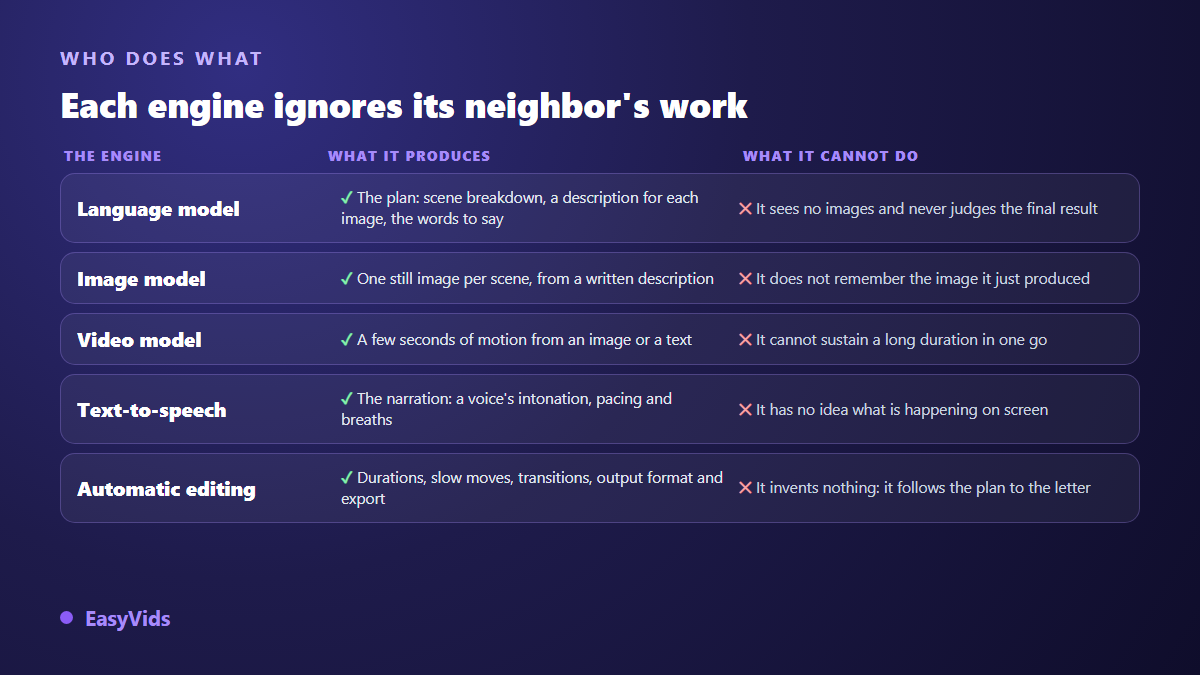
Remember this rule, it solves a lot of frustration: you do not set the length of a shot in the prompt, you set it in the words to be spoken. A shorter sentence gives a shorter shot. It is also why a scene of about thirty words naturally lands around ten seconds.
What this mechanism explains about your failures
Almost every flaw in an AI video traces back to one of the links described above. Recognising them saves a great deal of time, because each one is fixed in a precise place and nowhere else.
- A face that changes between scenes: the image model has no memory, you must feed it the same visual reference every time.
- Mangled hands or unreadable on screen text: fine detail arrives last in the denoising process, so it breaks first.
- A style that jumps: two scenes generated without a shared style instruction have no reason to match.
- A flat voice: intonation comes from the punctuation of your text, not from a slider.
- A shot that drags: duration comes from the length of the scene text, never from the model.
- A cropped frame after export: aspect ratio is decided before generation, not at export time.
The first item is by far the most common, and it has its own fix, described in our piece on the AI character whose face keeps changing. For a wider diagnosis, the nine causes of failed AI videos pair every symptom with its remedy.
Where you can take back control
- On the plan: rewrite a scene description before any image is computed.
- On the references: regenerate a character or a set, or supply your own picture instead.
- On a scene image: relaunch that one alone, with a corrected prompt, leaving the rest untouched.
- On motion: decide shot by shot what truly moves and what stays still.
- On the voice: change voice, change reading style, or simply rewrite the sentence.
- On the edit: open the project in the editor to adjust cuts, on screen text and captions.
Frequently asked questions
Does an AI video generator copy existing footage?
No. It does not fetch a clip from a library and hand it to you. It builds pixels from regularities learned during training. What it learned does come from existing works, which is why a strongly marked style resurfaces when you name it. Describing a style rather than naming an author remains the safer practice.
Why does the same prompt never give the same result?
Because generation starts from randomly drawn noise. That starting point changes on every run, and the cleaning path changes with it. Some tools let you freeze that draw to reproduce an image, but the reliable way to recover a look is to reuse the image you already have as a reference.
Can platforms tell that a video was generated?
Only partly. A file can carry signed provenance information, following the C2PA standard published by the Coalition for Content Provenance and Authenticity, but it disappears as soon as a tool re encodes the video. On the rules side, YouTube has asked creators since 2024 to disclose realistic content made with synthetic or altered media themselves, according to the YouTube Help Centre. Disclosure therefore stays largely on you.
Do I need a powerful computer to generate a video?
No, as long as the tool runs in a browser. All the compute happens on servers fitted with specialised graphics cards. Your device only sends text and displays the result, which makes generation possible from a phone as much as from an ageing laptop.
How long does a generation actually take?
It depends on the link. A scene image takes tens of seconds, a few seconds of motion take minutes, the voice is nearly instant, and the final edit stays fast since it calls no model at all. Studios process several scenes in parallel, which brings the total wait well below the sum of the steps.
Understanding the chain changes how you work: you stop regenerating at random and you fix the right link. The plan carries meaning, the references carry consistency, the text sets the duration, the edit sets the rhythm. To watch that machinery run on your own subject, create a free account and launch a first production: the EasyVids studio brings those six steps together in one place, each of them replayable on its own.