You want to create an AI influencer: a character who posts, replies in the comments, recommends products, and never reads as an abandoned account. The first attempt usually follows the same script. Three stunning images, a name found in ten minutes, a polished bio. Then, by the fourth post, the face is not quite the same. By the tenth, the account looks like a stock library with no owner.
The problem is not your visual taste, it is the method. A virtual persona rests on four layers stacked in a specific order, and the second one, the face, is not allowed to move. We covered the mechanics of that stability in our guide to keeping the same character across scenes. The goal here is different: building a whole account around that character, and keeping it alive week after week.
The short answer
Creating an AI influencer comes down to four decisions, taken in this order. Write the character sheet, one page is enough. Generate a single reference portrait and keep that file: it will be attached to every later generation. Pick one voice and never change it. Lock three topics and a posting rhythm you can hold for six months. Everything else, sets, outfits, formats, can vary as much as you like, and that variation is what creates the sense of a life. What never varies is the face, the voice and the editorial promise.
What the term covers, and what it does not
An AI influencer is a fictional character with a public identity and an account in their name. They do not exist physically, but they publish like a person: photos, short videos, replies, brand partnerships. The format is not new. Lu do Magalu, the virtual figure of Brazilian retailer Magazine Luiza, was created in 2003 as an online shop assistant before becoming a character in her own right on social media. Lil Miquela has posted on Instagram since 2016. Noonoouri, a fashion character created by German designer Joerg Zuber, signed a record deal with Warner Music in 2023.
Two confusions are worth clearing right away. An AI influencer is not a digital twin of you: a twin reuses your own face and voice, while here you build someone who never existed. It is not a filter over a real person either. No real body stands behind the image, which shifts the whole job: everything that would be naturally constant in a human being, the jawline, the eye colour, the way they laugh, has to be reproduced deliberately in every generation.
Step 1: write the character sheet before the first image
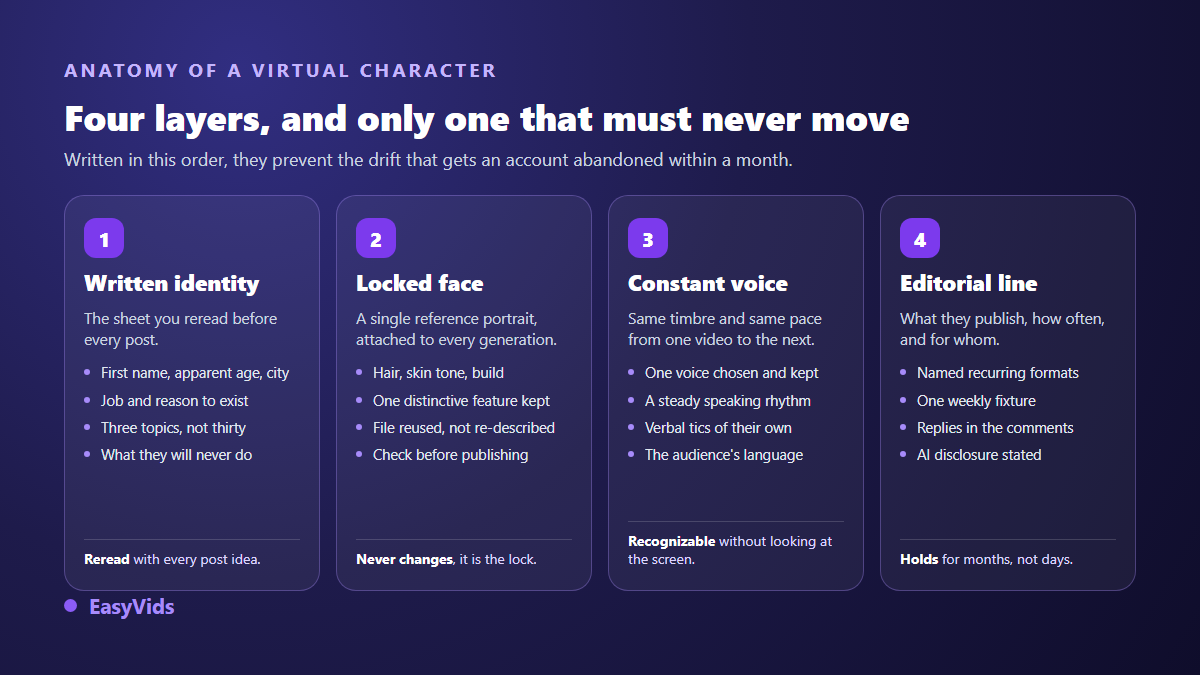
The most common mistake is generating a pretty face first, then inventing a personality around it. The reverse works far better. A one page sheet, written before any generation, gives you a decision rule for every future post: does this content sound like them, yes or no? Without that text, you post whatever image turned out well, and the account loses its unity within weeks.
- A first and last name, easy to pronounce in several languages, still available as a handle on the platforms you target.
- An apparent age and a city, because they drive the sets, the clothes and the cultural references.
- A job or a reason to exist: stylist, fitness coach, travel guide, brand mascot. A character with no occupation has nothing to say.
- Physical invariants: hair, skin tone, build, eye colour, and one distinctive feature that is easy to describe.
- Three topics, not thirty. That is the implicit promise made to anyone who taps the follow button.
- A tone of voice: warm, technical, wry. Write three sentences they could say, and use them as the reference for every caption.
- What they will never do: topics avoided, brands refused, registers ruled out. This line saves you from a post you would regret.
- The disclosure of their synthetic nature, planned in the bio from day one rather than added later.
The profile picture is decided at the same moment, because it is the first image thousands of people will see, usually at a very small size. A tight crop on the face, a plain background, strong contrast: the same rules as a professional headshot, which our eleven AI profile picture styles break down. That image doubles as your first check: if the face is ambiguous there, everything after it will drift.
Step 2: lock the face, the hinge of the whole project
An image model remembers nothing. Every generation starts from scratch and reads your text its own way. Retyping the same description never works: two identical prompts give you two cousins, not the same person. The drift is slow, almost invisible from one post to the next, and obvious the moment ten posts sit together on a profile grid.
The fix fits in one sentence: a face is not described, it is attached. You generate a single reference portrait, front facing, sharp, framed at the chest, on a neutral background, and that file rides along with every later generation as a reference image. The prompt then only describes the situation, the set and the light. In the EasyVids studio, the consistency screen accepts up to five reference images per generation, so you can attach the portrait and, when it helps, the recurring set or the product being shown.
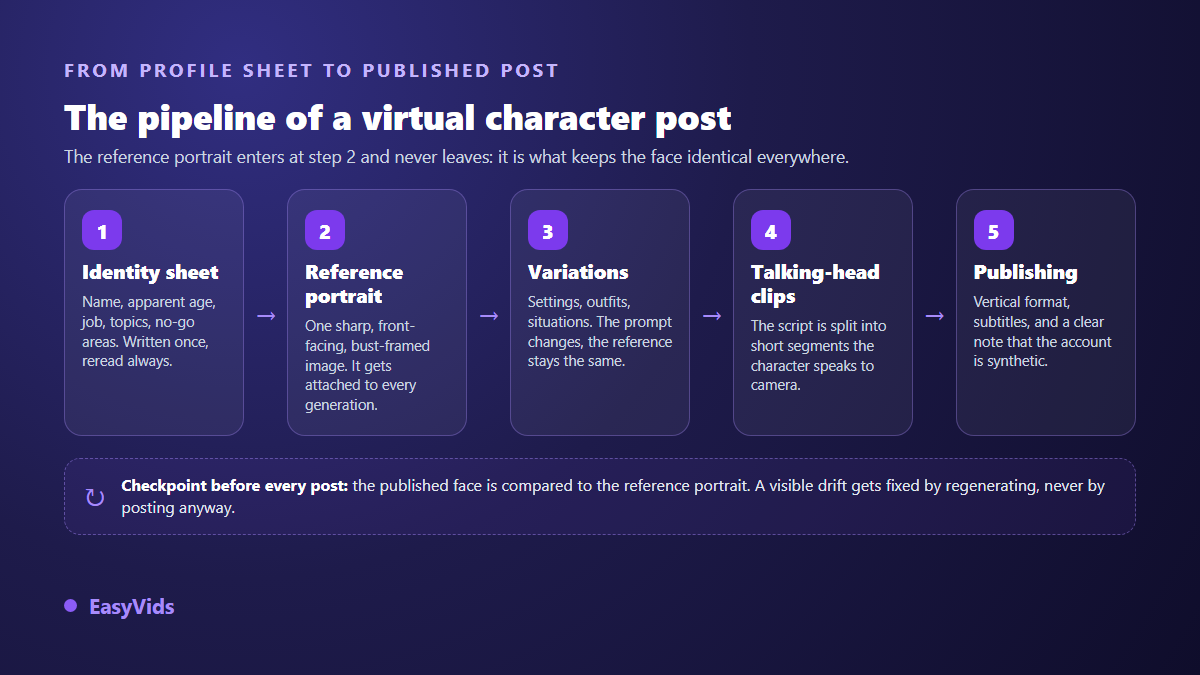
Keep a short written signature too, repeated in every prompt: the hairstyle, a signature garment, an accessory. The reference image carries the likeness, the written signature stops the model from contradicting it. And make a habit of opening the reference portrait next to the generated image before you publish. That check takes five seconds and prevents the post that breaks the illusion.
Step 3: one voice, and only one
Plenty of virtual persona accounts stop at the image. That is a waste, because voice is what turns a nice set of portraits into a recognisable presence. A follower should be able to identify your character without looking at the screen, just from the first seconds playing in their feed.
So pick a timbre, a pace and a language, then hold them. Note the voice reference in the character sheet, exactly like the eye colour. When your character speaks straight to camera, production runs through a presenter shot rather than narration laid over footage, and our guide to AI avatars and UGC videos walks through both ways of giving a character a voice.
Step 4: the content line that brings people back
A virtual persona account rarely dies of a technical flaw. It dies of boredom. The trap is publishing ever more beautiful images that say nothing, until followers stop telling the account apart from a catalogue. An influencer gathers an audience by delivering something regular and identifiable, exactly like a human creator.
- A recurring appointment: the same segment, the same day of the week, recognisable within a second.
- Useful content tied to the three topics: one tip, one comparison, one mistake to avoid.
- Behind the scenes, openly: showing how the character is built interests part of the audience and defuses suspicion.
- Replies in the comments, written in their own tone, never copied from post to post.
- Progression: a project that advances over several weeks gives a reason to come back, where a standalone image is consumed in a second.
On the production side, vertical video is still what puts an account in front of people who do not follow it yet. Plan the vertical frame at generation time instead of cropping a horizontal shot, a constraint we walk through in our method for making Instagram Reels with AI. Add captions every time: a large share of the audience watches with the sound off.
The format that lifts a character: talking to camera
The posts that truly establish a virtual persona are the ones where they speak. The build is simple: you write the text, it is split into short segments, and each segment becomes a clip where the character says those exact words to camera. In the EasyVids studio the split is strict, six, eight or ten seconds of speech per segment, because a video model cannot hold a longer line without losing the likeness or the lip sync.
Two treatments give very different results. The in action mode shows the character talking while doing something natural, walking down a street, cooking, handling an object: the register closest to real creator videos. The with cutaways mode alternates talking head shots with shots of what they are describing, their voice continuing off screen. The first builds closeness, the second suits explanatory content.
Say the character is synthetic, and why it serves you
Hiding the artificial nature of an account is both risky and counterproductive. Risky, because platforms now handle it themselves: since 2024 Meta applies an AI info label on Facebook and Instagram to content it detects as AI generated, based on technical signals inside the files, and its help centre asks creators to disclose realistic AI generated content themselves. A voluntary disclosure always beats a label you did not choose.
The legal frame is tightening in the same direction. The European Union AI Act sets a transparency obligation in Article 50 for content generated or manipulated by AI that resembles real people or real scenes, and those obligations apply from 2 August 2026. In the United States, the Federal Trade Commission rule on consumer reviews and testimonials, in force since October 2024, bans fabricated testimonials, which directly covers an invented character claiming to have tried a product. If your AI influencer recommends a brand, the commercial relationship must be disclosed as clearly as for a human creator.
Counterproductive, finally, because the admission is part of the appeal. Virtual persona accounts that last state their nature in the bio, in one line, and often turn it into a narrative device. Audiences do not resent the fiction, they resent the lie.
Keeping the account alive beyond the images
A character becomes believable through habits, not definitions. Give them a visible routine: a place that recurs, a mug that never changes, a recognisable jacket. Those details cost little and build, post after post, the feeling of a stable world. Plan a buffer as well: producing fifteen posts before opening the account protects you on the day inspiration runs dry, and that day is exactly what kills consistency.
Frequently asked questions
Do I need drawing or editing skills to create an AI influencer?
No. The work is editorial first: writing an identity, choosing three topics, holding a rhythm. The visual side rests on a reference portrait and situation prompts, and the video side on a script split into short segments. Neither drawing nor editing skills are required to publish. The same build produces creator style product videos filmed with no camera at all, where the character speaks while holding what they recommend.
How many reference images are needed to keep the same face?
One very good image is usually enough, provided it is sharp, front facing and well lit. Two or three complementary views, a profile and a wider shot, help when the character has to appear from varied angles or full length.
Does Instagram allow AI generated character accounts?
Yes, as long as the account follows platform rules and misleads nobody about what it is. Meta applies an AI info label to content detected as AI generated and asks creators to disclose realistic AI content. Passing yourself off as a real person, on the other hand, counts as impersonation and can cost you the account.
Can an AI influencer really land brand deals?
Yes, and several brands have worked with such characters for years. Advertisers look at engagement and audience fit before they look at the nature of the creator. The extra constraint is regulatory: the commercial relationship must be disclosed, and a fictional character cannot claim to have personally tested a product.
How long does a serious launch take?
Count one day for the character sheet and the reference portrait, then a few days to build a buffer of roughly fifteen posts before opening. That buffer is what protects consistency in the first weeks, when the account has neither feedback nor audience to keep you going.
An AI influencer is not an exercise in imagery, it is an exercise in consistency: a face that does not move, a voice people recognise, a promise kept every week. Write the sheet, generate the portrait, publish fifteen times before judging. To produce your character's images and videos in one place, creating an account opens the full studio, and the EasyVids home page shows the whole chain, from script to a file ready to publish.