The product page is live, the ad account is ready, and the only thing missing is the video. That gap is where launches stall, sometimes for weeks. Figuring out how to make a video ad used to mean booking a shoot, waiting on a quote, chasing an editor, then discovering in the edit that the hook does not land. Meanwhile nobody sees the offer.
This guide walks the full route in the order it actually happens: the promise, the placement, the script, the shots, the voice, the edit, the export. It fits inside one working afternoon, with no camera and no crew. Each step points to the article that goes deeper, starting with our complete product video guide, which covers what an ad has to get from a viewer and in what order.
The short answer
Making a video ad takes seven steps: write the promise in one sentence, pick the placement and the aspect ratio it forces, write a timed five beat script, gather the visual material, generate the shots, add voice and captions, then edit and export. Budget one afternoon for the first spot and often under an hour for the next ones. The only step you cannot fix later is the first: a vague promise produces a vague ad, however good the images are.
One afternoon, four hours, seven steps
The hard part of a video ad is not technical, it is sequencing. People who get stuck are not short of tools. They open an editor before deciding what the ad has to say, then spend three hours moving shots that serve nothing. Splitting the afternoon into hours fixes that, because it forces every hour to end with something tangible.
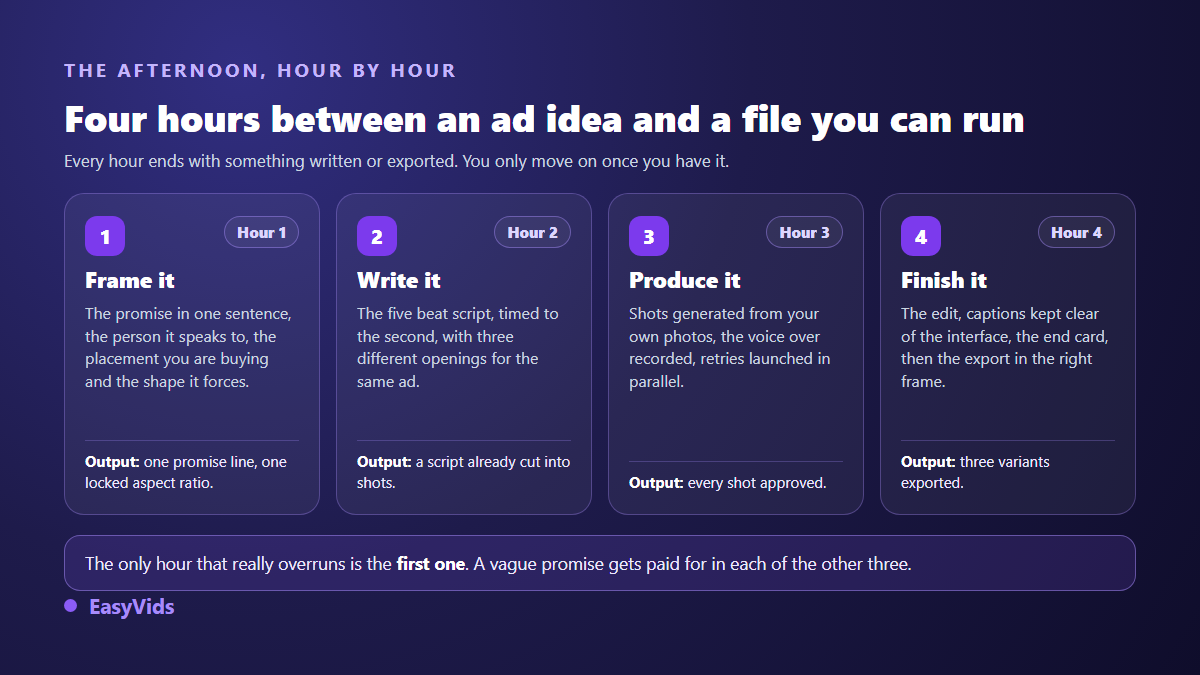
The schedule is not sacred, and it speeds up sharply on the second ad, once the structure and the settings already exist. What it gives you is a rule for moving on: until the current hour has produced its output, you do not start the next one. That is what stops you from generating beautiful images for an ad that does not yet know who it is talking to.
Step 1: write the promise before the script
A working ad fits in one sentence, written before anything else: who it is for, what problem, what changes. That sentence is never spoken in the spot. It acts as a judge. Every shot you build afterwards has to serve it, or it leaves the edit. Write it by hand, in one line, with no adjectives. If it needs three lines, your ad is aiming at two people at once and will convince neither.
The second habit is to write, right underneath, the single action you are asking for. An ad that asks people to visit the store, follow the account and leave a comment asks for nothing at all. One action, said out loud and written on screen. Those two lines govern the six steps that follow.
Step 2: pick the placement before you write a word
The same product does not sell the same way in a TikTok feed and in a Facebook feed, and the difference starts with the frame. According to the advertising specifications published by TikTok Ads Manager and consulted in 2026, the In-Feed ad fills the screen at 9:16, 1080 by 1920 pixels. On the Meta side, the advertising specifications guide consulted on the same date separates Reels and stories, in full screen vertical, from the news feed, where the shorter vertical and the square ratio are still recommended. Those official pages change: check them before a large campaign rather than copying a blog post, ours included.
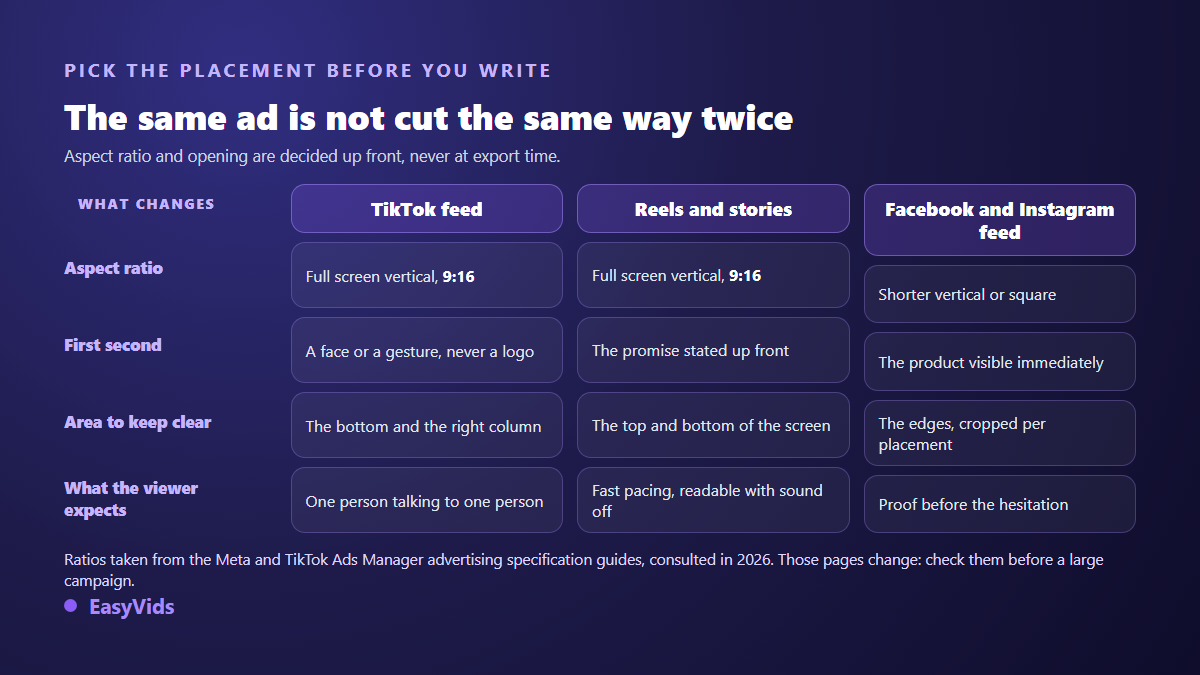
The second difference is tone, and it shows in the first second. A TikTok feed rewards something that looks like one person talking to another, and seven product video formats that convert on TikTok lays out the patterns that hold up. A Meta feed responds better to a promise stated up front and then backed by proof, which is the logic behind the anatomy of a Facebook creative that converts. The story placement adds its own interface margins, measured in our guide to Instagram story ads.
Step 3: the five beat script, timed as you write
An ad script does not tell a story. It answers five silent questions in order. That structure shows up in almost every ad that works, whatever the platform, and it takes about twenty minutes to write.
- The hook, inside the first three seconds: an image or a gesture that stops the scroll, never a logo or an animated intro.
- The problem, named in the customer's words rather than your spec sheet's.
- The demonstration: the product in use, shown instead of described.
- The proof, placed before the hesitation: a material, a finish, a real use, a review.
- The action, spoken and written at the same time, once, on the final shot.
Time the script while you write it. One second of voice over is roughly two and a half words in English, so a twenty five second ad lives inside sixty odd words. Then write three different openings for the same script body: it is the highest return work of the afternoon. Fifteen ad script templates ready to adapt remove the blank page at exactly that moment.
Step 4: gather the visual material without filming
By now you know what each shot has to show, so the question becomes where the images come from. Three sources almost always cover it: the photos you already own, from your product page or your supplier; shots animated from those photos when you need movement; and fully generated shots for the settings and use cases you have never photographed. An existing photo stays the best raw material, because it guarantees the delivered product looks like the advertised one. The full method is in our guide to turning a product photo into a video, and stores selling without stock will find the sorting rules in our article on product ads made without a sample.
Step 5: generate the shots, one by one or as a full project
This is where tools diverge, and the choice comes down to one thing: how many shots you need, and what has to stay stable between them. For a hook test or a single shot, the one shot generator in the EasyVids studio is enough. You describe one shot, pick the ratio and the duration, attach a few reference images including your product photo, and get a clip back. Several generations run in parallel while you write the next one.
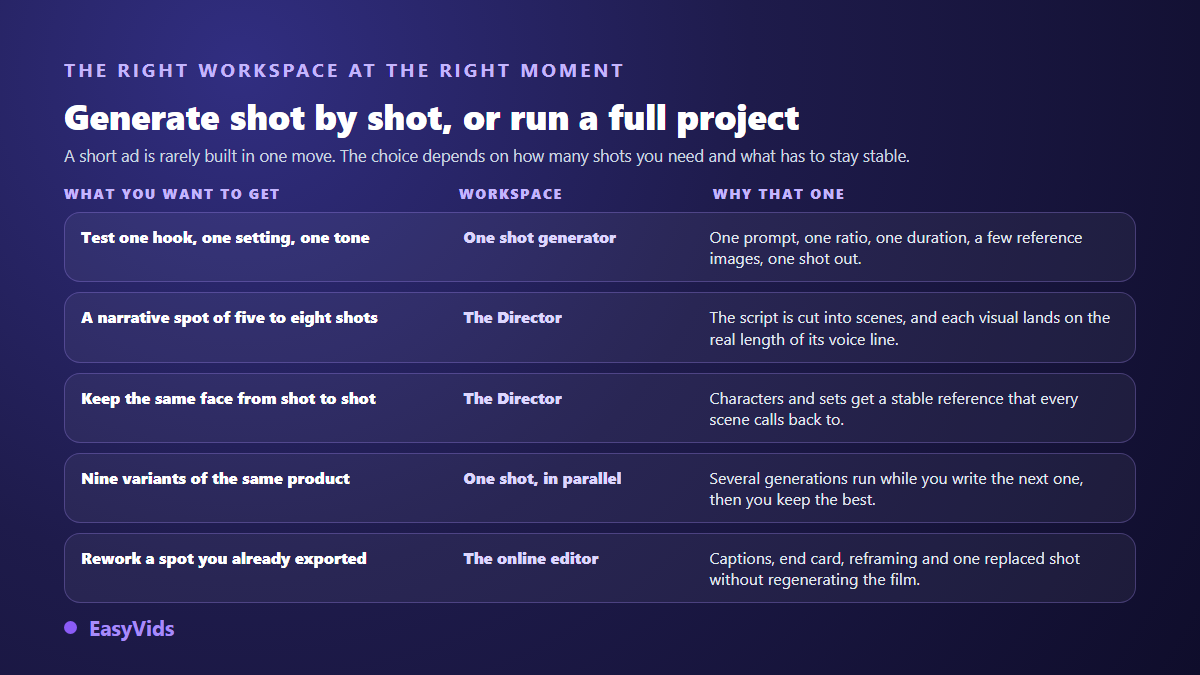
For a narrative spot of five to eight shots, the Director works differently. It cuts the script into scenes, builds the visual for each one, lands every shot on the real length of its voice line, then assembles the film. More importantly, it first writes a reference sheet for recurring characters and sets that every scene calls back to. That is what stops the presenter's face from changing between shot two and shot five, the number one giveaway of ads generated in bulk. The ratio chosen at the start follows the project all the way to export, which removes the destructive last minute reframe. For a thirty second ad built like a film, the shot by shot breakdown of a television grade spot gives the cutting rhythm and the shot sizes to aim for.
Step 6: voice, captions and the sound off problem
A video ad gets judged twice: once with sound, once without. A large share of vertical feed viewers meet your ad in silence, at least for the first seconds. So write for both. The voice over carries the argument, captions make it readable, and the on screen text repeats the promise and then the action. That is not redundancy, it is insurance. Timbre matters as much as wording: the same line sells or falls flat depending on the voice carrying it, so listen to two or three options on the same sentence before choosing. Keep the music clearly under the voice, around a fifth of its level, and check that the track is cleared for commercial use.
Step 7: the edit, the safe areas and the export
Automatic editing does most of the job: it places each visual on the length of its voice line and chains the shots. Three things are left to you. Keep captions and on screen text out of the areas the interface covers, because the handle, the caption and the button column eat the bottom and the right side of the frame. Cut the last shot down to two or three seconds, since an ending that drags pulls completion down. And make sure no watermark survives in a corner. For delivery, an MP4 encoded in H.264 at 1080p is plenty for a mobile ad, and extra ratios should be exported from the project rather than cropped out of a finished file.
What ad platforms check before your ad runs
An ad can be excellent and still be rejected. Meta's advertising standards, in the version consulted in 2026, prohibit misleading claims, unrealistic results, and asserting or implying that you know a personal attribute of the viewer such as their health, their weight or their money troubles. In practice, a hook that addresses the viewer's private problem head on falls under that rule, while the same idea stated generally passes. Before and after imagery is policed particularly closely in the health and appearance categories.
On artificial intelligence, the rules target what the ad shows and declares, not the tool that made it. TikTok's community guidelines require clear labelling of realistic content created or edited with AI, using the label offered at publication, and the platform announced in May 2024 that it would automatically label uploaded content carrying Content Credentials, the metadata defined by the C2PA standard. Meta, since 2024, requires a disclosure for political and social issue ads that use digitally created content. For an ordinary product ad that shows an item plainly, those disclosure duties usually do not apply, but the ban on misleading claims always does.
Ship three ads, not one
The costliest mistake of the day is not a bad image, it is betting everything on one perfect version. A single creative proves nothing: you will not know whether the result came from the hook, the selling angle or the product itself. Three variants that change one thing at a time tell you within days. The most profitable variation is the first three seconds, since that is where distribution is decided. Keep the script body, change the opening, and only then vary the angle and the format. The full matrix, the one that turns a single product page into nine testable variants, is in our method for AI generated ad creatives, and what the approach consumes depends on the number of shots and the model you pick, detailed on the pricing page.
Frequently asked questions
How long does it really take to make a video ad?
Budget one afternoon for the first one, writing and retries included. Once the structure and the settings exist, later ads often drop under an hour, because only the hook and a few shots change. Generation itself takes minutes when shots run in parallel: most of the time goes into writing and reviewing.
Do I need the product in hand to film the ad?
Not for most shots: a sharp photo is enough to build in context footage. You do need it as soon as the argument rests on a precise handling, a gesture, a texture or an assembly step. In that case film that one shot on a phone and generate everything around it.
How long should a video ad be?
On vertical placements the useful length usually sits between fifteen and thirty five seconds. Shorter and the proof is missing. Longer and completion drops. Write the five beat script first, read it out loud with a timer, then cut anything that serves neither the promise nor the action.
Can an AI generated ad be rejected?
It can, but rarely because of the generation. Meta's advertising standards and TikTok's advertising policies target what the ad claims: misleading statements, unrealistic results, implausible before and after shots. A generated video that shows a product honestly runs fine. The same video with an unverifiable promise gets rejected, whatever made the images.
Do I need an editor or professional software?
Not to publish. Automatic editing already lands each shot on its voice line and produces a file you can run. An editor becomes useful to adjust pacing, swap one shot or reframe the same spot for several placements, not to get a first ad out.
The real shortcut is not a tool, it is the order: promise before script, script before images, images before editing. Take your most promising product, write the sentence that says who it is for and what it changes, then block out an afternoon. To build the shots from your own photos and export your first three variants, create an account and open the studio.