Learning how to make an AI video no longer requires a camera, an editing suite or a production budget. One question still goes unanswered though: how long does it actually take, from opening the tool to finding the file in your downloads folder? The one-click promise suits everyone except the person who tries it and ends up two hours later with fourteen attempts and nothing worth posting.
The honest answer depends on what you mean by a video. An eight second shot for a story, a three minute narrated tutorial and a ten minute film do not follow the same route and do not cost the same time. This guide walks the shortest path first, the one that fits into five minutes, then covers what to add when you aim longer. If you would rather start with the full mechanics, our complete guide to AI video generators breaks the chain down step by step.
The short answer
Five minutes is enough to generate and download a single shot, as long as you keep it short: four to fifteen seconds depending on the model. The route comes down to five moves. Describe the scene in a few lines, pick a model, set the aspect ratio and the duration, run the generation, download the file. No editing skill is involved, because there is nothing to edit. For a narrated video of one to three minutes, budget about a quarter of an hour instead: you need a script, a scene split, a voice over and an assembly pass. Both routes live in the same online studio, with nothing to install.
Five minutes, move by move
The countdown below describes the shortest route, a single shot generated from a written description. It does not depend on your hardware: the compute runs on servers, your device only displays the interface and collects the result.
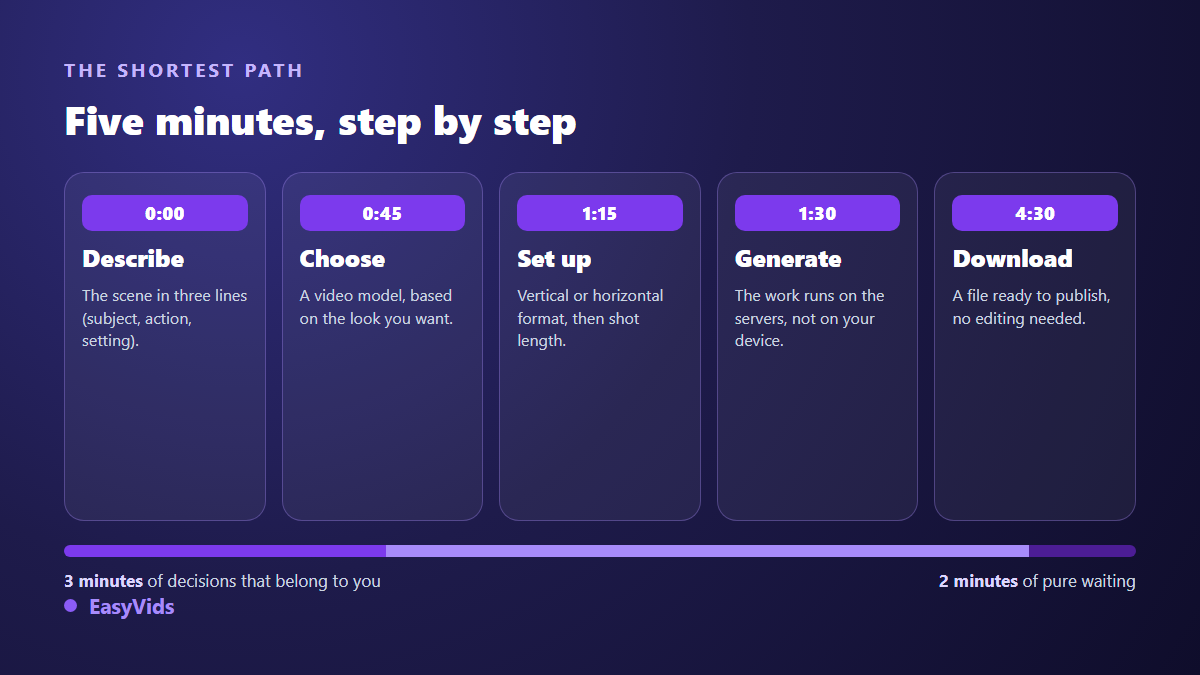
Two of those five minutes are pure waiting. The rest belongs to you. That split explains why creators who write their description in advance move far faster than those who improvise in the input box. Draft the scene in a notes app, read it back once, then paste it in. You have just saved most of the time beginners lose.
Three routes, three timescales
The most common mistake is asking a shot-oriented tool for a film, or the other way round. The three routes below do not replace one another. They answer three different needs and they do not cost the same amount of work.
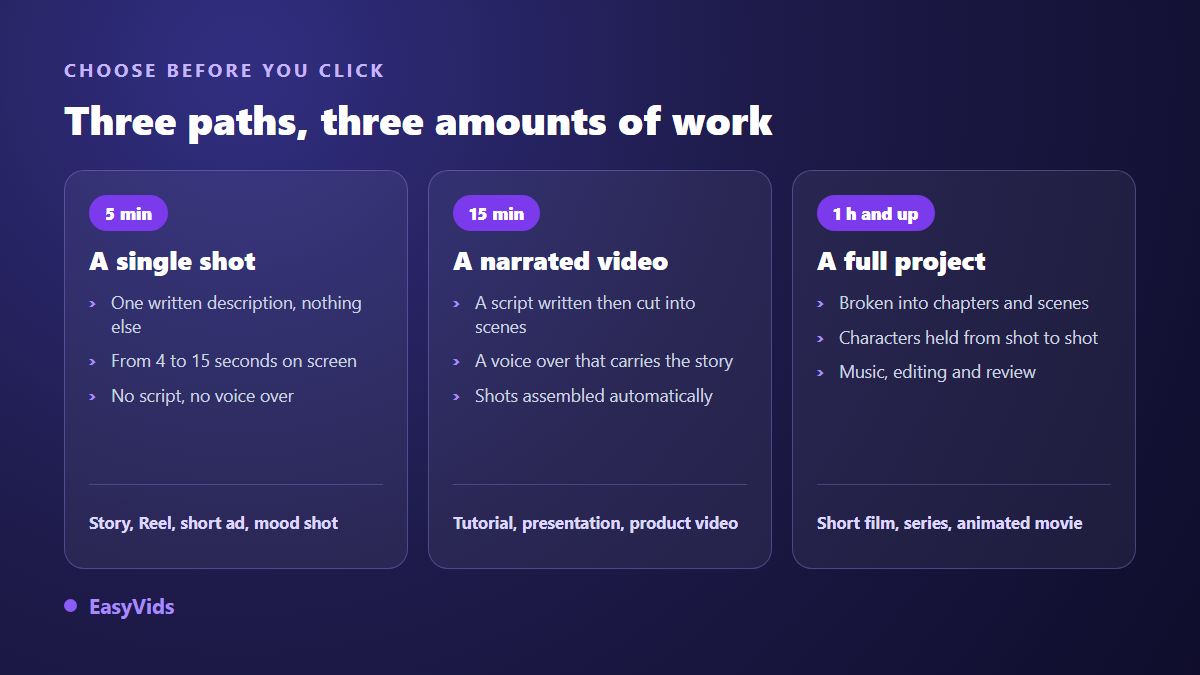
All three share the same engine: a model that builds moving images from text, and a layer of software that organises everything around it. If the word model still feels abstract, how an AI video generator works, explained simply covers the basics in a few minutes of reading.
Writing the prompt: five blocks that decide everything
A video prompt is not a sentence, it is a short spec sheet. Models respond poorly to vague instructions and very well to ordered descriptions. The structure below works whichever model you use, because it describes what a camera would see, in the order a cinematographer would think about it.
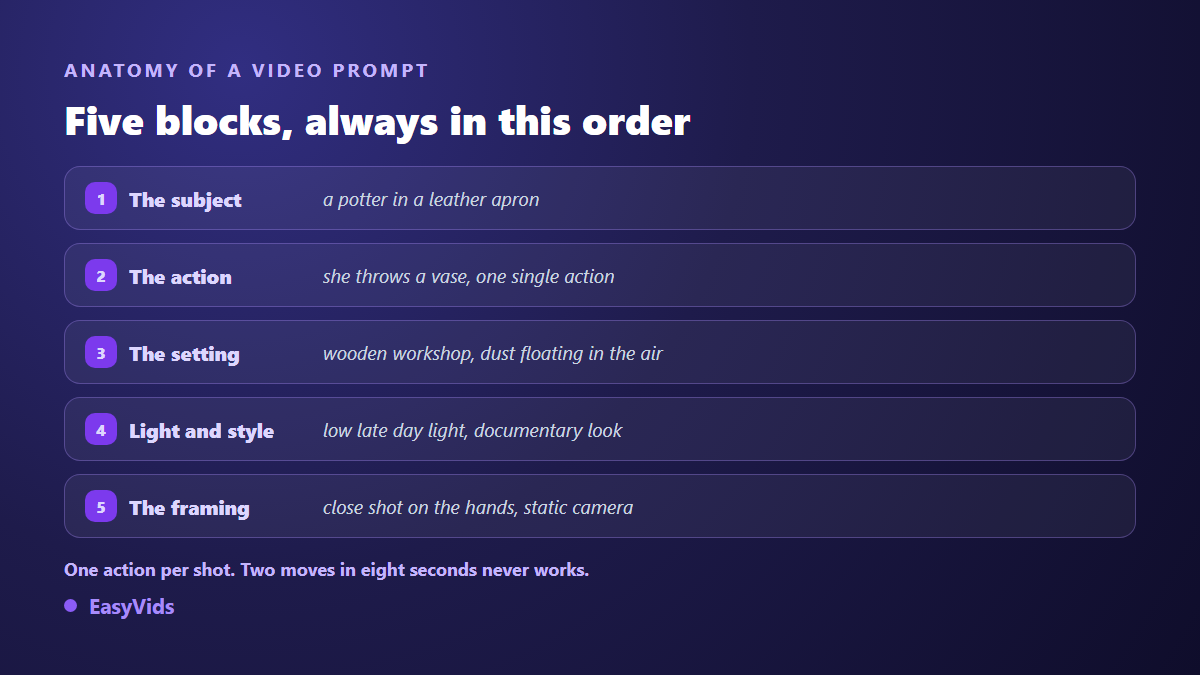
- Subject: who or what, in three precise words rather than a vague category.
- Action: one single movement per shot, written in the present tense.
- Setting: the place, the period, what should appear in the background.
- Light and style: low evening light, documentary look, 3D animation, watercolour.
- Framing: close-up, wide shot, slow push in, locked camera.
One rule outweighs the rest: one action per shot. The temptation is to ask for everything at once, a character who walks in, sits down, speaks and leaves. Across eight seconds the model skims all four moves and lands none of them. Split it into two shots and you get two clean clips instead.
Aspect ratio and duration are decided upfront
A shot generated in 16:9 and cropped to vertical always loses something: a cut face, text pushed off screen, a truncated background. Decide the format in the first second, not at export. Vertical for Reels, Shorts and TikTok. Horizontal for YouTube and for a website. Square when the video has to sit in a feed without knowing which screen it will land on.
Duration follows a technical limit beginners discover late: current video models produce short shots. Across our catalogue the useful range runs from four to fifteen seconds depending on the model. A one minute video is therefore never a one minute shot, it is a sequence of assembled shots. That constraint is not a flaw in any particular tool, it is the state of the technology, and it explains why a multi-scene route exists alongside the single prompt route.
What AI still gets wrong
Three limits show up across every model, and knowing them saves you half a day of insisting. Text written inside the image stays unreliable: a sign, a label or a title requested in the prompt often comes out mangled. Hands and fingers in fast motion remain the historic weak point of image and video models alike. Continuity is never guaranteed either: the same character generated twice changes face unless something anchors it.
Each of those has a simple workaround. On screen text belongs in the edit, not in the prompt. Fine gestures get framed wider or cut. Continuity is handled with reference images reused from scene to scene, the only reliable way to keep one face across a series. A good AI video is not one where the model did everything, it is one where you avoided the three known traps.
The voice over carries half the work
As soon as the video goes beyond an atmospheric shot, a voice comes in, and it carries a huge share of perceived quality. Beautiful visuals with a flat voice lose the viewer in ten seconds. Average visuals carried by a convincing voice hold to the end. It is the step that deserves the most care, and oddly the one beginners rush.
Three settings usually cover it. Punctuation first: synthesis engines read commas and full stops the way an actor reads a score, so cut your sentences short. Reading style next: an instruction such as read this like a calm storyteller changes the result more than the choice of voice itself. Length last: across our own generations, one minute of voice over runs to roughly 150 words, which lets you size a script before recording it rather than trimming it afterwards.
Editing without knowing how to edit
Automatic assembly syncs each visual to the real duration of its voice line, stitches the scenes in order and exports a single file. That is enough to publish, and it is exactly what no editing skills needed means in practice. You open no software, you place no transitions, you touch no audio track. An online editor stays useful for three things: adding captions, placing on screen text, tuning the pauses between shots. None of it is required for a first video. Pricing details sit on the pricing page, and a free trial is the fastest way to measure the real timing of the route.
Doing it from a phone, with nothing installed
Nothing here calls for a powerful computer. Generation happens server side, the device only renders the interface. A phone is enough to describe a scene, launch the generation, collect the file and publish straight away. Fine editing is more comfortable on a large screen, but it is in no way required for a first attempt, as our guide to making AI videos on a phone sets out.
The mistakes that cost the most time
Almost every failed AI video fails for the same handful of reasons, and none of them is the model. Here they are, in the order of frequency we see on beginner projects.
- Asking for several actions inside one short shot.
- Changing style every scene, which produces a patchwork rather than a video.
- Firing ten generations in a row without reviewing the first: the same mistake paid ten times.
- Writing the prompt in one language and expecting on screen text in another.
- Forgetting vertical format when the video is destined for a mobile feed.
- Leaving the music at the same level as the voice, which makes the message unintelligible.
When a result disappoints for no obvious reason, one checking order saves a lot of time: the prompt first, the format second, the model last. Switching models is the most common reflex and the least effective one. The nine causes of failed AI videos walks that diagnosis point by point.
Before publishing: what platforms expect
A generated video publishes like any other, with one caveat. According to the YouTube Help Centre, creators must disclose at upload time any realistic content that has been generated or altered with artificial intelligence, whenever a viewer could mistake it for real footage. A clearly stylised animation is out of scope. A realistic scene that never happened is not. The disclosure sits in the upload form and blocks neither reach nor monetisation. Length limits are worth checking too: the same help centre states that a Short can run up to three minutes, which leaves room for real narration. These rules move, so check them on the day you publish.
Frequently asked questions
Can you really make an AI video with no technical skills?
Yes for a short shot. Writing a description is enough, the tool handles the rest and automatic assembly returns a downloadable file. The useful skill is not technical, it is descriptive. Saying precisely what you want on screen matters more than any advanced setting.
How long does a one minute video take?
Budget about fifteen minutes. One minute of narrated video needs a script of roughly 150 words, a split into six to ten scenes, a voice over and an assembly pass. Generation itself is quick when scenes run in parallel. Most of the time goes into review, not compute.
Do I need a powerful computer?
No. All the compute happens on remote servers. An up to date browser and a stable connection are enough, on desktop or on mobile. The only moment a large screen genuinely helps is fine editing, and that comes after your first video, not before.
Can these videos be used to sell a product?
Yes, provided you check two things. The commercial usage rights granted by the tool you use, first. The absence of a recognisable real person who has not consented, second. A scene invented from scratch raises no issue. The face of an existing person does, whatever the tool.
What if the result looks nothing like my request?
Do not rerun it unchanged. Go back to the prompt and remove what is ambiguous: one action too many, two contradictory styles, an impossible camera move. Rerunning without changing a comma gives you another draw of the same problem, and costs just as much.
The real shortcut is not finding the most impressive tool, it is knowing which route matches your need before you start: one shot for a story, a sequence of scenes for a tutorial, a full project for a film. Write your description tonight, set the format, run it, watch it. Create your account to make that first attempt in five minutes and decide from there how far you want to go.