You have a story in your head, a couple of characters, maybe even a title. What you do not have is the hand that draws. Learning animation takes years, hiring a studio takes a budget, and professional software takes a patience most people never build. An AI cartoon generator fills exactly that gap: you write the story, the machine produces the images, the voices and the motion.
The outcome depends entirely on your method though. Generated cartoons that hurt to watch all share the same flaws: the hero's face changes between shots, the art style jumps from pencil to 3D with no warning, and the voice recites instead of acting. None of that is a technical dead end. Those are skipped steps. This guide walks the whole chain in the order it has to be followed. If the vocabulary of video generation is still new to you, our complete guide to AI video generators covers the basics first.
The short answer: what an AI cartoon actually takes
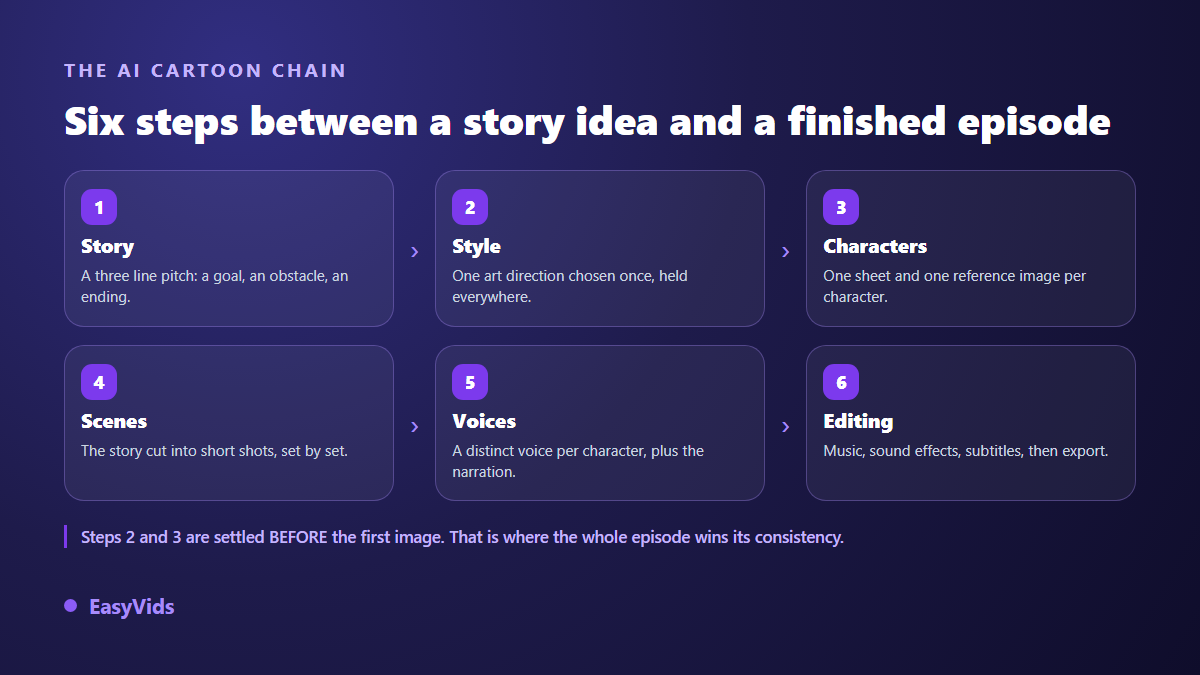
Six stages, always the same ones. A short readable story. One art style, chosen once. A character sheet with a reference portrait for each cast member. A cut into brief shots. Distinct voices. An edit with music and captions. The creative part stays yours, the machine executes, and it executes far better when you have already decided. Across our own productions, a two or three minute episode comes together in one evening when the prep is clean, and drags across several days of retakes when it is not.
What AI does well today, and what it still gets wrong
Be precise about the division of labour, because that is where disappointment hides. Image models now produce excellent cartoon frames: background, character, lighting, facial expression. Video models animate them over a few seconds with fluid motion and a believable camera. The assembly into a finished, edited video happens automatically. That foundation is plenty for a bedtime story, a teaching clip or a short social series.
What generation still does not do: several unbroken minutes of continuous animation, a precise technical gesture repeated identically, or perfectly legible text baked into the frame. Hands remain the well known weak spot. You work around all of it by cutting into short shots and adding titles in the editor rather than in the prompt. That is a formatting constraint, not a quality ceiling: animated features are built shot by shot too.
Step 1: the story comes before the first frame
The beginner move is to open an image generator and ask for a cute character. You get a nice postcard and nothing else. A cartoon holds together through its story. Three lines are enough to start: who wants what, what stands in the way, how it ends. That tiny structure carries a children's tale just as well as a forty second comedy sketch.
Then write for the ear, not for the eye. A line of narration should be sayable in one breath. Count roughly 150 words per minute of voice over to size your script: a two minute episode fits in 300 spoken words. If you are starting from a story you already wrote, the conversion follows precise rules, laid out in our method for turning a written story into an animated film.
Step 2: lock one art style and never drift
Style is the heaviest decision you make, because it shapes every frame produced afterwards. A cartoon can go in dozens of directions: watercolour storybook illustration, flat clean line, Japanese animation, family studio 3D, cut paper, clay. Pick one, then describe it in terms the machine understands: line quality, outline weight, palette, background texture, lighting.
The trap is rephrasing that style scene after scene. You think you are repeating yourself, the model hears something else, and the render drifts. The working practice is to freeze one visual description block and reuse it word for word everywhere, varying only the subject of the shot. In the EasyVids Director, that visual world is picked from a catalogue that includes an animated storybook setting, guessed automatically from your script, or defined from a sample image you upload. A one or two frame preview shows you the look before the whole episode runs.
- Line: thick black outline, fine line, or no outline at all.
- Palette: three to five dominant colours, named explicitly.
- Texture: watercolour, gouache, flat digital colour, paper grain.
- Lighting: soft and warm, high contrast, night time, backlit.
- Backgrounds: level of detail, depth, sharp or blurred.
- Proportions: realistic, oversized heads, simplified silhouettes.
Step 3: the character sheet, the real secret behind consistency
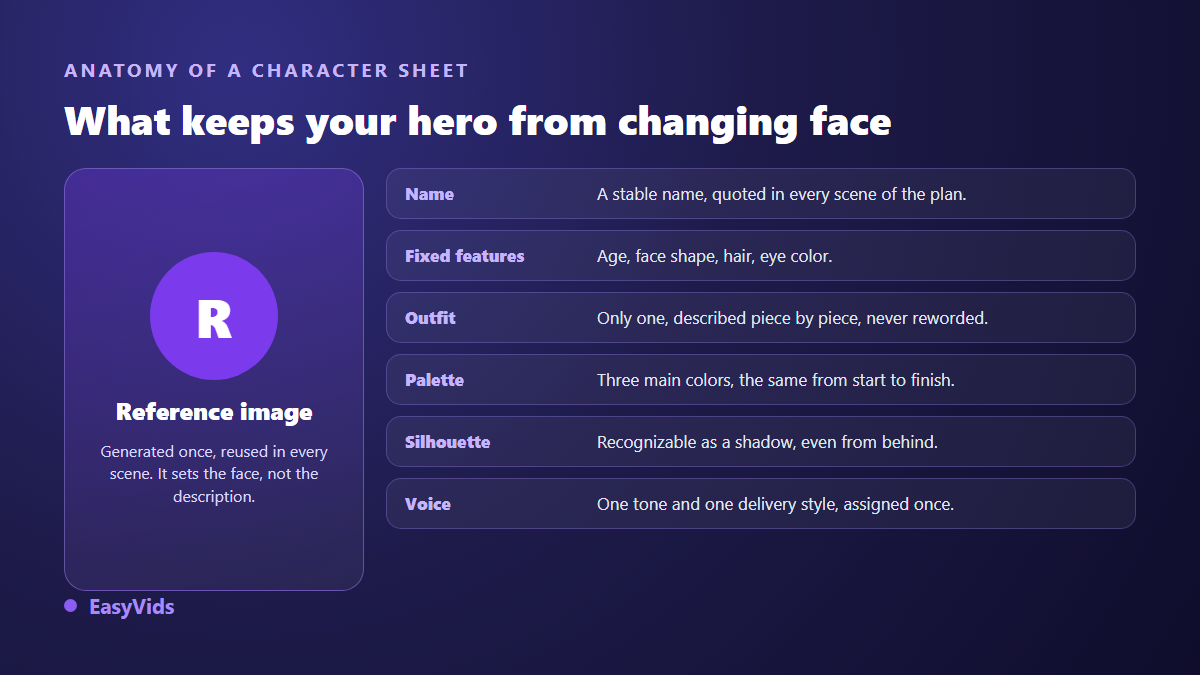
Viewers forgive a rough background. They do not forgive a hero whose face changes between two shots. This is the number one flaw of generated cartoons, and the cause is simple: a text description, however detailed, cannot reproduce a face. Two generations from the same paragraph give you two different people.
The fix has a name: reference. You generate the character portrait once, approve it, and that image travels with every scene the character appears in. Reference aware models then condition their output on the face you supplied instead of inventing a new one. The Director builds these references before producing any scene at all, writing a project bible first: characters, sets and props, each with a stable identifier and its own portrait. The full mechanism is taken apart in our method for keeping the same character across every scene.
Step 4: cut the episode into short shots
A cartoon is not text with pictures attached, it is a run of shots. Each one pairs a fragment of narration or dialogue, a set, one or two characters, and an intention. The rule we apply fits on one line: 5 to 15 seconds of voice per shot, meaning 15 to 40 words. Below that, viewers cannot take the image in. Above it, they drift off.
Cutting also means thinking in sets. Group the shots that happen in the same place: you reuse the same background, visual continuity improves, and production speeds up. Change location when the story changes place or time, never just to keep the eye busy.
Step 5: voices are what bring a cartoon to life
A cartoon is judged by ear as much as by eye. A flawless frame carried by a flat voice feels dead, while a simple frame carried by a voice that acts wins the room. Give each character a clearly different timbre: a low voice against a high one reads far better than two mid range voices, especially for young viewers.
The EasyVids studio handles this in a dedicated multi voice dialogue section: you type the exchange one line per cue, as the character name followed by what they say, assign each speaker a voice and a reading style, and get back a single audio file already stitched together. For the timbres and deliveries that suit the cartoon register, our review of AI cartoon voices goes into detail.
Step 6: music, sound effects and the edit
Music sets the tone before the first line lands. A light pad for a tale, a bouncy theme for comedy, a low tension for a worried beat. Keep it well under the voice, around a fifth of its volume, or the dialogue disappears. A few well placed effects, a door, a footstep, a comic impact, beat a dense wall to wall score. Automatic editing then syncs each visual to the real length of its voice, which is already publishable, and the online editor handles the finish: opening title, on screen text, captions, breathing room, vertical or horizontal format.
Does everything need to move?
Plenty of beginners want motion everywhere. That is the fastest route to an episode that is slow to produce, expensive and oddly tiring to watch. A readable cartoon alternates registers, exactly like traditional animation, where the studio habit is often to hold each drawing for two frames rather than draw one per frame.
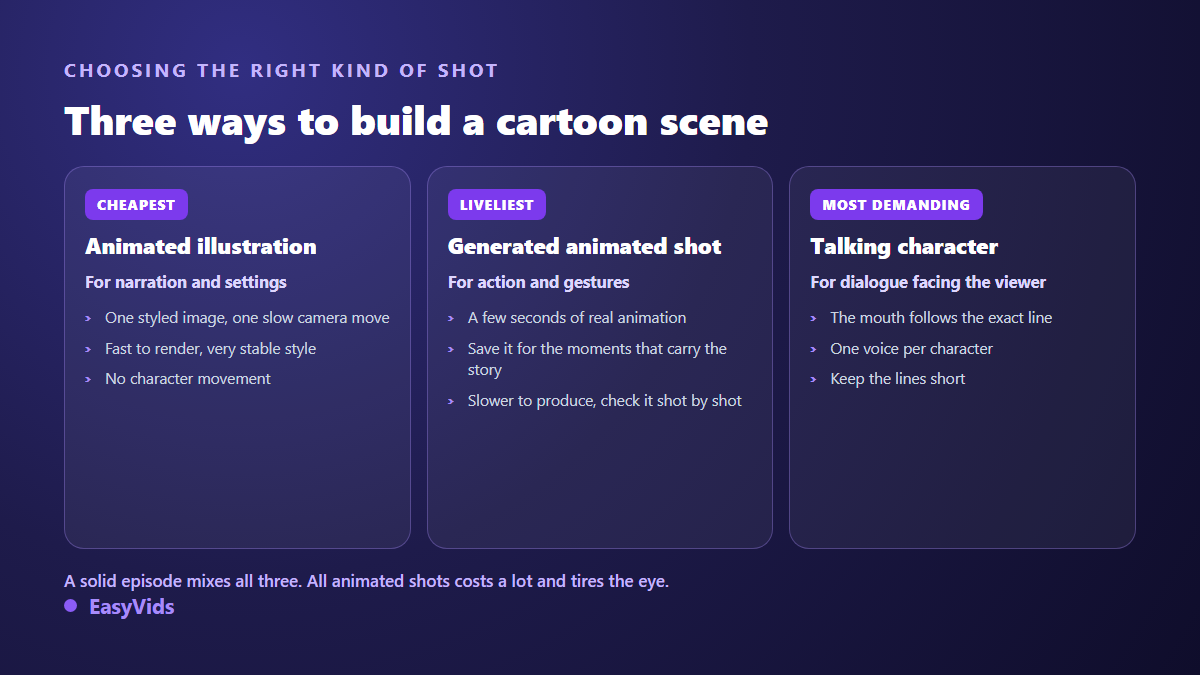
In practice, save genuinely animated shots for the moments that carry the action, and let the rest ride on illustrations with a slow camera move. The ear does the work: a lively voice over a still frame holds attention for eight seconds without trouble. You tune that balance shot by shot, and the pricing page sets out what each plan covers if you want to size a series before launching it.
The mistakes that give a rushed cartoon away
- A hero whose face shifts between shots: use a reference image, never a repeated description.
- A style that jumps from 2D to 3D: freeze one visual description block and reuse it everywhere.
- Shots that linger on a still image: cut every 5 to 15 seconds.
- Text baked in by the generator, usually mangled: write your titles in the editor.
- One voice for every character: give each of them a distinct timbre.
- Music as loud as the dialogue: bring it down, a cartoon is understood by ear first.
From one episode to an actual series
A one off cartoon entertains. A series builds an audience. The moment you aim at episode two, your character bible becomes an asset: same references, same world, same opening titles. The second episode takes far less time than the first, because all the definition work is already done. The method for holding recurring characters across a full season sits in our guide to producing a series with AI, and longer formats follow their own pacing rules, covered in our guide to making a film with AI.
Rights, platforms and what you are allowed to publish
Two questions come up every time. On protection, the guidance published in March 2023 by the United States Copyright Office on works containing AI generated material states that an element produced by a text prompt alone is not protectable as such, while human selection, arrangement and contribution remain protected. Your script, your cut and your edit count; the raw model output much less. On publishing, the YouTube Help Centre describes a partner programme that expects original content with genuine added value and penalises repetitive mass produced uploads. A cartoon you wrote, cast and edited sits comfortably inside that. Reproducing a studio's known mascot, however, stays an infringement whatever tool drew it.
Frequently asked questions
Can I make an AI cartoon without drawing skills?
Yes, that is the whole point. No graphic skill is required: you describe, you approve, you correct. What you still need is a sense of storytelling and some discipline about character consistency from shot to shot.
How long does one episode take?
For a two to three minute episode, allow one evening the first time, preparation included. Later episodes go much faster, since the style and the cast are already locked. Most of the time goes into review and targeted retakes, not compute.
How do I stop my character's face from changing?
Work from an approved reference portrait reused in every scene, rather than rewriting the same description in each prompt. Add one fixed outfit and a fixed palette: silhouette and colour carry recognition as much as the face does.
Can characters actually talk on screen?
Yes, on short shots. The result improves when the line is brief and the framing keeps the face clearly visible. For long speeches, narration over an animated illustration stays safer and more pleasant to watch.
A cartoon that works does not come from the most impressive model, it comes from held preparation: a short story, a frozen style, referenced characters, brief shots, voices that act. The rest follows almost on its own. To try the method on your own story, creating an account opens the full studio, and the EasyVids toolset brings writing, images, voices and editing together in one place.