Your text is finished. You open the file and find forty pages of solid grey, not one image, chapters starting halfway down a page. The content is good, the object is unappealing. That is exactly what an AI ebook generator with images is supposed to fix: the book comes back illustrated and typeset, instead of a raw document you still have to dress up yourself.
The word generator is what confuses everyone. Most writing tools stop at the last sentence: sourcing visuals, placing them properly, designing a cover and composing the pages are left to you, and that is where the hours actually go. This guide covers what a complete chain has to deliver, where illustrations belong inside a chapter, how a cover that survives thumbnail size gets built, and what layout really changes. If your text does not exist yet, our guide to writing an ebook with AI covers the step before this one.
The short answer
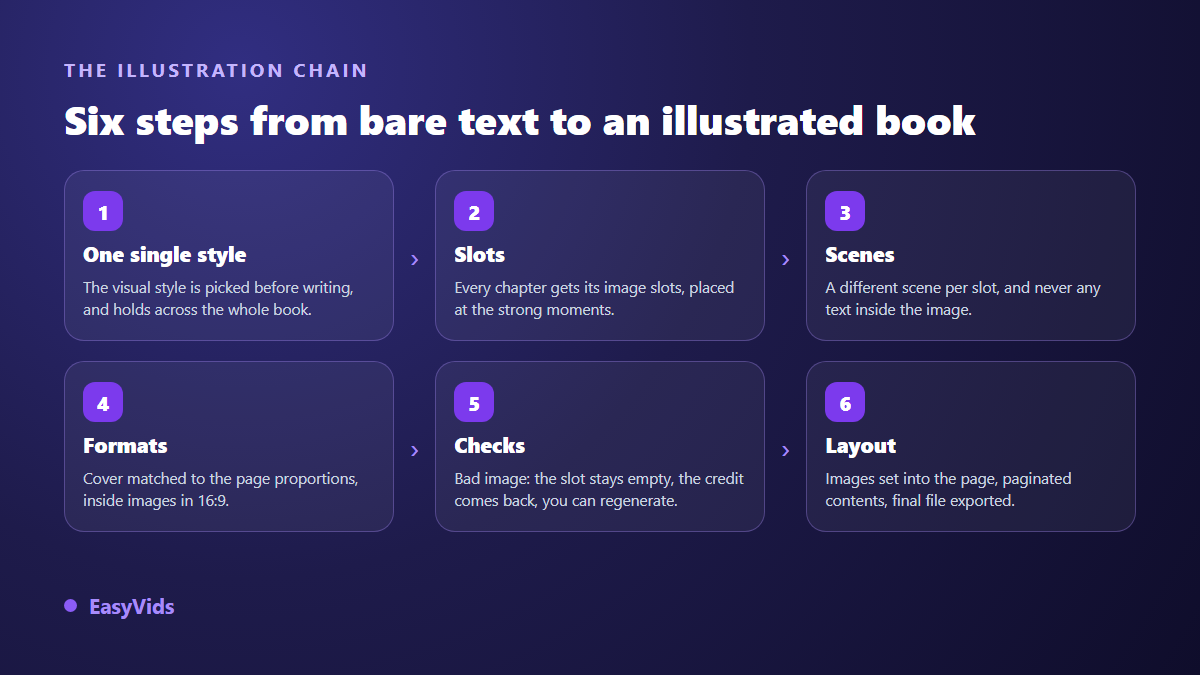
Three conditions separate an illustrated book from a text with pictures attached. Image slots are decided while the chapters are written, at the point where an image adds something. The visual style is chosen once and held from first chapter to last. The final composition places those images inside a real page, with a full page cover, a paginated table of contents and chapters that open on a fresh page. On EasyVids those three steps live in a single order: you set the number of images per chapter, the style and the image model, and the book comes back composed, ready to download as a PDF.
Why most generators stop at the text
Generating an image and illustrating a book are two different crafts. The first needs a prompt and a few seconds. The second means knowing how many images the book holds, where in each chapter they land, which scene each one shows, what shape it will be read or printed in, and what happens when one of them fails. None of those decisions is made well afterwards, once the text is frozen in a document.
Hence the method: the slots are born with the text. While each chapter is written, the model drops illustration markers at the moments it judges strongest, each with the description of its scene. Those markers are then renumbered, deduplicated and capped at the number you ordered, before a single image is generated. The same scene requested twice is produced once, and a talkative model asking for fifteen costs you nothing extra.
Where the images go, and how many to plan
Quantity is set per chapter, never per book. That is the right unit: a six chapter book and a twenty chapter book do not have the same need, and counting per chapter keeps the rhythm steady throughout. In our workshop the setting runs from no images at all up to eight per chapter, with the cover counted separately.
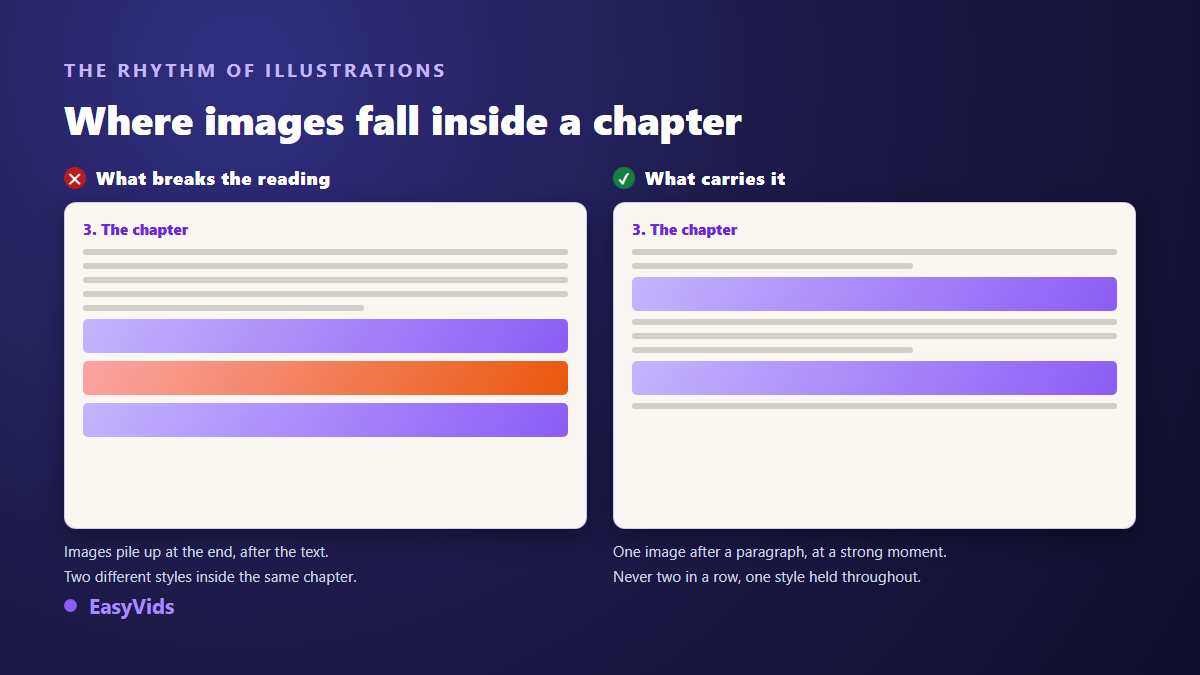
One image per chapter is enough for most books. Two or three suit a practical guide where every step benefits from being shown. Beyond that you are building an album, a legitimate choice for a children's book or a journal, but it changes the nature of the object. The real test is never the total: it is knowing what each image adds to the page it sits on.
- An illustration sits between two paragraphs, never in the middle of a sentence.
- Never two images in a row: the reader loses the thread of the text.
- A different scene every time, otherwise the book repeats itself visually.
- No text inside the image: generated lettering is almost always wrong.
- The same style from the first chapter to the last, with no exception.
The style is chosen once, for the whole book
A method manual wants photography. A tale wants drawing. An essay wants one strong, restrained image. Mixing two registers inside the same book gives a lopsided object, and it is the most visible flaw of books illustrated in a hurry. So the choice is made before the writing starts, and it does not move afterwards.
Our workshop offers eight clear starting points, from photography and cinema to watercolour, modern illustration, painting, ink sketch, soft 3D and retro print. An automatic mode derives the style from the dressing picked for your subject, and a free field lets you describe exactly what you want. That free text always wins: your brief goes through as written, with none of ours added on top. An illustration brief is written like a shot brief, subject, framing, light, style, and the five block method for writing a prompt transfers unchanged to the images of a book. For what today's models get right and still get wrong, our guide to AI image generators goes into detail.
What gives a generated illustration away
Readers spot a synthetic image in a second, and the subject is never what betrays it. It is always the same markers: poreless skin, faces that are too symmetrical, pushed colours, perfect light coming from nowhere, a glossy finish close to 3D. Models obey a named ban far better than a vague request to be realistic, which they tend to read as a request to be pretty.
The fix is to ask for the opposite, explicitly: grain, real skin texture, available light, a candid unposed moment, an imperfect setting. Our photographic styles already carry that brief, banned markers included. If you write your own style, keep the principle: name what you refuse as clearly as what you want.
The cover follows different rules
It fills an entire page, so it is generated at that page's proportions. A wide image placed on a tall page loses a large slice of its surface to the crop, and the main subject is usually what disappears. Our chain therefore requests, for the cover only, the available format closest to the proportions of an A4 page, which measures 210 by 297 millimetres, instead of the wide format used inside the book.
The second rule is less intuitive: the title must never appear in the image request. Quoting a title is an open invitation for the model to paint it into the artwork, with approximate letters that the crop then slices at the edge. The generated cover stays wordless, and the title, the kicker and the promise are composed over it as real text, sharp and complete. Check sharpness at full size rather than at thumbnail size, too: our explanation of AI renders that lack bite applies to a cover as much as to a video.
One format per slot, not one image for everything
The classic mistake is producing a single visual and cropping it everywhere. Every slot has its own geometry, and a destructive crop shows instantly: a flattened cover, a banner whose subject sits outside the frame, a thumbnail holding nothing but background.
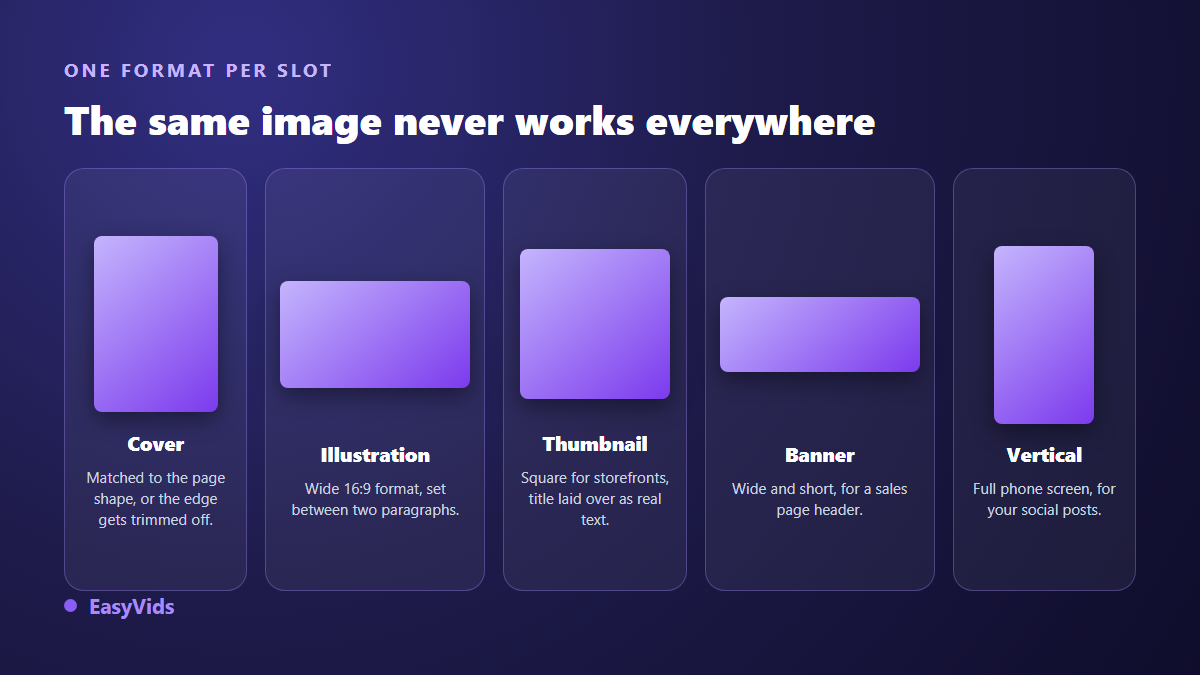
The finished book ships with its cover, its wide interior illustrations, and three creatives composed from the cover: a square thumbnail, a wide banner and a vertical visual for your posts. The title is written over the image in real type, never generated inside it. Those three shapes cover most of what a sales page and a social account ask for on launch day.
Layout is what turns images into a book
Well chosen images inside a badly composed document still give you a document. What makes a book is the service pages and the typography: full page cover, rights page with the author signature, contents, then one chapter per fresh page. A file exported from a word processor is recognised just as fast, by its default margins and its chapters starting anywhere. Layout weighs even heavier when a book carries little running text: on a journal or a fill in notebook it holds the whole value of the object, as our guide to low content books sold on KDP shows.
On our side the dressing is picked to match the subject rather than drawn at random: a colour family, a font pair, a chapter heading style, an opening capital, boxes for key points, justified text with no broken words at line ends. The contents page is a real clickable list, and the composed PDF carries the true page number of every chapter. The background stays white by default, because a book is read and printed on white. Plans are listed on the pricing page.
Keeping the same character across illustrations
Let us be blunt here, because it decides whether a children's book is feasible. Every illustration is generated independently, from its own scene description alone. Without precautions, a hero changes face, age or clothing from one page to the next. The book stays fine image by image and becomes inconsistent as a whole, which a young reader notices before the adult reading aloud does.
Two habits limit the drift. Describe the recurring character in the book brief itself, with three or four invariable traits: age, hair, dominant colour, one recognisable piece of clothing. And keep the cast small, since every extra face multiplies the chances of drift. Our method for describing a character who stays the same gives the exact wording. When a hero must be strictly identical on every page, the reliable route is character work built on visual references, which is a different job from automatic book illustration.
When an image does not come out
A safety filter, a network incident, a refused scene: it happens, and how a tool handles it says a lot. Our rule has three parts. Each image is charged individually before generation, then refunded if it fails after every attempt. The slot is left empty rather than filled with something off topic. The closing report lists what is missing, and a button regenerates the empty slots then stitches the book back together: same file, same link, cover included.
Two practical details matter almost as much. Illustrations are independent, so they are produced in parallel rather than one after another, which shortens that phase noticeably on a well illustrated book. And production runs on our servers: you can close the page, and your book keeps writing and illustrating itself without you.
Disclosing generated illustrations when you publish
If you list your book in an online store, you will be asked, and the full step by step of an Amazon KDP listing covers everything around that box, from the account to the product page. According to the Kindle Direct Publishing help pages, the platform asks authors to state at upload whether their content was generated by artificial intelligence, and separates text, images and translation: a book whose text you wrote but whose illustrations were generated is declared on that one count. The answer is not shown on the public book page. Answer honestly, then check the rules where you sell, since the legal status of a fully generated image is not the same everywhere.
Frequently asked questions
How many images should an ebook contain?
One per chapter suits most books, two or three for a practical guide where each step benefits from being shown. Think in rhythm rather than totals: no chapter should be left without a visual breath, and no page should carry two in a row.
Can I put text inside ebook illustrations?
Better not to. Image models compose approximate lettering, and one misspelled word printed across a full page undermines the whole book. The right method is to generate a wordless image, then place the text over it in real type, exactly as our cover does.
Are generated images sharp enough for print?
For screen reading, yes, without argument. For print, always judge the image at its real size in the page rather than as a thumbnail: a visual that looks crisp when small can turn soft once it spreads across a full page. An image meant to fill the page is generated at that page's proportions, otherwise the crop decides for you what stays visible.
Can I choose the colours and fonts of the book?
The dressing is picked to match your subject, among several visual families ranging from warm to dark premium, each with its font pair and its chapter heading style. You also choose the background, white or tinted, and a variant number lets you reuse the same dressing on a second book, or deliberately get a different one.
Can I swap an illustration for my own photo?
Not in the workshop: it accepts no file from your computer, every image in the book is generated. Regeneration is there for slots left empty, not to replace an image that already exists. If a render disappoints you, the useful lever sits upstream: sharpen the style, or describe the visual direction yourself before launching the order.
An illustrated book is not obtained by adding pictures to a finished text. It is obtained by deciding, while the text is being written, where they land, what they show, and what the page around them looks like. That is what separates a file people skim from a book people keep. Creating an account opens the workshop so you can start your first illustrated book today, and the text, the images, the cover and the launch visuals all come out of the same EasyVids studio.