You have things to say and no desire to be on camera. Maybe you like your voice but not your image. Maybe your job rules out being visible online. Maybe you simply have no set, no lighting and no time to film. Making videos without showing your face is no longer a fallback: it is a full production method, with its own formats, tools and pacing rules.
The question the idea lists never answer is the practical one: what goes on screen when the camera stays in the drawer? Finding a topic is one thing, and we have gathered twenty-seven examples with the method behind each. Building the shots is another. Here are the nine production methods that genuinely work, what each one needs, and which one fits what you publish.
The short answer
Nine methods cover almost everything published without a face: narration illustrated with generated visuals, photo slideshows, commented screen recordings, kinetic text, footage shot without you in frame, synthetic presenters, animation, animated stills, and clips produced by a video model. They all rest on the same foundation: text written for the ear, a voice to carry it, and images you never filmed. An AI video generator chains those three pieces into one flow, which is why this kind of content now takes an evening rather than a week.
The nine methods at a glance
None of these approaches needs a technical background. What separates them is the raw material they ask for: your screen, your photos, your text, or nothing at all. The map below is the reference before we go into detail.
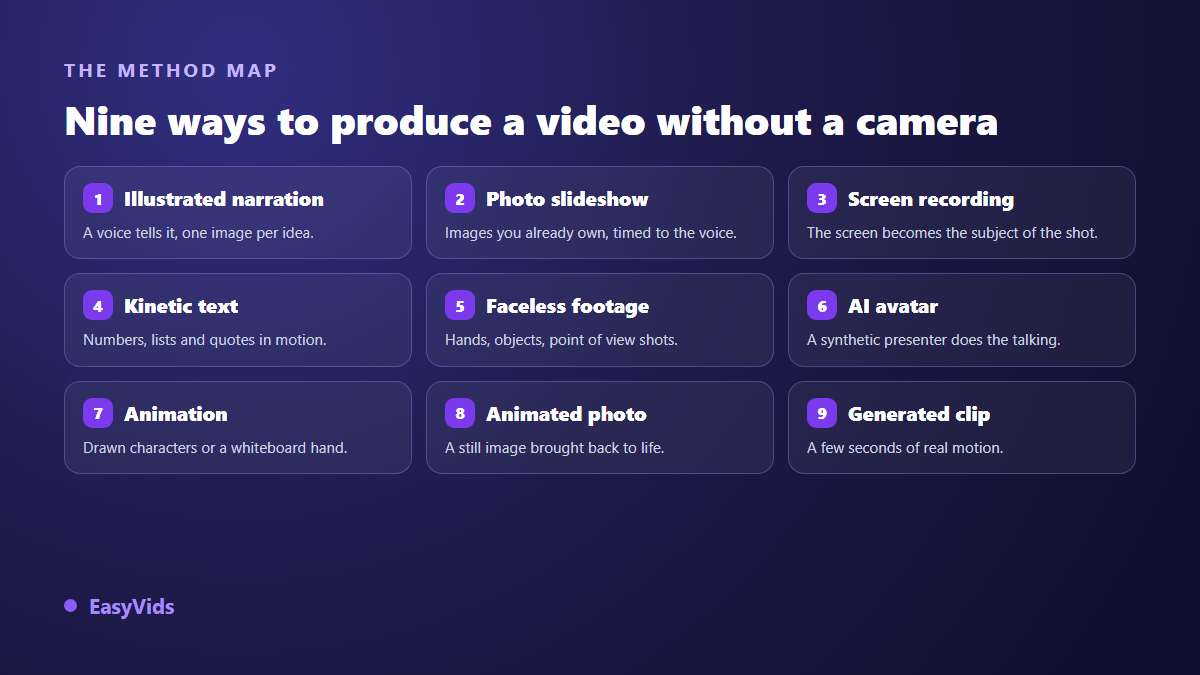
One point before we start: these methods combine. A single video can open on a generated clip, run an illustrated narration, drop in a screen recording halfway through and close on kinetic text. The steadiest faceless channels almost always work by assembly, never by loyalty to one format.
Method 1: illustrated narration, the base of everything else
You write a text, a voice reads it, every idea gets its image. This is the method faceless creators use most, because it fits any subject: a story, an explainer, a ranking, an analysis. The visual is not decoration, it shows what the voice is describing. One shot per idea, never one shot per minute.
Cutting is what decides the result. Across the videos produced with our studio, the scenes that hold attention run five to fifteen seconds of voice, roughly fifteen to forty words. Past that, viewers have finished reading the image and their thumb moves on. Below it, they cannot take it in. When a scene overflows, split it rather than speeding up the read.
Method 2: the slideshow, when you already own the material
Travel photos, screenshots of your work, product shots, family archives: when the images already exist, a slideshow is the shortest route to a publishable video. The edit syncs each photo to the length of the voice or to the tempo of the music, adds a virtual camera move, and you get a film that breathes instead of a stack of postcards.
Two settings carry the whole thing. Movement first: a slow zoom of a few percent is plenty, anything stronger makes viewers seasick. Sound next: keep the music clearly under the voice, around a fifth of its volume, or the narration slips into the background and people leave without knowing why.
Method 3: the commented screen recording
For anything explained by showing software, a website or a spreadsheet, a camera adds nothing: your screen is the subject. You record what you do, you talk over it, the video exists. Viewer comfort comes down to three details: a visible cursor, a zoom on the active area, and an edit that removes loading time. Cut dead air without mercy, it costs more drop offs than any image flaw.
Method 4: kinetic text and motion design
A sentence appearing word by word, a number counting up, an arrow drawing a path: motion design replaces filmed images with graphic movement. It is the natural format for data, lists, quotes and definitions, and it performs especially well vertically, where the text sits exactly where the eye already rests. One principle keeps it readable: one idea per screen. Three to seven words per line, a heavy typeface, strong contrast, and nothing in the zones the platform interface covers.
The shared foundation: text, voice, visual, captions
Whichever method you pick, a camera free video rests on four layers that replace what filming used to deliver in one go. Understanding them saves you from hunting for a miracle tool: the result comes from the assembly, not from a button.
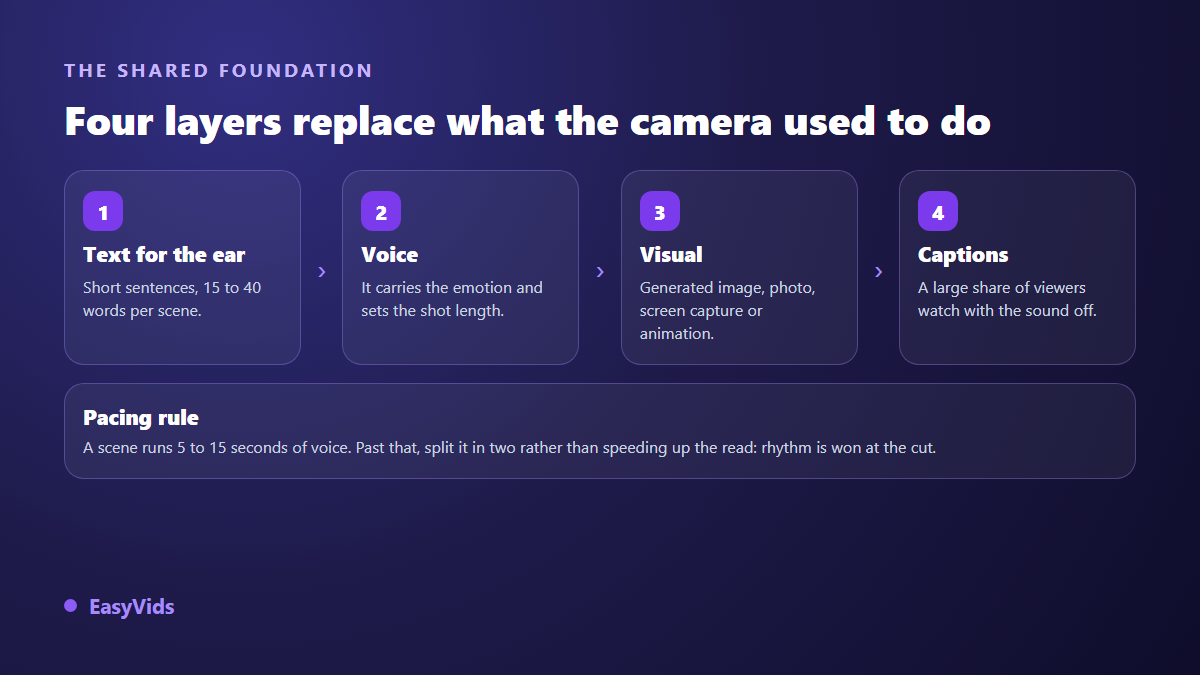
Captions are not a comfort feature. A large share of social views happen with the sound off, on a train or in a waiting room, and a faceless video stripped of its audio tells nothing at all. Burning them in costs seconds and saves a serious part of your audience.
Method 5: film, just not yourself
Nothing forces you to give up the camera, only to stay out of frame. Hands handling an object, a top down shot of a work surface, a walk filmed at eye level, a notebook being flipped through: these shots carry an action without ever showing a face. They bring what generated images still struggle to deliver, real texture, and they blend well with AI shots inside the same sequence.
Method 6: the synthetic presenter, a face that is not yours
When the message needs someone talking straight to camera, a generated presenter takes the role. You write the script, the avatar speaks it, the lips follow. This is the format of training videos, product announcements and ads built to look like customer testimonials, and our guide to AI avatars and UGC videos covers character choice and the limits of the technique. One rule is not negotiable: never use a real person's face or voice without written consent. A fully synthetic avatar raises no such issue, a recognisable likeness does.
Method 7: animation and the whiteboard
Animation removes the face question entirely: a drawn character carries the story for you. The whiteboard style, where a hand sketches the diagram while the voice explains, remains one of the most effective formats for a multi step argument, and our whiteboard video guide shows how to build one without animation software. Cartoons suit stories, tales and content aimed at children, where realism would work against the message.
Method 8: animated stills and archives brought back
A still image can be given motion: a slight head turn, a sky drifting, steam rising from a cup. The technique turns a photo library into video footage, which serves archive portraits and memorial montages as much as product visuals. Pushed further, it makes a portrait speak, with a voice synced to the lips.
Method 9: clips generated by a video model
Video models build a few seconds of motion from a description. It is impressive, it burns the most compute, and it is rarely the right answer for an entire film. Keep those shots for moments that deserve them: the opening, a setting you could never photograph, a transition. The rest of a narration holds up well with animated stills, and usually looks steadier.
Your voice becomes your face
With no image of you on screen, the identity of the channel moves entirely into sound. That is the good news of this whole article: a voice can be tuned, changed and rehearsed, while a face is simply endured. Too fast and the content feels anxious, too slow and it sends people to sleep, badly punctuated and it sounds artificial even when the timbre is excellent. Punctuation matters as much as wording, because synthesis engines read it the way an actor reads a score. Keep the same voice from one video to the next: that is what your audience will recognise.
Which method fits which content
The choice is rarely a matter of taste, it follows the nature of the content. A software demo shot in motion design loses its clarity, a story told in screen recordings loses its emotion. The grid below gives the most direct route for the most common cases.
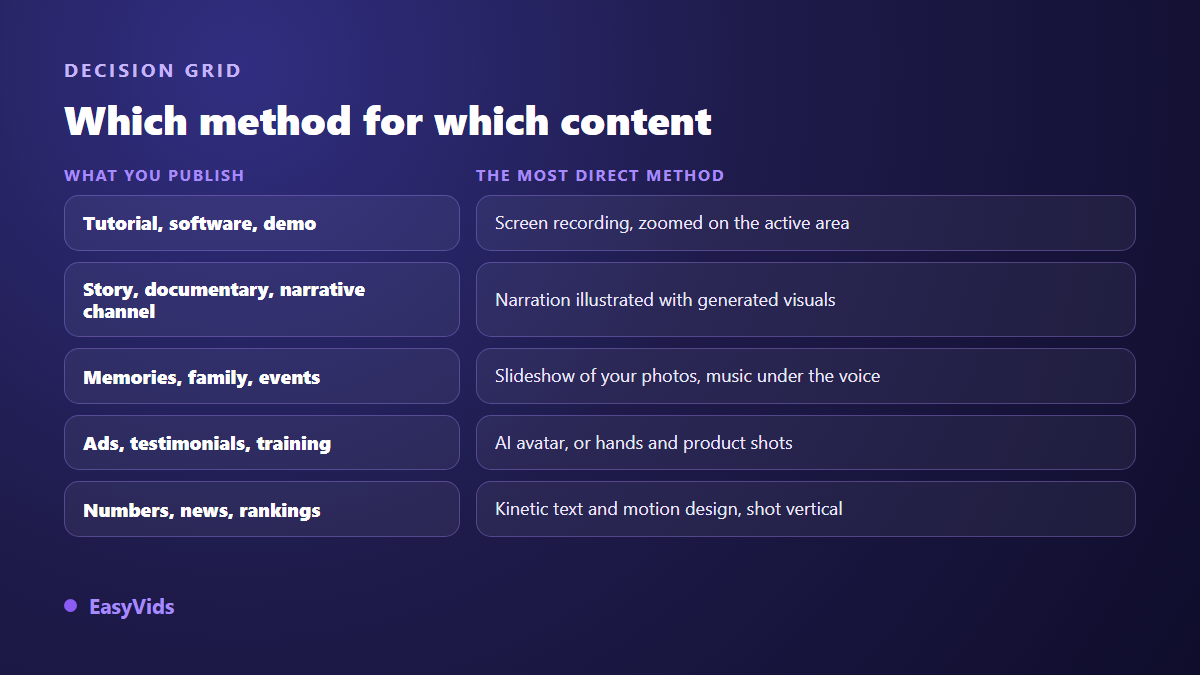
Still hesitating? Ask what the viewer has to see in order to understand. A manipulation? Show the screen or the hands. An emotion? Show faces, places and objects, generated or photographed. An argument? Show the diagram building itself. That single question names the method almost every time.
The mistakes that give a faceless video away
A poorly produced faceless video is spotted within seconds, and never for the reason people assume. What bothers viewers is not the missing creator, it is these production flaws, all of them avoidable.
- Shots that linger on a static visual while the voice keeps going: cut every five to fifteen seconds.
- A visual style that changes with every scene, as if ten people had worked on the same video.
- Music sitting at the same level as the voice, which makes the narration tiring to follow.
- On screen text checked on a desktop monitor and unreadable on a phone.
- No captions at all, when a large share of the audience watches with the sound off.
- Stock footage everyone has already seen, which makes your subject look like a generic ad.
What platforms actually allow
Two rules are worth knowing before you publish. The first is about transparency: since March 2024, YouTube asks creators to disclose in YouTube Studio any realistic content that has been generated or digitally altered, in particular when someone appears to say or do something they never did. A narration illustrated with visibly stylised images falls outside that disclosure; a synthetic presenter viewers could take for a real person does not. TikTok, for its part, requires realistic AI generated content to be labelled under its community guidelines, and announced in May 2024 that it reads C2PA provenance credentials automatically.
The second rule is about money. The YouTube monetisation policy updated in July 2025 talks about inauthentic content and targets mass produced repetitive uploads, not the use of AI itself. A faceless channel that brings an original script, a considered voice and a deliberate edit stays well inside the rules, as our guide to running a YouTube channel without showing your face explains. A channel republishing the same template twenty times with three words changed does not. Those official pages change: read the current version before building a business on them.
Frequently asked questions
Can a channel grow without ever showing a face?
Yes, and heavily followed channels prove it in narrative, educational and documentary niches. A face is only one identity signal. A consistent voice, a held visual style and a clear promise do the same job, as long as you do not change them every month.
Do I need a microphone to start?
No. A synthetic voice is enough to publish, and it lets you fix the script at will. If you prefer your own, a simple microphone in a furnished room, away from hard surfaces and fans, already sounds clean. The room matters more than the price of the gear.
Do these methods work in vertical format?
All of them, provided you compose vertically from the start instead of cropping at the end. A video designed in 16:9 then cut to 9:16 always loses something that mattered. Plan for the zones the interface covers at the bottom and right of the screen.
Can I do this for free?
Partly. Free tiers let you produce your first videos, usually with a length limit, a smaller voice selection or a watermark on export. That is enough to test a method and see whether it suits you. For regular publishing, compare what each level allows on the pricing page.
A face was never the condition for a good video. What holds a viewer is a clear idea, an honest voice and a steady rhythm, and the nine methods above deliver all three without a camera. Start with one: pick a subject you know well, write thirty lines for the ear, let production follow. Creating an account opens the full studio, and the EasyVids studio puts script, voice, visuals and editing in one place so your first video can go out tonight.