Your listing has good photos, a careful description, a few reviews. The visitor looks, zooms in on one image, hesitates, then opens another tab. What they are missing is almost never one more line of information. It is proof of reality. A product page video delivers that proof in ten seconds: the true size in a hand, the way the fabric falls, the gesture that opens the lid. No photo, however good, answers the question nobody types into your contact form: will this thing actually look like that when it arrives?
The good news fits in one sentence. This video needs no shoot, no studio, no crew. One photo you already own, a few seconds of motion, a line of on screen text, and the slot is filled. We covered advertising production in our complete guide to product video. This article is about something narrower and often more profitable: the clip that lives on the listing itself, between the gallery and the buy button.
The short answer
Add video to your product pages because it clears the three doubts that empty carts: scale, material and operation. Close to nine in ten shoppers say a brand video has convinced them to buy a product or service, according to the annual State of Video Marketing survey published by Wyzowl. The right format is short, silent and looping: six to fifteen seconds, sitting in second place in the gallery, right after the main photo. You do not need a film. You need an honest demonstration, framed tight, readable on a phone held at arm's length.
What video settles that a photo never will
A photo shows a still object under perfect conditions. It rarely lies, but it leaves out a great deal. Three questions escape it every time. Scale: a bag looks huge on a white background and tiny once carried. Material behaviour: linen that creases, plastic that shines, leather that folds. Use: how many gestures to assemble, open, adjust, plug in. Those three questions drive a large share of returns, and a return costs two shipments plus restocking.
Video answers all three in a single shot. It does not even need to be beautiful in the advertising sense. It needs to be demonstrative. If your source visuals are weak, fix those first, because a clip built on a poor photo stays a poor clip. Our method for turning a smartphone shot into a store grade visual covers that step.
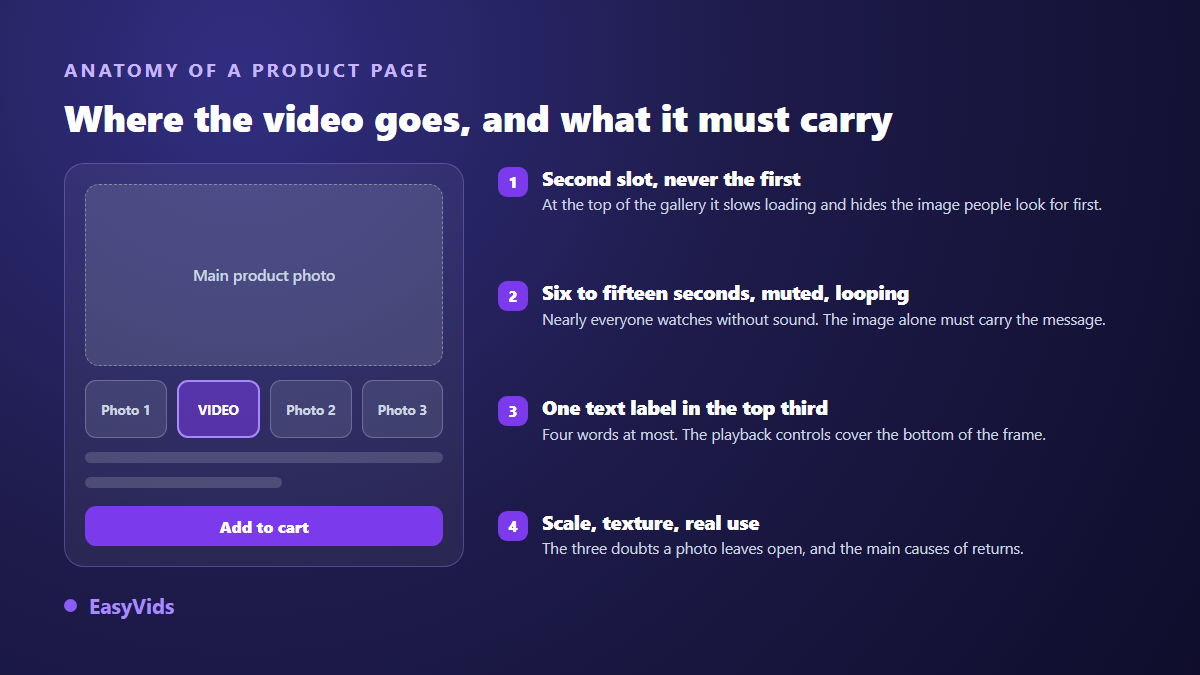
One clarification: the video never replaces the main photo. It slides in right behind it. In first position it weighs on page load and denies the shopper the reference they want first, a clean shot of the whole product. In third or fourth position it goes unseen, because most visitors swipe the gallery once or twice at most.
The sound is off, and it stays off
Nobody turns the sound on for a product listing. Mobile browsers block autoplay when a clip is not muted, and Etsy plays listing videos with no audio at all, as its seller handbook states. So write for the eye alone. The message travels through framing, motion and two or three words on screen, never through a voice over. If your clip does carry speech, reused from an existing campaign for instance, burn the captions into the image itself: a separate subtitle file is not read by product galleries.
On screen text follows one rule: one benefit per shot, four words maximum, large and contrasted. "Waterproof 30 minutes", "Folds in three", "Ships assembled". You are not writing a sentence, you are placing a label. Put it in the upper third, because the bottom is often covered by playback controls or by a promotion badge added by the store theme.
Six to fifteen seconds, on a loop
A product page video has no beginning and no end. It turns. That is where the duration constraint comes from. Too short and it stutters. Too long and the visitor leaves before the useful gesture. Six to fifteen seconds works, with a clear preference for ten. Care about the join between the last frame and the first: the loop has to restart without a visible cut, or the eye catches on the jump and looks away.
- The product held or worn, to give scale without a tape measure.
- A close up on material or finish: two seconds is enough.
- The gesture of use, the one your customer will repeat at home.
- The reassuring detail: the seam, the clasp, the seal, the connector.
- One text label per shot, four words at most, in the upper third.
- A clean join between end and start, so the loop stays invisible.
What each platform actually allows
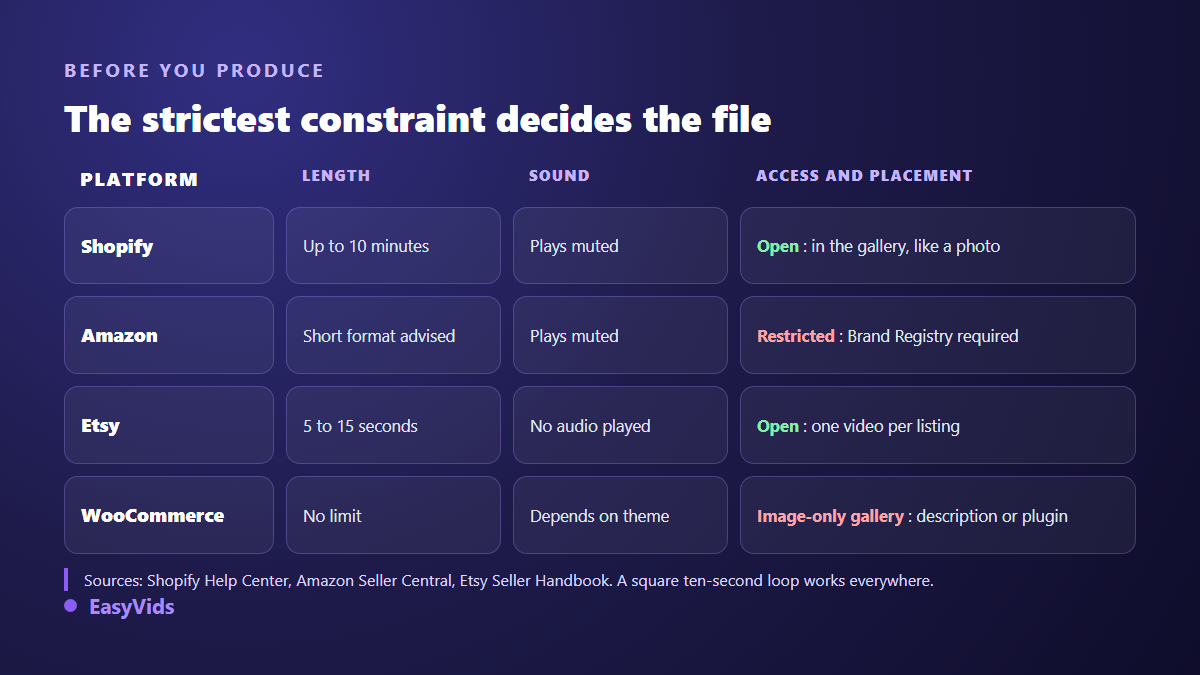
Check where the file will land before you produce anything, because the rules differ and an unusable export costs a day. According to the Shopify help centre, a video added to product media must stay under one gigabyte and under ten minutes, in .mp4 or .mov, and it takes its place in the gallery like any photo. That is the most comfortable setup: nothing to install, and the clip reorders among the media like an image.
Elsewhere the rules bite harder. According to Amazon's seller help centre, video on a product detail page runs through Brand Registry: a seller without a registered brand has no access. Etsy's seller handbook sets listing videos between five and fifteen seconds, played without sound. On WooCommerce the native product gallery accepts images only, so video goes in the description or through an extension. Find the strictest common denominator first, and you will export once.
A word on marketplaces in general: video there usually autoplays in a carousel with no visible controls. Treat it as a moving image, not as a film. Anything that does not appear in the first three seconds stands a good chance of never being seen.
File weight decides page speed
A slow listing loses sales before the video even starts. The thing to watch is not the video file but its poster image: Google's Core Web Vitals guidance treats that still, and the first frame of a video, as candidates for Largest Contentful Paint. So compress and prioritise the still, and let the video file load later, once the main content is on screen.
On playback, the mobile rule has been stable for years: the WebKit autoplay policy applied by Safari on iPhone only allows a clip to start without a tap when it is muted and set to play inline rather than switch to full screen. Hosted store galleries handle this for you. If you embed the video by hand in a theme, check those two points first, otherwise the clip stays frozen on its poster for a large share of your visitors and you will wrongly conclude that the format does not work.
Aspect ratio is decided before the first shot
Square remains the safest choice on a listing: it occupies the same slot as gallery photos and breaks the layout neither on mobile nor on desktop. Vertical makes sense when the same clip has to serve as an ad or a story, but it often forces the store to add side bars. Decide before you generate, because a late crop always removes what mattered. The table of sizes and ratios per platform keeps you out of that trap.
Producing the clip from the photo you already have
The shortest route starts from your product photo. In the studio, direct generation accepts several reference images: you drop the photo in, you describe the motion you want in one sentence, and you get an animated shot that keeps the object as it is. That is the decisive point for ecommerce. The product must not be reinvented by the model, it must be filmed. A short, slow camera instruction beats an ambitious one every time.
Available durations run from four to fifteen seconds depending on the model, which covers a loop exactly. Produce three shots rather than one: worn, material, gesture. Every generation is billed, so validate the motion at low definition first, then rerun only the keeper at high definition. Plans and the free trial are on the pricing page.
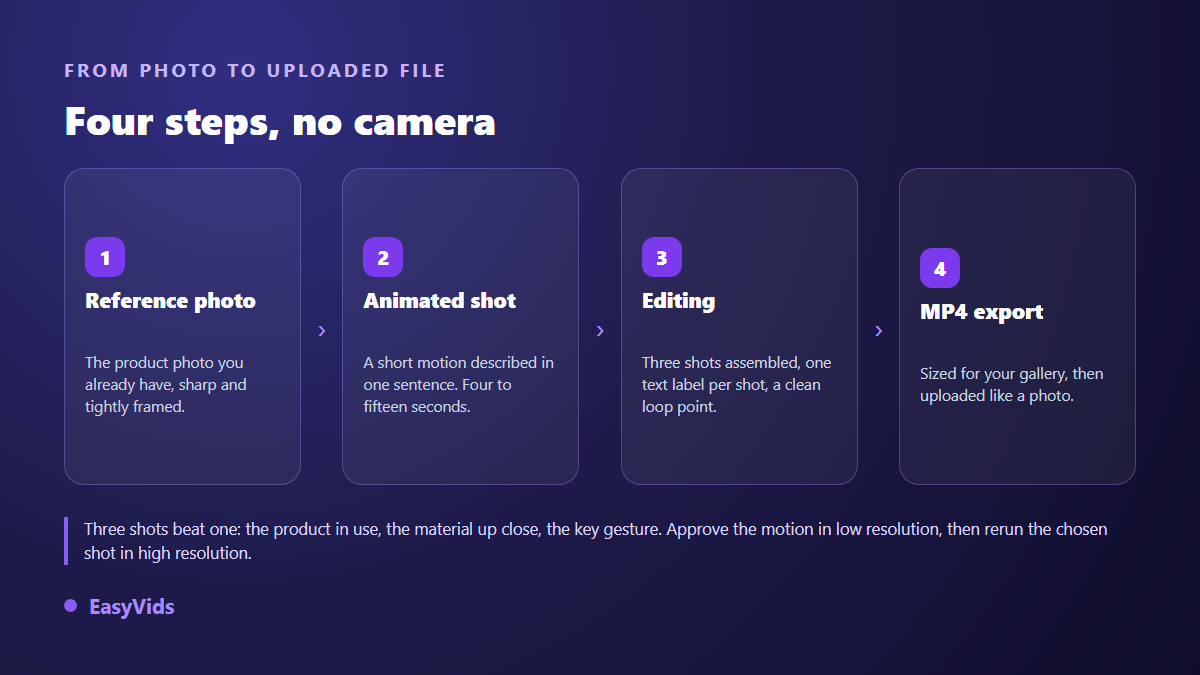
One reminder that saves disappointment: the studio produces and exports the file, it does not host your store. You download an MP4 and drop it into your product gallery, exactly as you would add a photo. No technical integration is required on the store side.
Rolling it out across a catalogue
Do the maths per listing, never per catalogue. Start with your twenty best sellers, the ones carrying the revenue. Once the template holds, each new listing is handled by swapping the reference photo and the label text. The volume logic matches the one described in our method for producing product presentation videos without stock, with a stricter demand for accuracy, since a listing video is a commercial promise. Never show a feature the delivered product does not have.
What search engines do with your video
A video on a product page can surface in search results, provided it is declared properly. Google Search Central's video best practices ask for three things: VideoObject structured data describing the clip, a good quality thumbnail, and a file URL crawlers can reach. Most store themes emit that markup automatically for gallery videos. Check yours: it separates a video only your visitors see from a video that brings traffic in.
Frequently asked questions
Do I have to film the product?
No. A sharp photo is enough as a starting point: it acts as the visual reference, and motion is added at generation. Filming still helps for a complex demonstration. For scale, material and a simple gesture, the photo does the job.
How long should a product page video be?
Six to fifteen seconds, ten as a rule. The clip loops, so what matters is not total length but the useful information landing inside the first three seconds.
Will video slow my product page down?
It can, if it is badly placed. Load the file lazily, compress the poster image, keep the video in second gallery position. Measured impact on speed then stays marginal.
Can I reuse the same clip as an ad?
Yes, if you plan the ratio from the start. A square ten second loop crops badly to full screen vertical. Export two versions from the same edit, one for the listing and one for social, with text adapted to each.
The right moment to test is when you already have the photos and the traffic: video does not create demand, it converts the demand you have. Take three listings, produce a ten second loop for each, run it for a month, then read conversion and returns. Creating an account opens the full studio, and EasyVids puts generation, editing and export in one place.