You export a video, you post it, and your headline vanishes behind a button. Or black bars frame the picture. Or the platform simply rejects the file. Social media video sizes are the technical detail nobody notices when they are right, and the one that spoils everything else the moment they are wrong.
The problem is rarely image quality. It comes down to a handful of numbers: an aspect ratio, a pixel size, a maximum length, a file weight. Those values differ from one platform to the next, and they change several times a year. This page gathers the ones that matter, taken from official documentation, along with a method for producing a video once and adapting it everywhere. Last checked: August 8, 2026.
The short answer
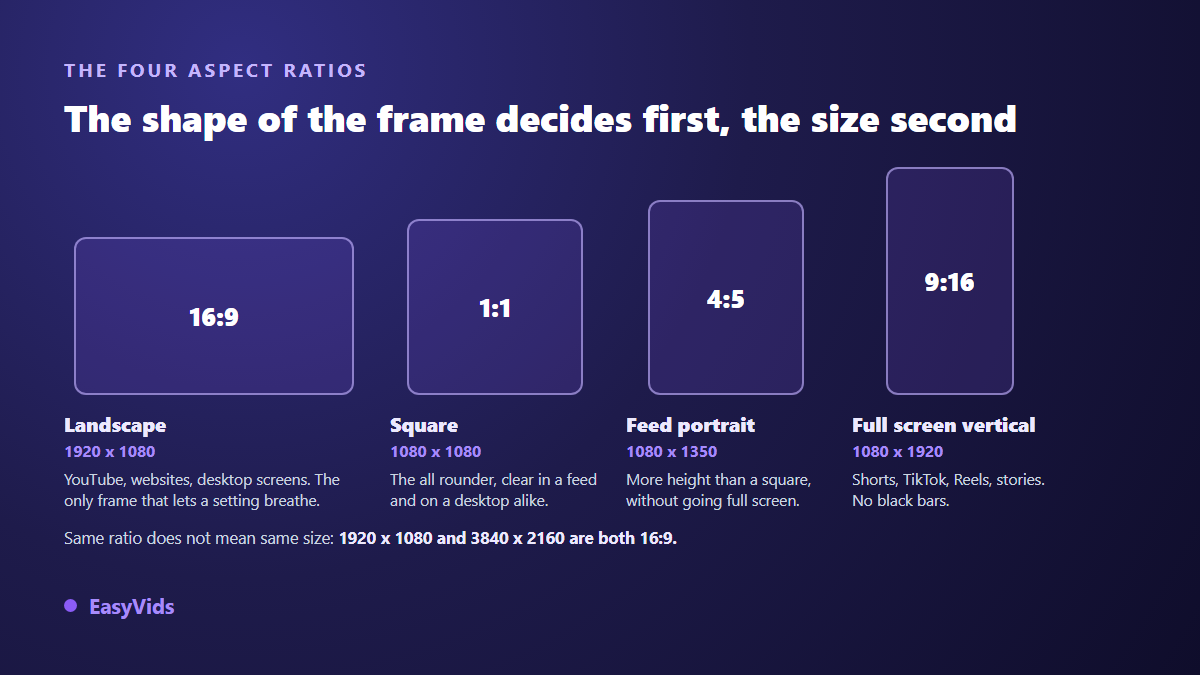
Four aspect ratios cover almost everything: 16:9 for landscape, 9:16 for full screen vertical, 1:1 for square, 4:5 for the feed portrait. The two reference sizes are 1920 x 1080 landscape and 1080 x 1920 vertical. Export MP4, H.264 video, AAC audio, and your file will be accepted everywhere. What remains, maximum lengths and file size caps, is platform specific.
Aspect ratio, resolution and file size are three separate things
The aspect ratio is the shape of the frame, the proportion between width and height. It is written 16:9, 9:16, 1:1, and it says nothing about pixel count or disk space. The resolution is that pixel count, written width by height: 1920 x 1080, 1080 x 1920. The file size is what the video weighs in megabytes, and it depends mostly on the bitrate you choose when encoding.
That distinction prevents the most common mistake. A 1920 x 1080 clip and a 3840 x 2160 clip share exactly the same aspect ratio, 16:9. The second holds four times more pixels and weighs far more, but it fills the same frame. Picking a format means answering two separate questions: what shape, then how fine.
The four aspect ratios and what each one is for
- 16:9 (landscape): the historical reference for video. It is the standard aspect ratio for YouTube on a computer, and the only one that gives a set, a screen demo or a two person conversation room to breathe.
- 9:16 (vertical): the exact opposite, cut for a phone held in one hand. Shorts, TikTok, Reels and stories all live in this frame, which forgives no wide shot.
- 1:1 (square): the compromise. It takes more height than 16:9 in a feed, still reads well on a desktop, and crops cleanly toward the other two.
- 4:5 (portrait): the feed format on Instagram and Facebook. Taller than a square without going full screen, it catches more surface as people scroll.
Two more shapes appear occasionally. 2:3, or 1000 x 1500, is the historical proportion of Pinterest pins. 1.91:1, very wide, mostly serves link previews and certain ad placements. You will not need either for most posts.
Resolution: what 1080p and 4K actually mean
Resolution is read in pixels. Landscape: 1280 x 720 for 720p, 1920 x 1080 for 1080p, 2560 x 1440 for 1440p, 3840 x 2160 for 4K UHD. Vertical simply flips those numbers, which gives 1080 x 1920 as the working resolution for all vertical content.
Should you aim for 4K? Rarely. 1080p stays sharp on a phone and on most televisions, encodes quickly and uploads without a wait. 4K earns its place when your source really is 4K, when you plan to crop hard into the image, or when you target a very large screen. Upscaling a 1080p file to 4K achieves nothing: the added pixels carry no new information.
Bitrate, codec and container
Bitrate is the amount of data per second of video. It explains a picture that falls apart in fast motion far better than resolution does. YouTube publishes its recommended values for SDR uploads at standard frame rates, meaning 24, 25 or 30 frames per second:
- 2160p, or 4K: 35 to 45 Mbps
- 1440p: 16 Mbps
- 1080p: 8 Mbps
- 720p: 5 Mbps
- 480p: 2.5 Mbps
- 360p: 1 Mbps
For the rest of the encode, the same documentation recommends an MP4 container with the index at the front of the file, the setting usually labelled Fast Start, H.264 video in High profile with 4:2:0 chroma subsampling, and AAC-LC or Opus audio at 48 kHz. None of this is YouTube specific: it is the common denominator every other platform accepts, which is precisely why it is worth sticking to. Shoot and export at the original frame rate too, since converting 25 to 30 introduces visible judder on pans for no gain.
Platform by platform
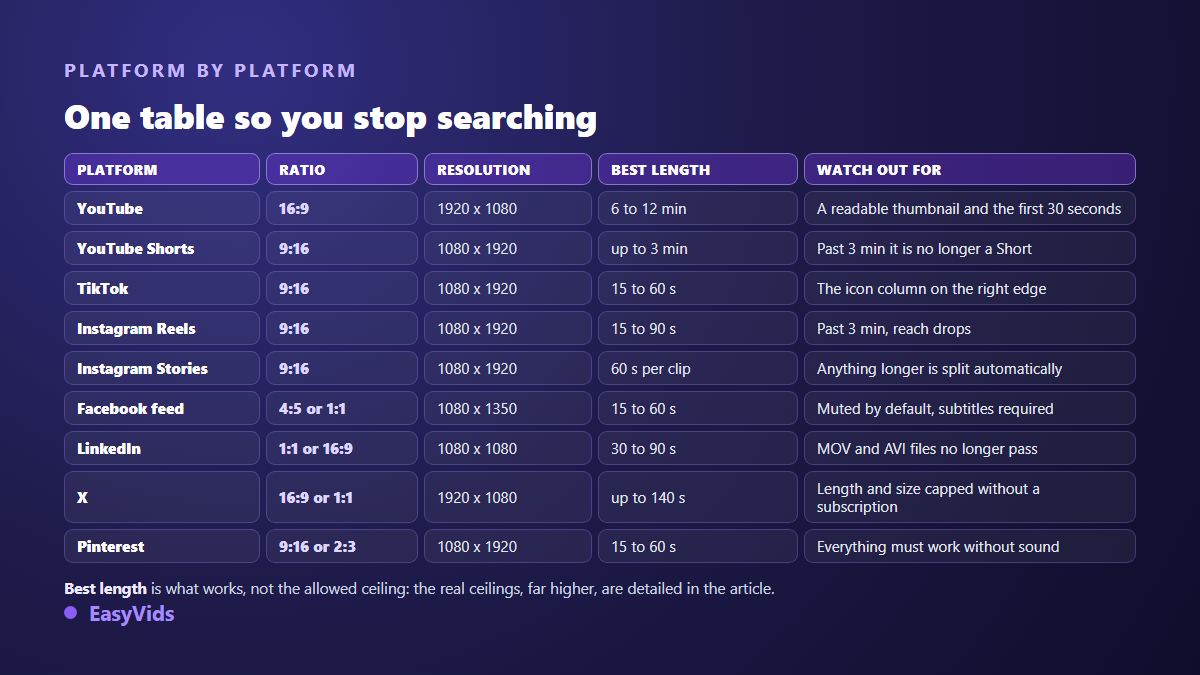
On YouTube, the standard aspect ratio on a computer is 16:9 at 1920 x 1080. The upload ceiling is generous: 256 GB or 12 hours, whichever is less. An unverified account is capped at 15 minutes per video until it confirms its identity. Shorts follow a different rule that is really a classification rule: a square or vertical video up to three minutes long is filed as a Short, for uploads made after October 15, 2024. Go past three minutes or post in 16:9 and you land on the long form side, with completely different distribution.
TikTok works in 9:16 at 1080 x 1920, MP4 or MOV encoded in H.264. Its length and file size limits depend on the upload path: the mobile app and desktop upload do not accept the same file sizes or the same durations, and some accounts get an extended ceiling. Check your own upload screen rather than a generic table, because this is where copied guides get it wrong most often.
On Instagram, Reels moved to three minutes in January 2025, an extension announced by Adam Mosseri, the head of the app. The number to remember is not that ceiling but this threshold: past three minutes, a Reel stops being recommended to people who do not already follow you. Stories take 60 seconds per clip in one piece, without the old automatic split into 15 second segments. In the feed, 4:5 portrait at 1080 x 1350 and square at 1080 x 1080 remain the safe choices. Facebook follows the same logic, and adds one thing that matters more than pixels: sound starts muted as people scroll, so a video without burned in captions loses its message before it is ever heard. The script is worth writing for both channels at once, the voice and the on screen text, which is what our method for turning a text into a narrated video sets out.
LinkedIn is by far the most explicit platform about its specifications. For Pages, a file must weigh between 75 KB and 5 GB, run from 3 seconds to 10 minutes, fit a resolution between 256 x 144 and 4096 x 2304, with an aspect ratio between 1:2.4 and 2.4:1, a frame rate of 10 to 60 FPS and a bitrate between 192 kbps and 30 Mbps. Watch out for one recent trap: AVI, QuickTime and MOV files are no longer supported. Export MP4.
On X, length and weight depend on your subscription. An account without one caps out around 2 minutes 20, that is 140 seconds, with a 512 MB file limit. Paid accounts go up to 4 hours and 16 GB from the web and the iOS app. Accepted formats stay MP4 and MOV, H.264 with AAC audio. Pinterest leans vertical: 2:3 at 1000 x 1500 remains the reference proportion for pins, 9:16 for video, with MP4, MOV and M4V files accepted up to 2 GB and lengths from 4 seconds to 15 minutes. Voice still earns its place there for the share of the audience that turns the sound on, and its register is chosen like the frame, before production: an animated sequence does not call for the same timbres as a demo, as our guide to cartoon character voices shows. WhatsApp publishes no comparable spec sheet and its limits shift with the app version, so keep the logic rather than a number: a status runs a few dozen seconds, the file is heavily recompressed, and an oversized video is rejected or degraded without warning.
Safe zones: the usable area is smaller than the frame
A 1080 x 1920 frame does not give you 1080 x 1920 usable pixels. The interface covers part of the image: account name at the top, caption and buttons at the bottom, an icon column down the side. Composing without accounting for that is writing under a banner.
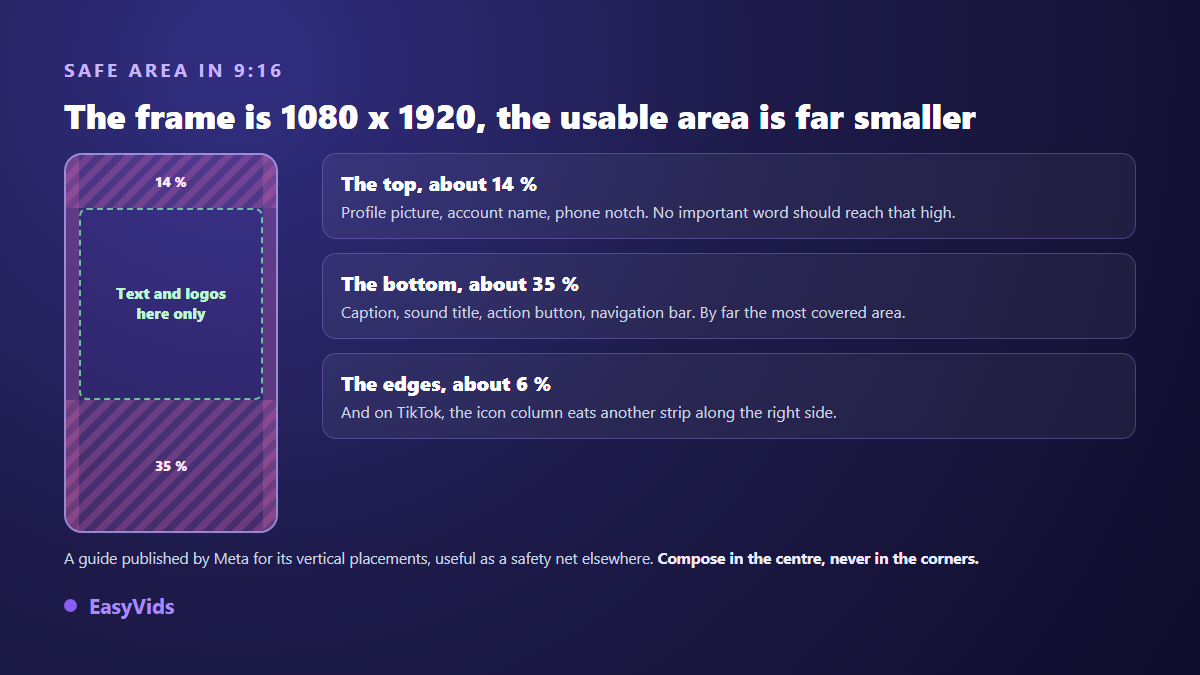
Meta publishes a single guideline for its vertical placements: keep roughly 14 percent free at the top, 35 percent at the bottom and 6 percent on the sides. On TikTok, the icon column on the right edge eats another strip. The practical rule fits in one sentence: anything meant to be read belongs in the middle third of the image. That constraint weighs most on videos carried by on screen text rather than by a face, a whole family of formats reviewed in our list of video ideas that need no camera.
Automatic cropping ignores all of that. Turning 16:9 into 9:16 by simple cropping removes two thirds of the width, and usually the subject with it unless it sat dead centre. Direction matters too: going from vertical to horizontal adds bars on the sides but destroys nothing. The same reasoning holds when the starting point is a still photo: pick the frame before you add any movement, as our guide to animating a photo with AI explains.
Produce once, adapt everywhere
- Pick the primary format based on the platform that matters most to you. It drives how every shot is composed.
- Compose in the centre, keeping subject, on screen text and logo inside the area shared by all the ratios.
- Work at the highest resolution you can handle. Scaling down is free, scaling up never is.
- Build each variant from the master file, never from an already compressed export: a twice compressed video visibly loses sharpness.
- Reposition on screen text for each format instead of letting it drift, since the safe zones move with the frame.
- Export MP4, H.264, AAC, then watch the result on a phone before you publish anything.
That is exactly how an online studio should behave. On EasyVids the format is chosen before generation, and each scene is composed for that frame, which removes the need to crop a shot that already exists. If you want the full mechanics, our guide to AI video generators walks the chain from script to export. One last check belongs at the end of that chain, the burned in mark some tools leave on the way out, which our guide to exporting AI video without a watermark covers.
The format mistakes that come back most often
- Shooting 16:9 then cropping to 9:16, which pushes the subject out of frame half the time.
- Putting text at the bottom of a vertical frame, right where the caption and buttons sit.
- Uploading a file already compressed by a messaging app, which the platform then compresses again.
- Upscaling 720p to 4K in the belief that it adds sharpness.
- Exporting MOV for LinkedIn, which no longer accepts it.
- Skipping captions, when sound starts muted on nearly every feed.
These numbers move: always note the date
No format table stays correct forever. Instagram went from 90 seconds to 3 minutes in January 2025. YouTube redrew the Shorts boundary in October 2024. LinkedIn dropped file types it used to accept. The figures on this page were taken from official platform documentation on August 8, 2026, and some of them will have shifted a year from now. Before a post that really matters, open the relevant help page and check only the two or three values you actually depend on: maximum length, maximum file size, accepted aspect ratio.
Frequently asked questions
What is the best video format today?
There is no single one. 9:16 at 1080 x 1920 dominates everything watched on a phone, while 16:9 at 1920 x 1080 stays the reference for long form and wide screens. If you could only produce one versatile file, 1:1 is the best compromise because it crops cleanly toward both.
Should I export MP4 or MOV?
MP4, in almost every case. It is the container accepted everywhere, it weighs less at comparable quality, and platforms such as LinkedIn no longer take MOV files. MOV keeps its value as a working format in an editor, not as a publishing format.
Why does my video have black bars?
Because its aspect ratio does not match the player. A 16:9 video shown in a vertical frame leaves a band at the top and the bottom. The fix is not to stretch the image, which distorts it, but to re export at the right ratio, or to fill those bands deliberately with a designed background and text.
How long should a vertical video be?
Between 15 and 60 seconds for most vertical content. Official ceilings run much higher, up to three minutes for a Short or a Reel, but watched duration matters more than allowed duration. Thirty seconds finished beats two minutes abandoned halfway.
How do I shrink a file without wrecking the image?
Lower the bitrate before touching resolution. Going from 16 to 8 Mbps at 1080p halves the weight for a difference rarely visible on a phone. Then cut what is not needed: one second less always weighs less than a clever setting. Dropping resolution should stay the last resort, because that loss cannot be recovered.
Format is not the creative part of the job, but it decides whether your creative work is seen the way you intended. Three habits are enough: choose the frame before you produce, compose in the centre, export MP4 H.264 from a good master. Everything else takes two minutes to verify on the platform's own help page. To produce straight into the right format, without destructive cropping, creating an account opens the full studio with vertical, square and landscape outputs.