You search for an AI script generator and you get lists of nine, eleven or fifteen tools. All different. All dated this month. None of them answers the one question that matters to you: which one will hand you a text you can read aloud, as it is, into a microphone or in front of a camera. The shortage is not in tools. Almost all of them write acceptable prose, and acceptable prose is not the same thing as a script.
There is no ranking on this page, and that is deliberate. These tools swap the writing engine underneath several times a year, sometimes without saying so, which means a list published in January is misleading by June. You get something that ages better instead: the seven signs that separate a real script generator from an automatic writer, the four families of tools hiding behind one label, and a twenty minute test you run yourself. If you need to write rather than to choose, our full guide to writing a video script covers the craft itself.
The short answer: what makes a script generator good
Seven things show up on the very first attempt. The hook stands on its own when you pull it out of the text. The structure moves forward instead of circling. The language is spoken, not written. The length matches the duration you asked for, not a character count. The context you supply genuinely changes the output. You can rewrite one passage without regenerating everything. And the script moves into production without a round of copy and paste. The seventh point decides more cases than the other six, because a flawless text you have to retype somewhere else costs you more time than it saves.
Why a dated ranking will not help you
Three reasons make tool rankings unreliable in this category, and none of them is a criticism of anyone. Most of these products do not build the language model that writes: they call a third party model and swap it when a better one ships. The product name stays, the writing changes. Perceived quality also depends enormously on the brief: the same tool, fed a vague sentence and then a precise frame, returns two texts with nothing in common. And no ranking knows your subject, your language or your usual format.
The fix is a habit rather than a shortcut. You test it yourself, on your own topic, in twenty minutes, and you repeat the test twice a year. That is faster than reading three comparison posts that contradict each other. At worst it costs you a free trial, since nearly every tool offers one, and our method for writing a week of content with a free script generator shows what you can already get without committing to anything.
Four families of tools behind one label
The phrase covers four different products, and half of the disappointment starts there. You pick a tool from the second family when your need belongs to the fourth, then conclude that AI writes badly. It wrote what it was asked to write, inside the frame it was given.
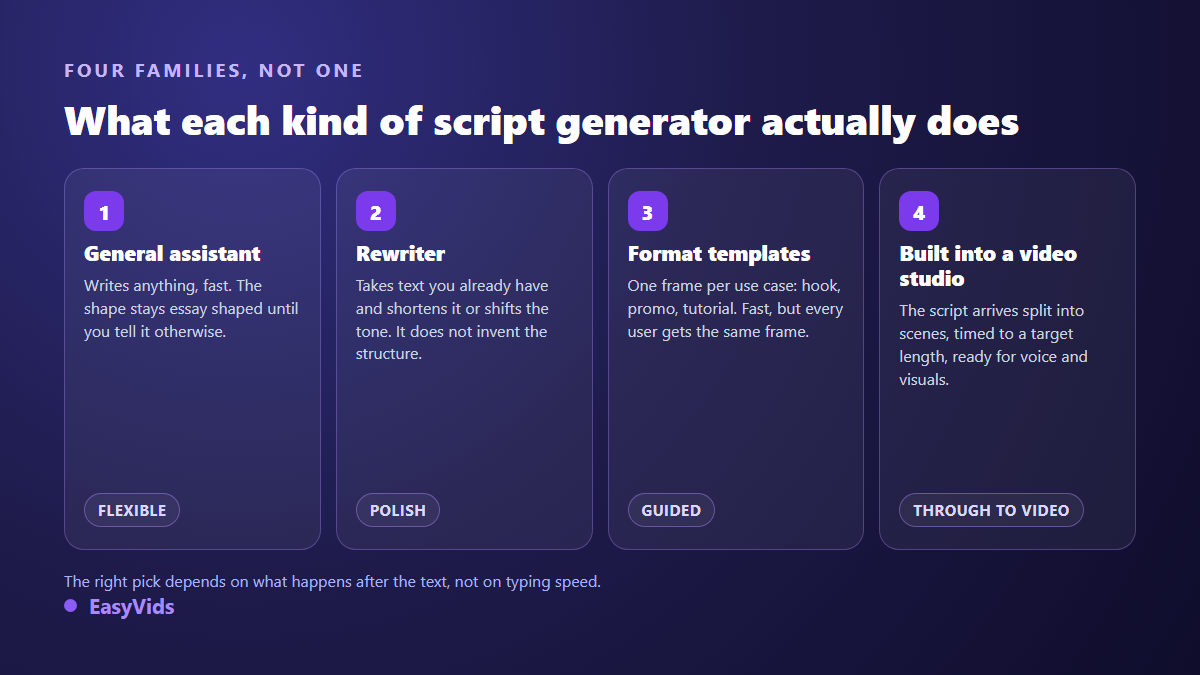
No family wins in the abstract. A general assistant suits you well if you enjoy framing the brief yourself. A rewriter is the right pick when you start from text you already have. Format templates earn their place when you publish a lot of the same kind of video. A generator built into a studio matters as soon as the script is only a step and the video has to ship the same day. Free and paid tiers exist in all four families, and our plans page sets out what ours covers.
Check 1: does the hook stand on its own?
Lift the first sentence out and read it alone. If it makes you want the second one, the tool understands what a hook is. If it announces the outline, in the style of « in this video we will look at », it handed you an essay introduction. This is the most common weakness, and it has a cause: language models learned overwhelmingly from written text, where an introduction announces, while a video has to promise. A good tool offers several hooks, genuinely different from one another, and regenerates them without touching the rest.
Check 2: does the structure progress?
A script is a progression: each part should make the next one necessary. The classic failure of an unstructured generated text is the disguised list, three interchangeable paragraphs you could swap without anyone noticing. Run the swap test. If parts two and three can trade places and the text still reads fine, there is no progression, only a stack. A solid tool lets you pick the frame instead of imposing one, and shows you which frame it used.
Check 3: is the language spoken or written?
This is the fastest check and the most merciless: read the output aloud. Do you stumble, run out of breath, have to reread a clause to get it? The text was written for the eye. A script written for the ear lives in short sentences, plain verbs and words you actually use when you speak. Punctuation is breathing there, not grammar.
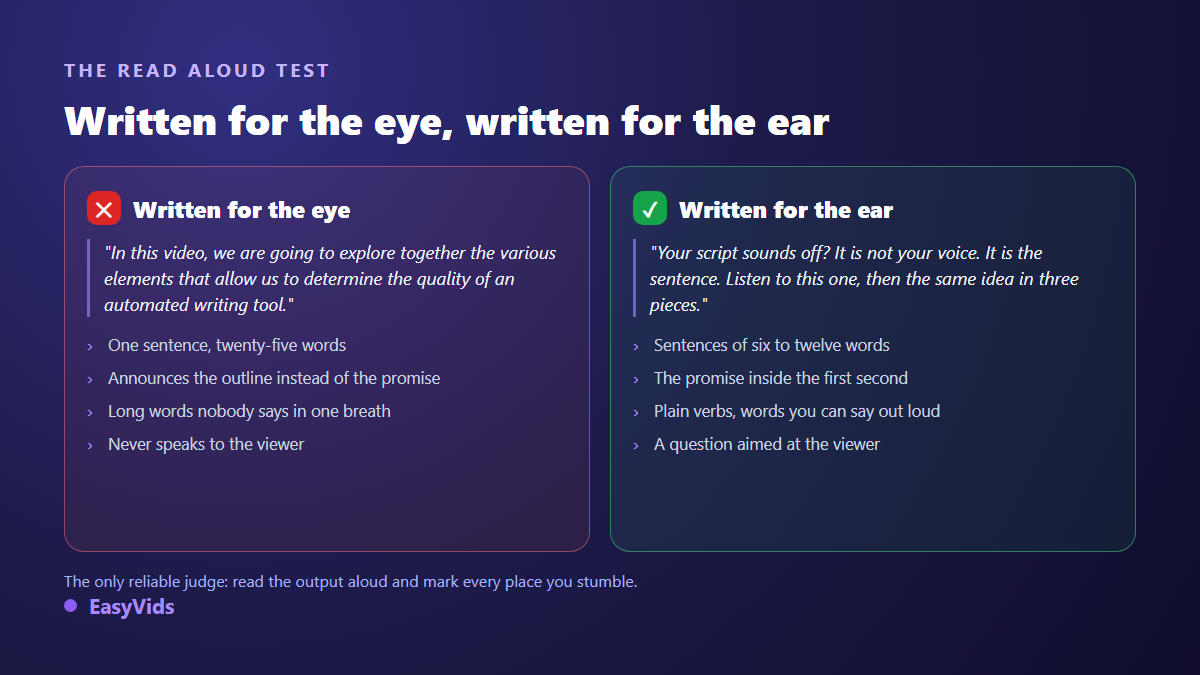
The point counts double when a synthetic voice reads the text. A long subordinate clause still survives a human read, because you interpret it, you speed up, you lean on a word. A generated voice reads it flat, and the weak writing becomes audible. The best script generator is the one that makes you rewrite the least before recording, not the one that writes the most.
Check 4: is the length tied to the target duration?
Ask for a two minute script, then time yourself reading it aloud. The gap teaches you a lot. A tool that thinks in words or characters hands you something to trim. A tool that thinks in video duration accounts for reading pace, breaths and pauses. Across our own generations, a minute of narration runs around 150 words, a figure that shifts with pace and format, as our word count for one minute of video sets out.
Check 5: does your context really change the text?
Plenty of tools display audience, tone and industry fields, then treat them as decoration. Test it in two runs. Generate once with the topic alone. Generate again with your trade, your offer, a real objection from your customers and the name of your format. Compare the two side by side. If only a few adjectives moved, the personalisation is cosmetic and you will keep rewriting everything. A tool that truly uses context changes the structure: it places the objection in the right spot and adapts the call to action to the channel, which shows up most clearly on commercial formats such as our advertising script frameworks.
Check 6: can you edit without regenerating everything?
This separates a toy from a working tool. You like the script except for its ending. What happens? On a weak tool you regenerate the whole thing and lose the hook you had finally landed. On a good one you select the passage, ask for a variant, and nothing else moves. Ask that question during the trial, because it is the operation you will repeat most often, far more than the first generation.
Check 7: what happens to the script afterwards
A script is not a deliverable, it is a step. The real question is the path: between an approved text and a publishable video, how many copy and paste rounds, how many tools, how many files? A generator that returns the text already split into scenes, each with its duration, spares you the most tedious step. One built into a production chain moves straight on to voice and visuals, as our guide to AI video generators describes.
The twenty minute test that settles it
Here is the procedure we run whenever a new writing tool shows up. It does not replace a laboratory benchmark and does not claim to. It has a more useful merit: it answers your question, on your topic, with the version of the product that exists today.
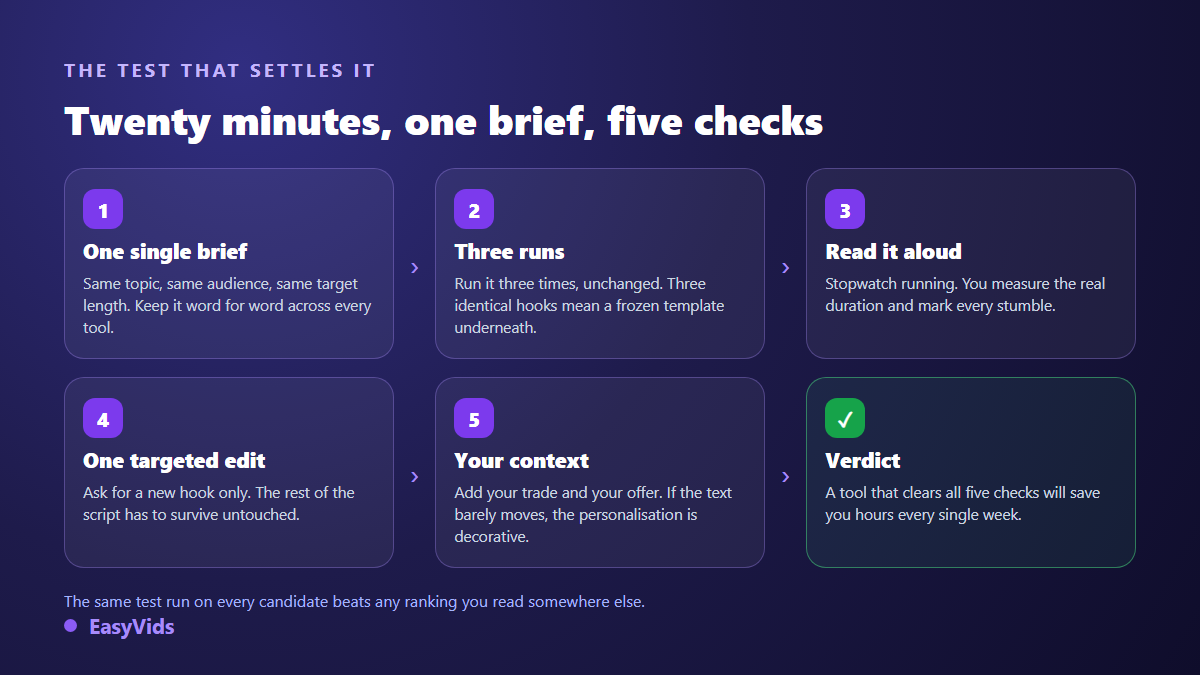
- Write one single brief: a precise topic, a named audience, a format, a target duration. Paste it unchanged into every tool, without reshaping it around their fields.
- Run it three times with nothing changed. Three identical hooks mean a frozen template. Three texts with nothing in common mean no frame at all.
- Read the best of the three aloud, stopwatch running. Note the real duration and every place you stumble.
- Ask for one edit only: a different hook, the rest untouched. You will see straight away whether the tool works in pieces or all or nothing.
- Add your context and run again. If the text barely moves, those personalisation fields are decorative.
- Look at the output: is the text split into scenes, exportable, usable elsewhere, or trapped in a window you have to retype?
Score each tool from zero to two on the seven checks and keep the sheet. Six months later you will know whether the product improved or your brief did. To compare on common ground, start from a topic you know by heart and hold the result against full scripts written for different formats.
Four choosing mistakes that cost weeks
- Judging on the first output. That first attempt depends on your brief as much as on the tool. Three runs, always.
- Choosing for volume. A tool that returns four pages is not better than one that returns twenty right lines. You pay the difference back in cuts.
- Ignoring the output language. A model that shines in English can return correct but stiff writing elsewhere, full of translated turns of phrase. Test in the language your videos are actually in.
- Forgetting the next step. The best text in the world is worth nothing if you then have to split it into scenes by hand in another tool.
Frequently asked questions
Is a free AI script generator enough to choose with?
For choosing, yes. The twenty minute test runs entirely inside trial versions, and it exposes all seven checks as well as a subscription would. Free tiers usually limit volume, maximum length and export, rarely the writing quality of the first draft. You will know quickly whether the tool fits you.
Do I need a specialised tool for each video format?
Rarely. A well briefed general generator matches a dedicated one, provided you give it the format, the target duration and the audience. Specialised tools pull ahead when you publish the same kind of video in series, because they save you from retyping the same brief and keep the frame stable from one post to the next.
How do I spot a script written by a machine?
Automatic detectors get it wrong in both directions, and we would not base a decision on them. The readable signs are more reliable: sentences of suspiciously even length, all purpose transitions, examples with no concrete detail, and no point of view anywhere. A script you have reread and reworked shows none of them.
Does an AI generated script raise rights issues?
The answer sits in one place: the terms of use of the tool you rely on, in the clause about ownership of generated content. Read it before you commit and check its date, because it gets revised. Some tools grant you full commercial use of what you generate, others reserve that for paid tiers. No general rule replaces that reading.
How long does a usable script take?
Across our own generations, a two to three minute script arrives in under a minute, and the read aloud pass takes another two or three. Most of the time goes elsewhere: into shaping the brief at the start, and into reworking the hook at the end. That is exactly why the editing check weighs so heavily when you choose.
Choosing an AI script generator does not call for one more comparison post. It calls for a brief, twenty minutes, and seven questions aimed at the text the machine gives back. Run the test on three candidates today, keep the one that makes you rewrite the least, and revisit the decision in six months. If you would rather go straight from script to finished video, voice and visuals included, open an account and generate your first script: the text arrives already split into scenes.