You search for a free AI video generator, you try one, and the first clip lands within minutes. The good feeling lasts until download. A logo sits across the frame, the clip stops at eight seconds, or the export button asks for a card number. None of that was hidden. None of it was announced either.
There is a simple reason behind those limits. One second of generated video runs on graphics cards rented by the minute, and that compute gets paid for whether you pay or not. Every free plan therefore sets a ceiling somewhere: on length, on resolution, on how many videos you get, on the export, or on usage rights. Spotting that ceiling before you generate saves you an afternoon. For the full chain, from script to export, our complete guide to AI video generators walks through the six steps hiding behind the button.
The short answer
A free AI video generator almost always produces something watchable. In exchange, it asks you to accept at least one of five constraints: a watermark on the frame, a clip of a few seconds, reduced resolution, a quota that closes fast, or a licence that rules out commercial use. So the useful question is not whether a tool is free, but which constraint pays for that free tier, and whether that constraint touches your project. A watermark kills an ad and does not bother an internal test. Eight seconds work for a vertical hook, never for a tutorial.
One word, five very different ceilings
The ceiling never sits in the same place twice, which is what makes comparison tedious. First comes length: the engine returns a clip of a few seconds. Second, the on screen mark, the watermark that signs your video for you. Third, resolution, often dropped to a preview grade that survives on a phone and collapses on a television. Fourth, volume: one or two generations, then a queue behind paying accounts. The fifth is invisible, it is the licence, and it decides what you are allowed to do with the file.
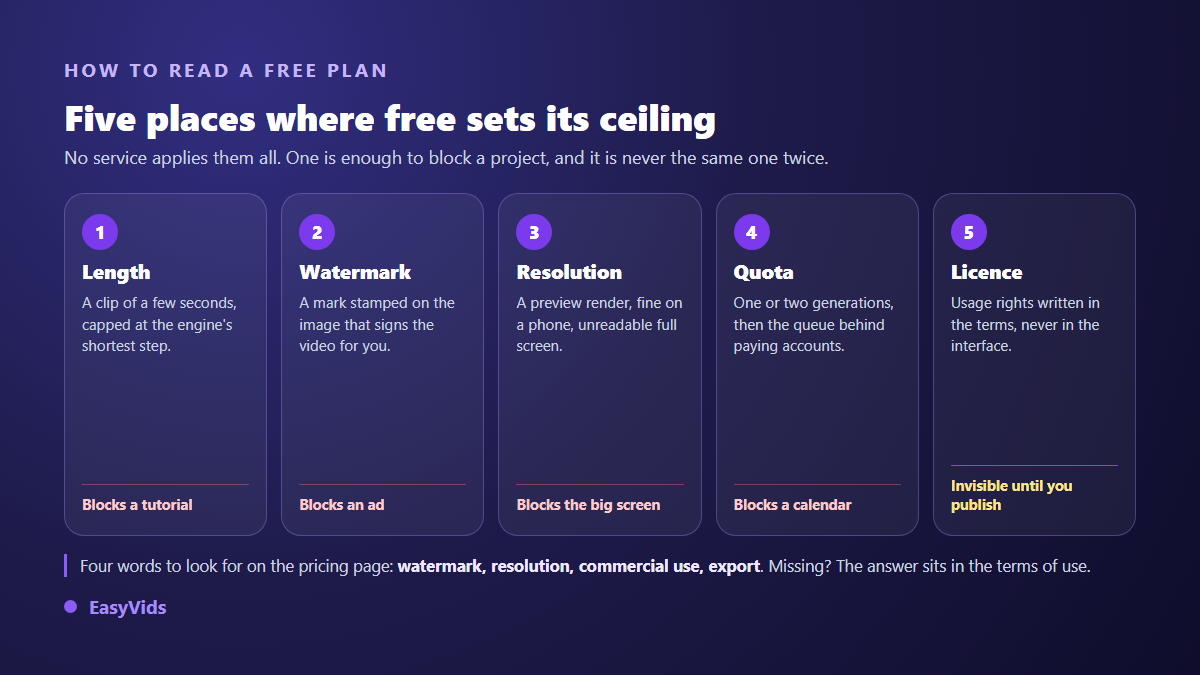
Two minutes of reading is enough to find them all. Open the plans page and look for four words: watermark, resolution, commercial use, export. If one of the four appears nowhere, the answer lives in the terms of service, never on the landing page. A service that spells those limits out is telling you something useful about the rest of its behaviour.
Three business models behind the same button
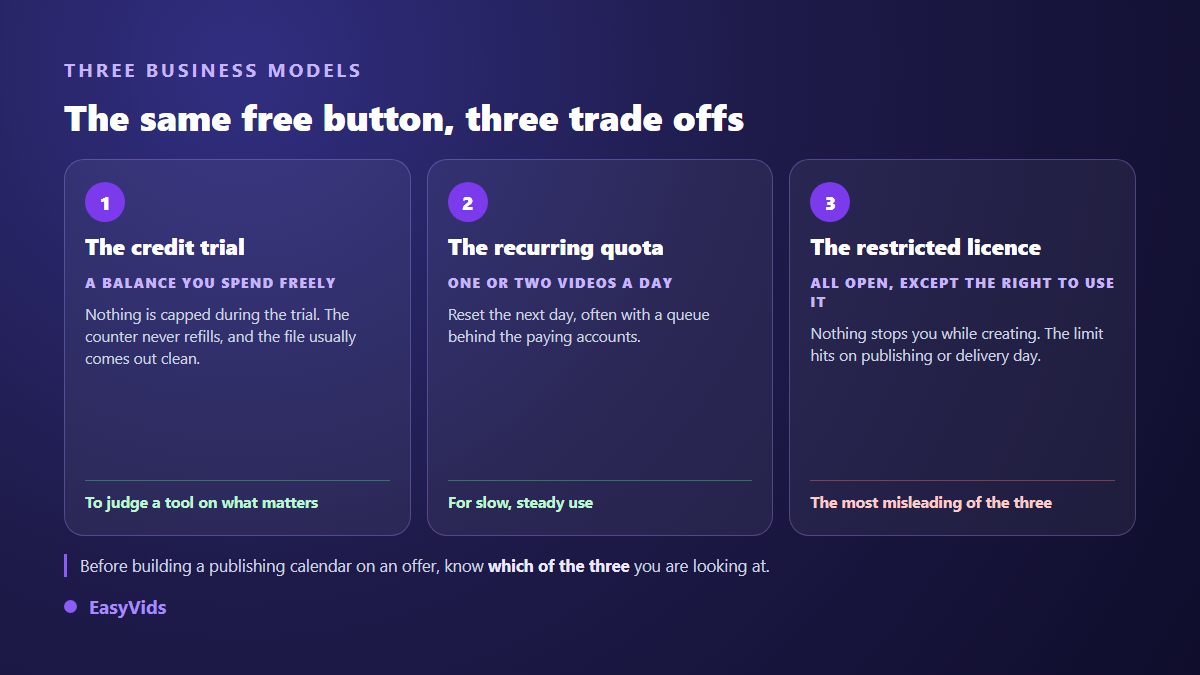
The first model is the credit based trial. You get a starting balance, you spend it as you like, and the counter does not refill. It is the only format that lets you judge a tool on your own subject, with your real constraints, because nothing is throttled while you use it.
The second is the recurring quota: one or two videos a day, reset the next morning, usually with a queue attached. It suits slow, steady use and never a video that must ship on a given date. The third is open access with a restricted licence, and it is the most misleading of the three: nothing stops you while you create, and the limit lands the day the video goes to a client or under an ad. We took that mechanism apart on a real case in our review of Vidnoz.
Length, the ceiling nobody talks about
Video models do not produce films, they produce shots. The engines we integrate currently range from four to fifteen seconds per clip, with a compute cost that climbs with both duration and resolution. A free plan therefore sticks to the shortest tier. That is not a commercial punishment, it is the line beyond which the compute stops being giveable.
Longer videos come from somewhere else: assembly. Across our generations, one shot runs five to fifteen seconds of voice, roughly fifteen to forty words. A minute of narration is about one hundred and fifty words, so six to ten shots in sequence. A tool that only returns an isolated clip leaves you halfway, and that is the single most useful thing to check before committing. Our breakdown of what free text to video really produces walks through the arithmetic.
Export: watermark, resolution and aspect ratio
The watermark is the most visible lock and the hardest to swallow. It does not degrade the image, it brands it, and that brand speaks for you: it tells viewers which tool you use, and it rules the file out for an ad, a client delivery or a channel aiming at monetisation. Removing it afterwards is a bodge, between a crop that eats the frame and a blur everyone notices. Aim for a clean export from the start, as our article on AI videos without a watermark explains.
Two more decisions happen at the same point. Resolution first: a preview grade file passes on a phone and falls apart full screen. Aspect ratio second: a video framed horizontally and then cropped to vertical always loses something that mattered, usually the top of a face or the end of a line of text. Pick the ratio before the first generation, not at publishing time.
Usage rights, the limit you never see on screen
The licence is the only constraint that appears nowhere in the interface. It lives in the terms of service and answers three questions: may you use the file commercially, may you hand it to a client, and does the service reserve the right to reuse your creations. A company that keeps commercial use for paid plans is entirely within its rights. The trouble starts when you learn about it after publishing.
Platform rules stack on top. The YouTube help centre asks creators, under the synthetic content rule introduced in 2024, to disclose at upload any altered or generated content that could be mistaken for a real scene. Separately, the C2PA standard, maintained by the Coalition for Content Provenance and Authenticity, defines a provenance metadata format that several generators write into the files they output. On what that means for a channel, our piece on YouTube monetisation and AI content goes into detail.
What a free trial is genuinely good for
A trial is not there to produce a video, it is there to help you decide. And it is not judged on a polished demo reel, where everything was picked to flatter the engine, but on your own subject, in your own words and language. Six things deserve your attention during that first session.
- The result on your subject: an engine that shines on landscapes can collapse on a product shot or a face.
- The voice in your language: intonation, numbers, proper nouns, pacing.
- Consistency from shot to shot: same character, same style, same light.
- Control: can you regenerate a single scene, or does everything restart?
- The final file: aspect ratio, resolution, on screen mark, weight and download speed.
- Failure behaviour: what happens when one shot misses, and what does that cost you?
The protocol fits in one hour. Take a single subject, the one you will actually publish. Build a short version end to end without chasing perfection. Export it, watch the file on a phone, then regenerate one scene to measure what a correction costs. You will then know what no comparison table can tell you: whether the tool holds up on your work.
Making a starting balance last
A free balance evaporates in three minutes when everything is generated at maximum quality on the first try. The method that stretches it runs in two passes. The first validates the substance with the cheapest options: script, scene split, fast visuals. It exists to test whether the story holds. The second regenerates only what goes online, with the better models, and only on the shots that matter.
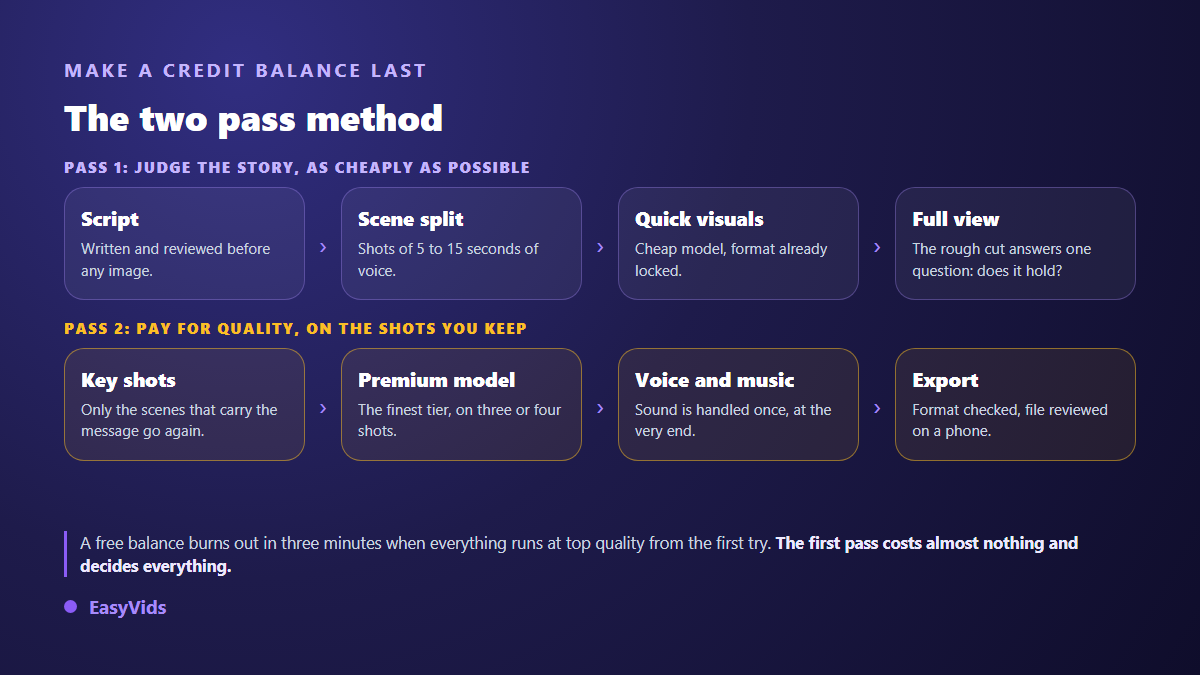
Two habits complete the method. Read the script before generating a single image, because a text fixed afterwards forces everything to be rebuilt. And lock the aspect ratio at the start, for the same reason. When the balance runs out, the pricing page sets out what each plan opens up, with no surprise at export time.
How EasyVids handles free
At EasyVids, free takes the form of a credit balance granted when you create an account, released once your email address is confirmed. It throttles nothing. Videos export without a watermark, in the three common ratios, horizontal, vertical and square, with voice over, music, captions and the online editor available exactly as on a paid account. The model tier stays your choice, which makes the two pass method possible from the trial onwards. The EasyVids studio brings those steps together in the browser.
One honest caveat: that balance does not refill on its own. It exists to produce real videos and form an opinion, not to feed a channel indefinitely. Better to know that before building a publishing calendar on it. If the vocabulary of credits and models feels opaque, our explainer on how an AI video generator works takes the machinery apart in plain words.
Frequently asked questions
Does every free AI video generator add a watermark?
No. Watermarks are common on permanent free tiers and much rarer on credit based trials, which usually deliver a clean file. Check that first, because it decides every public use of the video.
How long can a free clip be?
On a single clip, expect a few seconds, often under ten. For anything longer, it depends on whether the tool can chain shots together: assembly, not the generation model, is what produces a two or three minute narration.
Can I publish a video made with a free tool on YouTube?
Yes, provided the licence allows commercial use and the video carries real work of your own: a script, a voice, an edit. The YouTube help centre also asks you to disclose realistic synthetic content at upload.
Do I need a bank card for a free trial?
It depends on the service, and it is an easy sorting criterion. At EasyVids, creating an account and receiving the welcome balance require no payment method, only a confirmed email address.
How do I spot a free plan that leads nowhere?
It lets you generate with no visible limit and then shuts at the exit: download blocked, mark impossible to remove, or a licence that forbids any public use. Test the export on your very first video, before producing ten.
A free AI video generator is worth exactly what its output is worth: a file you can publish, or a preview that will never leave your screen. Look at the end of the journey before the beginning, and run your trial on the subject that actually matters to you. Creating an account opens the full studio with a credit balance included, no bank card, enough to judge on evidence rather than on promises.