
You have an empty property to sell or rent. The photos are sharp, the light is good, and the viewing requests never come. The property is rarely the problem. An empty room gives a buyer no sense of scale and no sense of use: they see a volume, not a living room. Virtual staging AI answers exactly that. It adds believable furniture to the real photo of the room, with nothing rented, nothing carried up a staircase, and no need to block the property for a week.
The hard part is getting a result nobody mistakes for a bad composite. That is where most attempts fail: the sofa floats above the floor, a window appears where none existed, and the listing loses the trust it was meant to win. This guide covers the method, eleven prompts for the rooms of a typical home, the settings that matter, and the disclosure rule you cannot skip. If image generation is new to you, our complete guide to AI image generators covers the groundwork assumed here.
Virtual staging AI: the short answer
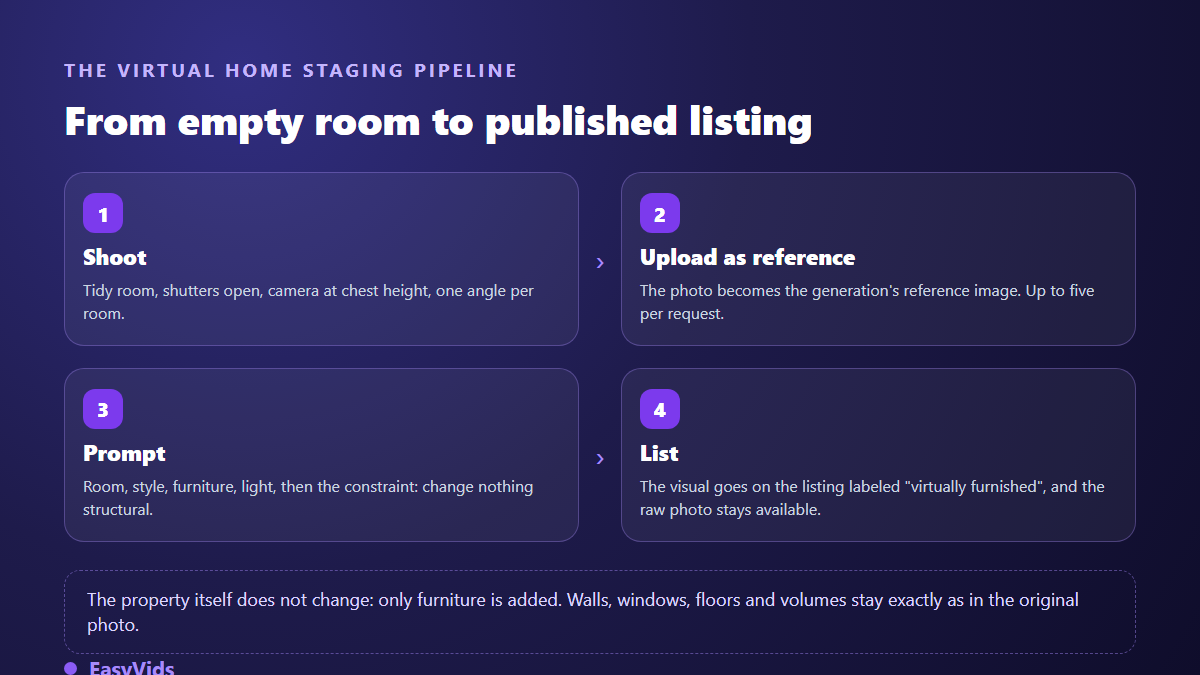
Photograph the room exactly as it is, attach that photo as a reference image in an image generator, then describe the furniture to add while explicitly forbidding any change to the structure. The model returns the same room, furnished. Expect one to two minutes per visual, a few attempts to lock the style, and a clear note on the listing stating that the photo was virtually staged. That last line is what separates a sales tool from a legal problem.
What virtual staging does, and what it must never do
Physical staging means renting furniture, delivering it, setting it up and taking it back. It works, it costs a lot in logistics, and it needs access to the property for several days. The virtual version moves all of that into the image: the property stays empty, only the photo gets dressed. For a renovation, for a remote landlord, or for a block of identical units, the time difference is enormous.
There is one line the tool must never cross: virtual staging furnishes, it does not renovate. Adding a sofa is honest. Repainting a stained wall, erasing a crack, widening a window or removing a neighbouring building is misrepresentation of the property. The logic matches what you would accept on an online store visual, where presentation improves but the product itself does not change, as covered in our method for turning a product photo into a professional visual.
The photos to take before you generate
Output quality starts with the input photo. An image model reads what you hand it: a blurry, dark or tilted shot produces blurry, dark and tilted furniture. Half an hour of careful shooting saves three hours of correction later.
- Empty the room for real. A forgotten box in a corner will be furnished around, and it will show.
- Open the shutters, switch the ceiling lights off. Daylight creates shadows the model can extend convincingly.
- Hold the camera at chest height, perfectly level. A low angle distorts volumes and makes any staging look wrong.
- Frame from the doorway, showing two walls and the floor. The model needs to see where furniture legs land.
- Shoot one well chosen angle per room rather than four mediocre ones.
- Keep the original file, uncropped and unfiltered: it is your evidence if a buyer compares.
Anatomy of a real estate prompt that holds the room
A staging prompt is not a description of a dream interior. It is a furnishing instruction, in a stable order, that always ends with a prohibition. The order matters: image models weight the opening of an instruction more heavily, and the closing constraint acts as a guardrail over everything else.
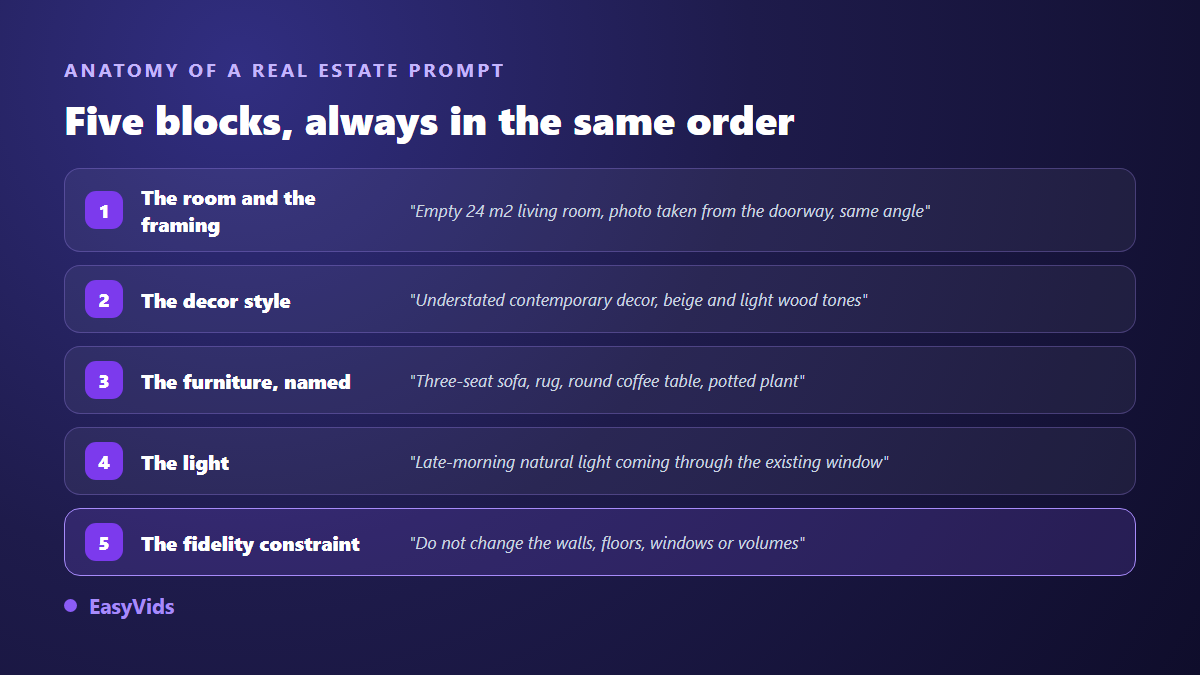
Copy the fidelity clause word for word at the end of every prompt: do not change the walls, floors, ceilings, windows, doors or proportions of the room; add furniture and decoration only. Without it the model assumes it may beautify, and it will. To go deeper into that writing craft, our library of image prompt examples shows how much a single subject shifts with the precision of the wording.
11 real estate staging prompts to copy
These eleven prompts cover the rooms of a typical home. Each assumes the photo of the empty room is attached as a reference. Swap the style and colours for what sells in your market, and leave the final sentence untouched.
- Contemporary living room. Furnish this living room strictly following the photo: light grey three seater fabric sofa, beige rug, round oak coffee table, tall green plant in the corner, one discreet framed print. Natural light from the existing window. Add nothing else and do not modify the walls, floor or joinery.
- Warm family living room. Family feel: beige corner sofa with a throw, floor cushions, thick rug, low bookcase filled with books, toys tidied into a basket. Late afternoon, soft light. Keep the architecture, openings and floor covering exactly as photographed.
- Calm main bedroom. Furnish this bedroom: double bed with a linen headboard, white bedding, two matching nightstands, shaded lamps, pale rug at the foot of the bed. Neutral palette. Do not change the proportions, window positions or wall colour.
- Child bedroom. Furnish for a six year old: single bed in light wood, plain colourful duvet, small desk, shelf with books and a few toys, round rug. Photorealistic, not illustrated. The architecture stays identical to the photo.
- Open kitchen. Complete this kitchen without touching the existing units: two bar stools at the counter, a chopping board, a fruit bowl, a herb pot, a folded tea towel. No added appliances. Do not modify the cabinet fronts, splashback or floor.
- Dining room. Add a rectangular wooden dining table for six, six matching chairs, a pale table runner and a pendant light above the table. No people. Reproduce the walls, windows and ceiling height exactly as photographed.
- Home office or spare room. Set this room up as an office: light wood desk facing the window, plain ergonomic chair, wall shelf with books and files, task lamp. Quiet, professional mood. Keep the existing architecture strictly unchanged.
- Bathroom. Dress this bathroom without replacing anything: rolled white towels, bath mat, ceramic dispenser, small green plant, existing mirror kept as is. Do not modify the taps, tiling or shower.
- Balcony or terrace. Style this outdoor space: round bistro table, two metal chairs, potted plants of varying heights, string lights along the railing. Sunny day, consistent shadows. Keep the view, railing and floor surface exactly as photographed.
- Studio or small unit. Furnish this studio with compact pieces: two seater sofa bed, folding coffee table, narrow vertical shelving, a mirror to widen the perception. No furniture blocks a window or a door. Architecture unchanged.
- Entrance hall. Dress this entrance: narrow console, wall mirror, coat hook with one coat, neutral doormat, one plant. Restrained, uncluttered. Do not modify the door, floor or walls of the original photo.
The settings that actually change the result
Three settings outweigh the rest. Aspect ratio first: a listing photo lives in 16:9 or 4:3, never vertical, unless you are posting to social feeds. Resolution next, because listing portals recompress images and a high definition render survives that better. The model last, since not every model reads input images, a capability that ranks among the seven criteria that truly separate image generators. In our studio, a model that cannot read a reference refuses the request before any credit is spent, with an explicit message: a reference silently ignored is a generation paid for nothing. Plan details sit on the pricing page.
Two behaviours are worth knowing. You can attach up to five reference images in a single request, which is useful when you want to supply both the empty room and two or three visuals of the furniture style you have in mind. But as soon as a reference is attached, the generation returns one image rather than a set: the model is working on your room, not proposing free variations. To compare options, run the same request two or three times.
What gives an AI staged photo away
Buyers spot artificial staging faster than you would expect, and the doubt then spreads to the whole listing. Four flaws come back again and again, and each is fixed either in the prompt or at selection time.
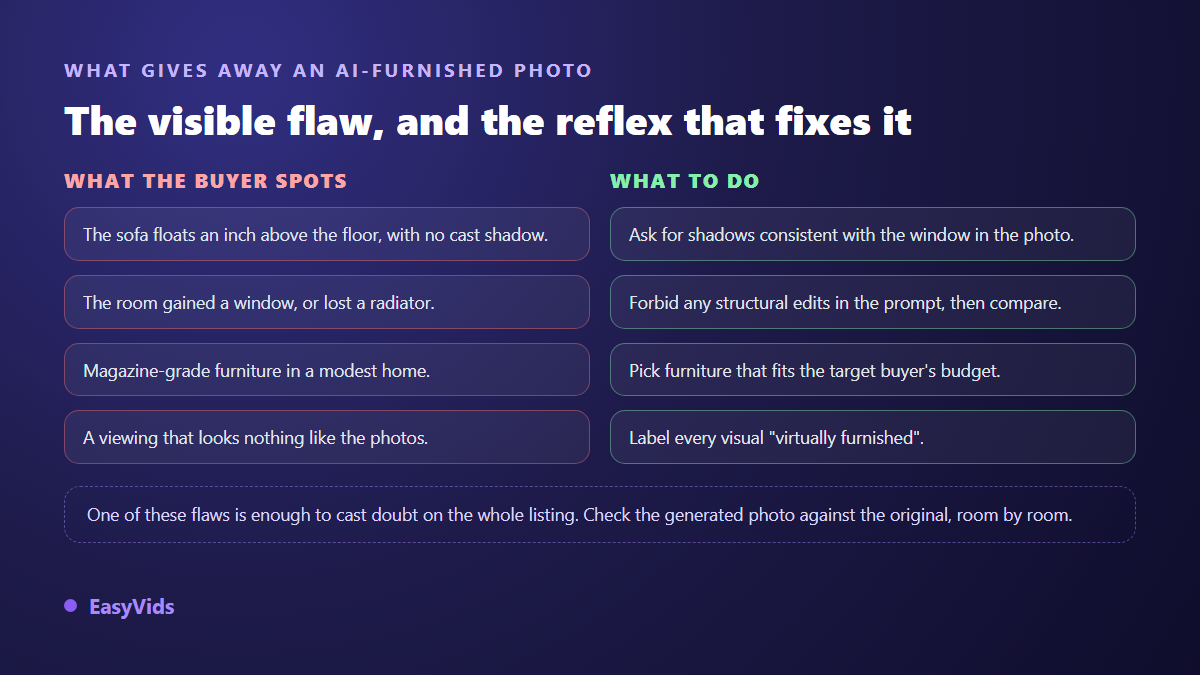
The ten second check that prevents all the others: open the original and the render side by side, and look for what has disappeared. A socket, a radiator, a wall angle, a skirting board. Models tend to erase small elements that disturb their composition, and those are exactly the ones a buyer will find during the viewing.
The disclosure you cannot skip
The most sensitive part of this subject is not technical. A virtually staged photo must be labelled as such, plainly, on the listing and on the image itself. The National Association of Realtors Code of Ethics requires, in Article 12, a true picture of the property in all advertising, and many listing networks have turned that into a mandatory label on edited images. A short line does the job: virtually staged, the property is sold unfurnished.
A newer layer applies to AI generated content. The European Union Artificial Intelligence Act sets transparency obligations in Article 50 for content generated or manipulated by an AI system, applicable since August 2026. Alongside it, the C2PA technical standard, maintained by the Coalition for Content Provenance and Authenticity, defines a provenance metadata format that several generators now write into their files. The practical rule holds in any country: keep the raw photo, publish the disclosure, and hand over the original on request.
Putting the staged room in motion
Once a visual is approved, there is a cheap next step: give the room movement. A slow push in, shifting light, a curtain that breathes, and the listing gains a video for social feeds from the same still. The technique is the one described in our seven ways to animate a photo with AI, applied to an interior shot. Keep the motion subtle: an aggressive push in distorts volumes and makes the room look bigger than it is, which brings you straight back to the fidelity problem.
How many staged visuals per listing
A three room home sells well with six to eight photos, of which three or four are virtually staged: the living room, the main bedroom, and the room whose purpose is not obvious. The rest stay raw. A fully AI staged listing rings false, whereas a mix of real photos and two or three furnishing projections reads as what it is, an aid to imagination rather than a stage set. Around twenty minutes covers a whole property once the method is settled, shooting included, and the EasyVids studio keeps generation, animation and editing in one place.
Frequently asked questions
Is virtual staging legal?
Yes, provided you disclose it. What gets penalised is deception, not editing: a staged photo published without a label can be treated as a misleading presentation of the property. The National Association of Realtors Code of Ethics asks in Article 12 for a true picture in advertising, and the European Union Artificial Intelligence Act has added transparency duties on AI modified content since August 2026. With the label in place, the practice is common and accepted.
Do I need a high quality photo for this to work?
Yes, it is the number one factor. A sharp, level shot in natural light showing two walls and the floor produces believable staging on the first attempt. A dark or low angle photo forces attempt after attempt, often without a convincing result. A recent phone is plenty; a tripod at chest height helps a great deal.
Can I remove furniture from an occupied property?
It is technically possible and much harder than adding furniture, because the model has to invent whatever sits behind each item. Results often show inconsistent floors and approximate walls. When a property is occupied, careful tidying followed by light staging gives a far more reliable render than full removal.
How long does one room take?
One to two minutes of generation, and five to ten minutes including attempts and selection. The first room always takes longer while you settle the style. The rest go quickly, since you reuse the same prompt and only change the furniture and the room named.
Can I keep one decoration style across the whole property?
Yes, and it is recommended so the listing feels coherent. Two methods combine: reuse the style, colour and lighting blocks word for word from one prompt to the next, and attach an already approved visual of the property as an extra reference. The model then aligns with the palette of the previous room.
Virtual staging will not sell a property for you. It removes the imaginative effort few buyers make in front of an empty room. Shoot cleanly, furnish without ever touching the structure, publish the disclosure, and keep the original photo within reach. To try the method on your next listing, creating an account opens the full studio and a free trial, with no bank card required.