You have things to say and no desire whatsoever to sit in front of a camera. The block is rarely shyness. It is the suspicion that faceless video ideas always end the same way: a flat slideshow over stock music. The channels living off this format disprove that every single day, and their audience never wonders who is speaking. The groundwork is the same as for any channel, and our guide for creators who never show their face lays it out step by step.
Finding a topic is not the hard part. Knowing how to build it is: what raw material to supply, in what order to work, and where the effort actually pays off. This list answers that for 27 ideas, each with its own production method. They are sorted by raw material rather than by genre, unlike our overview of the seven faceless content families, so you can pick based on what you already have.
The short answer
Every faceless video is built the same way: a text written for the ear, generated or animated visuals, a synthetic voice, a sound bed, and an edit that matches each shot to the length of its voice line. A complete AI video generator runs those five steps in one place. The 27 ideas below change one variable only, the input. Pick the one whose raw material is already sitting on your drive.
The five blocks that replace a camera
A camera does three jobs at once: it captures the image, it captures the sound, it imposes a rhythm. Without one, you rebuild those three functions separately. Less intuitive at first, far more flexible afterwards, because any block can be redone without reshooting the scene.
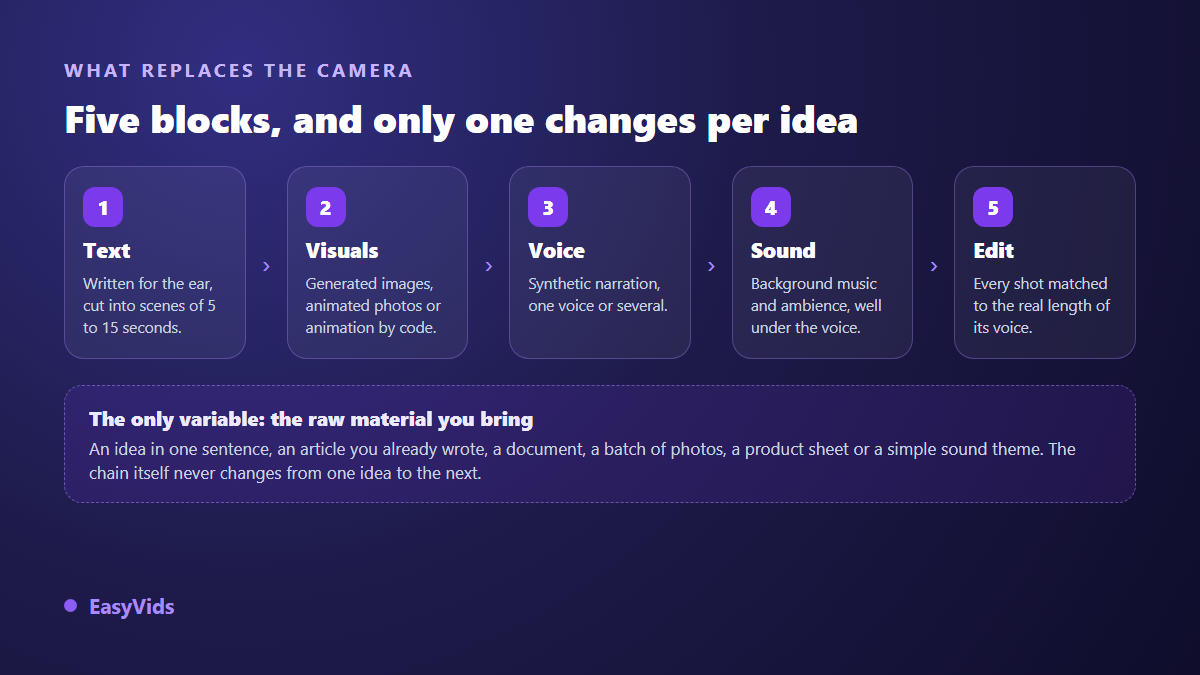
Across our generations, the tipping point is the cut. A scene that runs 5 to 15 seconds of voice, roughly 15 to 40 words, keeps the viewer. Beyond that they drift, however good the image is. That rule holds for all 27 ideas below, from horror storytelling to screen tutorials.
Storytelling: 6 faceless video ideas that carry a channel
Storytelling is the safest entry point, because attention rests on the story rather than on the narrator. The raw material fits in one sentence: an opening situation and the thing that tips it over. Everything else, visual descriptions included, is written afterwards.
- 1. A real case told in three acts. Situation, turning point, resolution, one sentence each, then hold a single visual style from start to finish. That is the mechanic behind our faceless true crime channel guide.
- 2. A forum thread turned into a story. Take a published account, rewrite it in the first person, keep the ending untouched. It is the easiest format to run as a series, as our method for forum story videos shows.
- 3. A short scare. One night, one location, one character. The constraint is what makes it credible, and the sound design does half the work, as our AI horror channel guide explains.
- 4. A children's tale in five scenes. Write one simple moral, hold one illustrated style, and give each character its own voice instead of a single narrator.
- 5. The lightning biography of a historical figure. Three dates, one decision, one consequence. Check every fact before generating: a factual slip in a short video spreads fast in the comments.
- 6. A motivation story built on a real failure. It works when the story is concrete and dated. It collapses the moment it becomes a string of maxims with nobody in them.
Knowledge: 5 ideas that still bring views months later
Explanatory content gets searched for, not stumbled upon. A video that answers one precise question keeps being found long after publication, unlike a story that rides a wave. This family needs raw material that already exists in writing: a text, a course, a document, a manual.
- 7. One concept explained in under a minute. A question up front, an answer in three shots, no detours. The vertical format forces that discipline, which is exactly why it works.
- 8. A blog post rebuilt as a video. Never paste the text as it stands: reduce it to one guiding idea and let the rewrite happen for the ear, following our method for turning an article into a video.
- 9. A lesson pulled from a document you already own. A manual, a report, a training deck: the document gives the outline, the voice over gives the rhythm. The route from PDF to narrated video covers the full case.
- 10. A narrated screen tutorial. You never appear, your screen is enough: record the steps, let a synthetic voice comment, and caption it for viewers watching in silence.
- 11. A head to head comparison. Five criteria, two columns, a recommendation you actually commit to at the end. It captures the most search demand on technical topics.
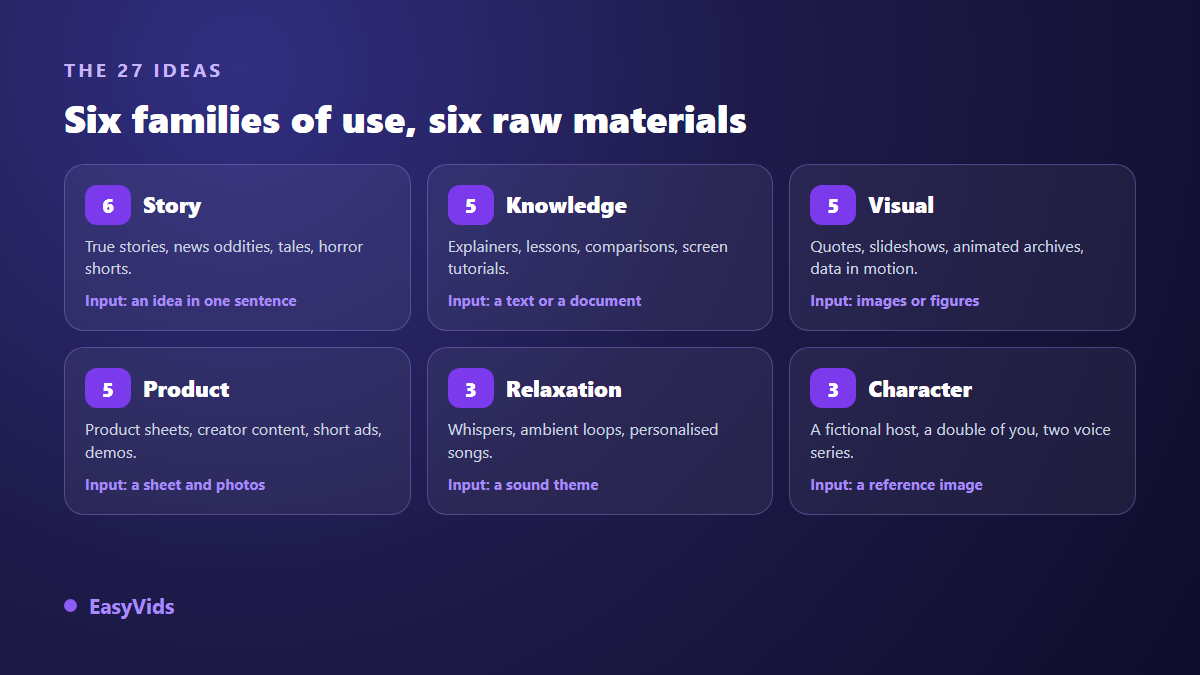
Visual: 5 ideas where the image carries everything
Here the text shrinks to a minimum, sometimes to a single sentence. The work moves to rhythm and art direction. These are the fastest videos to produce and the easiest to turn into a series once the style is locked, which makes them good ground for building a publishing habit. A year in review belongs to this family, with its photos set back in motion under a chosen track, and our guide to the year in review video lays out the full structure, from sorting the images to the closing shot.
- 12. An animated quote. One strong line, a slowly moving background, one typeface held across the whole series: our quote video guide gives the exact template.
- 13. A memory slideshow with music. Your photos, a steady transition, and a track chosen to follow the images rather than the other way round, as in our photo slideshow with music guide.
- 14. An archive photo set back in motion. A slow push in is enough to bring a still to life, and seven ways to animate a photo with AI cover the common cases.
- 15. Numbers that build on screen. A ranking, a trend, a breakdown: data becomes watchable when it assembles itself instead of appearing all at once.
- 16. A before and after of a place or an object. Generate the same subject in two states and let the transition do the arguing. No voice required.
Product: 5 ideas that sell without a studio
A shop does not need a set to show what it sells. It needs the product to be readable, the benefit to land fast, and the video to exist in the right aspect ratio. The raw material is already there: your photos, your product sheet, and the questions buyers ask before they pay. When that sheet is all you have, an ad generator turns it into a finished spot, from the selling angle to the final edit, and the only thing you write is the opening description.
- 17. A product sheet filmed without a studio. Product in close up, one benefit per shot, a call to action at the end: the whole product video guide sits in that discipline.
- 18. A creator style review for a shop. A character holds the product and speaks to camera without anyone filming, which our UGC for dropshipping guide breaks down.
- 19. A fifteen second vertical ad. Three seconds of hook, seven of demonstration, five of close. Write the ending first and the rest falls into place.
- 20. An animated app walkthrough. Your screenshots set in motion by animation built for the occasion, with no editing software to learn.
- 21. A product FAQ in video form. Take the five objections that keep landing in your inbox, one short video each. It is the commercial content that works the longest.
Ambient: 3 ideas where sound is the real subject
In this family the image becomes scenery and the sound becomes the content. Length is an advantage rather than a risk, because the viewer is not watching. They are listening while doing something else.
- 22. A whispered sequence. The voice has to sit close, slow and breathing: the settings that make the difference are gathered in our AI ASMR voice guide.
- 23. An ambient loop to work to. One instrumental bed and a single scene that barely moves, held over a long runtime, built with an AI music generator.
- 24. A song dedicated to someone, cut as a clip. Lyrics written around a first name and one precise memory, then images that follow the text verse by verse.
Character: 3 ideas with someone on screen who is not you
This is the demanding family, and the one that builds a brand fastest. A recurring face creates an appointment, provided it stays rigorously identical from one episode to the next. The technique hangs on one point: a reused visual reference, never a rewritten description.
- 25. A recurring host who does not exist. Lock the face once, reuse the same reference image in every scene: that is the only way to keep the same character across videos.
- 26. A double in your own likeness, with no camera. One photo of you acts as the reference and the character delivers your script on screen without a single take, as our AI double guide explains.
- 27. A two voice mini series. Two characters, one disagreement, one episode a week: the narrative thread is built exactly as in our method for creating a series with AI.
The four moves every one of these ideas shares
Whichever idea you pick, production follows the same order. State the idea in one sentence rather than handing over a finished text, because a text written to be read with the eyes always narrates flat. Set the length in minutes of video rather than in words: one minute of voice over runs to roughly 150 words. Let the scenes be cut, then fix the cuts wherever the rhythm sags.
The third move is the neglected one. The voice carries half the perceived quality, and a well handled voice forgives a lot of visual weakness. Punctuation then matters as much as wording. The fourth move is the edit, matching every visual to the real length of its voice line and exporting in the target ratio without destructive cropping.
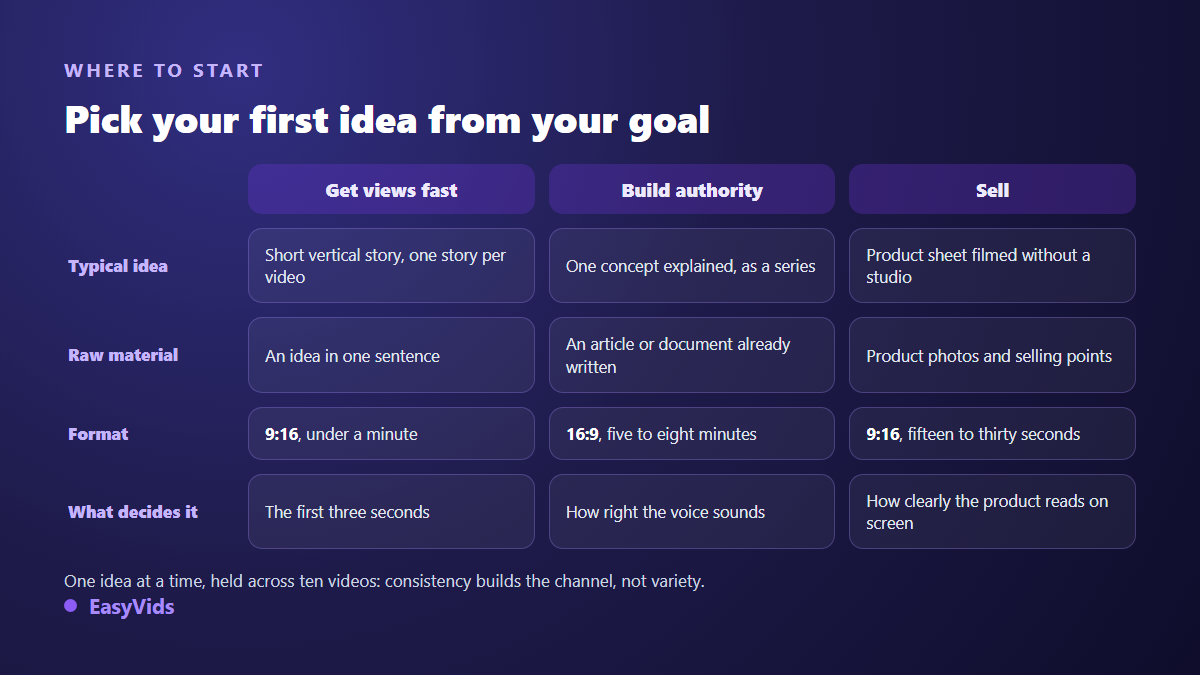
Pick one idea and hold it for ten videos
The common failure is not a shortage of ideas, it is a surplus. A channel that alternates story, tutorial and quote builds no expectation at all. Take a single idea from this list, ship ten episodes, then judge on numbers rather than on a feeling.
The second criterion is production cost per episode. An idea needing eight top quality generated shots cannot be sustained at the same pace as an idea built on three stills. Draft with fast models, save maximum quality for episodes that already perform, and check the plans on the pricing page.
What platforms expect when the video is generated
Two rules are worth knowing before you publish. According to the YouTube Help Centre, creators must disclose in YouTube Studio when a video contains realistic content generated or altered by artificial intelligence and a viewer could mistake it for a real scene: the declaration happens at upload, and the platform adds the label. On the European side, the AI Act requires under Article 50 that manipulated deepfake style content be disclosed as artificial, a transparency obligation that has applied since August 2026. A narration illustrated with visibly stylised images does not fall under those cases. A realistic character presented as a real person does.
Monetisation does not hinge on the tool. According to the YouTube Help Centre, the Partner Programme requires original and authentic content and rules out mass produced, repetitive material with no contribution of its own. A faceless channel clears that bar as soon as it brings a written scenario, a considered voice and a deliberate edit, as our piece on reused content and monetisation refusals details.
Frequently asked questions
Which faceless video idea should I start with?
The one whose raw material you already have. If you run a blog, rebuild a post as a video. If you have photos, make a slideshow. If you have nothing, start from a short story: one opening sentence is enough, and you will have seen the whole chain in a single production.
Should I use my own voice or a synthetic one?
Both work. Your own voice is a recognisable signature and forces you to re record on every correction. A synthetic voice is fixed in a second and travels across languages. Many channels start synthetic and switch once the format is settled.
How long does one of these videos take?
For a three minute narration, expect a few minutes of generation when scenes run in parallel, and around half an hour overall once you factor in reviewing the script and adjusting two or three visuals. Most of the time goes into review, not compute.
Can faceless AI videos be monetised?
Yes, as long as they contribute something of their own: a written scenario, a considered voice, a deliberate edit. What platforms reject is repetitive mass produced content, not the tool used to build it.
Do I need editing software installed?
No. Automatic editing assembles the scenes and produces a publishable file. An online editor is still useful for animated captions, on screen text or an intro, and it runs in the browser, phone included.
An idea is worth nothing until it is produced. Pick the one whose raw material you already hold, write the first sentence today, and let the chain handle the rest: one published episode teaches more than ten lists of topics. Creating an account opens the full studio, and EasyVids brings writing, images, voice, music and editing together in one place.