You want to post every week and you have no intention of appearing on camera. The problem is not shyness, it is repetition: every list of faceless video ideas you find repeats the same three suggestions, and none of them tells you how the thing is actually made. You open a blank document on Monday morning, write two titles, and close it again.
This page does the opposite. Twenty seven formats, grouped into seven families, each with what it really demands: where the footage comes from, who carries the voice, how many shots to plan. All of them can be produced without a camera, a studio or a crew, using the building blocks of an AI creation studio. Pick one, produce it this week, and keep the rest of the list for later.
The short answer
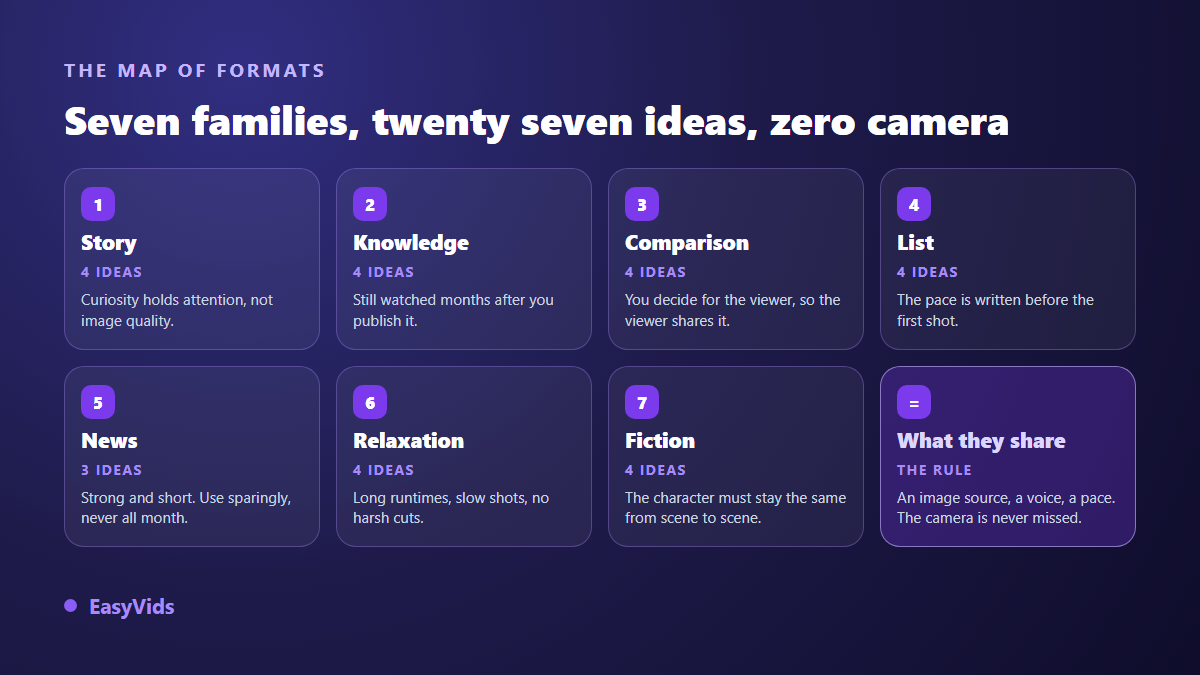
A faceless video rests on three decisions, never on a magic topic: where the image comes from, who carries the voice, and how fast the shots follow each other. The twenty seven ideas below fall into seven families: story, knowledge, comparison, list, news, relaxation and fiction. Choose the family that matches what you already know how to do, not the one that impresses you most, and ship a single idea this week.
The four blocks that replace a camera
Before the list, a way to read it. Every faceless video breaks down into four blocks, and one bad choice is enough to make the result painful to watch. The first decides everything: the source of your shots. It can be generated from your own text, pulled from public archives such as the NASA image and video library, captured from your screen, or built as animated text. The other three follow, and you settle them once for the whole series.
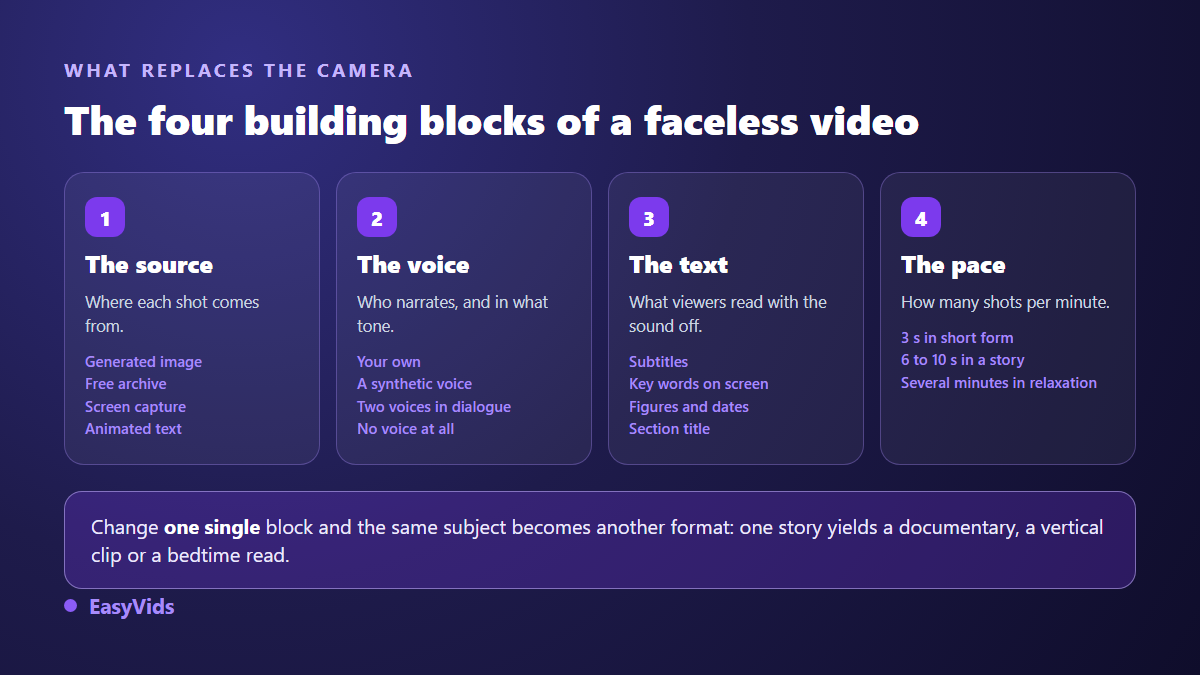
The most underrated block is the last one, rhythm. The same content is watchable or unbearable depending on whether the shot changes every three seconds or every twenty. A shot that runs past ten seconds with no movement and no reframe loses attention, except in relaxation formats where slowness is the point. The full chain, from written text to exported file, is laid out in our AI video generator guide.
Family 1: story
The easiest family to start with. Attention holds through curiosity, not image quality: an imperfect shot goes unnoticed if the next sentence makes you stay. In exchange, everything happens in the writing.
- 1. The rise and fall of a company. Cut the story into five acts: the start, the first win, the mistake, the fall, what remains. One setting per act, two or three shots inside it, a steady voice over and the dates on screen.
- 2. A historical event told at human height. Pick one single day rather than a century, and write in the present tense, like a witness describing what they see. Alternate a wide establishing shot with a close up of an object.
- 3. A public domain text staged again. Folk tales, myths, travel writing: online public libraries give you the full text of works whose rights have expired. Check the edition you use, rewrite it into eight hundred spoken words, one shot per paragraph.
- 4. The diary of an invented character. A first person voice, subjective shots (hands, a window, a road going by), no clear face. Few shots to generate, a lot of text to write.
Family 2: knowledge
An explainer keeps being watched months after publication, because it answers a question people type all year. It costs more preparation than a story and pays back for longer. One rule covers all four formats: a video answers a question, never a topic.
- 5. The three minute lesson on one single idea. A question in the title, the answer in the first sentence, three examples, a ten second recap. On screen text carries the keywords, the voice does not repeat them word for word.
- 6. The narrated screen tutorial. Record your screen, cut the dead time, add a voice over written afterwards and a zoom on every important area. No face, high perceived value, and a subject searched all year round.
- 7. The how it works of an everyday object. A lock, an engine, a search engine, a vaccine. Three shots are enough: the overview, the cutaway, then the path of one element through the system.
- 8. The word of the day, in a language or in professional jargon. One word, its definition, two uses, one common mistake. Thirty seconds, identical packaging every episode, posted at a fixed time.
Family 3: comparison
Comparing means deciding on behalf of the viewer. These formats get shared because they settle an argument, and they produce fast: the structure is known in advance, only the content changes.
- 9. A versus B, on five announced criteria. Two methods, two cities, two ways of doing the same thing. State the criteria up front, treat them in the same order for both sides, then call it. A split screen carries the whole video.
- 10. Before and after. A restored object, a changed neighbourhood, a practice over fifty years. The cut always happens on the same framing, otherwise the effect collapses and the eye stops seeing the difference.
- 11. What people believe against what is established. Five myths in one field, each stated then corrected, with the source named on screen. Handle it honestly: correcting without citing simply installs another belief.
- 12. Scale compared. Sizes, distances, durations, quantities. A familiar object becomes the unit, then every element is placed against it. One slow continuous shot can carry the entire video.
Family 4: list
A list has one rare advantage: its rhythm is written before the first shot. You know how many items, how many seconds each, and therefore how long production will take. This is the family to pick when you want regularity first. When every item fits on one written line, the jump from document to vertical video is almost direct, and our method for turning written text into a TikTok video sets out how to cut it.
- 13. The timed countdown. Ten items, fifteen seconds each, a timer in the corner. The duration constraint forces you to cut the filler and gives a steady pace with no editing effort.
- 14. The seven costliest mistakes in a trade. One mistake, its concrete consequence, the fix in one sentence. It invites saves: viewers keep it to come back to, which beats one more view.
- 15. The strangest places or objects in a theme. Each item gets a wide shot, a detail and a surprising line. Plan two shots per item rather than one: the second one builds credibility.
- 16. The toolkit of a profession. What practitioners actually use, in the order they use it rather than by popularity. It ages fast, so republish an updated version every year.
Family 5: news
News pays immediate attention and expires in days. Give it part of your calendar, never all of it: a channel that lives on news alone starts from zero at every upload and builds no catalogue.
- 17. The weekly roundup of your field. Five items, thirty seconds each, one practical consequence per item. Same packaging every week: here the appointment matters more than the surprise.
- 18. The term everyone uses without understanding it. A word that just surfaced, its origin, what it covers and what it does not. You catch a rising search, provided you publish within the week.
- 19. The public report explained. Official bodies publish open data almost nobody reads. Take three figures, put them on screen, explain what they change for your viewer, and name the source on screen every time.
Family 6: relaxation
Here the viewer is not really watching: they leave it running while they work, sleep or breathe. Durations are long, shots are slow, and one abrupt cut ruins the whole thing. Short to write, long to render.
- 20. The soundscape of a place. Rain on a window, a wood fire, a night train. One very long shot, a seamless audio loop, no voice. The difficulty is technical, not creative: the loop must be inaudible.
- 21. The guided breathing session. A calm voice, a circle expanding at the requested pace, a still background. The text is short and silence is part of the script.
- 22. The bedtime story. A slow narrative, no tension, no rising music. The voice drops at the end of each sentence and the edit never tries to wake anyone up.
- 23. The study loop. A discreet animated backdrop, continuous instrumental music, a timer on screen. Long format, short production, provided you truly own the rights to the music.
Family 7: fiction
Fiction demands the most method and builds the strongest channel identity when it is held. The trap is not the writing, it is visual continuity between scenes, solved with a reference image attached to every shot rather than a description copied into every prompt. When one of these formats still needs a person on screen, an avatar built from a single photo holds that role from one episode to the next, with no camera and no shoot.
- 24. The mini series with a recurring character. The same character returns episode after episode. The hard part is keeping the same face, outfit and setting from the first shot to the last.
- 25. The creator style testimonial. Vertical framing, everyday light, one person talking to their phone. One absolute rule: never present a generated character as a real customer, that is a deceptive practice and platforms act on it.
- 26. The what if. One hypothesis held to its end, with its chain of consequences. Announce the fiction in the title and repeat it on screen, otherwise you produce misinformation without meaning to.
- 27. The two voice debate. Two characters, two viewpoints, an exchange written line by line with a different voice for each. The ear follows a conversation better than a monologue.
Pick one idea, not twenty seven
Twenty seven ideas are twenty six reasons to publish nothing. The only useful decision today is to keep one, the one that uses what you already have: a skill, a voice you like, an archive, an appointment you can honour. If none of them stands out, look at what the finished result actually looks like first: our selection of AI generated video examples shows the output format by format. The grid below starts from your situation rather than from the format.
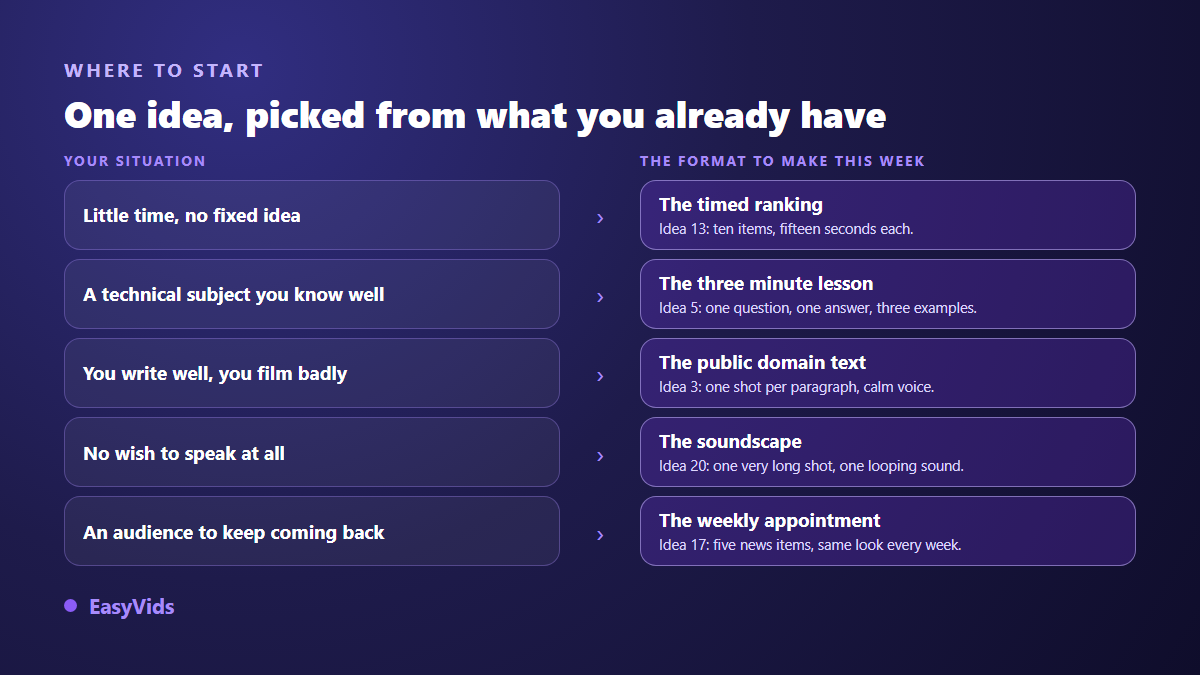
One last criterion, usually the real one: the volume you can sustain without burning out. A story needs more writing than a timed countdown; a relaxation loop needs little writing but a lot of runtime. Shot count drives everything else, including what production consumes, and the current plans are listed on the pricing page rather than in an article that would age badly.
Batch your production, never one at a time
A faceless channel does not die from a lack of ideas, it dies from pace. Making one video a week by hand wears you out; making four in one sitting once a month holds. Do the same step for every video before moving to the next one. Our step by step guide to a published YouTube video walks that cycle through one full episode. If your videos also have to follow each other, with the same characters from one week to the next, the method for building a series adds the bible and the story arc that tie them together.
- Write the four scripts back to back in one session, so the tone stays consistent across episodes.
- Then split all four into scenes without generating anything. This is where the padding becomes visible.
- Launch the visuals for the four videos at once and let them run: generation continues even if you close the page.
- Record every voice over in the same pass, with the same voice and the same reading style, to avoid tonal drift.
- Edit and export last, keeping identical packaging: same font, same accent colour, same intro.
- Schedule the uploads at a fixed time. The appointment beats the perfect video.
Your voice is the face now
Without a face, the voice becomes your signature. It is what a viewer recognises within three seconds and what decides whether they stay. Two mistakes come back constantly: text written for the eye, full of subordinate clauses, and a flat delivery that never speeds up. Both are fixed in the writing, never in the edit. Your own voice, a synthetic voice with a chosen reading style, or your voice cloned from a short sample all work, as long as the script was written to be spoken. The settings that matter are covered in our guide to natural AI voice over.
Five traps to avoid
- A topic that is too broad. Nobody searches for animals; people search for why cats purr. A video answers a precise question.
- An edit with no breathing room. One shot per sentence for eight minutes is exhausting. Let a shot run when the line matters.
- Compilation without contribution. Stacking other people's clips with no commentary or transformation risks takedowns and blocks monetisation on most platforms.
- No text on screen. A large share of your audience watches muted. Without captions, your voice over does nothing for them.
- Packaging that keeps changing. A different intro every episode stops viewers recognising you in a feed. Lock a font, a colour and a structure for twenty episodes.
Frequently asked questions
Can a faceless video be monetised?
Yes, as long as it contributes something. Platforms do not penalise the absence of a face, they penalise reused content with no transformation: compilations of other people's clips, raw readings of text found elsewhere, near identical videos produced in bulk. Original commentary, structure and an explaining voice take you out of that category.
Do I have to use my own voice?
No, but choose one voice and keep it. Recognition comes from consistency, not from timbre. If you dislike yours, a synthetic voice with a stable reading style does the job, provided the script was written to be spoken rather than read.
How many ideas should I test before settling?
Count at least ten videos before concluding anything, across two or three formats only. Trying all twenty seven ideas in twenty seven videos proves nothing, because you never keep one format long enough to compare. Two formats, five episodes each, is a real test.
Do these videos require editing software?
Not necessarily. Automatic assembly aligns every visual with the length of its voice over and outputs a file ready to publish. The online editor then handles the finishing: a cut, a transition, a caption to re time. Nothing to install, everything runs in the browser.
Do I need to disclose that a video was AI generated?
Yes whenever the content is realistic and could be mistaken for real footage. Major platforms ask for that declaration at upload and can show a label to viewers. Obviously stylised animation raises fewer questions, but the box takes two seconds to tick and forgetting it can cost you the video. More practical answers live in our frequently asked questions.
A faceless channel is built on three choices held for a long time: one family of formats, one voice, one publishing rhythm. This list exists to remove the blank page on Monday morning. Take the idea that matches what you already know how to do, write it tonight, produce it tomorrow, publish it this week, then do the same one again until it feels easy. Create your account to write the script, generate the shots, add the voice and export the file in one place.