You have a picture you like and it does not move. A product shot on a plain background, an illustration you generated yesterday, a portrait, a family photograph. In a feed, it goes by unseen, because thumbs no longer stop on still frames. Image to video AI answers exactly that gap: your picture becomes the first frame of a clip, and the model builds the seconds that follow.
The gesture looks simple, and it has become simple: one picture, one sentence, one clip. What stays hard is getting the shot you had in mind instead of a vague motion that damages your image. Most of the result is decided before you generate, in the picture you pick and in the way you describe the movement. This guide walks the whole chain, as it works inside the EasyVids creation studio and elsewhere.
The short answer
Turning an image into video with AI happens in three moves. You supply a picture, you describe the motion you want in one or two sentences, the model returns a clip of a few seconds that starts from your picture. The model does not start from a blank page: it extends what you hand it through time. That is the whole difference with text to video, where the entire scene is invented, and it is what makes the approach worth using: you keep control of what is on screen. Our guide to AI video generators sets the wider frame this article is the image chapter of.
What the model keeps, and what it reinvents
An image to video model takes two inputs: your picture, and a text describing the motion. It returns a run of frames that starts with your picture, or with something very close to it. The important word is close. Colours, composition, lighting and subject come across faithfully. Everything that moves, though, is recomputed frame by frame, and whatever is recomputed can drift.
That drift is not a manufacturing fault, it is the mechanism itself. The model predicts what comes next without knowing anything you know about the scene. It has no idea the person in the background is your sister, that the bottle label carries a specific name, that the hand is holding a particular object. The longer the sequence runs, the further it wanders from your source image. Across our own generations, flaws almost always show up in the last third of a clip, never in the opening frames.
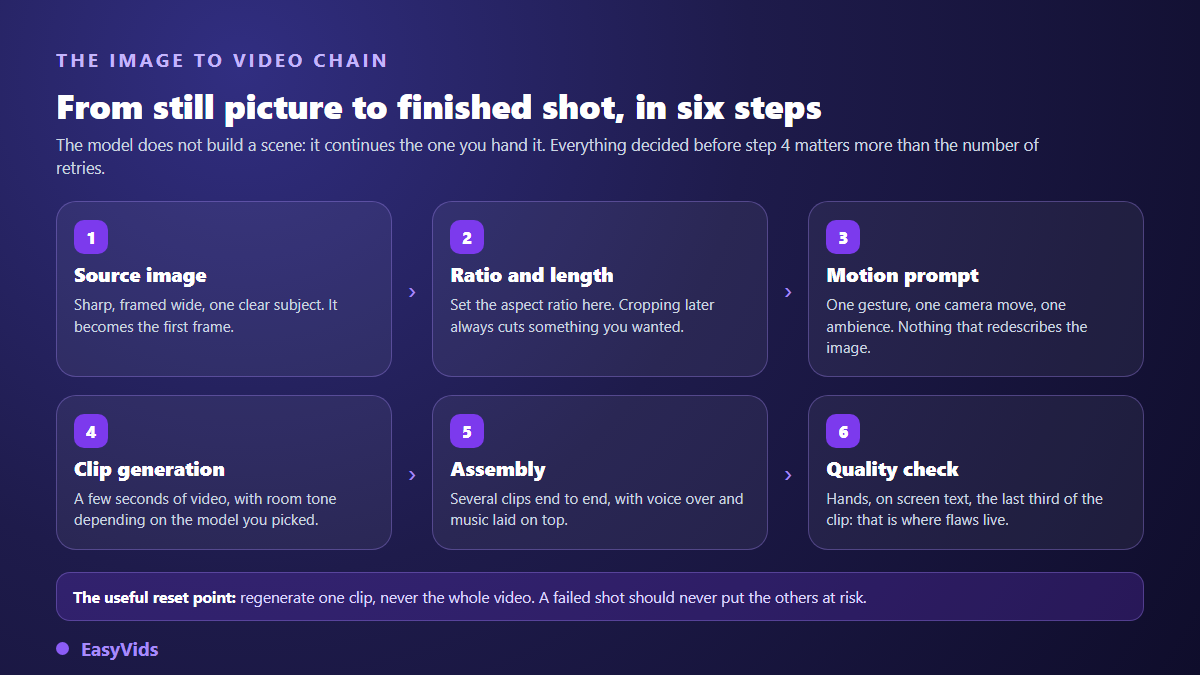
Hence the first working rule: ask for the smallest motion that still tells something. A breath of wind through hair, eyes lifting, a camera creeping forward a few centimetres. The shortest and plainest shots are the ones that come out clean, and they are also the ones nobody notices once they sit inside an edit.
Why start from a picture instead of a text prompt
Text to video describes a scene that does not exist yet. You get the model's proposal, often beautiful, rarely the one you pictured. Image to video flips the balance: the scene is already fixed, approved, framed by you. The model only has to give it duration. For client work, a product page or a run of shots that must look like siblings, it is the only route that holds up.
Three uses follow naturally. Animating pictures you already own, whether products, places or archives. Generating an image first, fixing it until it is exactly right, then animating it, which means you only pay for motion on a visual you have approved. And keeping the same set and the same character from shot to shot by starting each time from the same reference image. Our seven ways to give a photo movement covers the techniques available for the first case.
The source image settles most of the result
The beginner reflex is to rewrite the prompt when a clip disappoints. More often the problem sits upstream: the picture could never have animated cleanly. A blurry photo produces blur that starts moving on its own. A tiny face in frame changes features halfway through, because the model has too little to hold on to. A subject glued to the edge ends up out of frame the moment the camera moves.
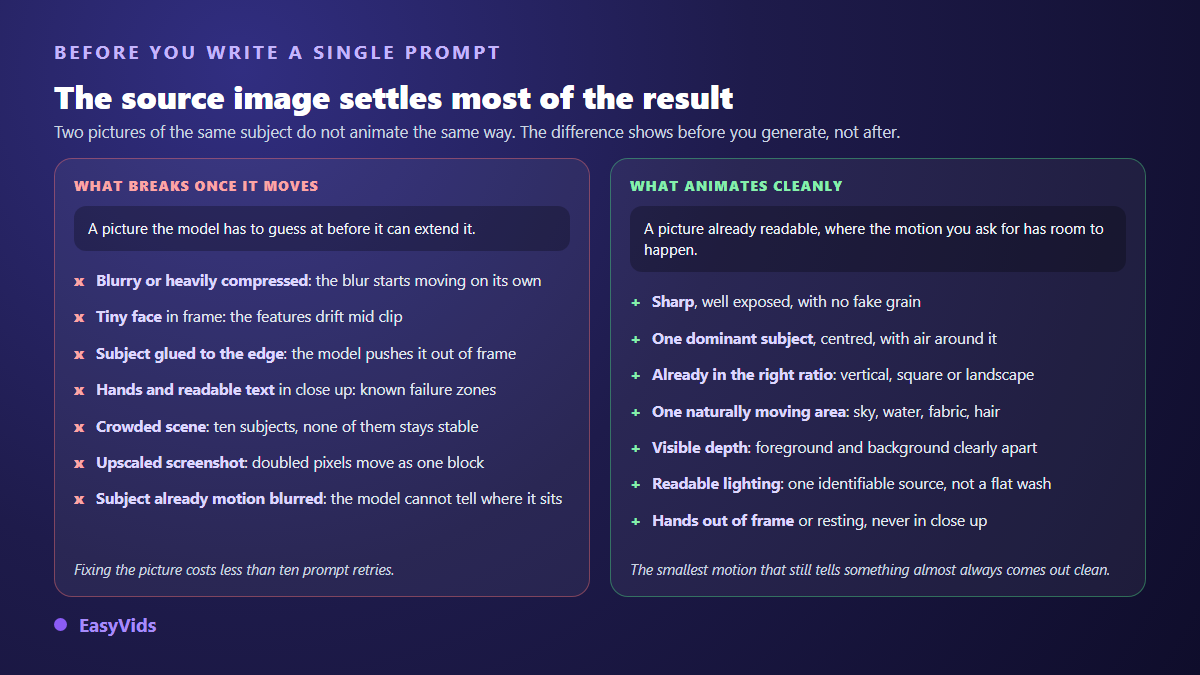
- Sharpness. A crisp, well exposed picture, with no added grain and no forced upscale.
- One dominant subject. A clear point of interest, roughly centred, with air around it.
- The right ratio from the start. Vertical, square or landscape, decided before generation rather than at the crop.
- One naturally moving area. Sky, water, fabric, hair: something the model can animate without inventing anything.
- Depth. A foreground and a background clearly apart, which makes any camera move believable.
- Hands and text kept out of close ups. Those are the two zones where flaws show up fastest.
If your picture fails those checks, repair it before animating. Recrop, sharpen, raise the resolution, remove a distracting element: each of those takes a minute and saves a run of failed clips. On an old photograph, restoration always comes before animation, otherwise the scratches and the grain come alive too.
Describe the motion, not what the picture already shows
Here is the most common mistake, and it runs against instinct. Facing the text field, people redescribe the photo: a man in a cafe, warm light, highly detailed. The model then receives a build order when it was asked for an animation, so it rebuilds the scene. The face slides, the set reorganises itself, and nothing happens for six seconds. An image to video prompt does not describe space, it describes time.
Three lines are almost always enough: what the subject does, what the camera does, what you hear. An action verb with a beginning and an end, a single camera move, and an explicit audio instruction so no music turns up unannounced. Add an identity line whenever a face matters, along the lines of same features, same hair and same clothes as the supplied image. Our twenty one image to video prompt examples give the exact wording, layer by layer.
Ratio and length are decided before, never after
The ratio of a video generated from a picture follows the ratio of that picture first. Feeding a landscape photo and hoping for a vertical render means asking the model to guess what is missing left and right: it invents it, and the seams show. Prepare the image in the ratio you are aiming for, then check that the same ratio is what gets exported, with no intermediate crop slipped in between generation and edit.
Length obeys a plain technical constraint. Image to video models return short clips, on the order of a few seconds, and quality degrades as the clip runs longer. In our studio, shots are cut at six seconds, which sits close to what a model holds without drifting. A longer video is not obtained by asking for a longer clip: it is obtained by chaining several short ones.
Five situations, five different motions
A product shot, a portrait, an illustration and a family archive do not call for the same treatment. The motion that flatters one ruins another. The grid below sums up what works across the five most requested cases, with the check that belongs to each.
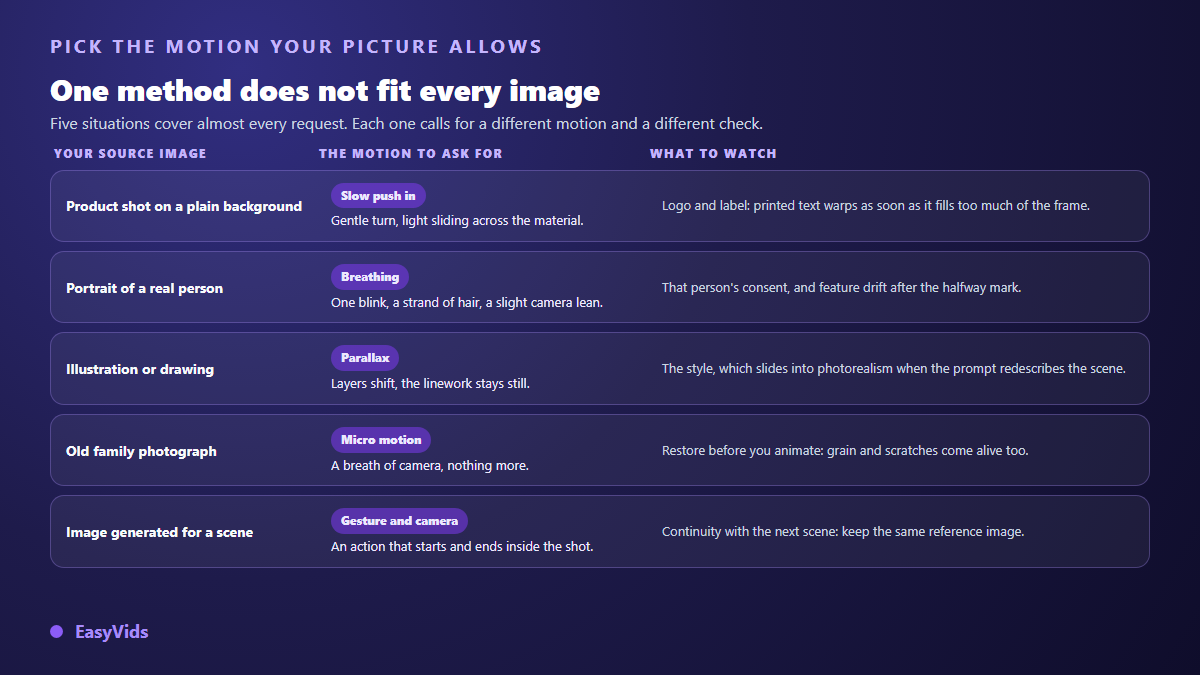
The commercial case deserves its own note. On a product shot, the winning motion is nearly always a slow push in or light sliding across the material, never a full turn that forces the model to invent the hidden side of the object. A picture that has been cleaned up first, with a plain background, gives a clip you can loop on a product page without anybody looking twice.
From one clip to an actual video
A six second clip is not a video. What makes a video is a run of shots that answer each other, a voice carrying the point and a soundtrack holding it together. The method that works starts with the breakdown: one sentence per shot, one image per sentence, one motion per image. You then generate the images, animate them one by one, and lay the voice over on the finished edit. Since a large share of viewers will watch these shots with the sound off, finish with a pass through a subtitle generator that stays accurate, so the point still reads in silence. Two habits avoid the catalogue effect: starting the next clip from the last frame of the previous one, and reusing the same reference images wherever the same character appears, which our method for keeping one character consistent across scenes explains in detail.
Rights, consent and disclosure
Three checks are worth a minute of your time. Do you have the right to use the source picture, given that stock licences often restrict modification and derivative use, and that a photo found through a search engine is never free by default. Did the identifiable person in the frame agree, because animating someone's portrait engages their image rights and written consent stays the only serious protection. And finally, disclosure: the YouTube Help Centre has asked since 2024 that creators flag, at upload, a video containing realistic altered or synthetic content, TikTok's community guidelines require realistic AI generated content to be labelled, the C2PA specification published by the Coalition for Content Provenance and Authenticity defines provenance metadata attached to the file itself, and the European Union AI Act sets out in Article 50 a transparency duty for content resembling real people or real events.
Where to animate an image in EasyVids
The Director path makes the chain explicit. Each scene first receives its image, built from the project references or imported from your computer, then that image is animated by a video prompt of its own. The two fields are separate on screen, and the second asks for one thing only: the motion, the camera, the dynamics of the scene. You edit that text scene by scene, relaunch a single video without touching the others, and request an assisted rewrite when a prompt gets refused by the filters. What each generation consumes is counted in credits, and the detail lives on the pricing page.
Frequently asked questions
What image size should I supply for a good animation?
Aim for at least the output resolution you want, so 1080 pixels wide for a standard vertical video. Below that, the model works on too little detail and drift arrives sooner. An artificial upscale is no substitute for a sharp picture: it manufactures pixels that will move as one block once animation starts.
How long can a clip generated from an image be?
A few seconds, depending on the model. Quality degrades with length, and the genuinely usable range stays short. For a video running several minutes, chain short clips in the edit rather than asking for a long clip, which nearly always drifts in its final stretch.
Can I animate a picture generated by another AI tool?
Yes, and it is the most comfortable case, since you can correct the image as many times as needed before requesting any motion at all. Just check the terms of the tool that produced the picture, particularly if your video has a commercial purpose.
Why does the face change when I supplied a photo?
Because every frame is recomputed, and the model has too little definition of the face to hold it to the end. Two moves fix most cases: supply a picture where the face occupies a real share of the frame, and add an identity instruction demanding the same features from the first frame to the last.
Does the motion prompt have to be written in English?
No. Recent models read other languages perfectly well, and clarity matters more than the language you use. A short, ordered instruction with no decorative adjectives beats a long approximate English paragraph whose nuances you do not control.
The right way to start is not to hunt for the perfect model. Take a picture you already like, ask it for one simple movement, and watch what comes back. A single generation will teach you what no article can: what your image can carry, and what it refuses. Everything else is built shot by shot from that first observation. Open an EasyVids account and animate your first picture today.