You typed a sentence into a generator, waited two minutes, and out came a video: smooth stock shots, a decent voice, quiet music, a clean edit. Technically flawless. And yet it looks like a bank commercial, exactly like thousands of others. That is the moment most people start looking for an InVideo review before paying for a subscription. The real question is never « does it work », because it does. It is « does it work for what I actually need to produce ».
This piece answers that one. It covers what InVideo really assembles behind its prompt box, where it is genuinely hard to beat, where it hits a ceiling, and what to check before signing up for a year. If you would rather start with the wider market than one tool, our comparison of AI tools for creators sorts services by need instead of by brand.
The short answer
InVideo is an excellent stock footage assembler and one of the fastest ways to turn an idea into a watchable file. It is very strong on explainer video, short advertising and high cadence social content. It runs into limits the moment your project needs a visual world that belongs only to you, and above all a character who stays the same from the first shot to the last. For storytelling, fiction or a series, look for a studio where consistency is the starting point rather than a feature added later.
What InVideo has become in 2026
The positioning has shifted three times in three years, which says a lot about the pace of this market. According to its product page as consulted in August 2026, InVideo now presents itself as an agent platform for serious creatives rather than a template editor. The promise is no longer « a video in five minutes » but « run a production ». The vocabulary changed more than the underlying machinery.
In practice, that same page advertises access to more than two hundred image, video, audio and music models, timeline editing with frame level control, a storyboard that turns a script into a shot by shot plan, a long term memory meant to hold character or story consistency, and multiplayer work on a shared project. Stock footage comes from partner libraries, with iStock and Storyblocks named directly. Voices rely on a third party synthesis engine, ElevenLabs, also named on the page.
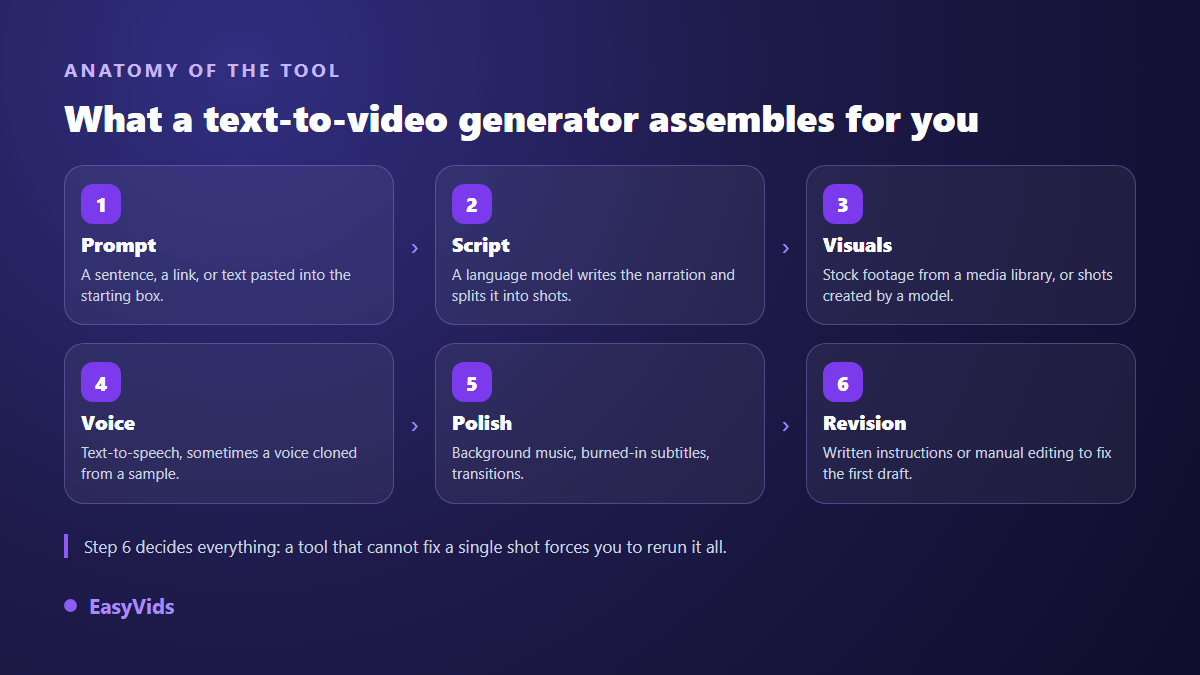
What matters is not the feature list but the chain those features form. Every serious generator runs the same six steps, and what separates them is how they let you take back control, as our guide to AI video generators sets out.
What InVideo does better than most
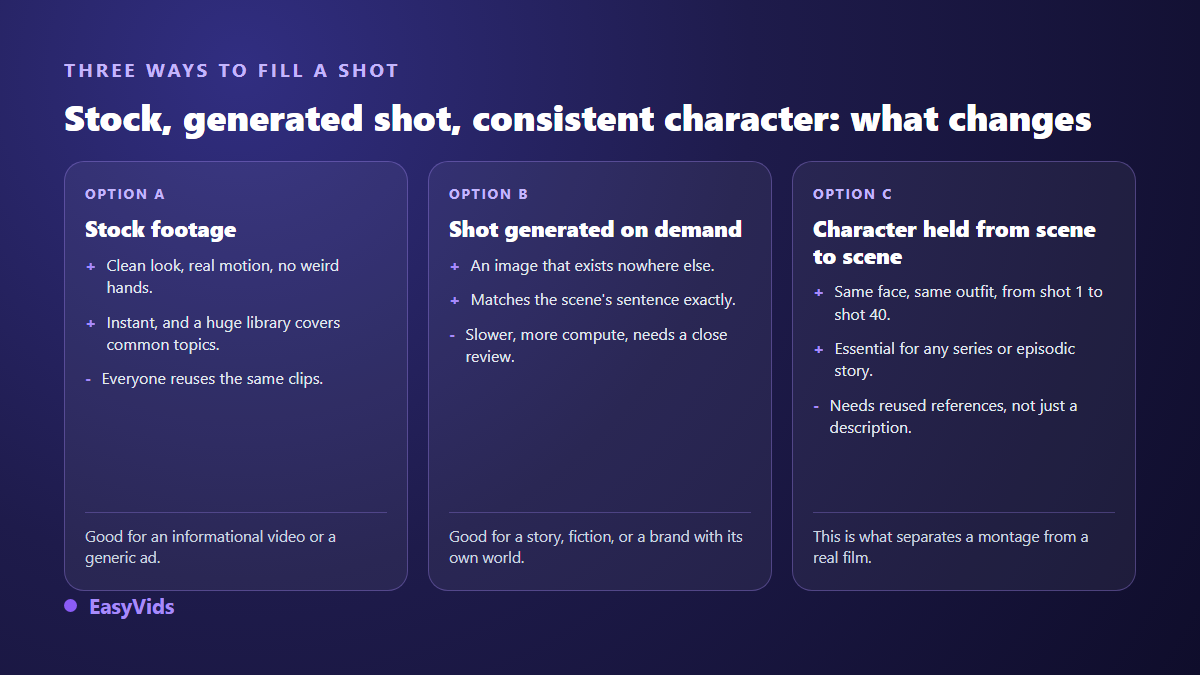
Its long standing advantage is the built in media library. When your subject is common, an office, a city street, a hand on a keyboard, a gym, you instantly get a sharp shot filmed by a human, with believable motion and zero artefacts. No generative model beats real footage on that specific ground yet. For an explainer or a service advertisement, that is a serious head start.
The second strength is the speed of the first draft. You write a prompt, the tool writes, cuts, picks the shots, lays the voice, adds captions and hands you a complete edit. That sense of magic matters: it gives you something to fix, which always beats a blank page. Timeline editing, added later, answers the most common criticism of the early versions, namely the impossibility of retouching one precise shot without regenerating everything.
Where the first draft gives you away
The auto generated script suffers from the same flaw across this whole category: it is correct, structured and completely interchangeable. It opens on a rhetorical question, lines up three arguments, closes on a call to action. A trained audience spots that shape within ten seconds. The first draft is never the deliverable, it is raw material. Reinvest the time you saved on production into rewriting the hook and the ending.
The second issue runs deeper. A stock library is shared by every subscriber. If you and three competitors describe the same subject, the algorithm will quite logically hand you the same shots, and your videos will look alike. For a channel building an identity, that is a glass ceiling. Here are the signs of a video assembled without any rework, the ones viewers feel without being able to name them.
- Stock shots with no real link to the sentence being spoken, picked on one isolated keyword.
- An opening built on a broad question nobody actually wants to answer.
- A voice with a perfectly even pace, no breathing, no change of rhythm.
- Identical transitions between every shot, applied automatically.
- Captions that break sentences in the wrong place for lack of proofreading.
- An ending that lands on the same subscribe formula as thousands of other videos.
Editing by written instruction: good idea, real limit
The most interesting promise of this generation of tools fits in one sentence: you fix the video by writing what you want changed instead of handling tracks. « Replace the office shots with outdoor ones », « shorten the intro », « make the tone more direct ». It is comfortable, and it removes the entry barrier of classic editing.
The limit shows up quickly. A written instruction is ambiguous by nature, and the tool interprets. On a broad change the result often lands beside the target, and you fire off three attempts to get what one click would have done in two seconds. The useful habit is to split the work: written instructions for structural changes, manual editing for fine adjustments. A tool that offers only one of the two will cost you time sooner or later.
Character consistency is the real test
This is what separates generative studios, and almost nobody runs it before subscribing. Take a character, describe them, and ask for ten successive shots in ten different settings. Count how many times the face, the haircut, the apparent age or the outfit changes. On most tools that rely on a description repeated in every prompt, the drift starts around the third shot. We documented the methods that hold up in our guide to consistent AI characters.
InVideo advertises a long term memory meant to hold that consistency, which points in the right direction. The thing to check yourself stays the same everywhere: consistency obtained through conversational memory and consistency obtained through reused visual references do not behave the same way across a long series. Run the test on your own character before you write twenty episodes.
Voice, music and captions: three checks that matter
The voice carries half of the perceived quality. Test it in the language you will actually publish in, with your own sentences, and listen closely to numbers, acronyms and proper nouns: that is where synthesis engines stumble. An English demo tells you nothing about the result in French, Spanish or Portuguese. Also check what you are allowed to do with a cloned voice: most services require written consent from the person whose voice is reproduced, and that rule applies whatever tool you use.
For captions, look at two things: how accurately they are split, and whether you can export a separate file. Captions burned straight into the image are convenient but impossible to correct afterwards and invisible to search engines. For music, confirm that the track is genuinely cleared for the platform you target, otherwise a claim can land on a video that was working well.
Watermarks and usage rights, settled before you publish
Nearly every generator offers free access, and nearly every one marks the exports from that free access. This is not a detail: a commercial video carrying another service's brand damages your image and makes the file useless for archiving. Before producing anything serious, read the terms of the tool you are testing, in particular the clause on commercial use and the one on ownership of the files produced. We went through the cases in our article on watermark free exports. On our side, exports carry no added mark, whatever format you choose.
Budget: a question usually asked the wrong way
Comparing subscriptions line by line leads nowhere, because the grids change several times a year and the units differ across services: minutes, exports, credits, generations. The only useful comparison is your real volume. How many videos do you publish per month, how long are they, how many reworks on average? Multiply, and the ranking often flips. We set out the full method in our analysis of what an AI video really costs, and our own plans sit on the pricing page.
Six criteria that should decide for you
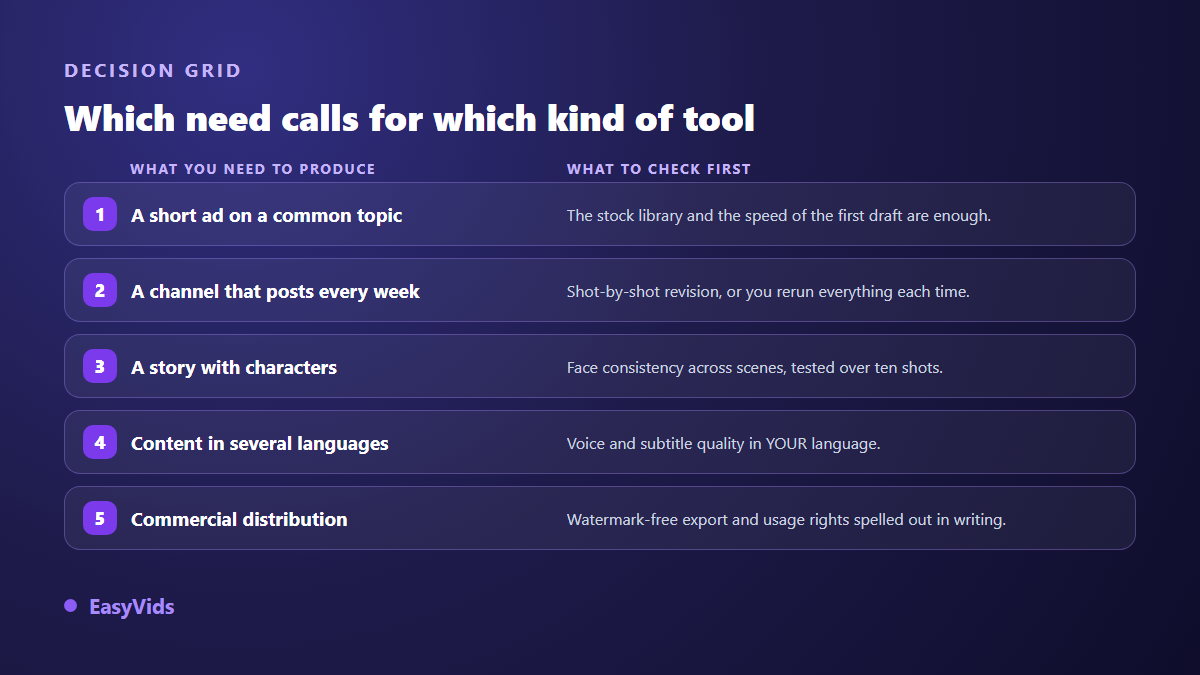
Run this list before subscribing anywhere. It takes twenty minutes and saves you a year of commitment to a tool that does not match your production. The same six criteria drive our side by side comparison of nine CapCut alternatives, where editors and generators are judged on the same grid.
- Shot by shot rework: can you regenerate a single scene without rebuilding the whole video?
- Character consistency across ten successive shots, tested with your own character.
- Your language, heard on your real sentences, not on the official demo.
- Output formats: vertical, square and horizontal, chosen upfront rather than cropped afterwards.
- Rights: commercial use allowed, no added mark on exports.
- The full chain: script, visuals, voice, music and editing in one place, or five subscriptions stacked.
One note on method: always test on your hardest subject, never on an easy one. A generator that nails a video about remote work will nail anything. Put it under pressure on your niche, your vocabulary and your constraints.
InVideo or EasyVids: where we stand
We are not going to claim we win on everything, that would be false and you would notice. On stock footage and on short advertising assembled in minutes, InVideo does its job well. We built the EasyVids studio around a different need: producing content where every image is made for you, with characters who stay identical from scene to scene and from one episode to the next.
Our chain starts from the script, splits it into scenes, generates visuals in the three standard aspect ratios, lays the voice over and the music, then assembles everything in an online editor where you can rework each shot. You pick the generation model scene by scene, a fast one for drafts, a more refined one for the final pass. Videos come out with no added mark. If your project is a story, a series, a faceless channel or a brand with its own world, that is the logic you need. If you mostly cut short advertising from existing footage, a stock assembler stays more direct.
Frequently asked questions
Is InVideo free?
Free access exists so you can try the tool. As with almost every service of this kind, exports without an added mark and commercial usage sit on the paid plans. Since these grids change several times a year, always check the terms in force on the vendor's own pages at the moment you commit, rather than in a comparison article.
Does InVideo work well in languages other than English?
The interface and the generation accept many languages, and synthetic voices have improved a great deal. The weak point sits elsewhere: scripts generated from a non English prompt often keep a structure designed for English, with phrasing that reads like a translation. Write your hook and your ending yourself, whatever tool you settle on.
Can you keep the same character across scenes?
InVideo advertises a memory meant to maintain character and story consistency. Results depend heavily on project length. The most reliable method, across every tool, is to reuse stable visual references rather than repeat a text description in each shot, because description alone lets the face drift scene after scene.
Is InVideo suitable for a faceless YouTube channel?
To get started, yes: the stock library covers explainer and list formats well. In the medium term the difficulty is visual identity, since your competitors draw from the same library. Channels that last end up mixing stock with generated shots, or move fully to visuals made for them.
What is the best alternative to InVideo?
It depends entirely on what you produce. For short advertising cut from existing footage, stock assemblers are broadly equivalent and the choice comes down to ergonomics. For storytelling, fiction, a series or a brand with its own world, look for a complete studio able to build every image and hold your characters over time.
A review of a tool is worth less than a test on your own subject. Take the hardest item on your content calendar, have two services produce it, and compare how many reworks each needs before the result is publishable: that number decides better than any comparison table. To try ours, creating an account opens the full studio, script, visuals, voice, music and editing included, with no bank card.