Your first image lands perfectly. You run the next one, and it is somebody else: different nose, shorter hair, ten extra years on the face. Getting the same character across multiple AI images is the number one blocker as soon as you need more than a single standalone visual. A carousel, a product catalogue, an illustrated book, a comic, a campaign built around a mascot: all of them fall apart when the hero changes face between two pictures.
This is not a limitation of image models. It is a method problem, and it is fixed by one switch: stop describing your character, start showing them. This guide covers still images, series and panels. If you need moving shots, our guide to keeping a character consistent on video applies the same logic to motion.
The short answer
Build one reference image, a clean portrait of your character, approve it, then attach that file to every following generation instead of rewriting the description. Engines that read input images accept three to five files depending on the model, so you can add a recurring location, an object, or a second character. Your prompt then stops describing the face and only describes the scene. That is exactly how the Consistent Characters workspace of the EasyVids studio works: drop your references, pick an aspect ratio, describe what happens.
Why the same description never produces the same face twice
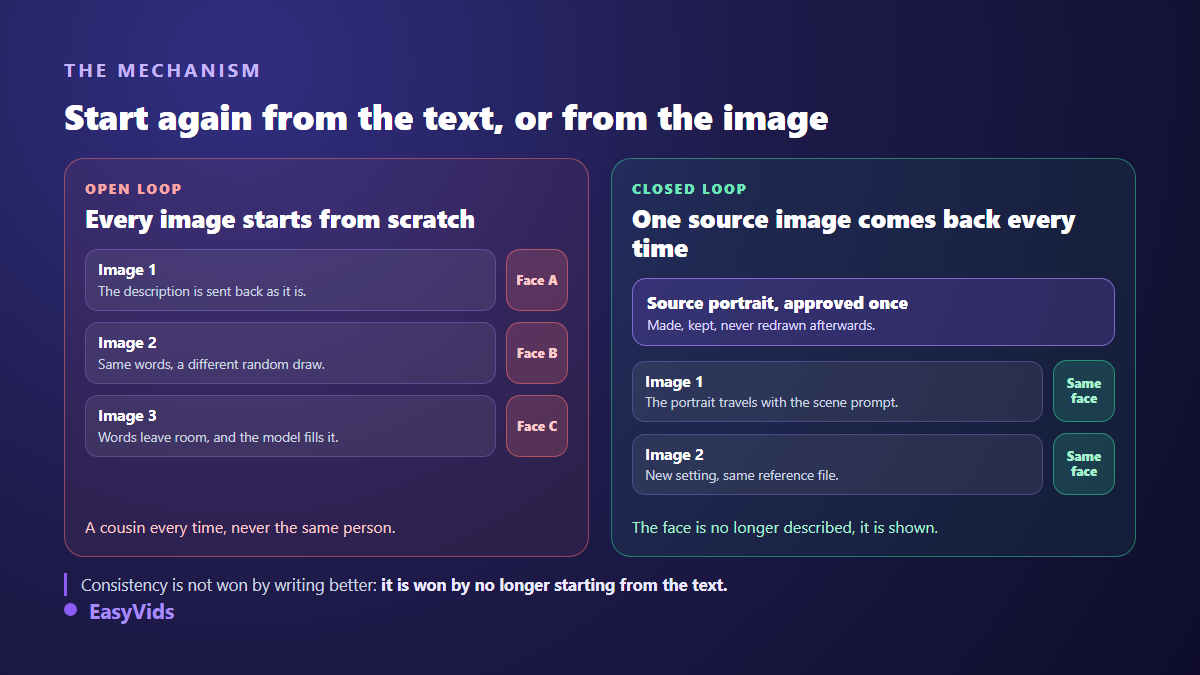
An image generator keeps no memory of your previous picture. Every request starts from random noise that the model gradually shapes, guided by your text. Two runs with identical wording start from different noise, so they land on different results. Nothing is broken: that is how the tool works.
Text always leaves room. A woman in her thirties, curly brown hair, denim jacket describes millions of plausible people. The model picks one. Next run, it picks another one, just as faithful to your sentence. You get cousins, never a person. Making the description longer does not solve it: it narrows the gap without ever closing it, and an overloaded prompt dilutes what actually matters.
The only way to close that gap is to hand the model what no sentence can carry: the pixels of the face.
The source portrait everything else comes from
It all rests on one image. Take the time to get it right, because every flaw it carries will be copied across the whole series. A good source portrait looks more like a careful ID photo than a spectacular scene: the face fills a large part of the frame, the light is soft, the background says nothing.
There are two ways to get it. Either you generate it, writing for once a long and precise description, since this is the one moment where prompt craft really pays off, and our AI image generator guide covers how to build that kind of prompt. Or you start from a real photo: yours, one from a model who agreed to it, or a shot of your product. Both work, and a real photo often gives the strongest likeness.
- A bust, or head and shoulders. Never a wide shot where the face is a handful of pixels.
- A plain neutral background, so the engine does not copy a setting you no longer want.
- Soft frontal light, no hard shadows: heavy shadows invent features that do not exist.
- A clear gaze, no sunglasses, no cap, no hair across the eye.
- The hairstyle and outfit you want to see again, because they become part of the character signature.
- No heavy filter, no artistic blur: whatever the engine sees poorly, it makes up.
Show instead of describe
Once the portrait is approved, your workflow changes. For every new image you attach the reference file and write only what varies: place, action, pose, framing, time of day. The face no longer needs describing, it is supplied.
The written prompt keeps a role, a different one. It states that the person in the reference is the person in the scene, it sets the shot you want, and it blocks the liberties models happily take: recolouring hair to match the setting, making a face younger, adding text inside the picture. Our guide to describing a character in a prompt lists the wordings that hold.
One rule sums it up: the prompt describes the scene, the reference describes the person. The moment you catch yourself rewriting an eye colour, the reference did not travel with the request.
How many references per image, and in what order
Engines that read input images have a ceiling, somewhere between three and five files per generation depending on the model. That ceiling is not a technical footnote: it decides how much you can hold stable at once. A character, a location and a product already fill three slots.
The second point matters even more, and almost nobody mentions it: the sending order. Attach four photos with no further guidance and the engine has no idea which one shows whom. It assigns faces as best it can, and it swaps them. Every reference must be announced in the exact order it is transmitted: the first shows the main character, the second the other character, the third the setting, and so on.
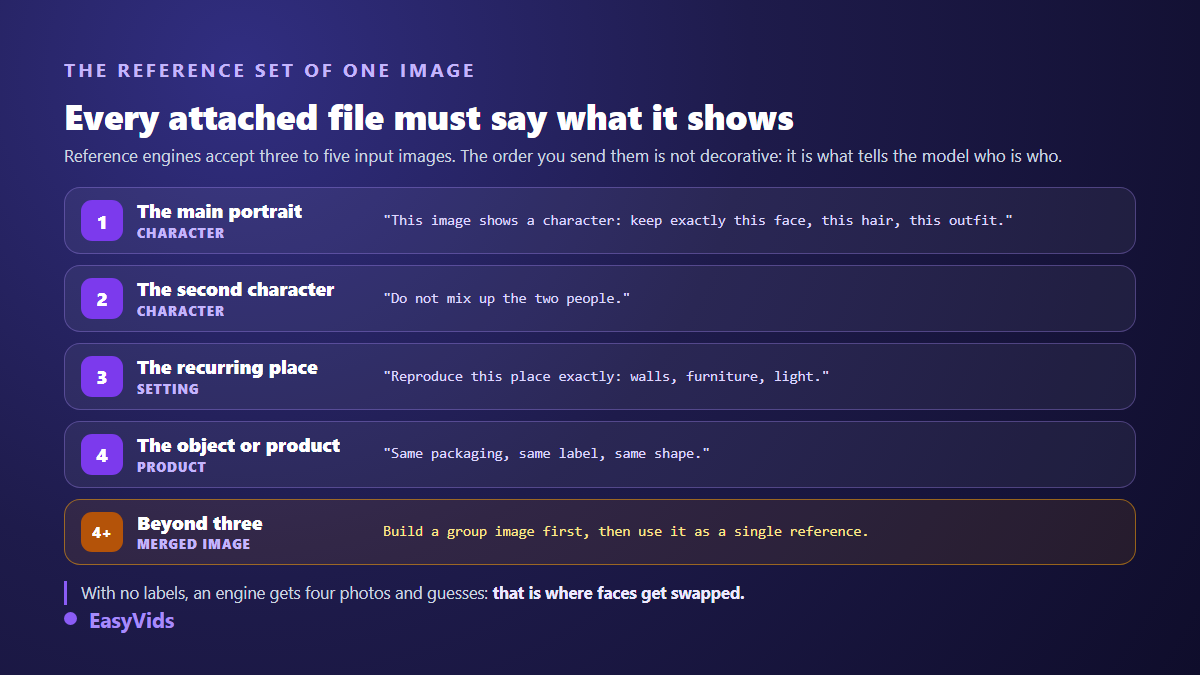
In the studio that announcement is built automatically from the references you drop in, including the instruction that forbids the engine from confusing people. On your side, you only write the description of your scene. Across our own generations, the hardest combination is still two faces plus a setting sent in one go, which is where mixing still happens even with a correct announcement.
Changing outfit, angle and setting without losing the face
A frozen series gets dull fast. Plenty of things can vary without breaking recognition, as long as you know which ones are negotiable. Setting, light, pose, expression and framing change freely: none of them touch identity. Those are now the only things your prompt has to carry, and our copy and paste image prompt examples give ready made wording for each of them.
Viewing angle changes too, with one caveat. A strict profile or a back view gives the engine very little to copy, and that is usually where the likeness weakens. If your series needs several angles, first produce two or three views of the same character from your source portrait, approve them, then use the view closest to the target angle as the scene reference.
Outfits are the trap. Viewers recognise a silhouette before a face. Change the jacket and the hairstyle at the same time and your character becomes someone else, even with perfectly accurate features. Change one element at a time and always keep a visual marker from image to image.
Two characters in the same image
Bringing together two characters held by two different references is the hardest exercise. The engine has to read two faces, assign them to the right bodies, and compose a believable scene. Three approaches work, in increasing order of reliability.
The first sends both portraits together with an indexed announcement and states the exact number of people in frame. The second composes in two passes: one image with the setting and the first character, then that image becomes the reference the second character is added to. The third builds a group image once, approves it, then uses it as a single reference for every scene where the pair appears. That last method is what the studio applies automatically when a scene would need more than three references.
If your characters still get swapped, the symptom is usually readable and the cause identifiable: our article on the character whose face keeps changing walks through the diagnosis.
Where consistency actually changes the outcome
This method is not just for illustrators. As soon as one image calls for another, consistency becomes the condition of a professional result.
- Carousels and post series: one face across ten images builds an identity, ten different faces look like a stock library thrown together.
- Illustrated books, especially for children, where a young reader spots instantly that the hero changed face between two pages, which is the deciding detail in a fully illustrated ebook.
- Catalogues and product pages: the same item shown from several angles and in several settings, with no studio and no photo shoot.
- Brand mascots, reused on a banner, a social visual and a YouTube thumbnail your audience recognises at a glance.
- Comics and graphic novels, where the next panel means nothing if the character changed face.
- Storyboards, where the crew has to recognise the cast before the first shooting day.
The mistakes that make a series drift
Consistency rarely breaks at once. It drifts: image three moves slightly, image eight moves more, and by image twenty nobody matches anybody. Five causes explain almost every case.
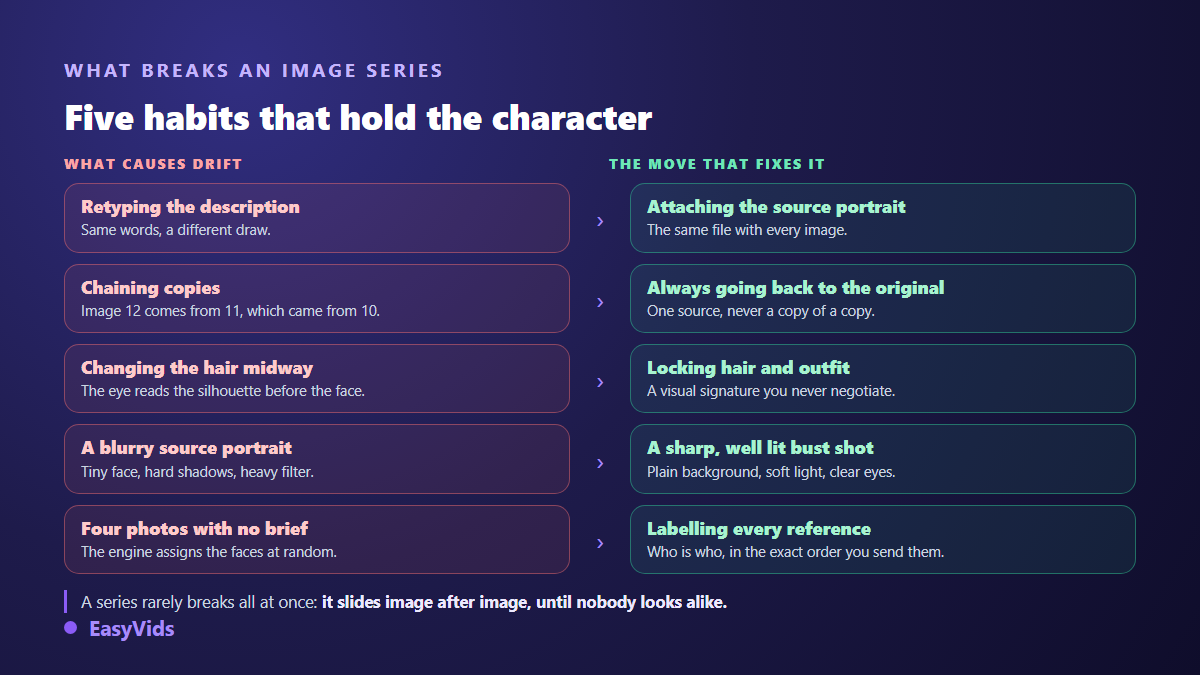
The most expensive one is chain drift. You generate image two from image one, image three from image two, and every copy adds its own small gap. After ten steps the accumulated gap is obvious to everyone. Always go back to the original reference, never to the last picture you produced.
The second, quieter cause is aspect ratio. A square reference pushed into a very wide visual forces the engine to recrop and recompose, which leads it to reinterpret the face. Generate in the final ratio whenever you can, rather than cropping afterwards.
When the character resembles a real person
Using a real person's photo as a reference requires their agreement, preferably written, and that agreement has to cover the intended use, commercial use included. Permission given for a personal post does not cover an advertising campaign. The same principle applies to photos of children, where caution should be highest.
For invented characters the question is different but still deserves care: avoid building a face that reproduces a public figure, and be wary of prompts that name a real person. On traceability, the C2PA standard, published by the Coalition for Content Provenance and Authenticity, defines a provenance metadata format that several generators embed in the files they produce, so depending on the engine your images may carry a trace of their origin.
Model choice also drives the cost of a series, since engines do not consume the same number of credits per image and the requested resolution counts too. A sound habit is to find your framing with a fast model, then produce the final version with a more faithful one. Plan details live on the pricing page.
Frequently asked questions
How many reference images does one character need?
One is enough in most cases, as long as it is sharp and framed on the face. A second view, profile or three quarter, helps when your series multiplies angles. Beyond that you burn reference slots you will need for the setting or the product.
Do prompts have to be in English to keep the same character?
No. Consistency comes from the attached image, not from the language of the text. English is sometimes slightly more precise on framing and lighting vocabulary, but it changes nothing about face stability.
Why does my character change even though I attached a reference?
Three causes come up. The reference never actually reached the engine, which shows as a result that ignores the supplied face entirely. The chosen model does not read input images, so it falls back on your text. Or your prompt contradicts the reference, for instance by describing a hair colour different from the portrait.
Can the same setting and the same object be kept too?
Yes, the mechanism is identical. An image of the place and an image of the object attach exactly like a portrait, with the same indexed announcement. It is the simplest way to hold a stable visual mood across a whole series, and it works particularly well for a product shown from several angles.
Does one failed image mean redoing the whole series?
No. Each image regenerates on its own, because they do not depend on each other: they all depend on the same reference. That is a direct benefit of the method, and one more reason never to build an image from the previous one.
Keep the switch in mind and the rest follows: one carefully built source image, attached to every generation, and a prompt that only talks about the scene. You move from a pile of unrelated visuals to a series that tells something, with a character your audience ends up recognising. To try it on yours, create your account and drop your first reference into the Consistent Characters workspace.