Your artwork is finished. A t-shirt graphic, a book cover, an app screen. The hard part is still ahead: showing it on a real object, in believable light, because nobody buys a flat file sitting on a white background. That is the job an AI mockup generator does. You supply the artwork, you describe the surface, and the image gives you the finished product, with no studio booked, no sample ordered, no shipping to wait for.
The trap shows up fast. Most tools redraw your artwork instead of reproducing it: the logo bends differently, the book title fills with invented letters, the pattern reinvents itself on every attempt. A mockup is only worth something if it stays faithful to the source file, because the buyer receives that file, not the model's interpretation. If your product already exists physically and you mainly want a better photograph of it, our guide to AI product photography covers the other half of the problem.
The short answer
An AI mockup is built by uploading your design as a reference image, then describing only the surface and the scene: this artwork printed on a cream cotton t-shirt, worn at a three quarter angle, natural workshop light, soft shadow, square crop. The model does not start from a blank page, it applies your file to the object you asked for. Two conditions make it work: pick a model that can actually read input images, and state in the prompt that the supplied artwork must not be redrawn or retyped.
Mockup, product photo, listing image: what the word covers
A mockup shows a design applied to an object. A product photo shows an object that already exists. The difference is not cosmetic, it changes the raw material of the work. In the first case you start from a flat file and the object has to be built around it. In the second you start from an object and the setting has to be built around that.
That distinction drives everything else. A print on demand seller owns no sample of the catalogue: the items stay files until an order arrives. An indie author has a cover in digital form, not a bound book resting on a wooden table. A developer has screenshots, not a phone held in a café. In all three cases, a mockup is the only honest way to show a product before holding one.
Three families of mockup, three different demands
Surfaces do not create the same problem for the model. Sorting them into families saves you from tuning settings that have nothing to do with your case, and from regenerating the same image ten times while looking in the wrong place.
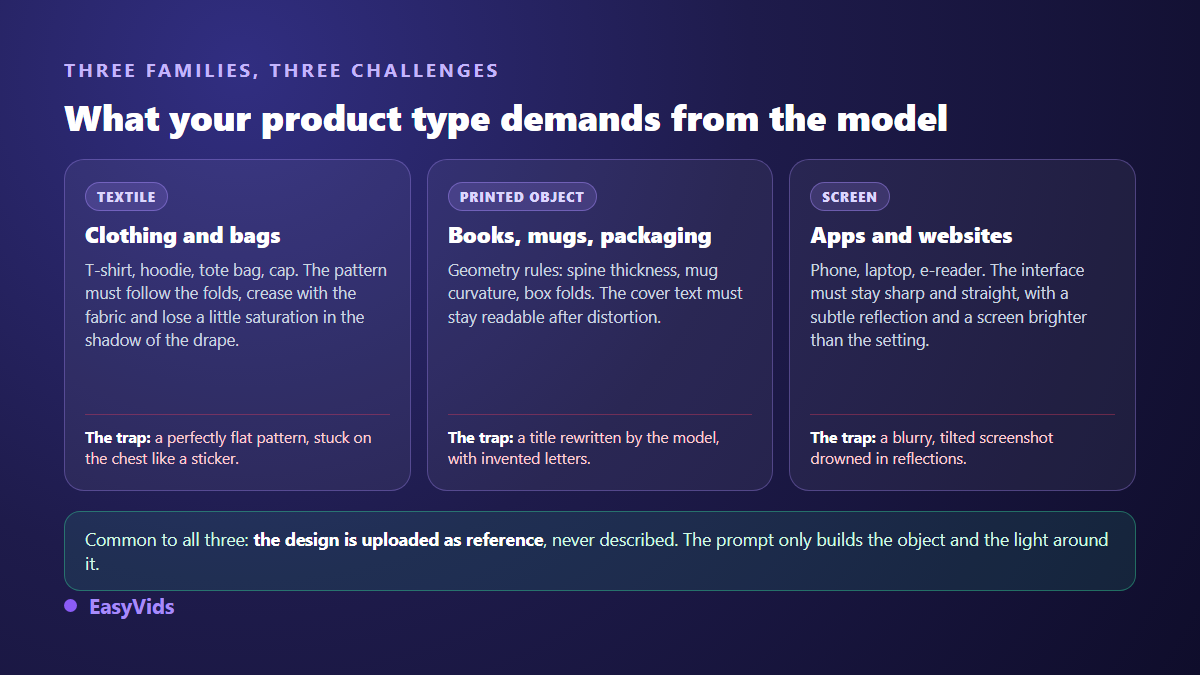
Textile forgives geometry and punishes material: a pattern that ignores the folds is spotted instantly. Printed objects forgive very little on shape, because a book spine or a mug handle reads down to the millimetre. Screens demand a compromise: enough reflection for the device to look real, little enough for the interface to stay readable.
The rule that decides everything: upload the design, do not describe it
Writing a t-shirt with an orange geometric fox gives you a fox, but not yours, and every run gives you a different one. The only way to get your design is to feed it in as a reference image. The model then treats it as data to place, not as an instruction to interpret. Reference capable models are the ones to look for, and the same mechanism applies whether the reference is a character or a printed graphic.
Not every model can read an input image. Some expose no field for a file at all: the reference is accepted by the interface, then silently dropped, and the generation is billed anyway. EasyVids blocks that exact case. Attach references to a model that cannot read them and the request is refused before any credit is spent, with a message inviting you to switch model or remove the images.
One closing sentence in the prompt completes the setup: reproduce the supplied artwork exactly, without changing shapes, colours or text. Without it, a generative model tends to improve what it sees, which is precisely what you do not want here.
Five steps from flat file to shop visual
The chain comes down to five moves, always the same ones, whatever the surface. The first three decide the quality, the last two decide the pace.
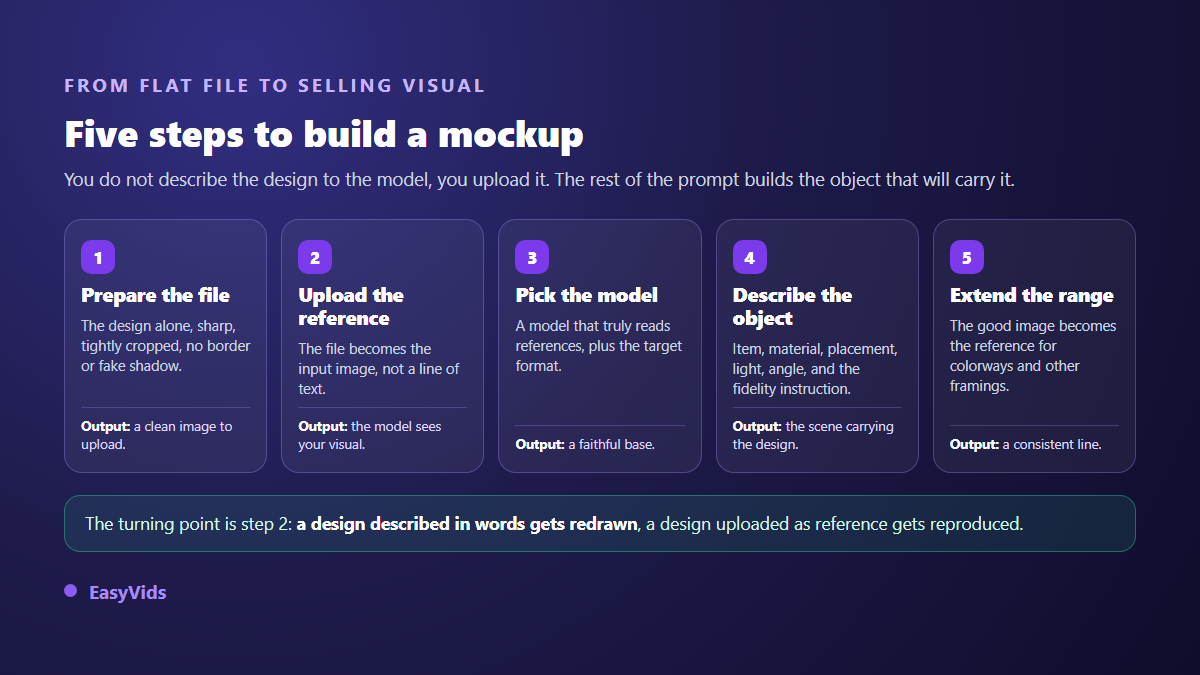
- Prepare the file. The design on its own, sharp, tightly cropped, with no decorative border and no baked in shadow. Common formats need no conversion.
- Upload the reference. The file goes in as an input image. Depending on the model you can attach several, up to five: the artwork, a photo of the real surface, a mood example.
- Pick the model and the aspect ratio. A reference capable model, the output shape that matches the final destination, and whatever quality setting that model exposes.
- Describe the surface. Object, material, placement of the artwork, light, angle, framing, then the fidelity instruction last.
- Generate, compare, iterate. Two or three variants beat one perfect attempt. The best image then becomes the reference for the rest of the range.
The prompt formula for a mockup
A mockup prompt never describes the artwork, it describes everything around it. Six blocks are enough, in this order: the surface and its material, the placement and size of the artwork, the setting, the light, the angle and framing, the fidelity instruction. Swap the subject for the surface and you have the structure used in classic product photography prompts.
A complete example to adapt: the supplied artwork printed on the chest of a heavy sand coloured cotton t-shirt, print width about twenty centimetres, worn by a person standing at a three quarter angle, bright workshop softly blurred behind, natural side light, soft shadow in the folds, waist up framing, photographic rendering, reproduce the supplied artwork exactly. Notice what the sentence holds and what it leaves out: no description of the graphic, but a size, a position, a material and a light direction.
Choose the aspect ratio before generating
Cropping a mockup afterwards always removes something useful: the top of the object, the cast shadow, the space you reserved for text. Square remains the safe choice for listings and marketplaces. Vertical serves social feeds and mobile ads. Horizontal serves shop banners and page headers. Generating the same scene twice costs less effort than rescuing a bad crop.
Check the resolution your platform expects before you run a batch. According to the product image requirements published in Amazon's seller help centre, an image of at least 1600 pixels on its longest side enables the zoom feature on a listing. If your model does not reach that size, keep its output for social channels and for your own store pages, where the constraint does not apply.
Building a range without starting over
A catalogue needs consistency: same light, same setting, same treatment from one item to the next. Lock the scene once, then change a single parameter per run. Keep the prompt, change the colourway. Keep the prompt, change the angle. Keep the prompt, switch from square to vertical. A second technique works even better: reuse the approved mockup as an extra reference alongside the design, so the model has a sample of the exact mood to match. Plan several attempts per item, since this is as much selection work as generation work, and the volume included in each plan sits on the pricing page.
What gives a generated mockup away
A weak visual is not spotted because it looks ugly, but because one detail contradicts physics. The buyer could not always name it, they simply feel the object does not exist, and they move on to the next seller.
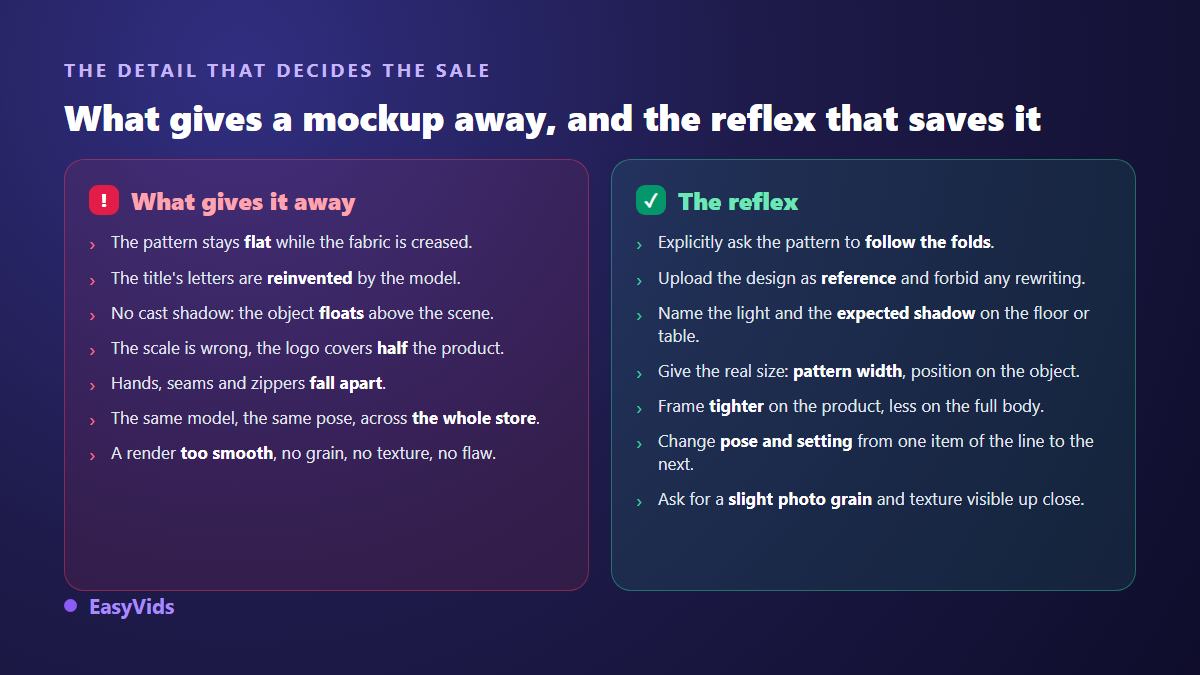
- Does the print follow the folds, the curve and the perspective of the surface?
- Is the text in your design still identical, letter for letter?
- Does the object cast a shadow consistent with the light you asked for?
- Is the scale believable: print width, handle size, spine thickness?
- Do the hard areas hold up: hands, seams, zips, page edges?
- Does your range avoid the same model in the same pose on every item?
- Does the render keep some grain and material instead of a perfect plastic finish?
What marketplaces accept
A mockup is a staged visual, and the rules change with where it is published. The decisive nuance concerns the main listing image. According to the product image requirements published in Amazon's seller help centre, that main image must show the product actually sold on a white background, with no text, no added logo and no scenery. A staged shot, however good, does not belong there. It belongs in the secondary images, the ones buyers swipe through.
On handmade and creative marketplaces the rule fits in one sentence: the Etsy help centre asks that photos accurately represent the item the buyer will receive. Mockups are standard practice there for print on demand, on the strict condition that nothing in the image is missing from the parcel. One prop shown but not shipped turns a useful visual into a misleading advertisement.
For books, one more point. Amazon Kindle Direct Publishing has asked since 2023 that publishers declare AI generated content at publication, covering text, images and translations. That declaration concerns the files you upload, cover included, not the promotional visual you post afterwards on social channels. Read the official help page of each platform before you publish, because these rules keep moving.
Frequently asked questions
Does the file need a transparent background?
It is not mandatory, but it helps a lot. A design on a transparent or strongly contrasted plain background tells the model exactly where the artwork stops. The worst input is a design already pasted onto someone else's t-shirt photo: the model copies that t-shirt too, folds and lighting included.
Can the model distort the text on my cover?
Yes, and it is the most common flaw on book mockups. Three habits fix it: supply the cover as a reference rather than describing it, state plainly that the text must not be rewritten, and frame wide enough that the title is not rendered at a tiny size. If the title still breaks, generate a tighter shot of the cover alone.
Can I keep the same model across a whole collection?
Partly. Attaching a portrait reference to every generation holds the likeness across a short series. Drift remains possible from one image to the next, especially when the angle changes a lot. For a full catalogue, several different figures read better than one approximately repeated face.
Can a generated mockup be the main image on a marketplace?
Rarely, because major marketplaces require an isolated product on a white background for that slot, which a staged mockup is not. Generate two versions from the start: a neutral white background shot for the main image, and your staged scenes for secondary images, ads and social posts.
How many mockups does one product need?
Four to six cover most shops: a neutral shot, one in use or worn, a close up on the material, a scale reference, and one or two mood visuals for social channels. Beyond that the return fades, and the time is better spent on the next product.
A good mockup does not require a better model, it requires a better input: a clean design, uploaded as a reference, wrapped in a surface described with precision. The rest is repetition, and that is where production gets fast. To build your first one, creating an account opens access to the reference capable models, and the EasyVids studio keeps the images, their variants and their animation in one place.