You have hundreds of photos on three phones, a camera roll from the photographer, and a reception in a few weeks. Somewhere in there is a wedding slideshow that will make the room go quiet. The problem is never a lack of material. It is deciding what to leave out.
A slideshow that lands is not a technical achievement. It is a series of choices: how many photos, in what order, at what speed, under which song. This guide walks through those choices in order, with the settings that matter, and it assumes no editing background at all. Everything described here runs in a browser, so you can build it on the laptop you already own.
The short answer
Keep roughly one photo in ten. Put them in chronological order, from childhood to the proposal. Give each one three to five seconds, pick the song before you touch the timing, and cut on the beat. Add gentle movement so nothing sits still, keep the on screen text to three cards, and export a file you can play offline at the venue. Five to seven minutes is the ceiling for a reception. Beyond that, forks go back down to plates.
Gather the photos before you plan anything
Photos live in more places than you think: phones, an old laptop, printed albums at both sets of parents. Ask early, and ask specifically, because a vague request returns nothing. Request original files rather than pictures shared inside a chat thread, since messaging apps compress what they send. For printed photos, a flat scan beats a phone snapshot taken at an angle under a ceiling light.
- Childhood photos of each partner, five to ten each, no more.
- The years before you met, which the other family has never seen.
- The first trips, the first flat, the everyday shots nobody framed.
- The proposal, and any photos from the engagement party.
- A recent portrait of the two of you, for the final image.
How many photos, and how long each
Work backwards from the running time. At four seconds per photo, a five minute slideshow holds about seventy five images. That number surprises most couples, who arrive with four hundred. Cutting is the job. Keep the photo where a face is readable and something is happening, drop the near duplicate taken two seconds later, and never keep two shots of the same moment.
Three to five seconds per photo is the range that works. Faster feels like a slideshow at a conference. Slower and the room starts checking phones. Give a little more time to a group photo, where guests hunt for themselves, and a little less to a landscape.
Chronology beats cleverness
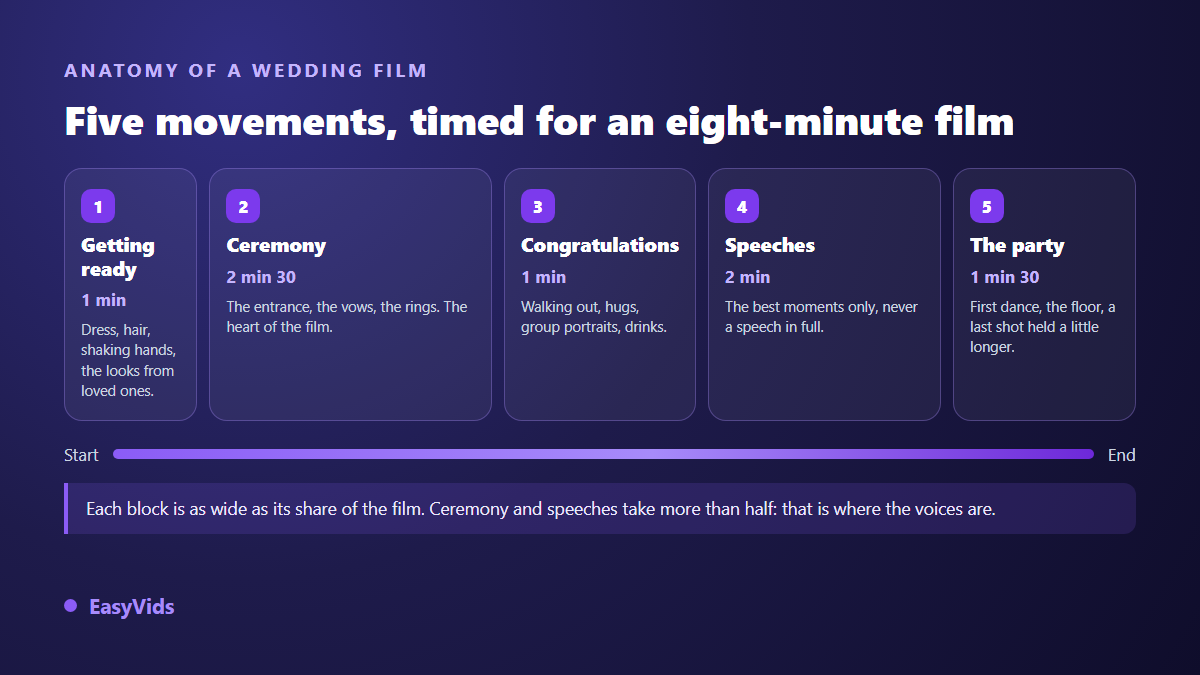
Childhood, teenage years, the meeting, the years together, the proposal, today. Guests follow that line without effort, and the emotional payoff builds on its own. Themed sections and shuffled timelines look creative on paper and lose the grandparents in the first minute. If you want one flourish, keep it for the transition between the two childhoods and the first photo of you together.
The song decides the edit
Choose the music first, then place the photos on it. Changes of image that land on the beat feel intentional even to people who could not name the reason. Drop a marker on the timeline at each strong beat, then snap your cuts to those markers. One song rarely covers seven minutes without sagging, so plan two, with the switch on a section change rather than mid verse.
If the slideshow will also be posted online, rights matter. According to YouTube's help centre, a commercial recording identified by Content ID can trigger a claim from the rights holder, which may mean blocking in some countries or revenue going elsewhere. A royalty free track solves it, and so does a song written for you, which our music studio can compose from your names and your story, with an instrumental version for the parts where people speak.
Nothing should sit still
A photo held motionless for four seconds reads as a technical problem. A slow zoom or a gentle drift, the effect known as Ken Burns, keeps the frame alive. The editor offers twelve of those movements in three intensities. Use the gentle setting throughout: the audience should never notice the effect, only the face.
The same restraint applies to transitions. There are eighteen families available in three intensities, and two of them are enough for a wedding: a straight cut, and a cross fade when you move from one chapter of the story to the next. If you have a hundred photos to animate, the magic edit applies varied movements and transitions in one pass, avoiding the same effect twice in a row, and you adjust by hand afterwards.
Voices in the middle of the pictures
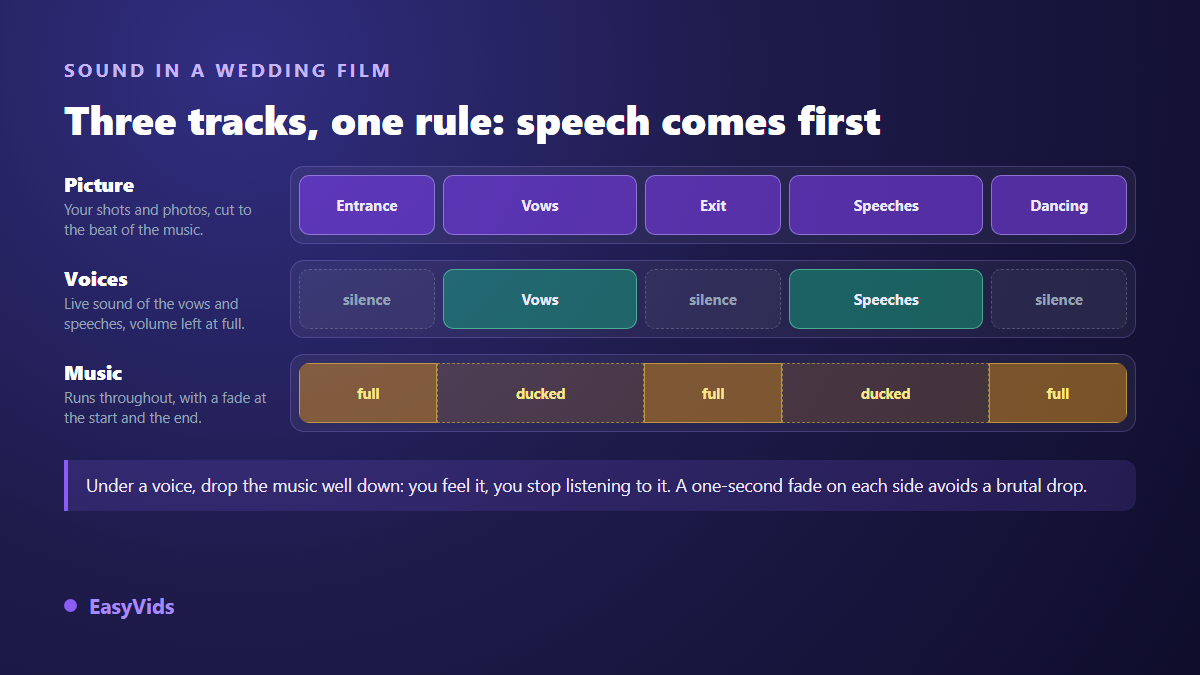
The strongest wedding slideshows are not silent. A recorded message from a parent who cannot travel, ten seconds of a grandparent's voice, a line from the proposal video: these are what make the room go quiet. Whenever someone speaks, pull the music well down underneath, add a one second fade on each side, and bring it back up. Every clip carries its own volume and its own fades, so this takes a minute.
Text on screen: three cards, no more
Names and the date at the start, one card to mark the shift from childhood to your story together, a thank you at the end. Anything else competes with the photos. Pick a legible typeface, place the text over a quiet area of the frame, and leave it up long enough to be read twice. If you would rather open on a moving title than a still card, building an animated sequence without a timeline is a short job on its own. If any of the footage carries speech, add captions: half of the room will be at the back, and the sound system will not do you any favours.
Playing it at the venue
This is where good slideshows fail. Export a finished file and carry it on a memory stick and on a laptop, rather than relying on the venue's connection. Ask which aspect ratio the screen or projector uses, and build in that shape from the start rather than cropping at the end, because cropping cuts faces off the edges. Test the sound in the actual room if you can, even for two minutes, since a mix that sounded balanced in headphones often disappears in a hall.
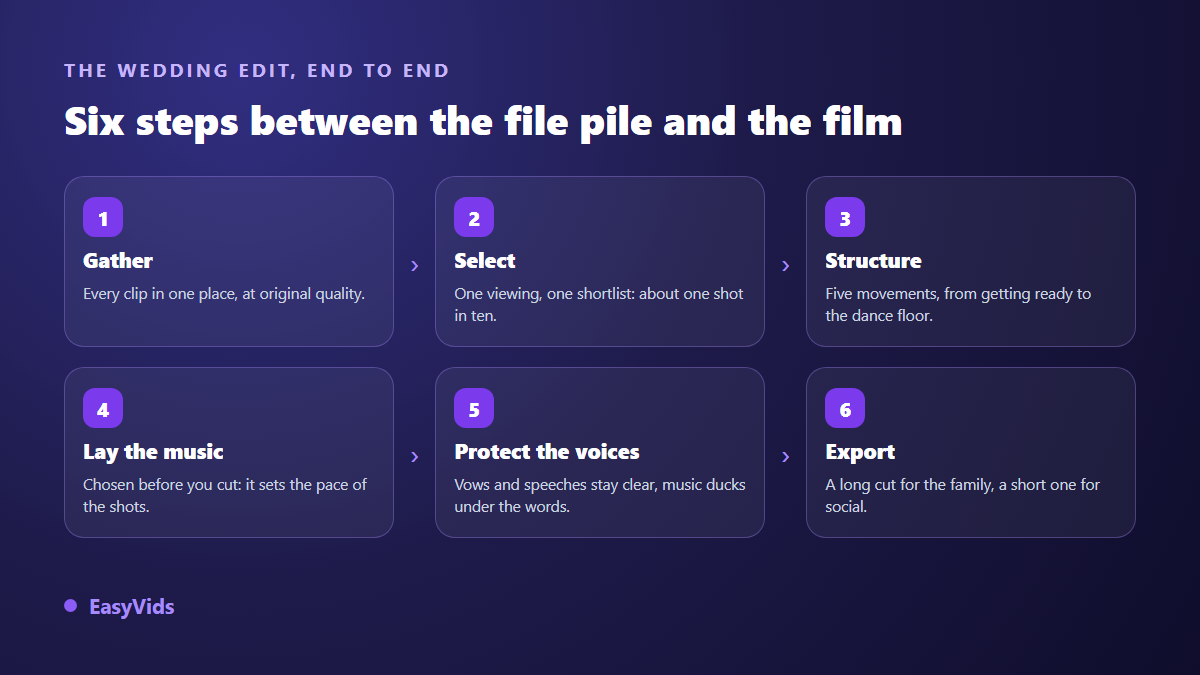
- Set the format before importing: 16:9 for a projector, 9:16 for a phone edit.
- Import photos, video clips and music by dragging them into the media panel.
- Lay the music down first, then the markers on the strong beats.
- Place the photos in chronological order, roughly four seconds each.
- Add gentle movement, then transitions, last of all.
- Balance the sound, with voices in front and music underneath.
- Watch the whole thing once on a phone before exporting.
- Export, then copy the file to two devices.
Frequently asked questions
How long should a wedding slideshow be?
Five to seven minutes at a reception. That is around seventy five to a hundred photos at four seconds each. A version for social media should be under a minute, cut from the same project.
How many photos should I use?
Divide your running time in seconds by four. Everything above that number has to go, and the film gets better every time you cut. Keeping one shot in ten from your original pile is the usual landing point.
Can I make a wedding slideshow without any editing experience?
Yes. The editor runs in a browser with nothing to install, and the hard part is choosing photos rather than operating software. Expect one evening of work for a five minute slideshow once the images are gathered. You can see the full studio on the EasyVids home page, and the plans are listed on the pricing page.
What music can I legally use?
For a private screening on the day, a commercial track is rarely an issue. Once the slideshow is published online, a rights claim becomes likely, as YouTube's help centre explains for Content ID. A royalty free track or a custom written song keeps you clear.
Can I build it on a phone?
Selecting images and assembling a simple edit works on a phone, since the interface is touch friendly. Final export needs a computer on Apple devices, and stays more comfortable on a large screen for a long project where memory and battery matter.
A wedding slideshow succeeds on three decisions: what you leave out, the order you tell it in, and the care you give to the voices. Gather the photos this week, pick the song, and build one complete pass before refining anything. Creating an account opens the editor and the music studio in one place, with nothing to install.