Your profile picture is the first thing anyone looks at, before your name and long before your headline. It is seen inside a circle the size of a fingernail, on a phone, between two notifications. And most of the time it is a selfie taken in a car, a crop from a wedding photo, or a portrait that is six years old. An AI profile picture generator solves that without a studio, without a shoot and without waiting on a photographer.
One trap makes most of these images unusable: generating a beautiful face that is not yours. The portrait has to stay you, recognisable on a video call and in a meeting room. This guide gives the full method, eleven styles with their prompts, and the settings that change from one network to another. If image generation is new to you, our complete guide to AI image generators covers the ground everything below rests on.
The short answer
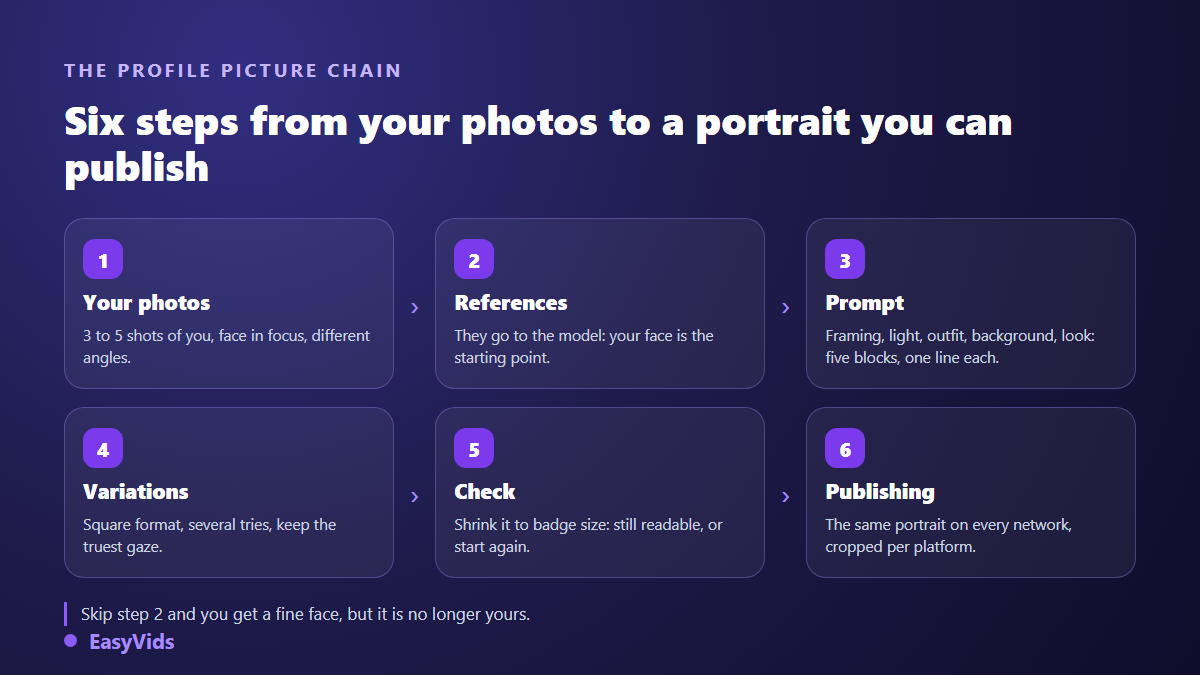
A good AI profile picture comes down to three decisions. You supply three to five photos of yourself as reference images, so the model works from your face instead of an average one. You write a prompt in five blocks: subject, framing, light, outfit, background. You generate several square variants, then judge them shrunk down to the size they will actually be seen at. Style comes last, and changes in a single line.
The rule that decides everything: start from your own photos
Any image model can produce a convincing portrait from text alone. The result will be flattering and completely useless: it is nobody's face. To get your face, you have to pass reference images to the model. Not every model can do it. Several popular generators have no image input field at all and silently discard whatever you upload, which means you pay for a generation where your references did nothing.
Pick three to five recent photos: sharp face, different lighting, at least one straight on and one three quarter angle. Leave out sunglasses, group shots, beauty filters and heavily compressed images, which teach the model a face that is already distorted. This is the same consistency problem as keeping the same character across every image, and it is solved the same way.
The five blocks of a portrait prompt
A portrait prompt is not a poetic description. It is a short spec sheet, in a stable order, that you reuse for every style. Five blocks are enough, one sentence each. Whatever you leave out, the model decides for you, almost always at the expense of legibility: that is how a neutral backdrop turns into a blurry office with plants.
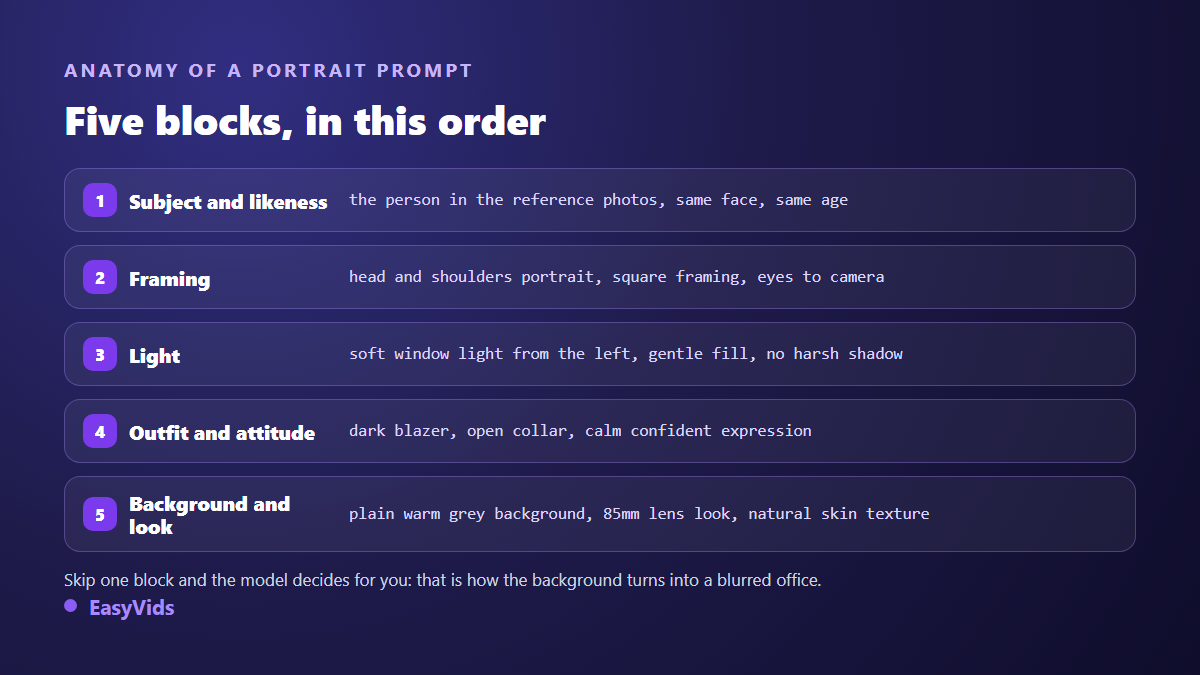
Two phrases are worth adding almost every time. Natural skin texture stops the skin turning into smooth plastic, the single clearest sign of a rushed generation. Eyes to camera guarantees a direct gaze, which a professional profile needs. Across our own generations, prompts written in English follow framing and lighting instructions more faithfully, even when the rest of your work happens in another language.
11 profile picture styles, with their prompts
These eleven directions cover almost every real need. Copy the formula, swap the outfit and background colour for yours, and always keep the first block that points back to your reference photos.
- Corporate portrait. The professional default. Prompt: head and shoulders portrait, plain light grey backdrop, soft key light from the left, navy blazer, calm confident expression, 85mm lens look, natural skin texture.
- Blurred office background. Warmer, useful for consultants. Prompt: portrait in a bright modern office, background softly out of focus, natural window light, light shirt, relaxed posture, shallow depth of field.
- Soft outdoor light. Ideal for freelancers and creative roles. Prompt: outdoor portrait in soft late afternoon light, blurred green foliage behind, casual jacket, warm skin tones, gentle backlight.
- Solid colour background. The most readable at small sizes. Prompt: studio portrait on a solid deep blue background, even soft lighting, dark turtleneck, direct eye contact, high contrast.
- Black and white. Sober and timeless, strong for authors and speakers. Prompt: black and white portrait, single soft light source, plain dark background, serious expression, fine film grain.
- Low key. Side light and plenty of shadow, for an assertive tone. Prompt: low key portrait, single side light, dark background, half of the face in shadow, cinematic mood.
- Neon. Built for gaming, music and nightlife profiles. Prompt: portrait lit by magenta and cyan neon, dark background, catchlights in the eyes, night city atmosphere.
- Vector illustration. Recognisable without showing a real photograph. Prompt: flat vector illustration portrait, two tone palette, clean shapes, simple background, minimal detail.
- Watercolour. Soft and handmade, a fit for care and craft businesses. Prompt: watercolour portrait, soft washes, visible paper texture, muted palette, plain background.
- Anime. Extremely readable when small, popular with younger audiences. Prompt: anime style portrait, clean line art, soft cel shading, simple pastel background, friendly expression.
- Stylised 3D. A rounded animation studio character, identifiable in a split second. Prompt: stylised 3D character portrait, soft studio lighting, rounded shapes, pastel background, warm friendly smile.
Generate at least four variants per style before choosing. Portraits turn on tiny differences: an eyelid, a shoulder angle, a smile a millimetre too high. To widen your prompt vocabulary beyond portraits, our 21 image prompt examples apply the same block logic to other subjects.
Square is the base unit on every platform
Always generate in 1:1. All three networks show the profile picture inside a circle drawn in a square: anything near the corners disappears, and a landscape image gets cut on both sides. Generating square from the start avoids that forced crop and leaves you free to tighten the frame per network afterwards.
Leave a little air above the head and cut mid chest. The face should fill roughly 60 % of the height: smaller and it becomes a smudge, larger and the chin and crown fall outside the circle. The test that never lies is to shrink the image to thumbnail size and look at it at arm's length. If you cannot read the expression or the silhouette, fix the framing, not the style.
LinkedIn: the likeness is not optional
This is the network where a generated photo can cost you the most, because the rules are explicit. LinkedIn's professional community policies require your profile to reflect a real person and your profile image to be a likeness of you, not of somebody else. A generated portrait is therefore fine as long as it remains your portrait, built from your own photos. An invented face, however good looking, exposes you to a report. On the technical side, the LinkedIn help centre recommends a square photo of at least 400 pixels a side, far below what current models output: resolution will never be your problem.
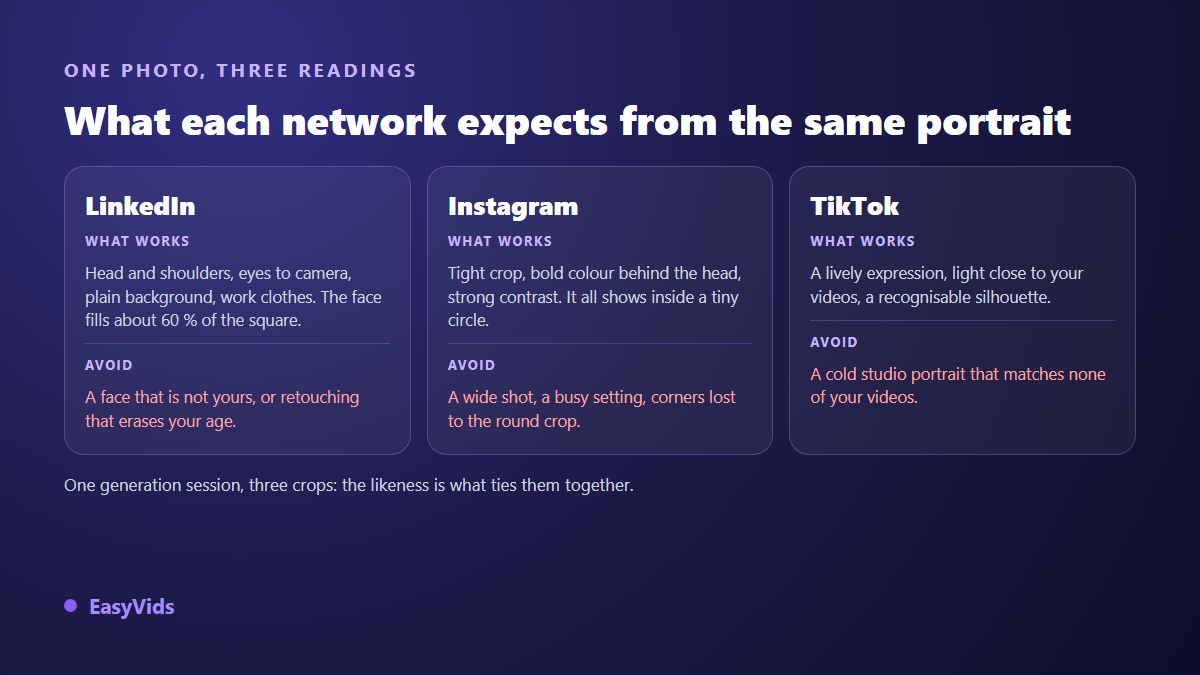
In practice, a plain light background, a dark jacket and a direct gaze remain the safest combination. Add a hint of your field rather than a whole set: a technical jacket for field work, an open collar shirt for tech, a tunic for care roles. Clothing says more than any backdrop, and it survives being shrunk to a thumbnail.
Instagram and TikTok: readable in a tiny circle
On these two networks your picture is first seen very small, in a comment thread or over a video. The logic flips: contrast matters more than realism. A bold colour behind the head, a tight crop and a clear expression beat a subtle portrait every time. The illustration, anime and 3D styles above exist for exactly that, and they survive shrinking far better than a photograph does.
TikTok adds one more requirement: your profile picture should look like what viewers see in your videos. Similar light, a recognisable outfit, the same energy. A glacial studio portrait above a channel filmed in a kitchen creates a mismatch people feel without naming it. If you already run an account without showing your face, building an AI avatar from a photo keeps the profile and the content consistent.
Six details that give a generated portrait away
Generated portraits are rarely spotted by the face itself. They are spotted at the edges, on accessories and in textures, wherever the model improvises. Run this list before publishing, once at full size and once very small.
- Skin too smooth, with no pores or grain: add natural skin texture and dial the perfection down a notch.
- Eyes: two identical reflections, or a glassy gaze slightly off axis. This is the first flaw a human notices.
- Glasses: arms that never reach the ears, lenses whose distortion ignores the face behind them.
- Hair meeting the background: strands that melt into the backdrop instead of standing out from it.
- Teeth and ears, two areas where models happily invent an unreal symmetry.
- Collars, buttons and seams: one lapel contradicting the other is enough to raise a doubt.
Should you disclose that a profile picture is AI generated?
Transparency is advancing through technology as much as through policy. The C2PA standard defines provenance metadata, known as Content Credentials, attached to the file itself and describing how an image was produced. TikTok announced in May 2024 that it was adopting those Content Credentials and automatically labelling AI generated content imported from other tools. Meta, for its part, applies an "AI info" label to images it identifies as generated, on Instagram and Facebook alike. A profile picture can therefore carry a provenance marker without you declaring anything.
The reasonable position is simple. A portrait built from your own photos, that looks like you and does not shave fifteen years off your age, deceives nobody: it replaces a photo session, it does not manufacture an identity. An invented face is a genuine problem on a professional network, and it always comes out at the worst possible moment, on a video call. The working rule: if you could not show up in person without surprising the other party, the image went too far.
How it works inside EasyVids
In the EasyVids studio, image generation happens on a single screen. You pick the model, the square format, the quality and the number of images, then upload your reference photos, up to five depending on the model. The studio refuses references on a model that cannot read them, rather than charging you for a generation where they would be ignored. As soon as a reference is attached, generation runs one image at a time, so each attempt is judged and retried on its own.
If the prompt feels intimidating, an assistant writes one from a simple theme and you refine it block by block. Generated images stay in your history, download at full resolution and reopen later for a variant. Models range from very economical to premium, listed on the pricing page; for a portrait, a model that reads references well always beats an expensive one that ignores them.
Frequently asked questions
Are AI profile pictures allowed on LinkedIn?
Yes, as long as the picture represents you. LinkedIn's professional community policies require the profile to belong to a real person and the profile image to be a likeness of you. A portrait generated from your own photos meets that requirement; an invented or borrowed face does not.
How many photos of myself do I need?
Three to five is enough, and variety matters more than volume. One straight on, one three quarter angle, one in natural light gives the model a stable idea of your face. Beyond that you mostly add noise, especially with older or heavily retouched shots.
Can I use the same portrait on every network?
Yes, and it is the better choice for being recognised across platforms. Keep the same face and outfit, then adapt the background and the crop: quieter on a professional network, higher contrast where the image is seen very small. One generation session produces all three versions.
Do I need to retouch the generated image?
Rarely the face, often the frame. A light crop to centre the gaze, sometimes a brightness tweak, and that is it. If you feel the urge to retouch the face, the prompt was usually incomplete: revisit the light or finish block and generate again, which gives a cleaner result than fixing it afterwards.
Does an AI profile picture work on a CV or a business website?
Yes, under the same condition: it has to look like you today. On a CV, prefer the corporate or solid colour styles, which stay readable printed in black and white. On a website, a slightly wider version of the same portrait illustrates an about page without breaking the consistency.
A good profile picture does not try to impress. It tries to be recognised in a tenth of a second and found again without hesitation. Start from your photos, write five lines of prompt, generate a few variants and judge them small: that is the whole method. To try it with your own references, creating an account opens the image studio with free credits and no bank card.