You have one photo. Maybe the supplier sent it, maybe you shot it on a kitchen table against a plain wall. And you need a video, because a scrolling feed no longer stops on a still image, and a listing without motion loses to the one next to it. Turning a product photo into a video used to mean a set, lights and a shooting day. Models that accept an image as input removed that step.
The trap is assuming the tool will fill in what the photo does not show. A video model knows only the pixels you hand it. The back of the item, the feel of a lining, its real size next to a hand: it invents all of that. So the method below starts with the photo, never with the prompt. For the wider view of the format itself, our complete guide to product video approaches the subject from the other end.
The short answer
Upload your photo as a reference image in a generator that accepts visual input. Write a prompt describing the motion, the camera and the light, never the object. Generate a short clip, six to ten seconds. Repeat two or three times to get different shots of the same item, then assemble everything in an editor with an on screen hook, a voice over and captions. A twenty second ad comes together in under half an hour, from a single starting image.
What one photo can and cannot deliver
An image to video model reads your photo, keeps its shape, colours and label, then generates the frames that follow. It is very good at anything that extends what it already sees: light sliding across a bottle, a camera creeping forward a few centimetres, a hand entering the frame, fabric settling, steam rising from a cup. Those movements are enough to build an ad.
It fails at everything absent from the image. A full rotation around the object forces it to invent a back it has never seen. Small packaging text turns illegible or into approximate characters. An accessory missing from the photo will not appear, or will appear wrong. Across our generations, the best predictor of the final result is not the model you pick: it is how sharp the subject is in the source photo.
Picking the source photo is the highest leverage decision
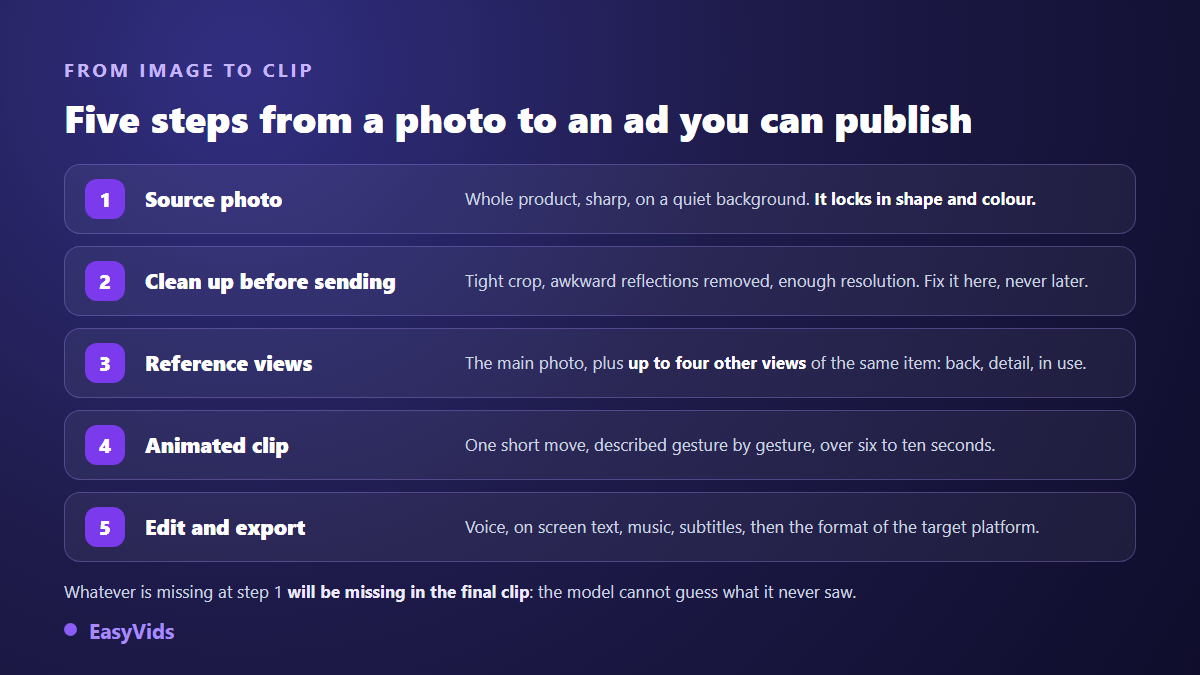
Five minutes of preparation beat ten regenerations. The ideal photo is not the prettiest one, it is the most readable: the whole item, sharp, filling a good half of the frame, on a background that does not compete with it. If your only image is a catalogue composite with a promotional banner burned in, remove the banner before uploading, or it will live in the entire video. When the original is poor, reshoot it rather than fight it, and our method for turning a phone photo into a shop grade visual walks through that stage.
- The item sits fully in frame, with no part cut off by the edge.
- Focus is on the product, not on the scenery behind it.
- Light is soft and comes from one side: direct flash flattens materials.
- The background is plain and its colour does not blend into the item.
- Packaging text is large enough to survive compression.
- Resolution is comfortable: a few hundred pixels will never yield a sharp shot.
- The file carries no watermark, no marketplace logo, no promotional banner.
Three ways to put a product photo in motion
Not all animations are equal, and the choice happens before the first line of prompt. Three routes exist, each with its own ground and its own risk.
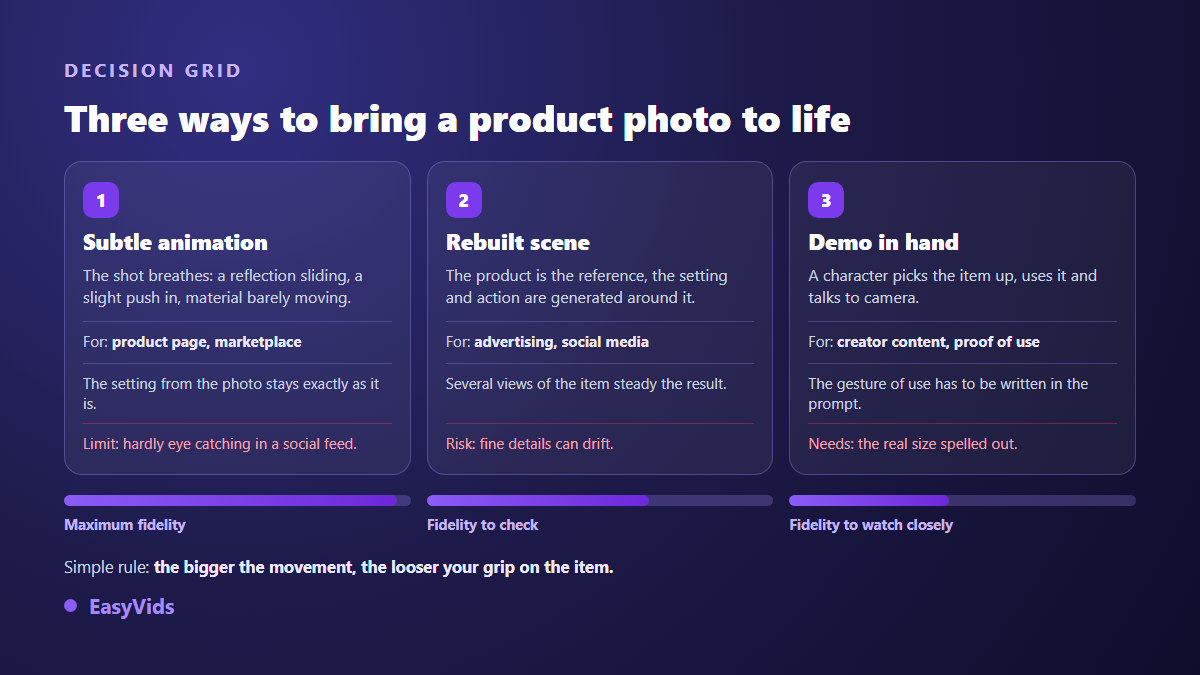
The first route keeps the photo as it is and simply lets it breathe: a moving highlight, a slight push in, a shifting shadow. That is the listing and marketplace choice, because nothing deforms. The second rebuilds a scene around the item, which stays as a reference while the set is generated: better for ads, riskier on fine detail. The third hands the object to a character who picks it up, uses it and talks to camera. On the first route, seven ways to animate a photo with AI sorts the moves that hold from the ones that show.
Writing a motion prompt that does not redraw your product
The costliest habit is describing the product inside the prompt. You already gave the model its photo: describing it again asks for a second one, which will take your product's place. A motion prompt only talks about what moves.
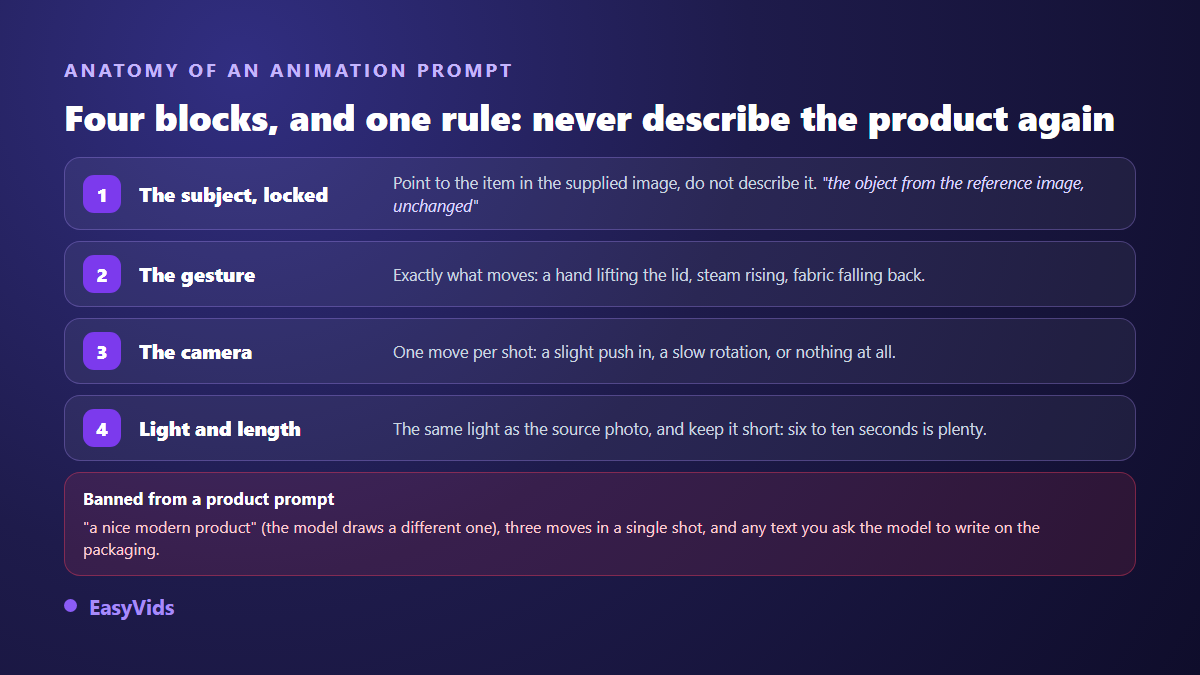
Four blocks are enough, in this order: the subject named without being described, the exact gesture, the camera move, then the light and the duration. Write the gesture the way a director would dictate it, with the precise verb: the hand unscrewing the cap, the cream spreading in circles, the lid closing. One move per shot, never three. If you want several actions, make several clips.
Give the model more than one view
A front shot is enough for one plan. It stops being enough the moment the camera turns or a hand handles the object. The fix is simple: supply several views of the same item instead of one. In the studio, a product entry takes a main photo plus up to four extra views, back, close detail, item in use, result obtained. The generator then has the hidden side instead of imagining it.
Those views come with a name and a short description, and that description solves the scale problem. A kitchen appliance presented as about the size of a large blender on a worktop will not be generated as a bathtub. Without that line, the model picks a size at random, and viewers notice immediately.
Let someone hold it
The shot that converts best is still the one where a person picks the item up, opens it, uses it and talks about it. It is built the same way: the product photo acts as a reference, a creator photo supplies the face, and the shot list requires the character to hold the object rather than leave it sitting as decor. That is the creator content logic covered in our guide to UGC for dropshipping. The script is written in the same place, from the product name and description, with a sales angle chosen upfront: problem then solution, demonstration, before and after, story, or testimonial.
The twenty seconds that sell
An animated clip is not an ad. The ad comes from the order in which you lay the shots down. A short structure works nearly every time, and it holds in five beats.
- The first three seconds: the product in action, not your logo.
- The friction: the annoyance your buyer genuinely lives with, named in one line.
- The demonstration: a gesture, a material changing, a visible result.
- The proof: a build detail, a real use, a customer line on screen.
- The action: one single instruction, spoken and written large.
Each beat becomes a clip, so a prompt. Five clips of four to six seconds make a complete ad, and each one can be regenerated without touching the others. That is the whole difference between an edit and a single video you must redo entirely when one shot disappoints.
Editing, captions and format
Clips laid end to end make a sequence of shots, not an ad. The online editor adds what is missing: on screen text for the hook and the call to action, a promotional badge, an arrow pointing at the detail the voice is describing, a discreet music bed, and captions. Captions are not a comfort feature. Ads are watched without sound in most scrolling situations, and burned in text stays readable even when the platform caption is collapsed.
Aspect ratio is decided before the first shot, never at export. Meta's published specifications for Reels and Stories describe a full screen vertical display in 9:16, while a shop listing is often served square or in 16:9. A video designed horizontally then cropped vertical loses a third of its frame, usually the third holding the product. Our rundown of sizes and ratios per platform has the detail.
Platform rules worth knowing
According to TikTok's community guidelines, realistic content generated or modified by AI must be disclosed by its author, and the platform provides a dedicated toggle at publishing time. On the marketplace side, Amazon's guidance for product listing media requires the visual to show the item actually sold, with no accessory absent from the delivery: a generated staging does not excuse you from that accuracy. The C2PA standard, backed by a coalition of publishers and manufacturers, also defines a provenance metadata format that several platforms already read to display an automatic notice.
Frequently asked questions
Do I need to own the product to make the video?
Technically no: a supplier photo is enough to generate a clip. You remain responsible for what the video shows, though. If it promises a texture, a capacity or a use the item does not deliver, the penalty arrives through returns and reviews, not through the tool.
How many clips make a complete ad?
Four to six clips of four to eight seconds cover a thirty second ad. Several short shots beat one long clip: each shot regenerates on its own, and the resulting rhythm holds attention far better.
Can a generated video replace a real shoot?
For advertising and social feeds, yes in most cases. For a demanding marketplace listing it works better as a complement: it stages the product, it does not replace footage of the real item when a buyer is trying to check one specific detail.
How do I keep my product's exact colour?
By supplying a correctly exposed photo, avoiding prompts that impose a colour mood, and checking the first shot before generating the rest. Warm light requested in the prompt also warms the item. If the tone drifts, fix the reference photo rather than the wording.
Do I have to disclose that the video was generated?
On social platforms, yes as soon as the scene looks realistic: TikTok requires it in its community guidelines and the other networks offer an equivalent setting. On a product listing, the question becomes accuracy: the media must match the item shipped, label or no label.
One photo is enough to start, provided you choose it carefully and leave the model the one job it genuinely does well: adding motion to what it can see. The rest comes down to ad structure and editing, two things no technology decides for you. To try it on your own catalogue, creating an account opens the full studio, plan details sit on the pricing page, and EasyVids brings generation, voice over and the editor together in one place.