The image is nearly perfect. The framing works, the light is beautiful, the eyes are right. Then you look down at the hand resting on the table and you count: six fingers. Or a thumb pointing the wrong way, or two fingers fused into one. If you have been wondering why AI can't draw hands while it nails a face down to the eyelashes, the cause is neither your prompt nor the model you picked. It is the way these tools build an image in the first place.
No magic word fixes it. What fixes it are decisions made before you hit generate, plus a repair reflex when the result goes wrong. This guide explains the mechanism in plain terms, then gives seven fixes we apply on our own generations. They assume your base prompt already holds together: if you are just starting, our complete guide to AI image generators covers the fundamentals first.
The short answer
An image model does not draw a hand. It builds a patch of pixels that looks like a hand. It has no skeleton, no finger counter, no concept of what «five» means. And the hand is the hardest possible subject: anatomy textbooks count twenty-seven bones in it, it takes hundreds of plausible positions, it hides itself, and it occupies a handful of pixels in the frame. Three levers change everything: the pose you ask for, the space the hand gets in the image, and how many attempts you allow yourself. Everything else is repair work.
The model guesses, it does not draw
The mechanism deserves thirty seconds of attention, because every fix below follows from it. These models start from an image of pure noise, then clean it step by step until something consistent with your text emerges. At no point do they build a skeleton, place joints and dress the result. At each step they look for the most plausible continuation locally. One extra finger stays locally plausible: next to a finger, the thing that looks most like what should come next is another finger.
The second decisive detail: the work does not happen on the final image, but on a compressed grid. The research that introduced latent diffusion in 2022 describes a reduction of a factor of eight on each side. A hand eighty pixels wide in the image becomes roughly ten cells in that working space. The model sees a blob of skin there, not a joint. The decoder that reconstructs the visible image then invents plausible detail from that blob. That is exactly where fingers multiply.
Five causes that stack up
None of these causes would explain the problem on its own. It is their accumulation on a single subject that makes the hand more fragile than a face, a background or a piece of clothing.
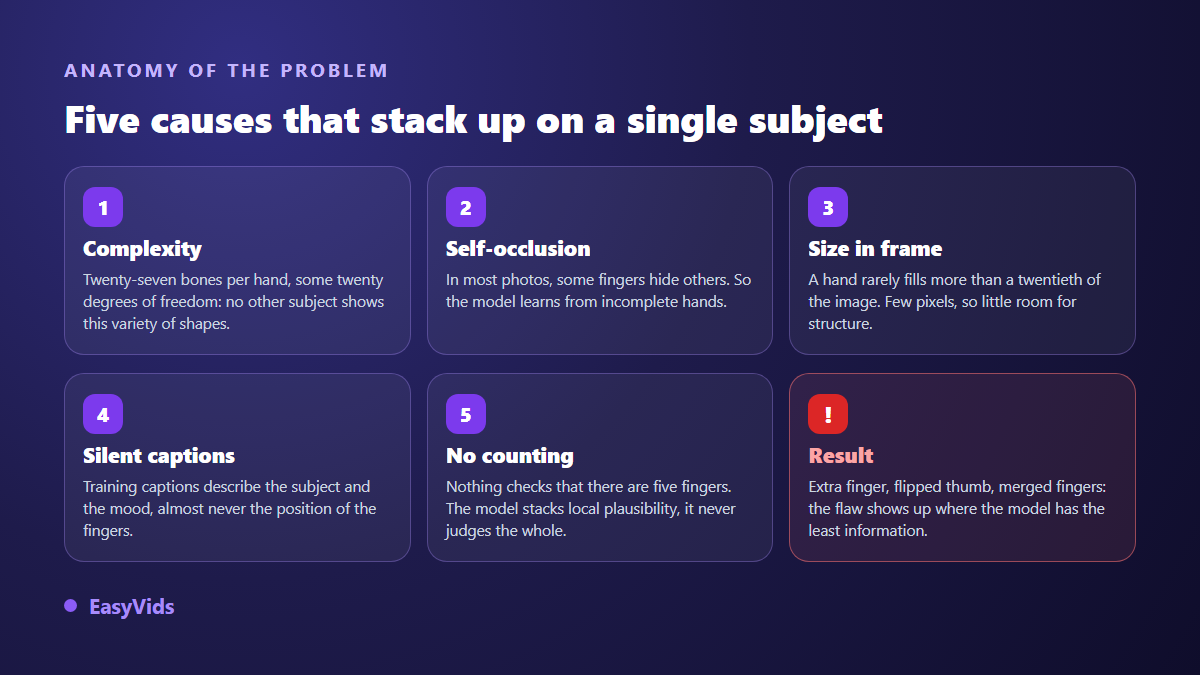
- Joint complexity. Twenty-seven bones according to anatomy textbooks, and around twenty degrees of freedom according to the robotics work that tries to reproduce it.
- Self-occlusion. In most photographs, fingers hide other fingers. The model therefore learns mostly from incomplete hands.
- Size in frame. A hand rarely covers more than a twentieth of the surface. Few pixels, so little room to write a structure.
- Silent captions. Training captions describe the subject, the mood, the style. Almost never the position of the fingers. Supervision is missing exactly where it would help.
- No counting. Nothing in the process checks that there are five fingers, or two hands. The model never evaluates the overall result.
Fix 1: decide what the hand is doing before you generate
The first decision is not a word in the prompt, it is an intention. A hand doing nothing specific is a hand the model will invent for you. Ask what it holds, where it rests, whether it must be fully visible. Three answers are possible, and they cost very different amounts of effort: the hand is out of frame, the hand is at rest, the hand is acting. The first is free, the second is reliable, the third has to be earned.
Keeping hands out of frame is not an admission of defeat. A waist shot cut above the wrists, a hand in a pocket, crossed arms, a subject seen from behind: all of these remove the risk without making the image poorer. On a thumbnail, the finger pointing at the camera is an expensive cliché, because it drags attention straight to the weakest area of your visual. The face and the contrast do that job better, as our breakdown of what actually drives thumbnail clicks explains.
Fix 2: describe the hand explicitly
Whatever you leave undescribed, the model decides. A prompt that stops at «a woman sitting at a desk» leaves the hands entirely free, therefore left to chance. Add the position: «both hands flat on the desk, fingers relaxed, palms visible». You guarantee nothing, but you narrow the range of possible shapes, and that is precisely what lowers the failure rate. Two habits help. Write in the positive, since negation is poorly handled in the main prompt. And keep it short: position, orientation, tension. A full paragraph about hands unbalances the rest of the description.
Fix 3: a closed pose beats a rare gesture
Poses are not equal, and the gap between the simplest and the rarest is enormous. A hand closed around a wide object exposes almost no structure, so there is little to get wrong. An open hand with spread fingers demands five correct shapes, separated, proportioned and correctly oriented. Across our generations, failures cluster on fine gestures and on hands manipulating narrow objects.
- Reliable: hands in pockets, crossed arms, a hand flat on a surface, a closed fist, a hand wrapped around a mug or a book.
- Middling: clasped hands, a hand on a shoulder, a phone held flat.
- Risky: a finger pointing at the lens, a hand near the face, interlaced fingers, counting gestures, a thin object held with fingertips.
- Avoid when the image ships as is: handshakes, hands on a keyboard, fingers on a guitar neck, hands on a steering wheel.
Fix 4: give the hand more pixels
The number of available pixels decides much of the outcome. The proportion rules used in life drawing give the hand the length of the face, roughly a tenth of the body height. In a full body shot inside a thousand pixel tall image, that leaves about a hundred pixels for the whole hand, and around ten for the width of one finger. The model simply has no room to write a joint in there.
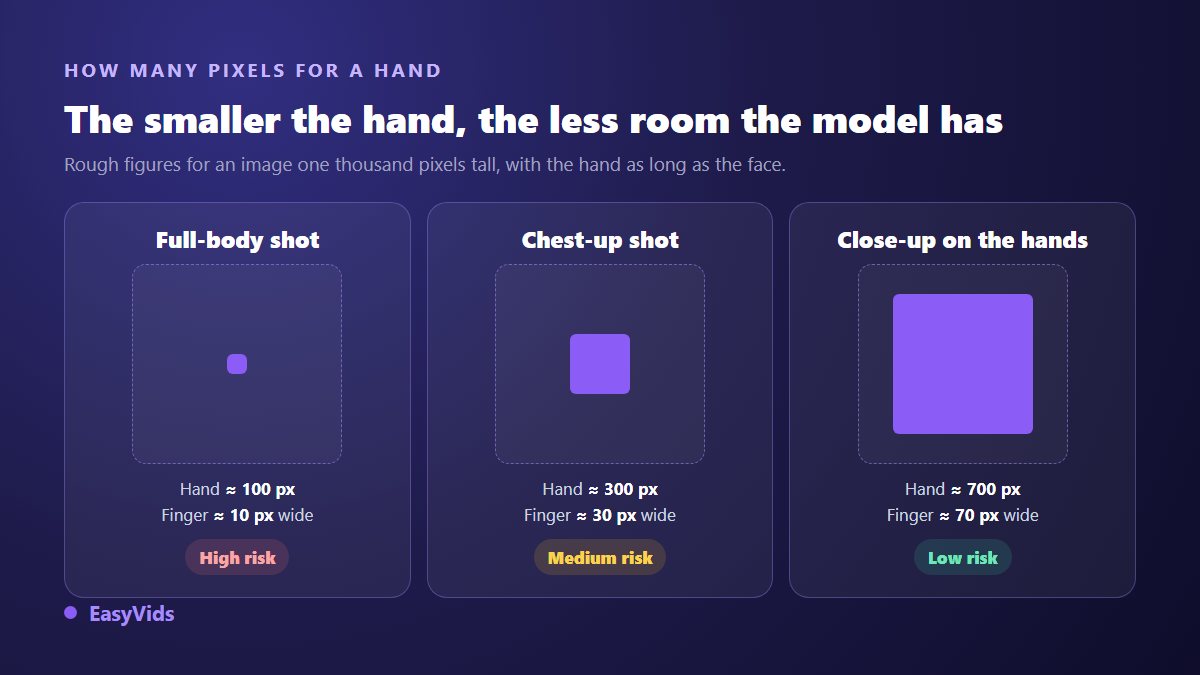
Two settings act on this. Framing first: moving from a full body shot to a chest shot triples the size of the hand and changes nothing else. Output resolution second, when the selected model offers it. In the Images tab of the One-Shot page, aspect ratio and resolution are set before launching, and generating large then scaling down always beats the opposite. If the hand is the subject, frame on it: a close-up of hands succeeds far more often than a wide shot where they sit at the edge.
Fix 5: write down what you do not want to see
Negation works poorly in the main prompt, but many tools provide a separate field for terms to exclude, and that one is processed on its own. In the EasyVids workshop it is labelled «to avoid in images» and applies to every scene of a project. An entry such as «deformed hands, extra fingers, fused fingers» guarantees nothing by itself, but it costs a single input for an entire series. Fill it in when you lock your visual direction, alongside the style, and forget about it.
Fix 6: ask for several candidates, keep the good one
No trick makes hands reliable every time, and accepting that is part of the method: the approach that works is statistical. Generate several images from the same prompt and keep the one whose hands hold up. Some models return several candidates in a single request, and the count is chosen before launching. One caveat worth knowing: as soon as you attach a reference image, generation drops back to a single output. Since every image requested is counted, save candidate batches for the visuals that really matter, and the plan that fits your pace is on the pricing page.
Fix 7: start from a reference, not from a description
One image beats a paragraph. Models that accept reference images pick up the structure of what you feed them, hand position included. Photograph your own hand in the pose you want, or reuse a generation that already worked, then attach it. The reference upload appears automatically when the selected model can read references, and disappears when it cannot, so you never believe a reference was used when it was silently ignored. This is the same mechanism that keeps a face stable from one image to the next, covered in our method to keep the same character across all your images.
Repairing a bad hand without redoing the image
An imperfect image is not necessarily wasted. Three repairs take less effort than a fresh batch, and the right one depends on where the flaw sits.
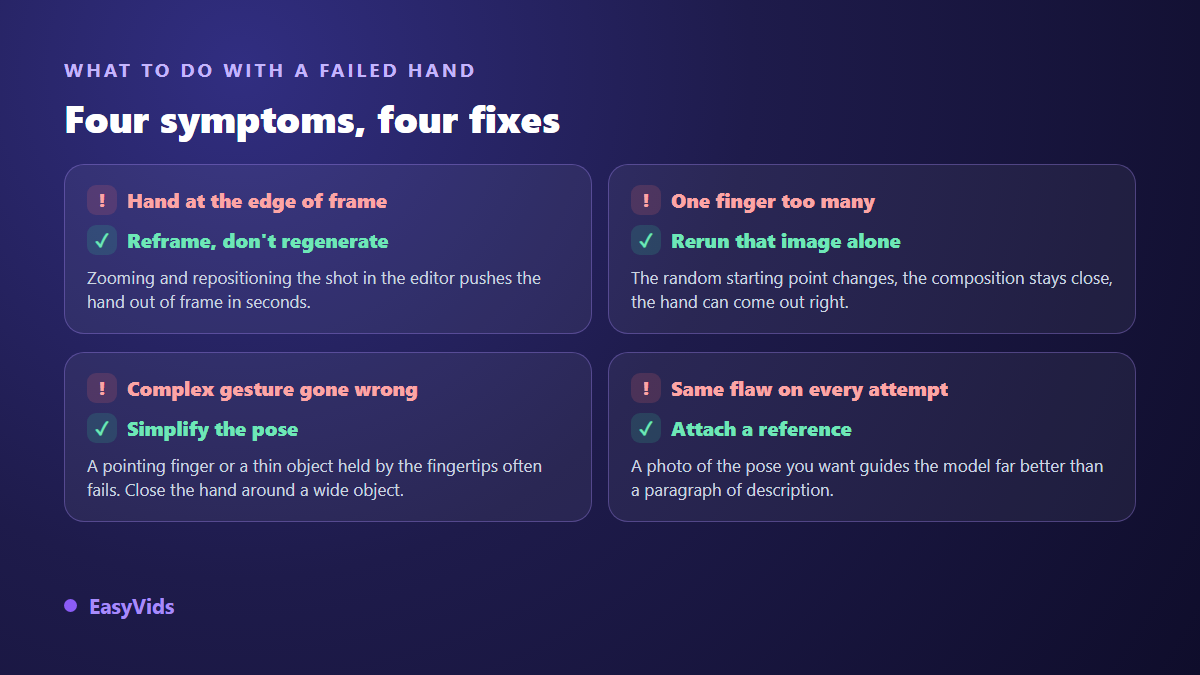
The fastest route is reframing. In the editor, scaling the shot up and moving it on the canvas pushes the hand out of view in seconds, with nothing regenerated. The second is rerunning that single image: the random starting point changes, the composition stays close, and the hand often lands correctly on the second try. The third is editing the prompt by hand before rerunning, simplifying the pose. In the workshop, a prompt you edited yourself is sent to the model exactly as you wrote it, with no automatic rewriting on top.
Hands in video: the same flaw, now moving
In video the flaw does not merely exist, it moves. A finger that appears then vanishes between frames pulls the eye far more than a badly formed still hand, because the brain detects change before it understands what it is looking at. The same rules apply, more strictly. Avoid shots where hands manipulate objects, prefer slow wide gestures to fine movements, and cut before the hand enters the frame. It is one source of that «almost right» feeling described in the nine causes of a failed AI video.
Frequently asked questions
Which image generator handles hands best?
None of them guarantees it. Recent model generations do noticeably better than those from 2022, and the gap between two models shows mainly on complex poses. The only test that counts is yours: run the same prompt, with the same pose, on two models, and compare across five images. On EasyVids, the model you pick is the one that produces the image, with no silent substitution along the way.
Should I write «five fingers» in the prompt?
The effect is weak. The model does not count, it maps words to shapes seen during training. Describing the pose, for instance «hand flat, fingers together», carries far more weight than a numeric reminder. Keep the mention if it reassures you, but do not build your method on it.
Why do faces come out fine and hands do not?
A face is almost always frontal or three quarter, centred, lit, and it fills a large part of the image. Its structure barely varies from one photo to the next. A hand changes shape with every gesture, hides itself and takes up little room. The model has seen millions of faces in comparable positions, and hands in an almost infinite number of them.
Can a bad hand be fixed without regenerating?
Yes, in two cases. If the hand sits at the edge of the frame, reframing in the editor is enough. If it is small and blurry, an element placed in front of it, an object or a text banner, hides it cleanly. Once it is central and sharp, regeneration is the only honest answer.
Do broken hands really get noticed?
On an image seen for two seconds in a feed, often not. On an enlarged thumbnail, a printed poster or a product visual, yes, and the doubt transfers straight onto how serious your offer looks. Set your standard by the medium instead of chasing perfection everywhere.
Remember the logic rather than the list. Hands are fragile because they are small, articulated and rarely described: lower the difficulty of the pose, give them room in the frame, and allow yourself two or three attempts when they are visible. Those three habits remove the vast majority of failures without touching a single technical setting. To put them into practice right away, create your account and generate your first images: the EasyVids studio brings generation, reference images and the editor together in one place.