You described your idea, hit generate, waited, watched the result once and closed the tab. The question that follows is always the same: why do my AI videos look bad when other people, using the same tools, get clips that hold up? The answer is rarely mysterious. It comes down to a small number of identifiable causes, and each one is fixed at a specific point in the production chain.
This guide isolates nine of them. For each you get the exact symptom on screen, what actually broke, and the correction to apply. The goal is not to hit regenerate and hope: it is to look at a disappointing video and know where the problem lives.
The short answer
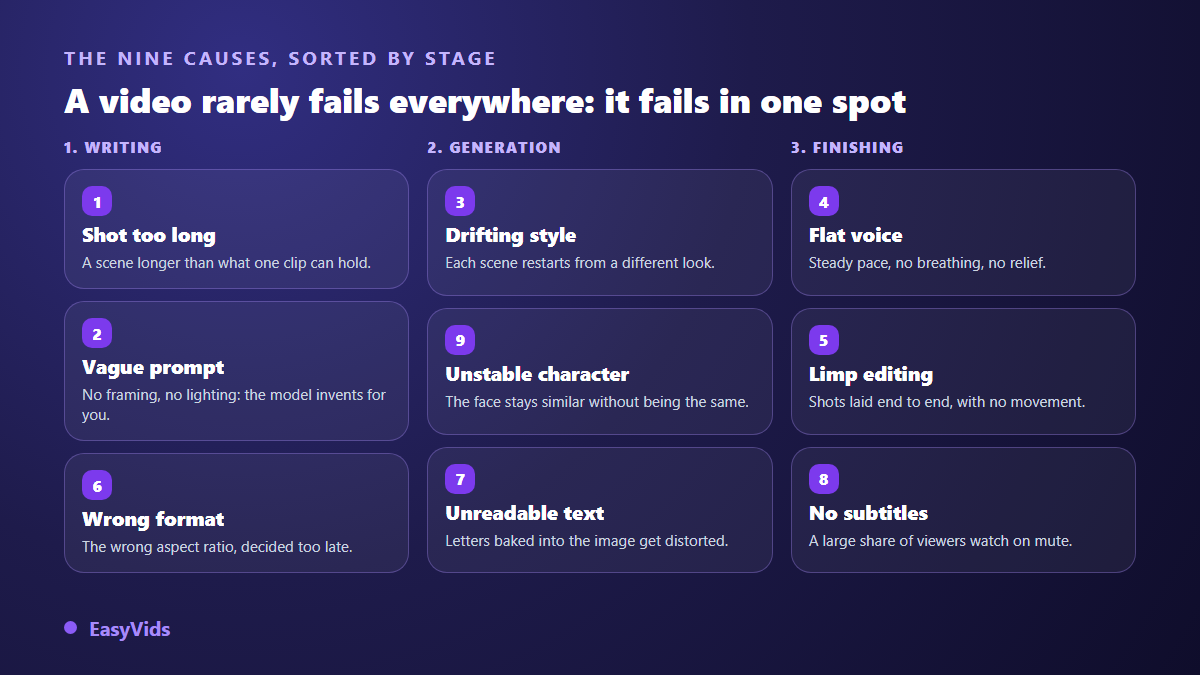
A generated video almost always fails for a structural reason rather than a model defect. The nine usual suspects: a shot longer than a clip can hold, a vague prompt, a style that shifts scene to scene, a flat voice, an edit with no rhythm, the wrong aspect ratio for the platform, unreadable baked in text, missing captions, and a character who stops looking like themselves. Seven of those nine are settled before generation, at the writing stage. That is why our AI video generator guide spends so much time on planning.
Diagnose before you regenerate
The first instinct in front of a bad result is to click regenerate. It is the worst move: an identical run reproduces an equivalent flaw, and every retry spends budget without teaching you anything. Spend thirty seconds looking at the video the way an editor would, and find the exact moment it loses you.
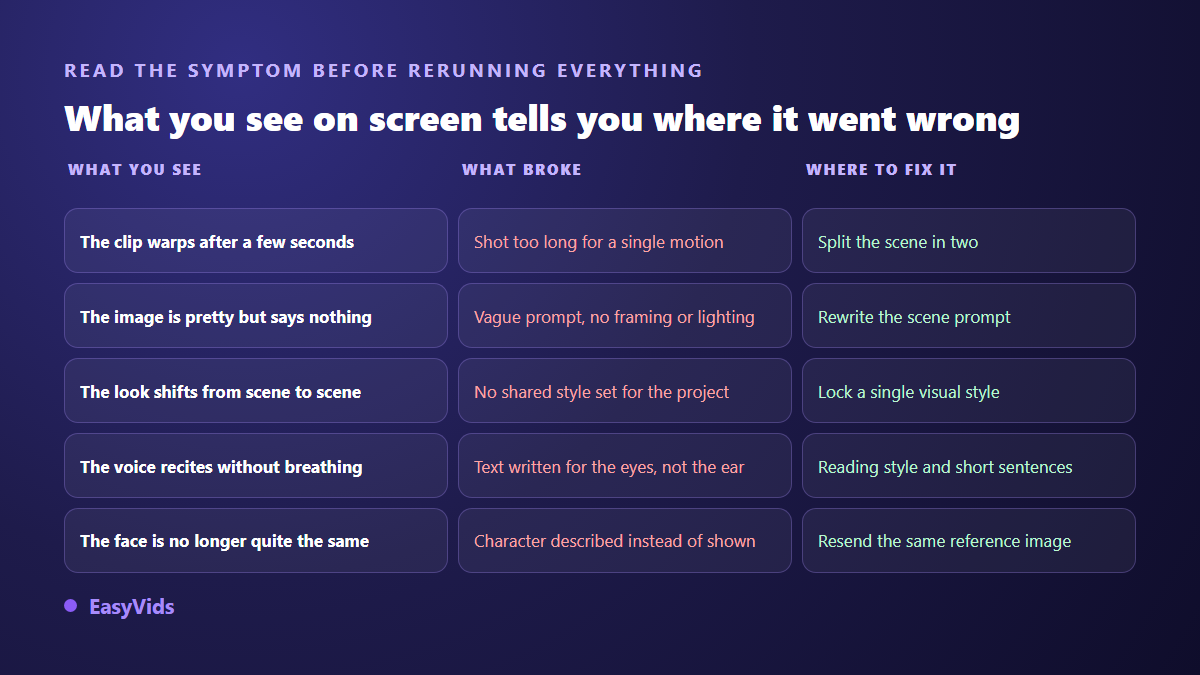
Three questions locate almost any problem. Does the disappointment show on one scene or on all of them? One scene means the fault is local: its duration, its prompt, its reference. All of them means a global setting is wrong: style, aspect ratio, voice, edit. Second question: is the problem still visible with the sound off? If yes it is visual, if no it is audio or pacing. Third question: is the video broken, or just flat? Broken is a technical fault and fixes fast. Flat is a writing fault, slower to fix and far more valuable once you do.
Cause 1: the shot runs longer than a clip can hold
The tell is unmistakable. The first seconds look great, then something starts to slide: a hand gains a finger, a background folds into itself, an object changes shape as the camera moves in. The longer the scene, the more the model has to invent, and the further it drifts. That is not a bug, it is the normal ceiling of a generated clip. The fix is a writing rule, not a setting: one idea, one action, one movement per shot. Our workflow cuts to short targets of six, eight or ten seconds per scene, and any model that cannot produce the chosen length is removed from the list rather than allowed to approximate it.
Cause 2: the prompt is vague, so the model decides for you
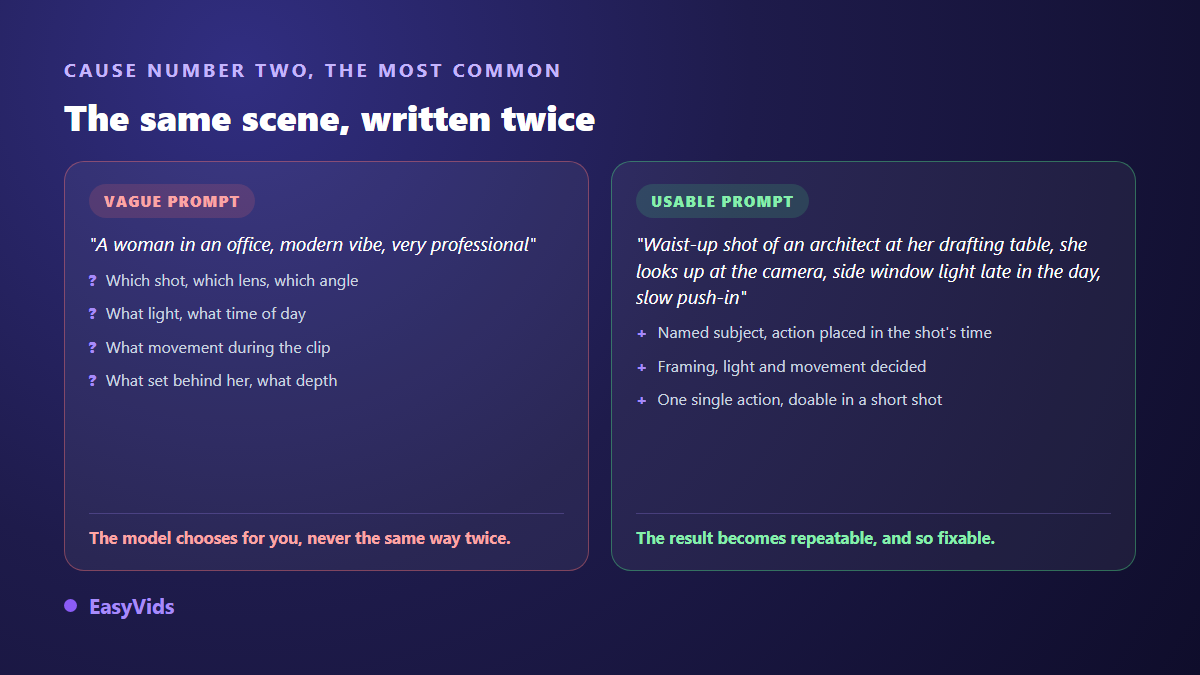
Symptom: the image is pretty and says nothing. Generic framing, neutral light, stock decor. You cannot even name what is wrong, which is exactly the signal. A prompt like "a woman in an office, modern feel" leaves the model four major decisions: shot size, angle, lighting, movement. It makes them, differently every run. Add four things every time: the named subject, the action inside the shot, the framing and the light. Add camera movement whenever the shot is animated. A scene prompt is written and rewritten one at a time in the workspace, without touching the rest of the project.
Cause 3: the style changes between scenes
Symptom: taken one by one, every image is fine. Put end to end, they do not look like the same film. Scene one leans photographic, scene three illustrated, scene six rendered in three dimensions. Viewers cannot name the flaw, but they lose the thread, because the brain reads a change of style as a change of story. The cause is nearly always the same: no shared look was imposed on the project, and each scene was described on its own. Fix it by locking a single visual universe at project level before the first generation, or by uploading one to three images of the look you want and letting that style become the project's. Previewing the look before launching the series saves you from discovering the problem across twenty finished scenes.
Cause 4: the voice is flat and it shows in one sentence
Symptom: even pace, no breath, no hesitation, no rise. The voice recites. Most people blame the synthesis; usually the script is at fault. Copy written to be read becomes artificial the moment it is spoken, because the sentences run long and the connectors turn formal. Rewrite for the ear first: short sentences, active verbs, the words you would use on the phone. Read it aloud before generating, because whatever you stumble on, nobody will listen to. When you arrive with a script that is already finished, that rewrite is part of turning it into a film, and our method for turning a script into an edited video covers the cutting to do before the first generation. Only then work on delivery: a reading instruction placed at the head of the text genuinely changes the result and can be saved once on your account. We covered that rewrite in our natural sounding AI voice over guide.
Cause 5: the edit has no rhythm
Symptom: every shot is fine, the voice is perfectly aligned, and the whole thing still sends you to sleep. This is the classic failure of automatic edits: scenes laid end to end, all the same length, with no internal movement, no transitions, no variation in shot size. A video is not a run of pictures, it is a run of durations. Fix it in two places. While writing, vary scene length, since a short scene after two long ones resets attention. While editing, switch on what creates movement: a slow zoom on stills, a very slight drift on video clips, transitions at scene changes, and one shared colour grade across the whole piece.
Cause 6: the aspect ratio does not match the platform
Symptom: the video looks good on your monitor and bad in a vertical feed. Characters shrink to nothing, the subject floats inside black bars, or an automatic crop cuts heads off. The problem is not the video, it is the aspect ratio, chosen too late or never chosen at all. Decide it before the first image, because it drives the composition of every shot; framing built for landscape cannot be rescued by cropping. In our studio the ratio is picked at project start and applied to every image and every clip, and models that cannot produce it drop out of the list. Leave margin at the top and bottom of a vertical video too, since platform interfaces cover those zones. Our step by step YouTube video guide covers that framing platform by platform.
Cause 7: baked in text is unreadable
Symptom: you asked for a word, a sign or a title inside the image, and you got twisted letters, a half invented word, and a typeface that changes every shot. This is a known ceiling of image models: they draw letter shapes, they do not write. Separate the two jobs. Let the model produce the picture, then add the text on top in the editor with a real font. You gain sharpness, the ability to fix a typo without regenerating anything, and control over contrast, which alone decides readability on a small screen. When a word truly has to live inside the generated image, keep it very short, set it in capitals, and check every shot. That split between generated image and typeset text reaches well beyond video, since the journals and notebooks sold through self publishing rest entirely on it, as our guide to low content books shows.
Cause 8: there are no captions
Symptom: retention collapses in the first seconds even though the video is good. A large share of viewers watch with the sound off, on transport, at a desk, next to somebody. With no text on screen your message does not exist for them. Generate captions from the audio track, proofread them, then burn them in. Our editor transcribes a project's audio into short segments you can correct and style before export. Publish the caption file as well where the platform accepts one: YouTube documents how to add subtitles and captions, and that text is read by the search engine as much as by your audience.
Cause 9: characters stop looking like themselves
Symptom: your lead has lighter hair in scene four, a different jacket in scene seven, and a cousin's face in scene nine. Viewers first assume a new character, then work it out, then disengage. It is the most destructive flaw for a story, because it breaks identification exactly when it should be forming. The cause is almost always method: the character was described in each prompt instead of being shown. A repeated description produces a family of lookalikes, never the same person. Build one reference image and send it with every scene, along with an explicit instruction to keep the same face, hair and outfit. Watch one detail people miss: not every model reads reference images, and one that ignores them fails silently. When that character has to speak straight to camera, the safest route is to animate a single portrait, a technique covered in our guide to making a photo talk.
The order to fix things in
Fixing out of order is expensive, because some faults hide others. Polishing a scene prompt is pointless if the project ratio is wrong, since it will all be redone. This order avoids the round trips.
- Aspect ratio first: it drives the composition of every single shot.
- Project style, locked once and applied to every scene.
- Script segmentation: one idea per scene, short and varied durations.
- Character reference images, prepared before the first scene is generated.
- Scene prompts, corrected one by one on the shots that disappoint.
- Voice: the rewritten script first, the reading instruction second.
- The edit: alignment to the voice over, movement, transitions, shared grade.
- Captions and on screen text, added last inside the editor.
That discipline changes one thing above all: you only regenerate what needs it. A failed scene reruns on its own while the rest of the project stays untouched, which saves time as much as budget. Plan details live on the pricing page, and the whole chain from script to final edit runs from the EasyVids studio.
Frequently asked questions
Why do my AI videos look bad even with a strong model?
Because the model only acts at the end. It executes a prompt, a duration, a ratio and a reference that you supply. Seven of the nine causes here are decided before generation. Swapping models without changing the preparation reproduces the same result in a different look.
Do I have to regenerate everything when one scene fails?
No, and you should not. A scene reruns on its own with its corrected prompt while the rest of the project stays put. It is faster, cheaper, and it lets you confirm a fix works before applying it anywhere else.
How long should a scene be to stay clean?
A few seconds. Short targets of six to ten seconds suit most subjects, and one action per shot remains the best protection against visual drift. A shot that runs too long cannot be rescued in the edit, it has to be split while writing.
How do I keep the same character across a whole video?
Show them instead of describing them. Prepare a reference image, send it with every scene, and explicitly ask to keep the face, hair and outfit. Also limit abrupt lighting and framing shifts between neighbouring scenes, because they amplify drift.
Do captions really make a difference?
Yes, on two fronts. They hold the audience watching without sound, and they hand the search engine text to read. It is one of the cheapest corrections in effort for the effect you get.
A bad AI video is not a machine failure, it is a diagnosis nobody made. Open the last one that disappointed you, mute it, note the exact scene where you check out, and fix that cause instead of regenerating the lot. Most of the time a single change lifts the whole piece. Creating an account opens the studio so you can apply these fixes to your next project, scene by scene.