You have a training module to ship, a company update to publish, or a weekly news channel to feed. That means someone on camera, a clean background, a microphone that does not hiss, and a person willing to say the words without stumbling. An AI presenter removes that bottleneck: the face and the voice are generated, the script stays yours, and the video comes out of your browser.
The useful question is not whether the technology works. It works. The question is where it holds and where it still shows. An eight second shot to camera passes easily; a three minute unbroken take does not exist yet. For the wider picture of on camera content without a camera, our guide to AI avatars and UGC videos covers the ground. This piece takes the business angle: training, internal communication, service presentations, industry news.
The short answer
An AI presenter is a generated character who speaks your text to camera, always with the same face. You paste the script, you supply a photo of the presenter or let the studio define one, then you pick the aspect ratio and the shot length. The text is split into short segments, each segment becomes a shot where the person says exactly those words, lip synced, and the edit stitches them together. It suits videos that explain, announce or teach. It replaces neither an interview, nor a hands on demonstration, nor an executive speaking on a serious matter.
Three different things hide behind one term
The first is the stock avatar: an actor filmed once, whose likeness is offered to thousands of companies. The second is your own double, built from a photo of you. The third is a presenter defined from scratch, who never existed and belongs to nobody. All three produce decent videos, but they commit you to very different things: the first turns up on a competitor's channel, the second exposes you personally, the third leaves you free.
A presenter is also different from a one off animation. Making a photo move for a story is an effect. A presenter is a host: they return from one video to the next, open every episode the same way, and end up carrying the identity of the channel like a title sequence does. That permanence is the real technical difficulty, and it decides your credibility around the tenth video.
Where the face comes from
- Your own face, from a sharp, front facing photo in soft light. Your audience recognises you and no rights question arises. The full method is in our walkthrough for building your AI double.
- A colleague or a spokesperson, with written consent naming the uses, the channels and the duration. Plan for the day that person leaves the company.
- A presenter defined by the studio, from a short description: age, look, clothing, setting. Nobody to convince, nobody to replace, and a face that belongs to no stock library.
For long running corporate communication, the third route is usually the calmest. A face defined once lasts for years, works across languages, and survives any change of team. The first stays best when your own name is the brand.
From script to delivered file
You paste the script, upload the presenter photo, set the shot length, pick the aspect ratio and the visual style. The studio then writes the shot list: the description of the person, the setting, the framing, and the exact sentence they speak. Shots are generated, then assembled in order.
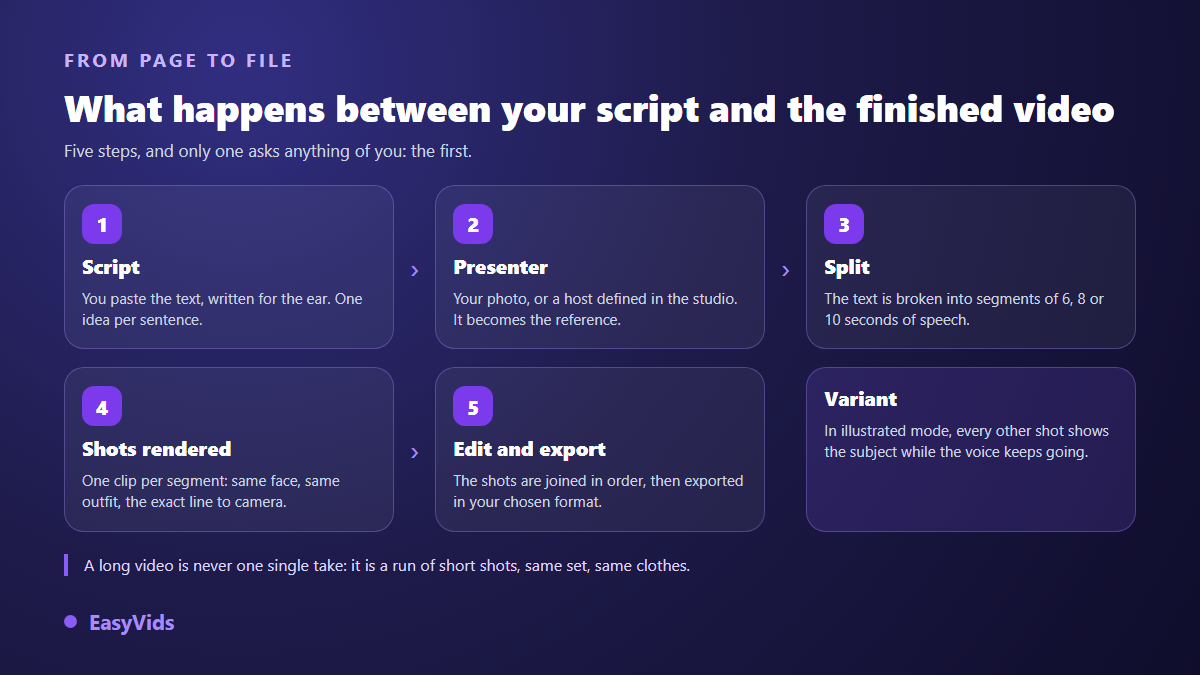
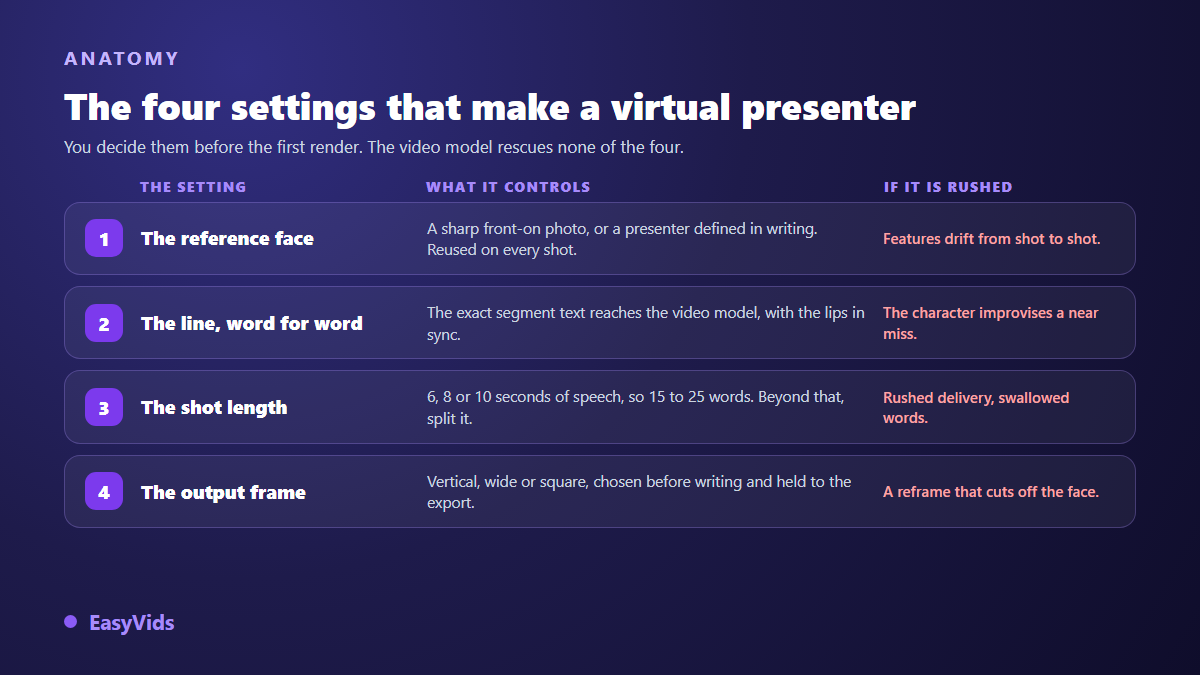
One technical detail explains most failed presenter videos elsewhere: the line has to reach the video model word for word. Without that, the character improvises something close to your text but not your text. We fixed exactly that on our own pipeline: the segment text is appended at the end of the instruction, in the position that wins, with an order to say nothing else.
Shot length is the constraint that shapes everything
Current video models produce short clips. In our studio the split is set to 6, 8 or 10 seconds of speech per shot and nothing else, precisely so every segment fits inside a clip. A two minute video is therefore not one take: it is a run of consecutive shots, same setting, same clothes.
The constraint has a happy side effect. It forces short sentences, regular changes of angle, and no lingering shots. It creates the rhythm professional editors add by hand. Budget around 15 to 20 words for a six second shot: beyond that the delivery speeds up and quality drops.
Straight to camera, or alternating with cutaways
Two edits coexist and they serve different goals. The first keeps the presenter on screen throughout, possibly in motion: walking, holding an object, moving through an office. That is the edit for short messages, announcements and social formats.
The second alternates presenter shots with cutaways showing what is being described, the same voice continuing off screen. That is the edit for training modules and corporate videos: the face builds trust, the cutaways carry the information. When a module reuses existing material, the same logic applies as when you turn a document into a narrated video, and any passage full of figures works better as an animated sequence than as a table read aloud.
Pick the aspect ratio before you write
A shot framed in landscape and then cropped to vertical loses half the setting and often part of the face. Choose at launch: vertical for social feeds, landscape for training, intranet and sales pages, square for timelines. Then write accordingly. A vertical shot holds a presenter and nothing else. A landscape shot leaves room for on screen text, a capture or a diagram.
Four business uses that genuinely hold up
- Training and onboarding: welcome modules, procedures, safety reminders. The content changes often, filming never keeps up, an update is one generation away.
- Corporate communication: offer presentations, customer messages, quarterly summaries. The face reassures and the edit stays identical from one edition to the next.
- News and industry monitoring: sector round ups, weekly digests, short explainers. Publishing rhythm matters more than staging.
- Support and product pages: frequently asked questions, tool walkthroughs, an item presented in hand to camera.
These four share one trait: the viewer came for information, not for a performance. That is exactly where a generated presenter goes unnoticed.
Write for a speaker, not for a reader
A company text written for print sounds wrong in a mouth. Sentences run long, clauses pile up, and the presenter seems to recite a sheet. Write for the ear: one idea per sentence, active verbs, plain words, rounded figures. Read it aloud before generating, it is the most reliable test and it costs two minutes.
Keeping the same face across a series
This is what separates a demo from an editorial system. A face described in words drifts with every generation: the hair changes, the age moves, the gaze is not the same. The only reliable method is to reuse a stable reference image, then lock the identity during animation so the features hold from the first frame to the last, the principle described in our guide to consistent characters.
What it does not replace
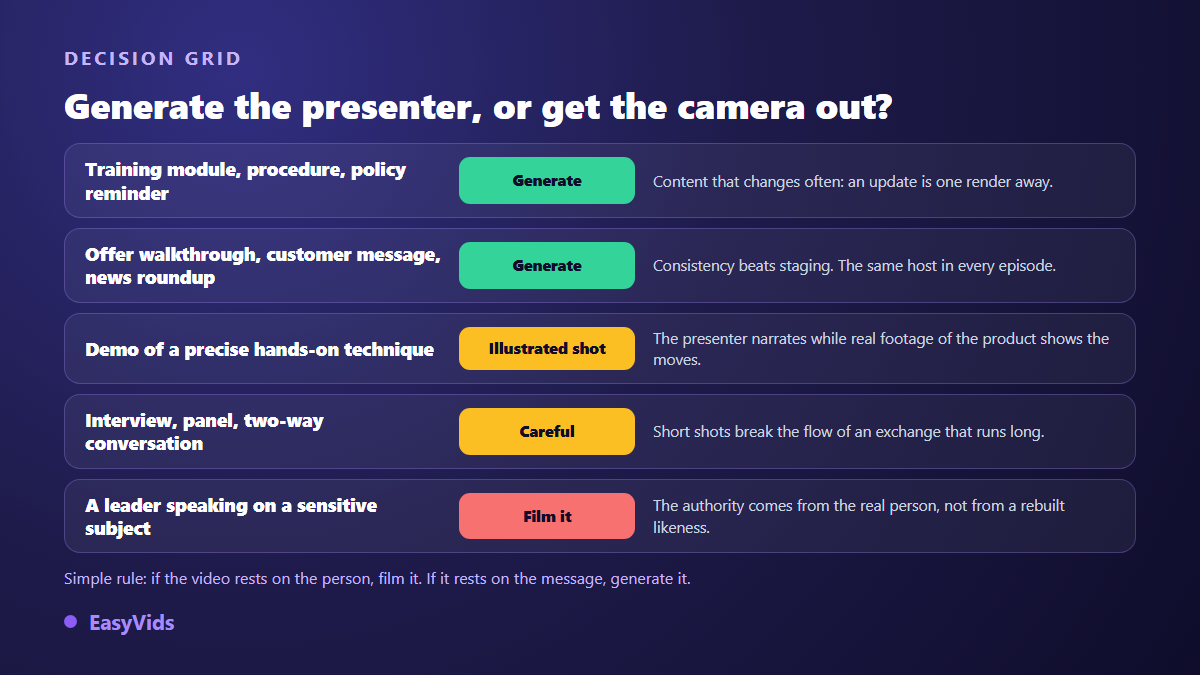
Hold on to the dividing line. Whenever the video rests on the person, on their authority or on their physical presence, film it. Whenever it rests on a repeatable message, generate it. In between, the cutaway edit gives you a middle path: the presenter comments, real footage shows.
Consent, disclosure and platform rules
A presenter defined by the studio raises no likeness question. A presenter reusing a real person's face or voice does. Consent should be written, dated, and should name the permitted uses, the channels and the duration. Voice cloning, which is more tightly framed, is covered in our review of the legal ground for voice cloning.
On the publishing side, two texts concern you directly. According to the YouTube help centre, creators must flag in YouTube Studio, at upload time, any realistic content that was altered or generated by a machine, and the platform then shows a notice to viewers. The European regulation on artificial intelligence sets out, in its article 50, an information duty when content is artificially generated or imitates a real person. Declaring costs you nothing: staying silent is what exposes you.
Frequently asked questions
Can an AI presenter speak several languages?
Yes. The words spoken on screen are the ones you supply: write the script in the target language and the presenter delivers it in that language, with the same face as in your other versions. Test one shot before launching a full series, since delivery quality varies by language.
Do I need a professional photo to build a presenter?
No, but a sharp, front facing photo in soft light, with no sunglasses and no harsh shadow, changes everything downstream. That image is the reference for every shot, so a blurry frame costs you across the whole series.
How long can a presenter video run?
As long as your script, provided you accept a run of consecutive shots of a few seconds each. A ten minute video is possible, it simply contains many shots. Review becomes the long part, not generation.
Can these videos be monetised?
Yes, when they add value of their own: an original script, verified information, a deliberate edit. What platforms penalise is repetitive mass produced content with no contribution. A carefully written training module or news digest sits within the rules, provided you declare synthetic content where the platform requires it.
AI presenter or film yourself?
If you are comfortable on camera and publish rarely, film yourself: nothing beats real presence. If you publish weekly, in several languages, with frequent updates, the AI presenter wins on consistency and on the hours it gives back.
An AI presenter is not a demo toy, it is a production chain: a stable face, a script written for the ear, short shots, an aspect ratio settled up front, a clear disclosure at publication. Start small, with one announcement or a two minute training module, and judge the result rather than the promise. Creating an account opens the full studio, and every production tool stays in one place, from script to export.