You are weighing HeyGen vs Synthesia before committing, and you hit a sourcing problem. Most pages that answer that query come from one of the two vendors, from a site paid per signup, or from someone copying both. The verdict is decided before the first line, and it says nothing about your project.
We will not pretend otherwise: we have not run these two tools against each other on a bench, and a fake test always shows. What we can do is read what each vendor documents publicly, put the two descriptions side by side, flag what stays unverifiable, and hand you the checks to run yourself. If only one of them interests you in depth, our usage review of Synthesia already covers that half. Here, the comparison is the subject.
The short answer
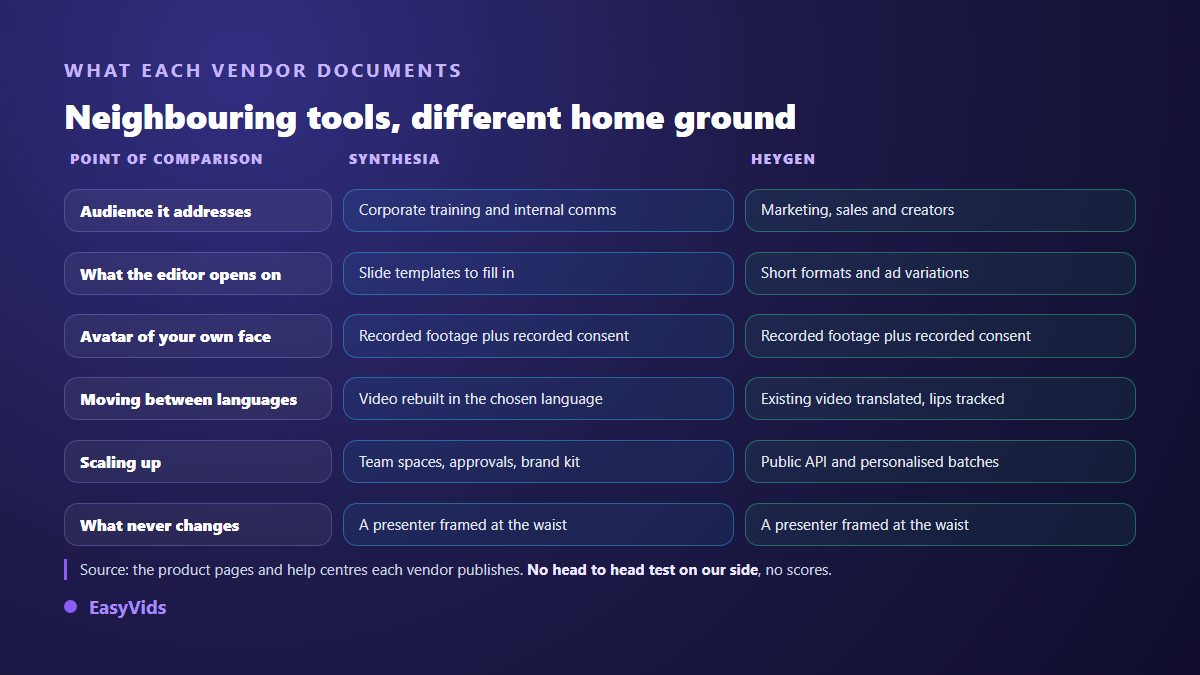
Both tools belong to the same family: they make talking avatars. You write a script, a virtual presenter delivers it to camera, in the language you pick. On top of that shared brick, each vendor aimed at a different audience, and their own pages say so. Synthesia speaks to organisations first: training, internal communication, teams that review and localise one message. HeyGen speaks to marketing and creators first: short formats, ad variants, personalised videos produced in batches, and a public API to trigger all of it from your own systems. If your video shows a person talking, either will do the job, and the choice comes down to how you work rather than to an overall score.
What both tools share, and an honest comparison says first
Before the differences, there is a wide common base. Both platforms start from a script, offer a library of studio filmed presenters, sync lip movement to a synthetic voice, add on screen text, a logo, a background, and export a file you can publish. Both vendors advertise well over a hundred languages and accents: the exact count moves from quarter to quarter, so we do not repeat it here, and you will check it on their pages the day you decide.
- The starting point is text, never a shoot. You paste a script, you pick a face and a voice.
- The frame is a presenter at the waist. The avatar talks, it does not act a scene or move through a set.
- An avatar of your own face is possible on both sides, through dedicated footage and a recorded consent statement.
- Moving between languages is a headline feature for both, with lip movement resynced.
- A free trial exists on both sides, capped in volume and export options: it is a demo, not a smaller product.
- Both publish a content policy that rules out certain uses, starting with impersonating a real person without consent.
What Synthesia puts forward on its own pages
Synthesia's public documentation points at the enterprise, and the editor shows it from the first screen: slide templates to fill in, a brand kit, shared workspaces, comments and approvals. The vendor also describes an export aimed at online learning platforms, which gives away its home ground: the module you have to keep current, localise into several languages and distribute to staff.
On custom avatars, Synthesia's help centre describes a controlled procedure: dedicated footage, plus a filmed consent statement recorded by the person themselves. The vendor also publishes a content policy that rules out several categories, news style content among them, and a compliance page written for procurement and security teams. That framework is a selling point inside a large organisation, and a real constraint for anyone in a hurry.
What HeyGen puts forward on its own pages
HeyGen describes a product aimed at commercial output: short social formats, variants of the same ad, personalised outreach videos addressed to a named recipient. The vendor documents a public API that triggers a generation from your own tools, and interactive avatars able to answer in real time. That is the vocabulary of growth and automation, where Synthesia's is the vocabulary of governance.
On translation, HeyGen documents a flow that starts from an existing video, including genuinely filmed footage, and renders it in another language with lip movement tracked. Creating an avatar of your own face also goes through a recorded consent step, according to its help centre. On paper the two platforms meet on the safeguards, and part ways on how you drive them day to day.
Consent and disclosure: where both meet
This is the part feature tables skip, and the one that can cost the most. Both vendors gate a custom avatar behind recorded consent, and their terms forbid making a real person speak without agreement. That rule does not depend on which tool you pick: it follows you.
Disclosure comes from platforms and from law. The European Union AI Act, in force since 1 August 2024, sets a transparency duty on AI generated or manipulated content in its Article 50, with application from 2 August 2026. YouTube's own help centre has asked creators since March 2024 to declare realistic synthetic content at upload. Check both on the official pages when you publish: these are living texts, and a stale claim costs more here than elsewhere.
Six checks beat any ranking
No general ranking survives the next model release, and nobody can judge for you whether a voice sounds credible in your language. The useful method is to open both free trials on the same evening, with the same script, and repeat the same six moves. One hour gives you an answer that holds for your project, which no article can produce, this one included.
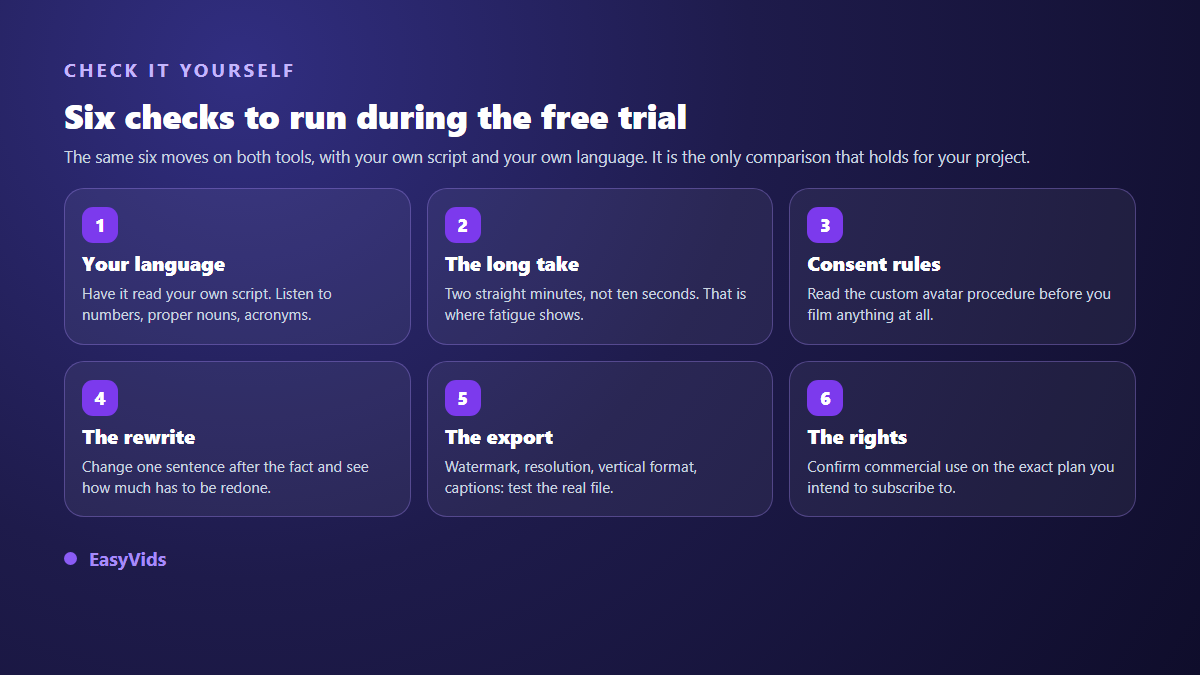
Two of those checks usually decide it. The long take first: an avatar holds up well for ten seconds, the real question is two straight minutes, when the eye starts noticing repeated gestures. The rewrite next: change one sentence mid script and watch how much has to be rebuilt.
Budget, without a single figure
We publish no prices, neither ours nor anyone else's: those grids change faster than the articles quoting them, and a priced comparison turns false without warning. Look instead at the shape of the bill, which barely moves. Both vendors charge by video volume, with tiers, seats for teams, and options that unlock only above a certain level, custom avatars first among them. The question is not which offer is cheaper today, but what your bill becomes when your output doubles. On our side the grid stays public on our pricing page.
The case where neither one answers
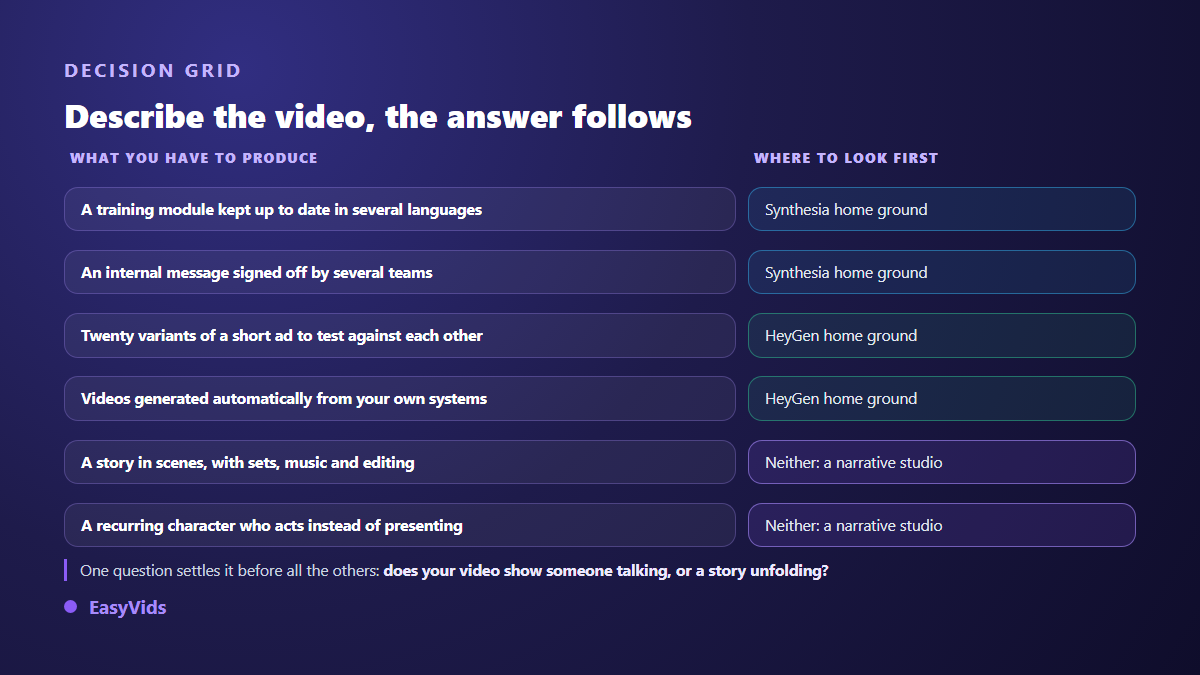
It deserves to be said plainly, because it is the real dividing line: Synthesia and HeyGen are excellent at showing someone talking. They are not built to tell a story. A narrative video is not a presenter against a backdrop, it is a run of scenes, with sets, pacing, music and an edit that matches every shot to the length of its voice. That is a different production chain, laid out in our guide to AI video generators, and one these two platforms never set out to cover.
That is exactly where EasyVids sits, and the difference is one of nature, not degree. Our studio starts from the script, cuts it into scenes, builds an image or a clip for each one, keeps the same character from scene to scene, adds voice over, music and captions, then assembles the whole thing. Nobody presents to camera unless you decide otherwise. Conversely, if your need is a training module localised into twelve languages and signed off by three departments, our approach is not the most direct one, and the two tools compared here will serve you better.
How to settle it in one evening
The decision comes from producing, not from reading. Here is the order that saves time, and above all avoids paying for a subscription only to hit a wall on the third video.
- Write the script of a video you actually need, not a demo text.
- Open both free trials and generate the same minute from the same script, in your language.
- Watch both files on a phone, sound off, then sound on: the flaws differ.
- Change one sentence, rebuild the video, and time the rebuild honestly.
- Read the terms that cover commercial use on the exact plan you are considering.
- Ask whether the video in your head shows a presenter or a story: the answer may send you elsewhere.
What we did not verify
Two points of honesty beat a pose of neutrality. First, we publish an AI creation studio, so we are an interested party and you should read these lines knowing it. Second, this article rests on no comparative test of ours. We did not measure image quality one against the other, time their renders, or compare their voices under identical conditions. So we publish no score, no ranking, and no screenshot presented as proof. Everything attributed above comes from the public pages and help centres of both vendors, and those pages change: check again the day you decide.
Frequently asked questions
Synthesia or HeyGen for a YouTube channel?
Both suit a company, training or factual channel, where viewers arrive looking for a specific answer. For a general audience channel that has to hold attention, the presenter on a neutral background runs out of steam quickly, whichever tool produced it. The subject then becomes staging, not avatar realism.
Which one handles my language better?
We cannot answer that honestly without a comparative test we did not run. Both list a long language catalogue, and the result depends mostly on the voice you pick and on your script. Have each read the same paragraph containing numbers, proper nouns and an acronym: that is where the gap becomes audible.
Can I create an avatar from a single photo?
Not within the frame these two vendors describe for their custom avatars: their help centres describe video footage plus a recorded consent statement. Other approaches do start from one portrait, with a different result and consent rules that stay just as binding.
Are avatar videos monetisable?
That is settled by the distribution platform, not by the tool. YouTube's help centre has asked since March 2024 that realistic synthetic content be disclosed, and its monetisation rules target mass produced repetitive content with no added value. An original script, a worked voice and a real edit stay inside the rules; a copied text read by an avatar much less so.
Do I really have to choose one?
No, and many teams do not. An avatar tool can carry the messages where a person must appear, while a narrative studio produces brand videos and social formats. The waste is not paying for two tools, it is forcing one tool to do what it was never designed for.
A good choice always starts with one sentence said out loud: describe the video you want, and look at what appears on screen. A person explaining something to a team, in several languages? The two tools compared here are built for that. A story unfolding, with scenes, an atmosphere and a character you follow? The EasyVids studio is built for that job, and creating an account is enough to produce your first complete video before you decide.