You generated the perfect poster. The scene is right, the light is beautiful, and in the middle of the frame the word you asked for reads « SOLEDS ». AI generated text in images is the last place these tools give themselves away. They never type letters on a keyboard: they paint a shape that looks like text. One wrong character is enough to bin an otherwise excellent image.
There is nothing mysterious about it. The flaw comes from how a model receives your sentence, and it has three different workarounds depending on how much you need to write. This guide covers them in the order you should try them. If image generation is new to you, our complete guide to AI image generators sets out the basics of prompting, framing and style first.
The short answer
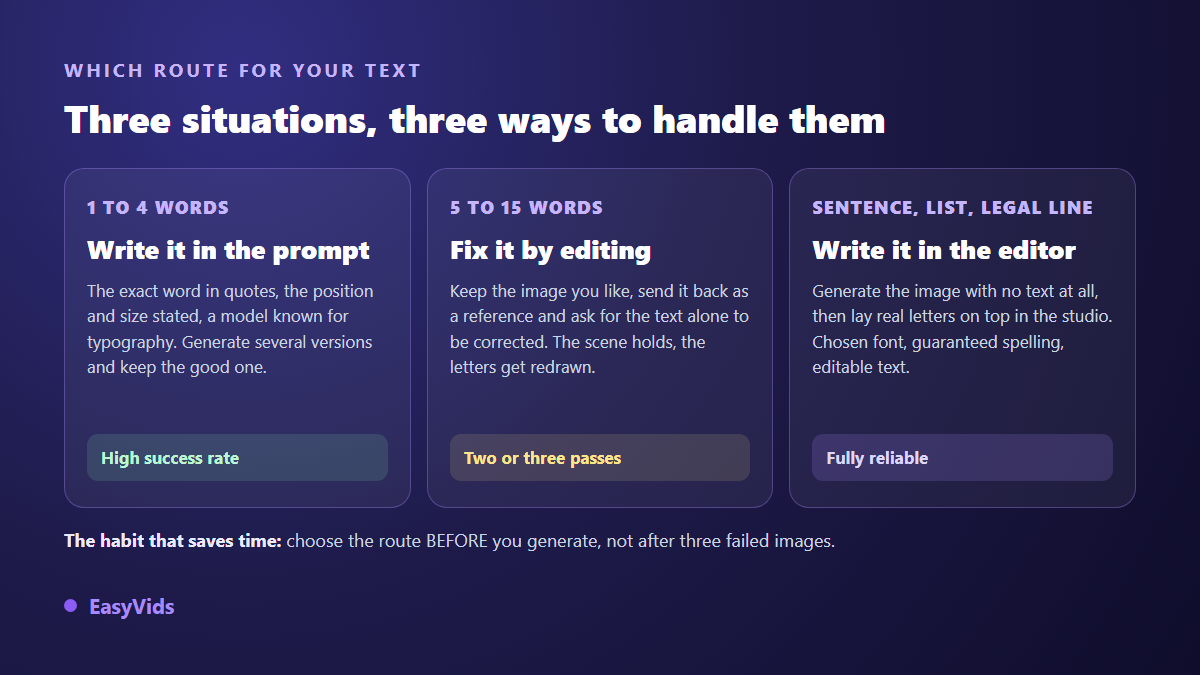
An image model does not know the alphabet. It reproduces the appearance of text, learned from millions of photos, without ever handling a single character. Three rules cover most cases: put the exact word in quotation marks inside the prompt, stay under four words, and state where it sits and how much of the frame it fills. Add a model picked for its typography and, across our own generations, you move from a frustrating run of attempts to a usable image within the first few. Beyond a handful of words, change method: generate the image with no text at all, then lay real letters over it in an editor. Spelling stops depending on the model.
Why the model gets your letters wrong
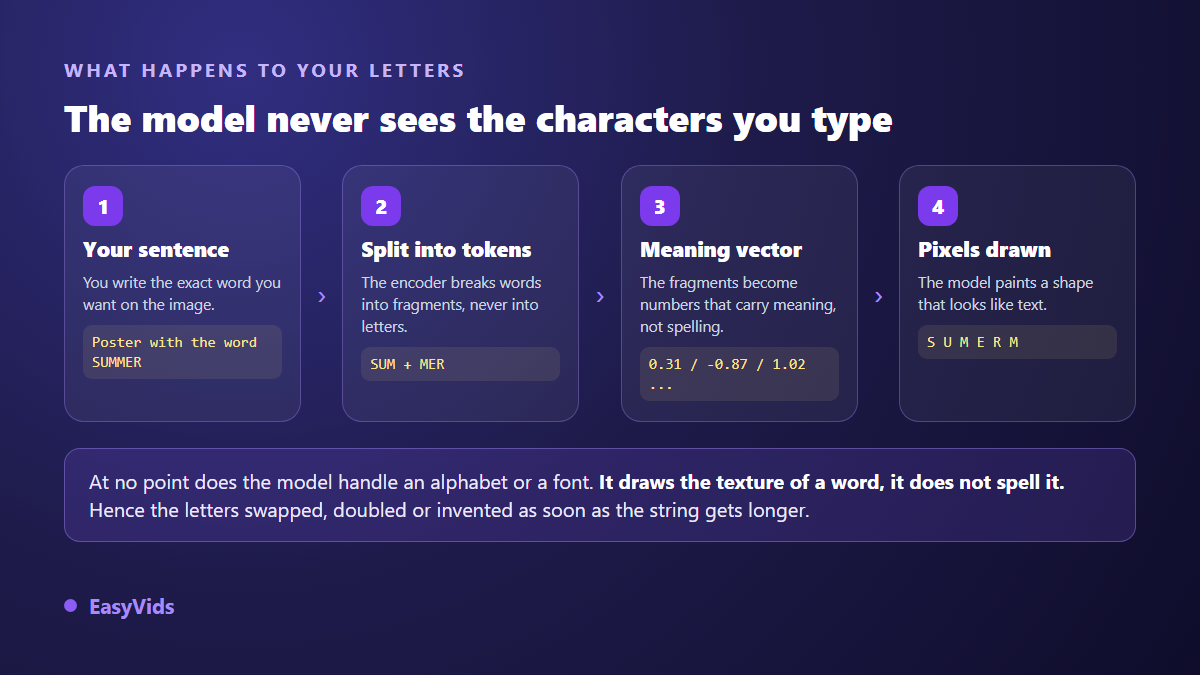
An image generator starts from a square of noise and denoises it step by step until a plausible picture appears. Nothing in that mechanism resembles a word processor. The model has no font, no concept of a word, no spelling rule. It has seen billions of pixels where dark aligned shapes appeared on signs, book covers and shopfronts, and it learned what that texture looks like. When you ask for a word, it paints the texture of a word.
The second layer of the problem happens before any drawing starts. Your sentence goes through a text encoder that splits it into tokens, meaning fragments of words, never letters. « SOLDES » may become two fragments, « BOUTIQUE » just one. Those fragments then turn into strings of numbers carrying meaning, connotation and context, but not the ordered list of characters. The very information needed to spell correctly is lost at the first corner.
This is not a blogger's theory. The Google Research team behind Imagen showed in 2022 that scaling the text encoder improved prompt fidelity more than scaling the image generator itself, and text rendering was one of the categories in their benchmark. Language understanding, not drawing power, is what decides the outcome. Recent models write better because their encoders understand better.
A third factor completes the picture: the training images themselves. In a photograph, text appears at an angle, half hidden, blurred in the background, squashed by perspective. The model therefore learned that text is usually unreadable. It faithfully reproduces what it saw, imperfection included, which is exactly where those blocks of fake lines in the background come from.
Six failures you will recognise
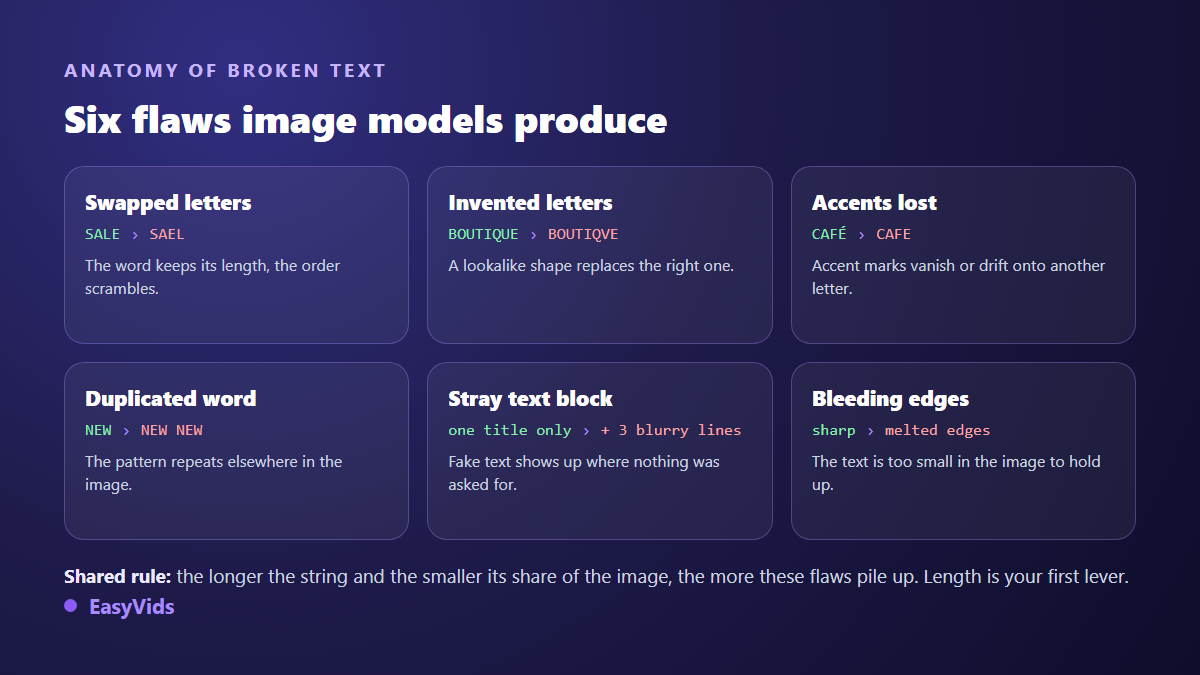
Text errors are not random. They fall into six families, and naming them helps you pick the right fix. A word whose letters get shuffled needs a completely different treatment from a word whose edges smear.
- Swapped letters: the word keeps its length, the order scrambles. A sign the requested string is too long for the model.
- Invented letters: a lookalike shape replaces the right one, usually on characters that resemble each other. A higher resolution fixes part of these cases.
- Lost accents: very common outside English, because most training text is in English.
- Duplicated word: the pattern repeats elsewhere in the frame. State that there is only one text area.
- Ghost text block: fake lines appear in the background. Ask explicitly for an image with no other text.
- Smeared edges: the text takes up too small a share of the image to hold together. Make it bigger or tighten the framing.
Seven settings that produce clean letters
These settings stack. On their own each one helps a little; applied together they change the nature of the output. They hold on every image model, whatever platform you work on.
- Put the exact word in quotation marks. Ask for the word « SALE » written large, never a sale banner. Quotation marks flag a string to reproduce verbatim, and recent models treat them that way.
- Stay under four words. That is the threshold above which the error rate climbs fast on every model we use. A short headline plus a subtitle added later beats one long sentence asked for in a single go.
- Say where the text sits and how much room it takes. Top, centred, filling roughly a third of the width produces far steadier results than saying nothing. Big text is text the model has room to draw.
- Name a lettering style in plain words. Thick sans serif letters, white, with a black outline works well. A precise font name does not: the model has no font library.
- Ban everything else. Add no other text in the image at the end of the prompt. That single line removes most ghost blocks.
- Raise the resolution. On models that expose it, moving from a standard render to 2K or 4K gives the text more pixels and therefore crisper edges. The gain shows most on small characters.
- Generate several versions and choose. Text is the least stable part of any generation. Running several images from one prompt takes less time than rewriting that prompt five times.
The prompt, before and after
Weak version: a promotional poster for a sports shop with summer sale text. The model receives an intention, not a string to reproduce. It improvises, and it improvises badly.
Solid version: promotional poster for a sports shop, bright orange background, the word « SALE » written very large in the centre, thick sans serif letters, white with a black outline, filling half the width of the poster, no other text in the image. Every constraint closes a door the error used to walk through. Prompt length is not the point: precision is.
Fixing without starting over: editing from your own image
When the scene works and only the text failed, regenerating everything is a mistake: you lose the composition that already worked. The right move is to feed the failed image back to the model as a reference, with a targeted correction instruction. Several editing models accept this, and some are built precisely to respect the source image while changing one element.
Keep the instruction short: keep this exact image, replace only the text with the word « SALE ». Two or three passes are usually enough. Inside the EasyVids studio this route runs through reference images: you attach your visual to the generation and the model works from it. The model picker also flags which models accept a reference, because sending one to a model that ignores it means paying for a wasted generation.
The safest method: generate the image empty, write afterwards
Past a handful of words, no prompting trick holds. A full sentence, a three point list, a legal notice, an address: none of these should ever be handed to an image model. The reliable method has two stages. You generate the visual while explicitly asking for a clear area where the text will go, then you write that text over it in an editor, with a real typeface.
The benefit goes beyond spelling. The text stays editable, it translates in seconds, it adapts to several formats without regenerating the image, and you choose the font, the colour and the line spacing. In the EasyVids editor that text is a full element of the scene: you move it, animate it, sync it to the voice. To make it live rather than sit flat, our nine animated text effects cover the entrances and impacts that stay readable on screen.
The same reasoning settles the trickiest case of all: the brand name. It is a word the model has never seen, often invented, sometimes spelled unusually. Models replace it with a neighbouring word that exists in their vocabulary, or distort it letter by letter. Remember the rule: a rare word is a word the model cannot spell.
The practical consequence is clear. A logo is not generated inside the image, it is placed on top afterwards. Generate the visual with an empty area where it belongs, then drop your logo file over it in the editor. You keep your exact colours, proportions and typography, which no image model can promise you.
Thumbnails, where the text is the whole pitch
A YouTube thumbnail rests on three or four huge words. That is exactly the format models handle well, provided you ask properly. The common mistake is drowning the text inside a crowded scene description: the model then treats typography as one detail among twenty, and rushes it.
The EasyVids thumbnail mode separates the two fields for that reason. You describe the scene on one side, you type the text to display on the other, and the platform builds a prompt that isolates the string and demands highly legible lettering. The same logic can be copied by hand on any tool. For the rest of the composition, from the face to the contrast, our complete YouTube thumbnail guide covers the rules that earn clicks.
Accents and non Latin scripts
Image models mostly see English during training. The direct consequence: accented characters lose their marks, cedillas vanish, umlauts drift. On a short uppercase word without diacritics, no language poses a particular problem. As soon as an accent appears, the failure rate rises visibly.
Two workarounds. The first is choosing words without accents when meaning allows it. The second, safer one, is writing the text in the editor. The same applies to Arabic, Cyrillic and Asian characters, where the quality gap between models is even wider than in the Latin alphabet.
Choosing a model for what you actually write
- One short word on a poster or thumbnail: recent models from the major families handle it well, even in their fast mode.
- A multi word headline with layout: favour models their makers present as strong on text rendering. Our picker flags that speciality in each model description.
- A correction on an existing image: you need an editing model, able to take a reference image and change only one area.
- Small, long or repeated text: do not pick a model, pick the editor. No generator holds on that ground.
- A non Latin script: test two models on the same word before committing to a whole series.
One habit pays off: keep the most capable model for the final image and draft with a fast one. The choice happens at generation time, image by image, and what each tier consumes is listed on the pricing page.
Check before you publish
One last habit avoids nasty surprises. Look at your image at the size it will be seen, never at the size you build it. A thumbnail is judged small on a phone, a poster is judged from across the room. Then read the text out loud, letter by letter, on the reduced version: that is the only way to catch a wrong character your eye silently corrects once it recognises the word.
Frequently asked questions
Why does AI spell words wrong in images?
Because it does not write them, it draws them. The model receives your sentence as fragments and then as numbers, never as ordered characters, and it paints a texture learned from photographs. No step in that chain knows spelling.
Which AI image model renders text best?
The ones whose makers highlight text rendering, and that list changes often. Rather than memorising a name, keep the method: test two models on the same short word, keep the winner, and repeat the test with every new version. A ranking written today would be wrong within months.
Can I fix the text on an image already generated?
Yes, two ways. Send the image back to the model as a reference with a targeted correction instruction, which preserves the scene and composition. Or cover the area and write the text in an editor, which gives an exact result every time.
How many words can AI write correctly in an image?
Treat four words as a sensible ceiling, and one word as near certain. Beyond that, every extra word multiplies the chances of an error, especially when the text occupies a small share of the frame.
Should I avoid accents in AI generated images?
Where meaning allows, yes, because models mostly see English in training and often drop diacritics. When the accent matters, write the word in the editor instead of the prompt.
Clean text inside an image is not won by pushing harder on the prompt. It is won by choosing the right route from the start: the prompt for one word, reference editing for a correction, the editor for everything else. That single decision, made before you generate, saves more time than any magic formula. To try the three routes on your own visuals, create your account and run your first images. The EasyVids studio brings generation, reference editing and the text editor together in one place.