You describe a scene in one sentence, and a picture comes back a few seconds later. That is text to image AI, and the first time it feels like magic. The second time, much less so: the character faces the wrong way, the light is flat, the background changed although you changed nothing. So you rerun, you pile on adjectives, and nothing really improves.
The model is almost never the problem. What you believe it does is. As long as you picture a machine that understands a brief the way a designer would, you write prompts that cannot work. This guide takes the other route: what actually happens between your sentence and the image file, and the writing method that follows. For the wider view of the tool and its uses, our AI image generator guide covers the ground.
The short answer
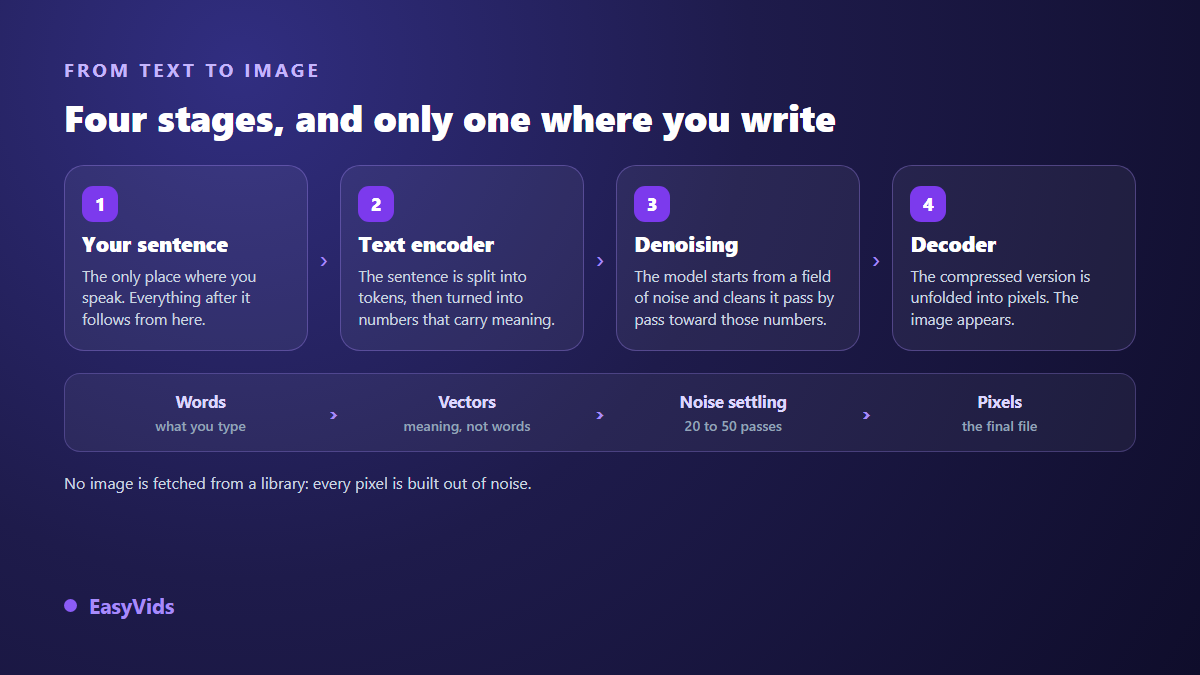
A text to image model does not look up an existing picture. It builds one out of a field of random noise, which it cleans pass after pass. Your sentence is not an order, it is a direction: it is turned into a series of numbers that carry meaning, and those numbers steer the cleaning at every pass. Which gives you the whole method in one rule: describe what is visible, never what you feel. A word that points to nothing observable can steer nothing.
The model does not fetch an image, it builds one
The most common misreading says these tools glue together fragments of training pictures. That is not what happens. What the model kept from millions of examples are regularities: what a cast shadow looks like, how fabric falls on a shoulder, which texture goes with the word ceramic. None of those pictures sit inside the model file, whose weight is counted in gigabytes where the training data was counted in terabytes.
That difference changes how you write. You are not picking from a catalogue, you are describing a target. The more your words point at observable things, the sharper the target. The more they stack value judgements, the more it blurs, and the model falls back on its average: mid shot, frontal light, subject dead centre. That is exactly the characterless picture everyone gets on the first attempt.
Stage one: your sentence becomes numbers
The first thing that happens to your text is tokenisation, a split into word fragments. Those tokens then run through a text encoder, a network trained to pull a description and its matching image close together. The best known one, CLIP, released by OpenAI in 2021, works on a window of 77 tokens only, start and end markers included. On models built around it, anything past that window is simply dropped.
That is the mechanical reason behind something every user has noticed without explaining it: past a certain length, adding words changes nothing. Newer generations widened that window by doubling or replacing the encoder with larger language models, which lets them follow long briefs and relations between objects. The safe habit does not change: put what matters most at the front of the sentence, because the head always weighs more than the tail.
Stage two: denoising, inside a compressed space
The heart of the system is a reversal. Instead of learning to draw, the model learned to remove noise. During training, a real image is taken, noise is added in small doses until nothing but static remains, and the network is asked to recover, at each dose, what was just added. The method was formalised in 2020 in the research paper « Denoising Diffusion Probabilistic Models », which gave the whole diffusion family its name.
At generation time, everything runs backwards. The model starts from pure noise and cleans it pass after pass, asking itself the same question each time: if this image were to end up matching this description, what would it look like one notch further along? Your sentence steps in at every pass, like a compass. It draws nothing, it points at the direction to clean towards.
That left a cost problem. Cleaning noise directly across millions of pixels would take an enormous amount of compute. The paper « High-Resolution Image Synthesis with Latent Diffusion Models », presented at the CVPR conference in 2022, moved the operation into a compressed space, the latent space, where an image fits in a few thousand values instead of several million. The denoising happens there, then a decoder unfolds the result into pixels. That shortcut is what put image generation inside a browser tab. It also explains a good share of the flaws you see: fine details, text, fingers, small patterns are the ones that suffer most from the compressed space, because they take little room and therefore carry little weight.
The three dials that drive the result
Beyond the sentence, three settings decide what you get. Most consumer interfaces hide them to keep things simple, but they are always there in the background, and knowing what they do changes the way you rerun an image.
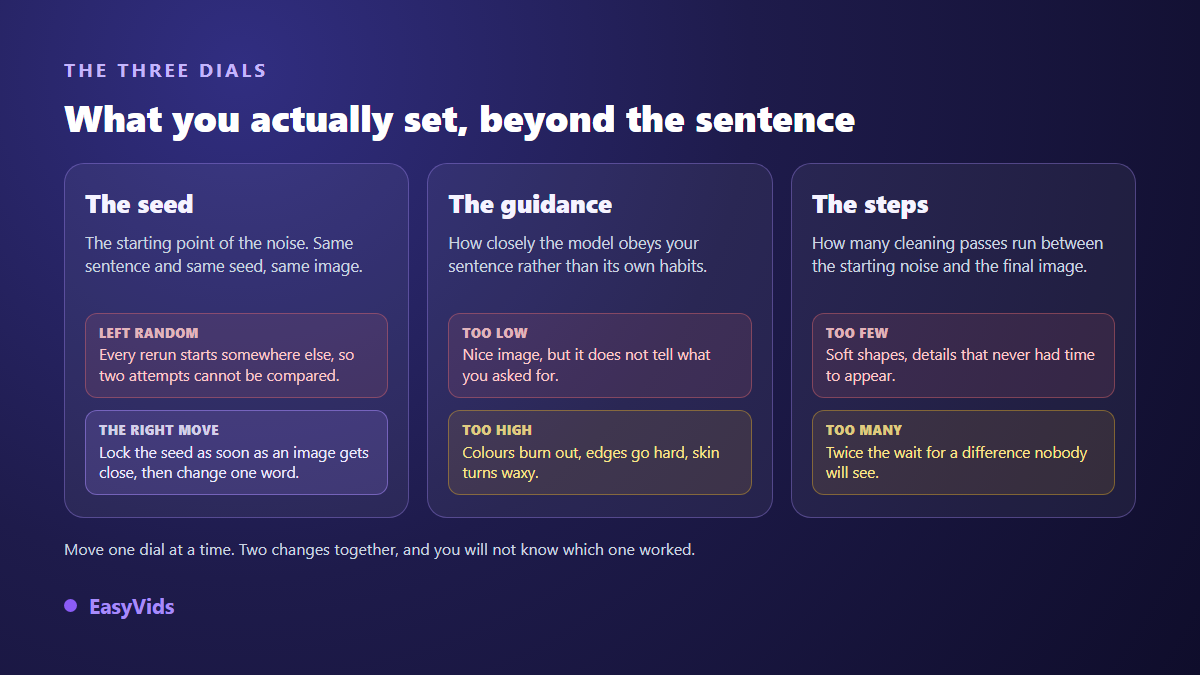
- The seed decides the starting field of noise. Two runs sharing the same sentence and the same seed give the same picture, pixel for pixel.
- The guidance doses how closely the model obeys your text. Too low and the image is pretty but off brief. Too high and colours burn, edges harden, skin turns waxy.
- The step count is the number of cleaning passes. Below twenty or so, shapes stay soft. Far above, you double the wait for a difference nobody will see.
- The aspect ratio is not a crop: it changes the composition the model produces. The same subject is not framed the same way vertically and horizontally.
- A starting image, where the tool accepts one, replaces the initial noise with your own visual. That is how a composition or a face survives from one run to the next.
The habit that makes a series improve fits in one line: as soon as an image gets close, lock the seed, then change one element at a time. Without that, you are comparing two pictures that differ in every way, and your attempts teach you nothing.
The words it carries out, and the words it drops
Not every word in a prompt carries the same weight. Some point at something visible and show up in the picture. Others have no visual translation at all, take up room for nothing, and dilute the ones that matter.
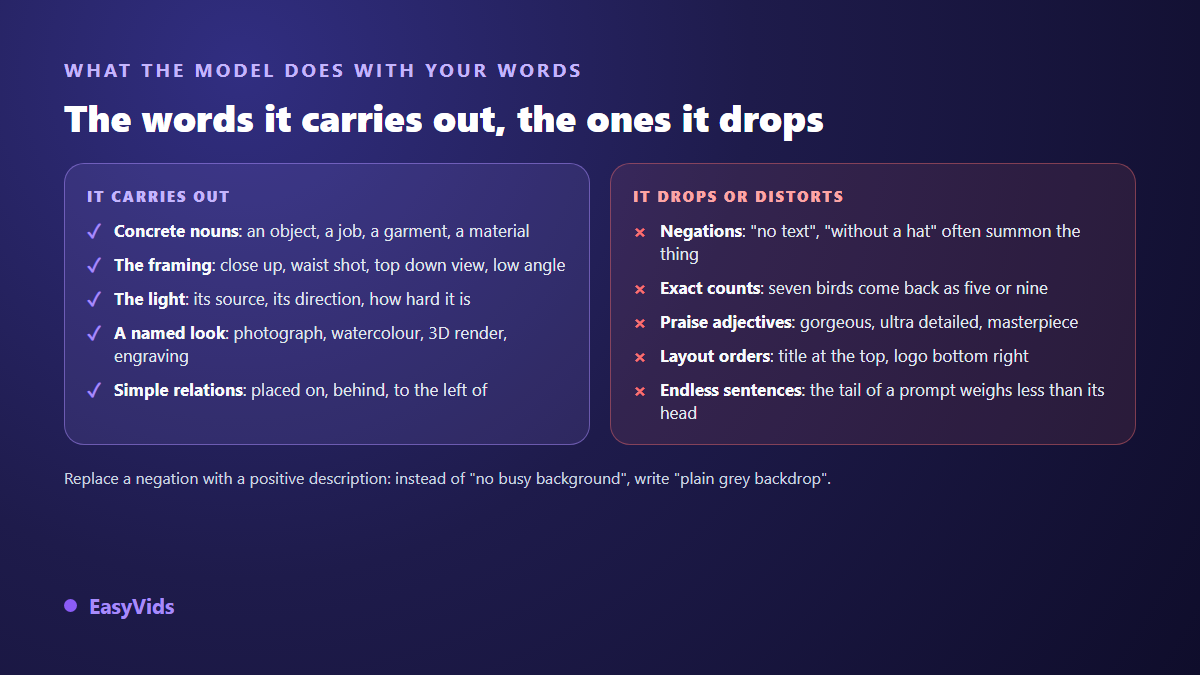
Negations deserve a stop, because they catch everybody out. Writing « without a hat » does put the word hat into the encoded description, and raises your odds of seeing one. The model has no « not » operator. The phrasing that works is positive: « short hair, bare head ». When a tool offers a separate negative prompt field, that field, and only that field, is where you declare what should stay out.
Writing a prompt: four passes, in this order
Once the mechanism is clear, writing becomes a procedure rather than an inspiration. First pass, describe the subject as if dictating it to someone who must draw it without ever seeing it: what it is, what it wears, what it does. Second pass, make the decisions the model will make for you if you stay silent, namely framing, angle, light source and its direction. Those are what separate a flat picture from one that holds.
Third pass, name the render: photograph, ink illustration, 3D render, engraving. That segment holds a whole series together, and it is the one to stop touching once found. Fourth pass, reread and delete everything that cannot be seen, starting with praise adjectives and intentions. To see that skeleton applied to real jobs, portrait, product, scenery or book cover, our 21 annotated image prompts run through the same segments every time.
Why the same sentence never gives the same picture twice
That is the question everyone ends up asking, and the seed holds the answer. Every run starts from a field of noise drawn at random. The prompt steers the cleaning, it does not fix the starting point. Two different starts lead to two different destinations, even with an identical compass. So this is not instability, it is normal behaviour. Turn it into a lever: generate a few images from one prompt to explore, pick the composition you like, note its seed, then refine the text while keeping that seed.
Fix instead of starting over
When an image misses, the usual reflex is to rewrite the whole prompt. That is the surest way to go in circles. Diagnose first. Wrong subject means the problem sits in the first pass. Right subject but flat image means framing and light are missing. A style that drifts from one picture to the next means the render segment is absent or vague. A stubborn stray detail is usually named somewhere in your sentence, negations included. And many fixes no longer go through text at all: starting from your own image and asking for a local edit, a background swap, an object removed, a colour adjusted, is more reliable than a fresh prompt, because the composition you already approved is kept.
The limits that still hold
Three weaknesses keep coming back, and the mechanism above explains all three. Hands take up few pixels, come in a staggering number of poses and forgive no counting error. Text inside an image fails for the same fineness reason, with the added issue that the model learned letter shapes, not spelling. Exact counts fail because nothing in the process ever counts anything: the model adjusts shapes and textures, it does not enumerate. The workaround is the same in all three cases and it is unglamorous: do not ask the model for what it cannot do. Frame differently, add the text over the picture afterwards, or compose the quantity yourself.
Frequently asked questions
How long should an image prompt be?
Long enough to cover subject, framing, light, background and render, rarely more. On models built around a CLIP encoder, anything past the 77 token window is never read, which is roughly sixty English words. Newer models read far longer prompts, but the hierarchy holds: what sits at the front weighs more than what trails at the end.
Does the generator copy existing pictures?
No. No images are stored inside the model, and every result is built out of noise. Research published in 2023 on training data extraction showed that a model can return a near identical copy of an original, but only for visuals duplicated a very large number of times in the data, such as famous posters. On an ordinary description, that case does not arise.
Can you tell an AI generated image apart?
Often yes, by eye, on recurring tells: hands, ears, inconsistent reflections, warped text, symmetry that is too perfect. On the technical side, the C2PA standard, run by the Coalition for Content Provenance and Authenticity, defines a signed manifest attached to the file to declare its origin, but it disappears as soon as a platform re encodes the image.
Do you need a powerful computer to generate images?
Not if you go through an online service: the compute runs on servers and your device only displays the result, which a phone does perfectly well. A local install, on the other hand, needs a graphics card with comfortable video memory, and stays reserved for people who want to modify the models themselves.
Should prompts be written in English?
English remains the most precise language for photography and style terms, because captions in the training data were largely English. Other languages work on recent models, and the safe compromise is to write naturally while keeping the trade vocabulary in English, or to let a tool translate the sentence before it reaches the model.
Take a prompt that disappointed you and run the four passes in order, adding nothing else: in most cases the picture moves more than after ten random reruns. Then lock the seed, change one word, compare. That short loop is what slowly builds a library of phrasings that belong to you. Create your account to try the method on your own visuals, and to animate them once they hold up. Plans are listed on the pricing page.