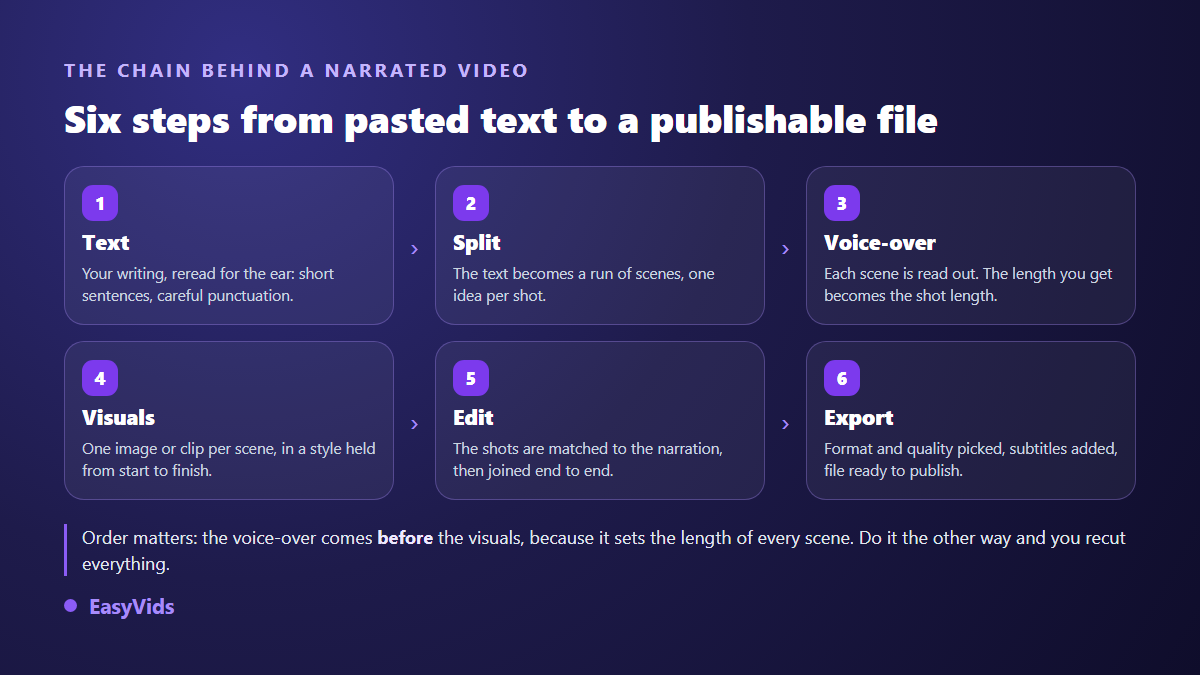
You already have the text. An article, a book chapter, a story, a product page. What is missing is the voice that tells it and the images that carry it. Text to video with voiceover is not an artistic problem, it is a sequencing problem. Five operations have to happen in the right order, and a single inversion is enough to produce a video nobody finishes.
The most common inversion fits in one sentence: people build the visuals first, then try to fit the narration on top. The opposite is what works. The voice sets the duration, the visuals follow. This guide walks the whole chain, from raw text to exported file, with the rules we use daily. If your question is more about the conversion itself and what the models can do, our general guide to text into video covers that ground; here everything is seen through the narration.
The short answer
To turn a text into a narrated video: read the text out loud and fix everything that does not say well; split it into scenes of 6 to 10 seconds, one idea per scene; generate the voiceover scene by scene with a reading instruction; illustrate every scene in one held visual style; then let the edit lock each shot to the real duration of its voice. Expect around twenty minutes of focused work for a three minute narration, most of it spent reviewing rather than waiting on compute. The order of the steps matters more than the choice of tool.
What a voiceover changes across the whole chain
A silent video is judged on its images. A narrated video is judged on its voice, and the image becomes the accompaniment. That shift has one very practical consequence: the length of the shot is no longer set by the clip, it is set by the spoken sentence. A ten word scene runs about three seconds, a thirty word scene runs about eight, and no manual setting will decide that better than the voice itself.
Hence the working order: text, split, voice, visuals, edit. Generating images before you have the voice is like cutting costumes before measuring the actors. You end up with good looking shots that then have to be stretched, looped or trimmed to fit the narration, and that patchwork is as audible as it is visible.
Step 1: rewrite the text for the ear
A text written to be read with the eyes performs badly out loud. Long sentences collapse, subordinate clauses lose the thread, and brackets simply do not exist in speech. So the first operation is not technical at all: read it aloud, pen in hand. Anything you cannot say in one breath gets cut in two.
Three details weigh heavily on the result. Punctuation first: synthesis engines read it the way an actor reads a score, a full stop is a real pause, a comma a short breath, an ellipsis a held silence. Numbers next: spell them out rather than writing digits, otherwise the reading varies from one engine to another and units sometimes vanish. Proper nouns last: a mispronounced name is fixed by writing it phonetically in the text, which is the simplest and most reliable method. If you are starting from a script already written for video, preparing a finished script covers the edits that actually change the outcome.
Step 2: split the text into scenes, one idea per shot
The split decides the rhythm, and it is the step most people rush. A scene is a piece of text, a visual and a fragment of voice. Too long, and the viewer stares at a still image for twenty seconds. Too short, and the edit turns choppy with nothing given time to land. The good news is that the split can be calculated.
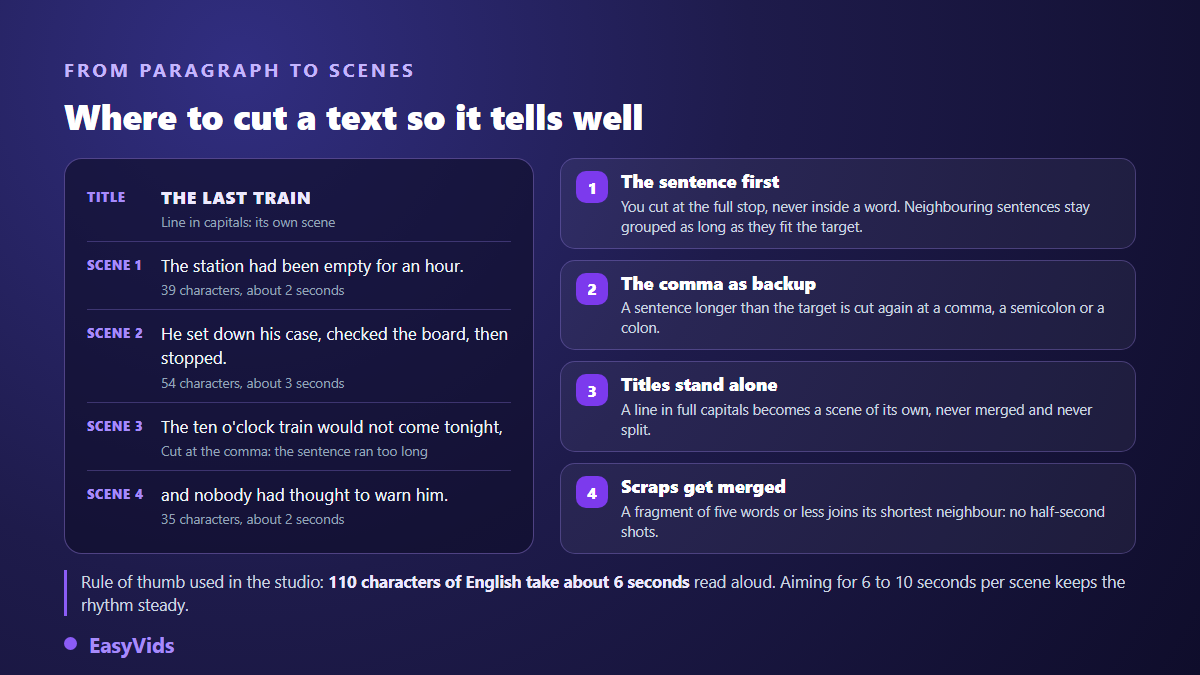
The rule of thumb we use in the studio is one line long: around 110 characters take roughly 6 seconds to read aloud. Aiming for 110 to 180 characters per scene puts most shots between 6 and 10 seconds, the comfortable range for narration. Automatic splitting then applies a few sensible rules: it cuts at sentence ends, recuts at commas or colons when a sentence runs past the target, isolates lines written in full capitals because those are headings, and merges fragments of five words or fewer with their shortest neighbour so you never get a half second shot.
Four ways of splitting coexist, and they do not suit the same texts.
- Automatic: cuts on headings and punctuation while aiming for a scene size. The default, and the right pick for a story or an article.
- By paragraph: one scene per paragraph. Useful when your text is already built from short ideas, a list of tips for example.
- By word count: evenly sized scenes, handy for a fixed cadence format where every shot should weigh the same.
- Manual: you place every cut yourself. Slowest, most precise, and unavoidable for dialogue or a text built around a punchline.
Whichever mode you pick, review the split preview before generating anything. Cutting a scene in two, merging two fragments or inserting an empty scene costs seconds at this stage. The same fix once twenty visuals exist costs far more.
Step 3: pick the voice, then tell it how to read
You choose a voice on timbre, but the result is decided elsewhere. Two narrations built with the same voice can sit as far apart as a news bulletin and a bedtime story. What separates them is the reading instruction, and almost nobody writes one. Voice lists get all the attention; our complete guide to AI voiceover covers cloning and dubbing, but if you take one setting away from this page, take this one.
A reading instruction is a plain sentence placed before the text, which the model interprets without ever speaking it. It changes pace, energy and where the breaths fall. Not every voice range accepts one, so check that before relying on it. Five wordings that produce clearly different results on the same paragraph:
- "Read like a captivating storyteller, in a warm and steady voice", for a story.
- "Read like a TV news anchor, serious and brisk", for news or analysis.
- "Read with enthusiasm, like a high energy ad", for a product pitch.
- "Read in a soft, soothing voice, like a meditation", for relaxation or sleep content.
- "Read like a documentary narrator, deep and mysterious", for an investigation or a darker subject.
The instruction is written once and applies to every scene of the project, which keeps the narration consistent from start to finish. One last habit: listen to a sample of the voice before committing the whole text. Thirty seconds of listening regularly saves redoing forty scenes.
Step 4: illustrate without breaking the narration
Once the voice exists, every scene knows its exact length. All that is left is an image for it. The choice happens scene by scene between a still, lightly animated at the edit, and a generated video clip. Stills remain the default for narration, and that is not a compromise: when the voice carries attention, a well framed still beats approximate motion. Video clips are worth spending on the moments that genuinely gain from movement, an opening, a turning point, an ending.
The rule that makes the difference is style. Describe one visual direction once, universe, render type, palette, mood, then vary only the subject of each shot. A style that changes every three scenes is the single most recognisable sign of content produced without method, far more visible than any isolated generation flaw. On long stories it also pays to widen the context given to the AI when it writes each scene prompt: characters and settings then survive from one scene to the next.
Step 5: the edit follows the voice, never the other way round
At the edit, the reference duration of a scene is its voiceover. A still is displayed exactly as long as its sentence and is never distorted. A video clip rarely lasts the right amount of time, and that is where a real choice appears.
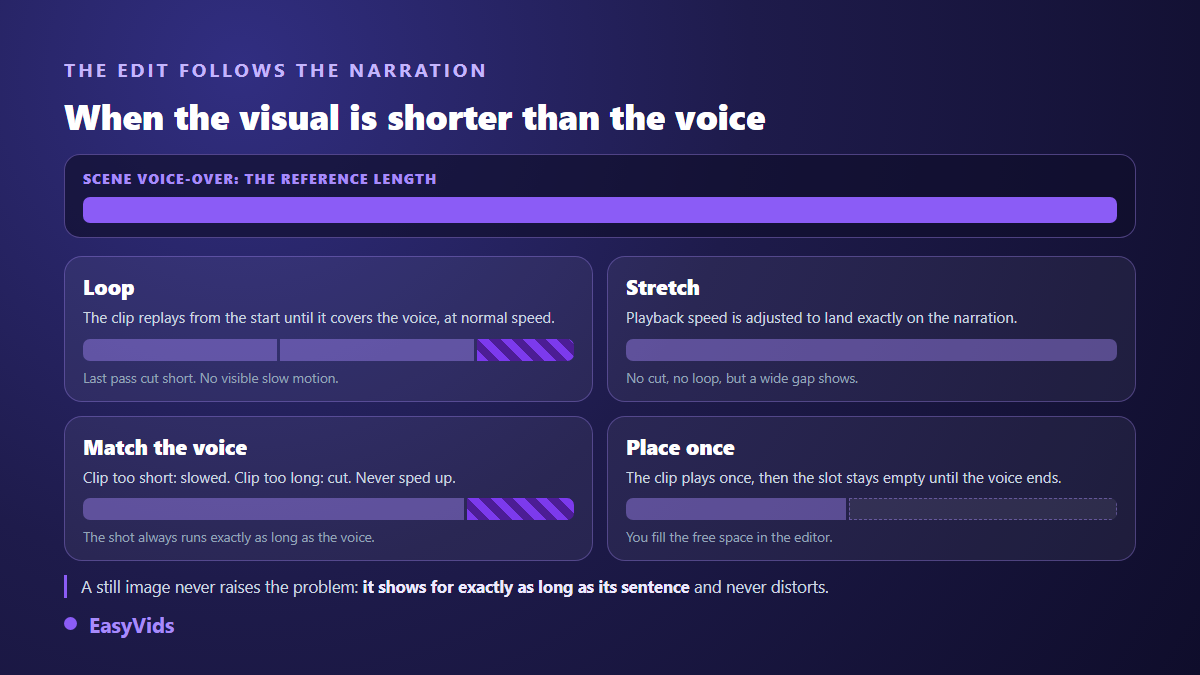
Loop replays the clip from the start until it covers the narration, at normal speed: the safest treatment, nothing looks slowed and the last pass is cut clean. Stretch adjusts playback speed to land exactly on the voice: flawless when the gap is small, very visible when it is large. Lock to the voice slows a clip that is too short and trims one that is too long, without ever speeding it up. Place once plays the clip a single time and leaves the rest of the sentence free, which matters when you plan to fill that space yourself in an editor.
One detail is worth knowing before your first edit: the original audio of generated clips is dropped, only the narration survives. That is deliberate. A clean voiceover over random ambience beats an uncontrolled mix every time. If you want to keep the sound of one specific clip, do it in the editor, where each track is handled separately, not in the automatic edit.
Long texts: what changes past a few minutes
A three minute narration fits in one breath. A full chapter, a long feature or a thirty minute story change scale. Technically the ceiling is high: a text of 100,000 characters, roughly one hour forty of audio, can go out in a single run. Past 3,000 characters it is split, the parts are generated in parallel and merged into one audio file with nothing for you to stitch back together, and the job keeps running on our servers even if you close the page.
The real advice sits elsewhere. Beyond ten minutes of narration, work chapter by chapter rather than in one block. You will review better, fix faster, and above all keep control of the pace: a wrong tone spotted at minute twenty eight of a single file is far more painful to repair than one scene inside a short chapter.
Captions are no longer optional
Plenty of videos start muted in social feeds, and a silent narration tells no story at all. Two routes lead to captions. The first reuses your own text: you already have it, already split into scenes, so it only needs timing. The second transcribes the generated voice into a ready to use SRT file; according to the YouTube help centre, a subtitle file can be uploaded straight onto a video that is already published, without replacing it. Our guide to automatic subtitles compares both methods and their traps.
Two ways to produce, depending on what you already have
The studio offers two routes, and the right one depends on what is missing. One-shot mode handles one request at a time: paste your text, pick a voice and its reading instruction, collect an audio file. That is the direct road when your images already exist, when you edit elsewhere, or when the voiceover is the only missing piece. You can fire several in a row without waiting for the previous one.
The workspace takes the whole problem: your text becomes a project split into scenes, each scene carrying its visual, its voice and its fit mode. An automation can run every scene server side with the page closed, then let you redo a single failed scene without touching the others. That is the road to a fully narrated video. The EasyVids studio brings both ways of working together in one place, and the credit system lets you set the spend scene by scene: a fast model for drafts, a more careful one for the final pass. Plan details live on the pricing page.
The mistakes that give a narrated AI video away
Viewers do not recognise a model, they recognise flaws. There are few of them, always the same, and all avoidable upstream.
- A voice read flat, with no reading instruction at all: the most expensive flaw, and the easiest to fix.
- Twenty second scenes on a still image: cut them, one idea per shot, never two.
- A clip slowed to absurdity to cover an overlong sentence: change the fit mode instead of forcing the speed.
- A visual style that changes with every scene: pick a direction and hold it to the end.
- A text read as written when it was written for the eye: endless sentences are heard instantly.
- No captions, when the narration carries the entire meaning of the video.
Frequently asked questions
Do I need a finished text to start?
No, but it is the most comfortable starting point. An existing text, even a rough one, is reviewed and split within minutes. If all you have is an idea, have it written first and think in minutes of video rather than word counts: one minute of narration is roughly 150 words. You get a text calibrated for the length you want instead of one you have to amputate.
How much text makes one minute of video?
Around 900 to 1,000 characters, roughly 150 words. Characters are the more useful unit because they drive the split: about 110 characters run near 6 seconds, which gives six to ten scenes per minute depending on the scene size you aim for.
Can I use my own voice instead of a synthetic one?
Yes, in two ways. You can record your narration and import it scene by scene, which stays the most faithful option. You can also go through a cloning tool, which reproduces your voice from a short audio sample, fifteen well recorded seconds being enough in most cases. Cloning somebody else's voice without their agreement is another matter entirely: what the law says about voice cloning walks through it.
How long does a three minute narrated video take?
A few minutes of compute when scenes are processed in parallel, and twenty to thirty minutes overall including reviewing the text, listening to the voice and redoing two or three visuals. Machine time is never the limiting factor: your review is, and it is what shows on screen.
Can a video narrated by a synthetic voice be monetised?
Yes, as long as it contributes something. According to the YouTube help centre, monetisation rules require original and authentic content and rule out repetitive, mass produced material with no contribution of its own. A story you wrote, split with care, illustrated in a held style and read with a genuine reading instruction sits inside those rules. A stack of texts copied from elsewhere and read back to back does not, whatever tool produced it.
A narrated video that works never comes from the most impressive model. It comes from a text read aloud and fixed, a steady split, a voice that was told how to read, and an edit that follows the narration instead of fighting it. Everything else falls into place. To turn your first text into a narrated video, create an account and paste your writing into the workspace: the split, the voice and the edit are already waiting.