You already have the words. A poem written for someone, a birthday message far too long for a card, the speech you never dared read out loud. It says exactly what you meant, and it stays on the page. Text to song AI is the shortest route from that page to a track with a voice, a tempo and a chorus people actually remember.
The move looks automatic: paste, generate, listen. In practice almost everything is decided before the generation, in the way you prepare your lines. A text written for the eye does not sing as it stands, and an engine handed a full paragraph recites it instead of singing it. This guide walks the conversion line by line. If you are starting from a blank page instead, our walkthrough on writing a whole song from a single idea covers the other half of the road.
Text to song AI: the short answer
Cut your text down to its concrete images, break it into short lines of similar length, pick the one line that will come back as the chorus, then hand those prepared lyrics to a music generator along with a precise style brief: genre, voice, tempo, mood. The engine writes the melody, sings the words and returns an audio file within minutes. The human work sits entirely in the preparation. The EasyVids studio keeps both stages on one page, and a free trial is enough to hear what your words sound like once sung.
Six moves between your text and a track
Turning a text into a song is not one button, it is a chain. Six moves follow one another, and each decides the quality of the next. Skipping them always gives the same result: a voice reciting a paragraph over a music bed, which the ear identifies within three seconds as a reading rather than a song.
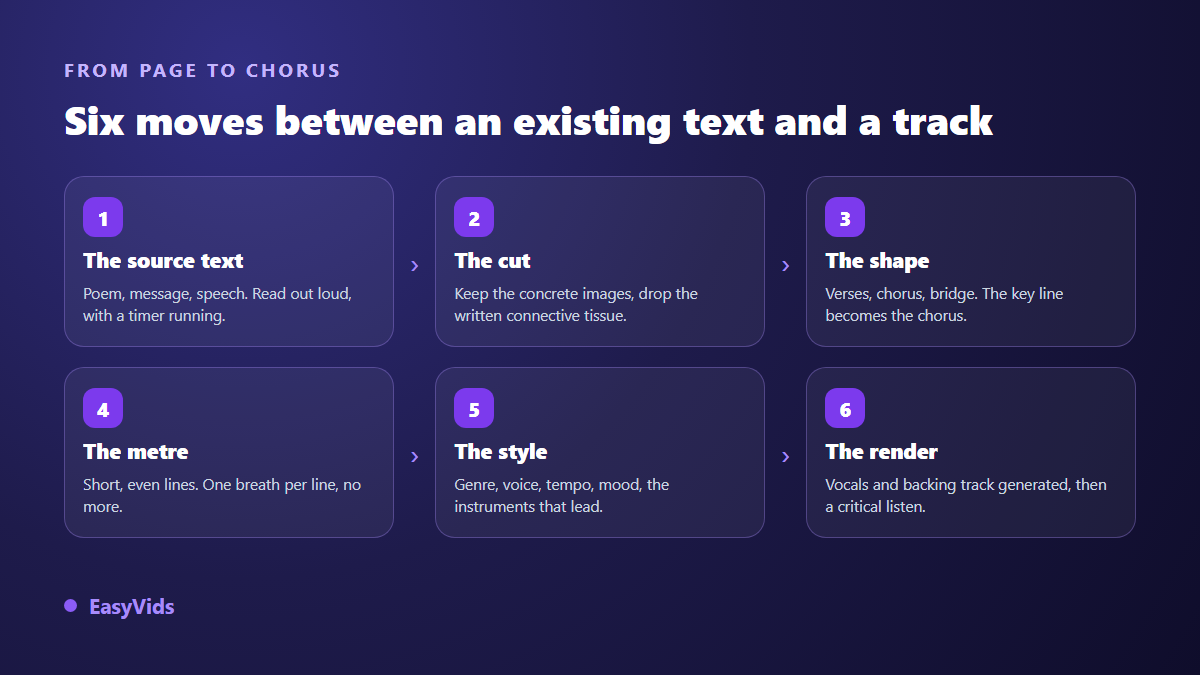
You can step back in at any of those stages. A chorus that does not land, two lines that run too long, a voice that fights the words: all of it is fixable without starting over. That is the normal way to work. The first render exists mainly to let you hear what is wrong with the lyrics.
Why a text written to be read does not sing
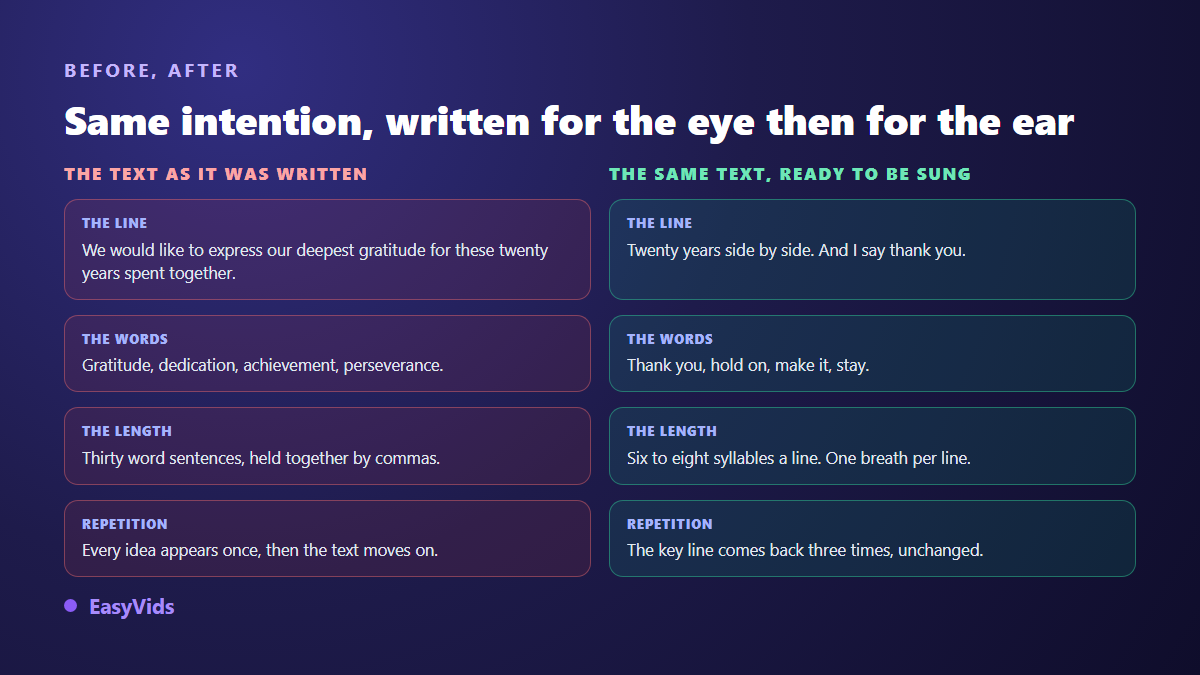
A written text moves forward. It stacks ideas, it leans on subordinate clauses, it avoids repetition because on the page a repeated line reads as clumsy. A song does the opposite. It circles, it returns, it repeats the same line on purpose until the line settles. The two forms are not chasing the same thing: one informs, the other imprints.
There is a physical constraint too. A sung line has to fit inside one breath. When a sentence runs past that limit, the voice model does not stop: it speeds up, swallows syllables, crushes word endings. That is the most common cause of a disappointing render, ahead of the choice of genre. Vocabulary matters just as much. Long abstract words sing badly, short concrete words almost sing themselves.
Four kinds of text, four ways to cut them
Texts do not all need the same preparation. Before cutting anything, work out what you are holding, because the job changes completely with the source.
- A poem. The easy case: the metre is already there. Keep the lines, pick the stanza that will serve as the chorus, and simply check that the rhymes hold up when spoken.
- A message or a letter. The most common source, and the longest to prepare. It carries politeness, explanations, sometimes apologies. Keep the facts and the images, throw out the formulas.
- A speech. It almost always contains one strong line, already written for the ear: that is your chorus. The rest drops into verses, cut by half.
- A long text, an article or a chapter. Never feed it whole. Boil it down to five ideas, then write the lyrics from that summary. A song cannot carry a full page.
- A list of facts about a person. Name, job, habits, dates. It is not a text yet, and it is still the best possible starting point for a song written for someone.
Step 1: cut before you think about music
The first pass is about deleting, never adding. Strip the politeness, the logical connectors, the adverbs, the general compliments. Keep what can be seen: a place, a date, an object, a gesture, a job, a line the person repeats all the time. A song remembers details, not adjectives.
Then run the test that settles everything: read what is left out loud, slowly, as if you were singing it. Every point where you run out of air marks a line that is too long. Every word you stumble on will come out badly from a singer, human or not. The test takes two minutes and replaces every writing rule anyone could give you.
Step 2: give it a song shape
A trimmed text then goes into a form. The sturdiest one is also the simplest: verse, chorus, verse, chorus, bridge, final chorus. The chorus is not a summary, it is the line you would keep if you kept only one, repeated word for word on every return. Verses carry the facts, in chronological order where possible. The bridge says what has not been said yet: the confession, the promise, the turn. If the sorting stalls you, a song lyrics generator will arrange your material in that shape and let you fix it afterwards.
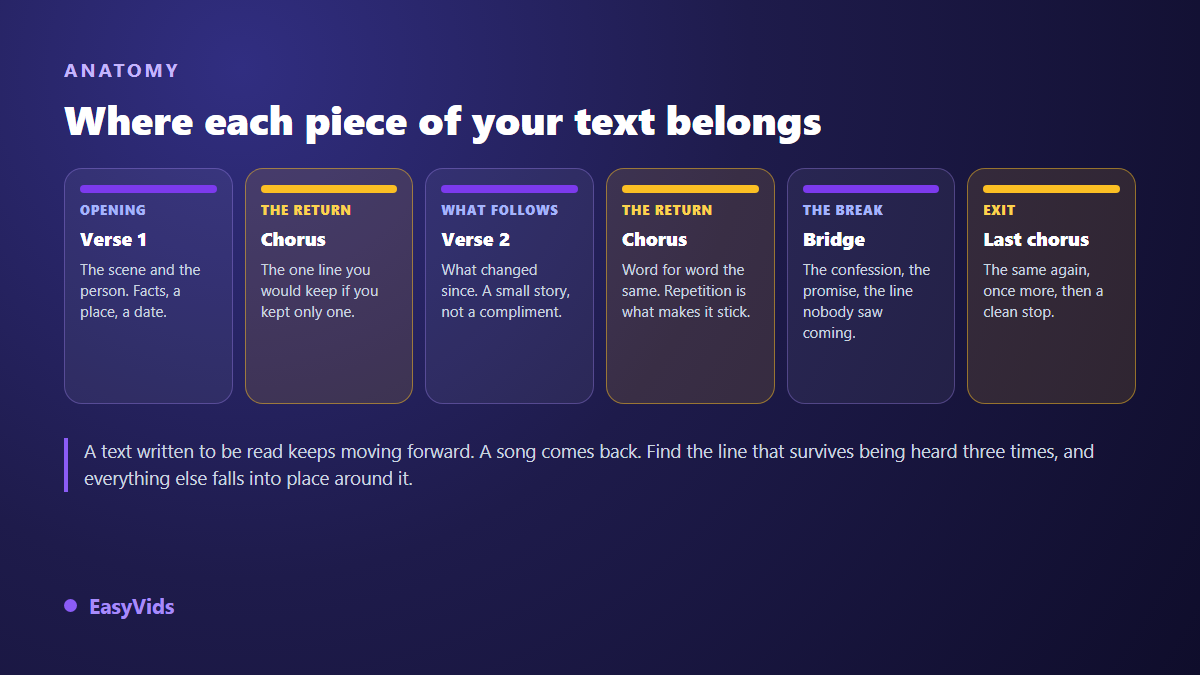
Mark that structure inside the lyrics themselves, naming the section before each block. Music engines read those markers and change energy accordingly: a held back verse, a wider chorus, a bridge that differs from both. Without them the track runs flat and every section sounds like the last.
Step 3: line length and the sound of words
Aim for six to eight syllables a line in the verses, slightly shorter in the chorus. Regularity matters more than the exact count: two neighbouring lines of similar length create a pulse, two wildly uneven lines break the melody. You do not need to scan verse like a poet, reading aloud is enough to feel the imbalance.
Then watch three families of words that trip up singing models. Numbers written as digits, which get pronounced unpredictably: spell them out. Acronyms and abbreviations, to be expanded. Rare names or names from another language, to be written phonetically in the lyrics when pronunciation matters, even if the written line then looks odd. Nobody reads the lyrics, everybody hears them.
Step 4: describe the style, not just the feeling
Once the lyrics are ready, the style brief decides the rest. The most common request, a beautiful moving song, tells an engine nothing: there are a thousand versions of that. Five building blocks are enough to frame a track, and they fit in one sentence. Our guide to AI music generators covers each one with examples.
- The genre, one only, the dominant one: acoustic folk, afrobeat, piano ballad, gospel, eighties pop.
- The voice: female or male, deep or bright, close to the mic or set back, solo or with backing vocals.
- The tempo: slow, medium, fast. It follows the words rather than the other way round, since a text about gratitude sits badly on a dance rhythm.
- The lead instruments: solo guitar, piano and strings, drums and bass, warm synth pad.
- The intended use: headphones, a room, or a bed under a video. It changes how dense the mix should be.
Write those blocks in that order, in a single sentence, without superlatives. A plain brief gives a cleaner track than a pile of enthusiastic adjectives, because every extra adjective pulls the composition in one more direction.
Step 5: listen as a listener, not as the author
The first listen is always biased. You know the text, so your head fills in what your ear missed. Play it a second time while doing something else, without the lyrics in front of you, and note only the moments where you lose the thread. Those are the ones to fix, and almost always in the words rather than in the music.
Two corrections handle most cases: shorten the line that rushes past, and replace the word you could not make out. Then generate again. Two renders from the same text never give exactly the same track, so download the version you like the moment you like it.
What the machine still gets wrong
Worth saying plainly. Singing on very long words stays unreliable. Line endings sometimes cut off when the text runs past what the melody can carry. Duration is not a dial: it follows the amount of lyrics, so a shorter text gives a shorter track with no way to trim it to the second. And you get a finished mix rather than separate stems, which rules out lowering only the vocal afterwards.
Three workarounds cover it. To hit a length, add or remove a verse instead of hoping for a slider. To avoid a cut, split the line yourself. For a bed under a video, ask for an instrumental version from the start rather than trying to erase the voice later.
When the text is not yours
A poem found online, the lyrics of an existing song, a passage from a novel: those texts belong to someone. The Berne Convention for the Protection of Literary and Artistic Works, in its Paris revision of 1971, sets a minimum term of protection in Article 7 of fifty years after the author's death, which many countries have extended to seventy. While that term runs, the author or the rights holders decide what may be done with the work.
The part that concerns you has a precise name: the right of adaptation, reserved to the author by Article 12 of the same text. Setting a protected poem to music is an adaptation, so it needs permission, including with no commercial intent and even if you credit the author. A public domain text, or a text you wrote yourself, raises no such question. What you may then publish and monetise with a generated track is covered in our piece on AI music and copyright.
From an audio file to something you can share
An audio file on its own travels badly. A voice note gets lost in a conversation, an attachment posts nowhere. The natural next step is to put the song on images: photos of the person, scrolling lyrics, or a clip generated around the track. That is the subject of our guide to music videos made without a shoot, which starts from an existing audio file.
Decide the output format before you produce, not after. A song meant for a story is cut differently from one meant to be heard in full: in the first case, open on the chorus, because nobody waits for the second verse. The available plans, free trial included, are set out on the pricing page.
Frequently asked questions
Can I turn a text into a song without changing a single word?
Technically yes: the lyrics field accepts any text and the engine sings it as written. The result is rarely good when the text was never shaped for the ear. If you insist on keeping every word, for a poem you are attached to for instance, at least pick a slow tempo and a sparse arrangement so the voice has room to unroll the long lines.
How much text does a three minute song need?
Far less than people expect. The chorus alone eats a good share of the time since it returns three times, and a sung line moves more slowly than a read one. A full page is well past what a short song can carry. Start with two verses and a chorus, listen, then add a verse if the track feels short.
Can I set a poem I did not write to music?
For strictly private use the risk is low, but the rule does not change: setting a protected text to music falls under the right of adaptation, which belongs to the author. As soon as the song is published or distributed you need permission, a public domain text, or a text of your own. Distribution services also ask you to declare, at upload, that you hold the rights to the lyrics as well as to the recording.
Which language will the lyrics be sung in?
The one they are written in: lyrics are not translated automatically. An English text gives an English song. For another language, translate the lyrics first, read the translation out loud, then run a second render. Line lengths shift from one language to the next and deserve a fresh pass.
How long does the render take, and do I have to stay on the page?
Count one to four minutes for the render itself, and around ten minutes end to end including the text preparation and a second attempt. You can close the page: production runs on our servers rather than in your browser, and the track waits in your account history, ready to play again or download.
A text that matters to you deserves better than a quick paste. Take the ten minutes of preparation: cut, shape, read aloud. That is where the difference sits between a voice reciting and a song someone plays again. To set your own words to music now, creating an account opens the Music Studio, and a first render will tell you within minutes whether the direction is right.