Your manuscript is finished. The cover exists, the file is clean, and nobody is buying it because it sits on your hard drive. Learning how to sell ebooks on Amazon is the shortest path from that file to a first paying reader, for one reason: the Kindle store brings its own buyers. You are not building traffic, you are earning a listing.
The process has a bad reputation, and exactly one step deserves it: the tax information, which people postpone and which then freezes their payments. The rest fits in an evening once you know the order Amazon asks for things. This guide follows that order, from the account to the first sale. If you have not settled on a store yet, our comparison of the seven ebook sales channels answers that question. Here the decision is made and we set the book up.
The short answer
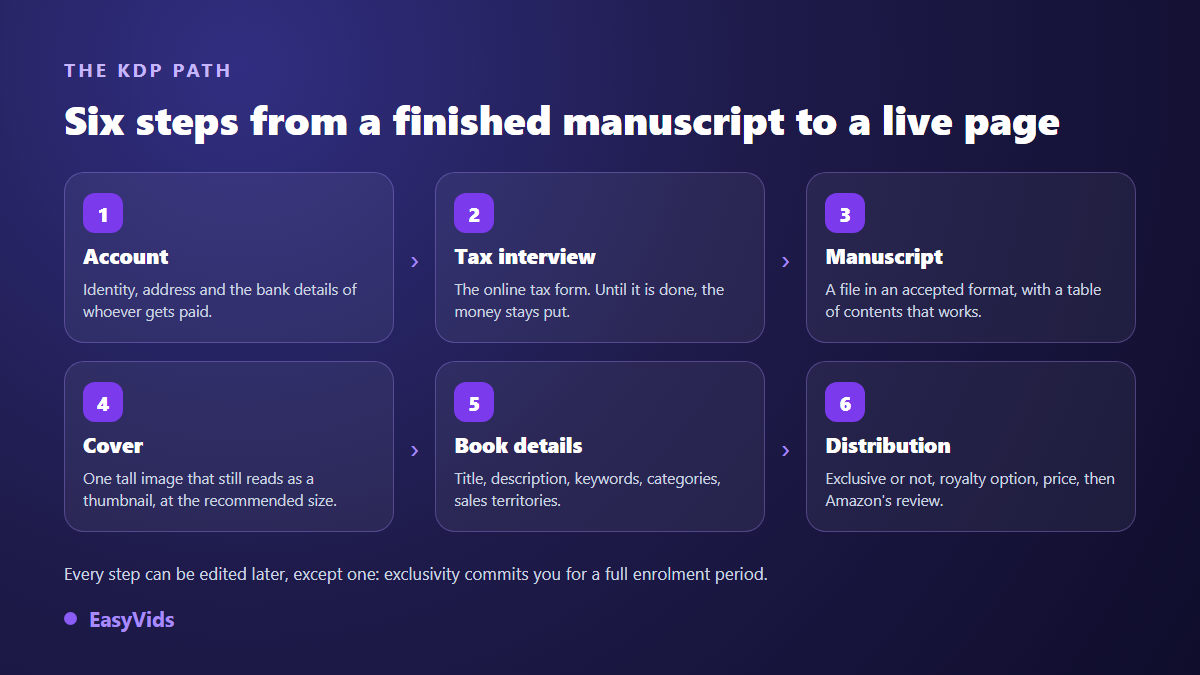
You open a Kindle Direct Publishing account, the self publishing service everyone calls KDP, using your existing Amazon account. You fill in your identity, your bank details and your tax information. You upload two files, the manuscript and the cover, then complete the book details: title, description, keywords, categories, territories. Finally you choose exclusivity or not, a royalty option and a price. Amazon reviews the file, the book goes live. Everything can be edited afterwards except exclusivity, which commits you for a full term.
What to have ready before you open the account
KDP is not a writing workspace, it is an upload desk. Turning up with a half written manuscript means stopping on page three of the form. The text has to be finished, proofread and split into chapters with real headings, because the ebook table of contents is built from those headings. If yours is still in progress, finish it first: our chapter by chapter method for writing a book keeps a manuscript from collapsing halfway.
- A finished manuscript, proofread, with a proper heading hierarchy.
- A tall cover image, ready, at the size Amazon recommends.
- Identity and address matching the person or company that publishes.
- A bank account able to receive transfers in a supported currency.
- Your tax details, including a tax identification number if you hold one.
- A title, a subtitle and a description, written before you open the form.
One more thing is better settled before upload than after: how much of the book came from a machine. The Kindle Direct Publishing content guidelines, updated in September 2023, require you to declare AI generated content at upload, text and images alike, and those same guidelines state that the declaration is not shown on the product page. The box sits in the form, and our piece on the KDP rules for books written with AI walks through the line between generated and assisted.
Opening the account in the right name
A KDP account is created from an existing Amazon account. Resist the temptation to reuse your personal shopping account if you publish as a registered business: the account holder name, the address and the bank account are those of whoever receives the payments, and changing the holder later is not a checkbox. One account per person or company is the rule, and the KDP terms of service forbid multiple accounts.
Three blocks wait in the account settings: seller information, bank information, tax information. The last two control the money. While they stay incomplete you can still publish, but nothing leaves for your bank. That is the classic trap behind authors who discover their sales months after their first title.
The tax interview, the step that freezes payments
Amazon puts every publisher through an online tax interview, a questionnaire that replaces the paper forms of the US tax administration. For an author living outside the United States it produces a form in the W-8 family, completed straight in the browser, with nothing to print or post. The KDP help page on tax information describes the process, in the version we read in September 2026.
What is at stake is the withholding on royalties sourced in the United States. Without a completed tax interview, a default withholding applies. A tax treaty between your country of residence and the United States may reduce it, provided you declare a valid tax identification number. Rates and cases depend on your personal situation and they change: we quote none of them here, the KDP tax interview help page and your own tax authority are the only sources that count.
The manuscript: format matters more than layout
An ebook is not a printed page. Readers change the type size, the typeface, the column width. Layout polished to the pixel does not survive that. What survives is clean structure: heading styles actually applied, page breaks in the right places, images placed without exotic text wrapping.
On formats, Amazon accepts several file types at upload, word processor documents and EPUB among them, and provides its own formatting tool. The list changes: the MOBI format, long tied to the Kindle, has not been accepted at upload since KDP announced the change in 2021. Check the KDP help page on supported manuscript formats before converting anything, because that page is what counts on the day you publish. Keep PDF for what it does well: it freezes the page, so it suits a phone screen badly.
The cover is the only image most readers see
In the store your cover first appears as a thumbnail the size of a stamp, among dozens of others. The test is one question: at that size, can you still read the title? A short title, hard contrast, an image that signals the genre in a second. Long subtitles and delicate typefaces vanish, however good they are.
The cover guidelines published by Kindle Direct Publishing, in the version we read in September 2026, ask for a tall image with a height to width ratio of 1.6, ideally 2 560 pixels tall by 1 600 wide, saved as JPEG or TIFF. Build to those dimensions from the start, because upscaling a small image later shows instantly on modern screens. Our AI book cover guide covers the framing that survives a thumbnail, and our AI creation studio generates the tall images you need, with a free trial to judge the output first.
Book details: title, subtitle, description
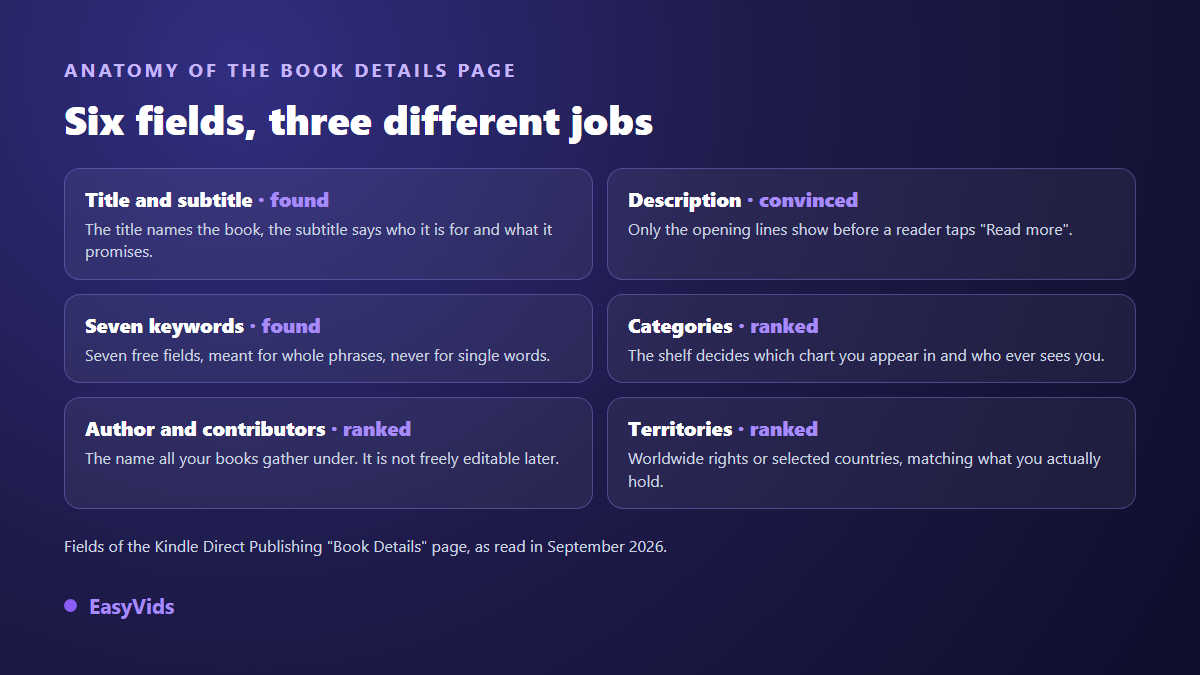
The title is set once. It appears on the cover, in the page address and in search results, and it has to match what the cover image shows: the KDP help page on updating a published book sets out what stays editable. The subtitle carries the promise, meaning who the book is for and what it lets them do. The description has room, up to four thousand characters according to the KDP help page on book details in its September 2026 version, but only the first two or three lines show before the button that unfolds the rest. Put the promise and the audience there.
Keywords and categories
KDP offers seven keyword fields, according to its keywords help page in the version we read in September 2026. Seven fields, not seven words: each box takes a whole phrase. Two mistakes cost sales. Repeating what the title already contains wastes a box, since those words are taken into account anyway. Using another author's name or a trademark is explicitly ruled out by the KDP keyword guidance, and that one can block publication rather than earn a warning.
Categories decide which shelf Amazon files you under, and therefore which chart you can appear in. You pick several at upload, three at the time of our reading in September 2026, a number that has changed before, so the KDP help page on categories holds the current rule. Prefer a precise shelf to a huge one: visible in a niche beats ten thousand places down a general category.
Exclusivity or wide distribution
At publication Amazon offers its digital exclusivity programme. In exchange your ebook must not be sold or distributed anywhere else, your own website included, and you join the reading subscription paid on pages read, with promotion tools reserved for the programme. The terms published by Amazon, in the version we read in September 2026, run in enrolment periods that renew automatically unless you switch the option off, so check the term length in force before ticking the box.
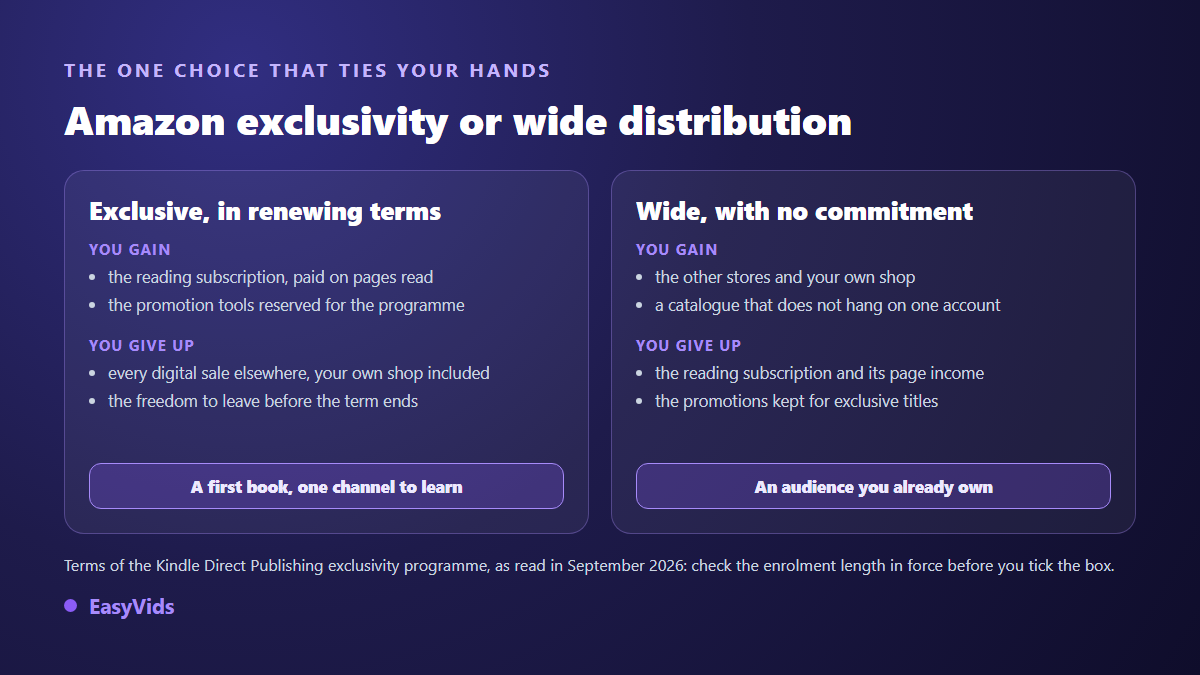
There is no universal answer. For a first book with no audience and no other channel, exclusivity concentrates the effort where the buyers already are. For an author with an email list, a shop or readers on other stores, it closes doors that were paying. The question comes back at every term, and nothing forces you to treat every title the same way.
Price and royalties
Amazon offers two royalty options for an ebook. The more generous one comes with conditions: a price bracket to respect, territories, and a delivery charge taken from each sale based on file weight. The other pays less per sale and accepts any price. The KDP help page on ebook royalties gives the exact rates and thresholds store by store; they depend on the buyer's country and they move, so we quote none of them. Two practical consequences: compress your images before upload, and check the automatic price conversion between stores, because a blind conversion sometimes lands a book outside the bracket that unlocks the better option. On the production side, what a book costs to build with our tools is on our pricing page, and that changes nothing about what Amazon keeps.
After you upload: review, then the real first weeks
Once submitted, Amazon reviews the book before it goes on sale. The platform states a delay of up to 72 hours on its help page about publishing a book, in the version we read in September 2026. After that the product page exists with its in house identifier, the ASIN: Amazon does not require an ISBN for an ebook published with it, as its help page on identifiers states. Payments arrive several weeks after the month of sale and a minimum amount applies depending on the payment method and country, detailed on the KDP payments help page.
What happens next no longer depends on Amazon. Three levers actually move a listing: the first honest reviews, a description rewritten after two weeks of real data, and a second book. A catalogue of one title always plateaus, while the same author with four titles sells each title better, because every satisfied reader has something else to buy.
Frequently asked questions
Do I need an ISBN to sell an ebook on Amazon?
No. For an ebook published through KDP, Amazon assigns its own identifier, the ASIN, and does not require an ISBN, as its help page on identifiers states. An ISBN is still useful if you distribute the same book elsewhere, and it becomes necessary for a paperback edition, for which KDP offers a free identifier.
How long before the book is on sale?
Allow up to 72 hours after submission, the delay Amazon states on its help page about publishing, in the version we read in September 2026. Updates to a published book go through the same review. Build that delay into any launch date you announce to your audience.
Can I sell the same ebook elsewhere at the same time?
Yes, unless you joined Amazon's digital exclusivity programme, which forbids it for the whole enrolment term. Outside that programme nothing stops you selling the same file on other stores or on your own shop. The print edition stays free in both cases.
What if Amazon rejects my book?
The rejection message names the rule at issue: file quality, rights to the content, misleading metadata, undeclared content. Fix the point raised and submit again, and never open a second account: the KDP terms forbid multiple accounts, and creating one after a rejection makes things worse rather than better.
The long part of this process is not the form, it is the book. Once the manuscript is finished and the cover is ready, everything else fits in an evening, tax interview included. If your book is still to be written or illustrated, open a free EasyVids account and build what gets uploaded first: the text, the images, the cover. Amazon runs the storefront; what you put in it stays yours.