You need an animated video by Monday. A service explainer, a launch announcement, a one minute pitch. You open editing software and find a timeline, layers, keyframes and easing curves. Two hours later you have a title sliding from left to right, and no desire left to continue.
The problem is not you. Professional animation software is built for people who live in it, and learning it takes months. What changed is that building an animation no longer has to go through it: an animated video can be written, computed and assembled without a timeline ever being opened. If you want the principles of movement itself first, our complete motion design guide covers them. This page is about production.
The short answer
An animated video maker now replaces editing software in three moves: you write the script, you let it be cut into shots, you pick an aspect ratio and a voice. Everything else, the composition of each shot, the movement, the timing against the narration and the export, is built for you. You never move a keyframe. You fix text, and the film recalculates.
Animated video: five things behind one phrase
The phrase covers five very different objects, which is the first reason people pick the wrong tool. One method does not serve all five.
- The explainer: a product or service explained in a minute, with a voice over and visuals that follow the argument.
- Animated text: words that enter, compose and leave, with typography as the only image. The effects that actually work are listed in our review of animated text effects.
- Animated data: a figure, a curve, a market share built on screen, as in an animated infographic.
- Brand furniture: openers, logo animation, lower thirds, end screens.
- Drawn storytelling: characters, a setting, a story, what everyone calls a cartoon.
The first four families rest on shapes, text and colour. They need no character, no shoot and no drawing, which is exactly what a computer can build from a written description. The fifth belongs to another craft. When this article says animated video without software, it means those first four, and they cover most of what a business or a channel actually needs.
Why "without editing software" finally holds
Animating in a classic tool means placing markers for position, opacity or scale on a timeline, then letting the machine compute what happens between two markers. The gesture is simple. What costs you is repeating it hundreds of times, for every element, on every shot, and redoing it whenever one line of script changes.
A written description does the same job. Saying that a title enters from the left at the first third of the shot, then holds still, describes exactly what two keyframes describe. In one sentence. And that sentence takes three seconds to change. This shift, from gesture to text, is what puts animation within reach of someone who has never opened a timeline.
What the software did, and what replaces it
No function disappears. Each one simply changes hands, and the mapping is worth writing down, because it tells you where your attention has to go now.
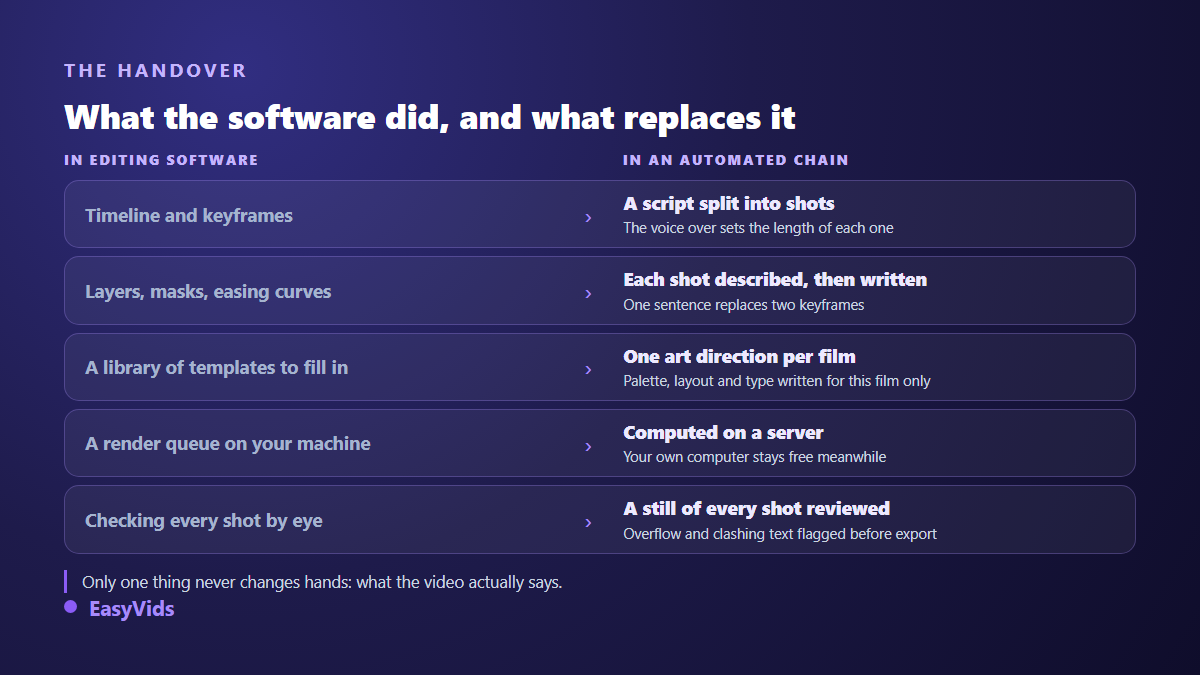
The one job that stays entirely yours is the first in the chain: what the video says. It is also the one that decides its quality, and the only one no tool will do for you. Flawless animation carrying a confused message is still a video nobody finishes.
Written in code, not filled into a template
There are two ways to automate an animated video, and they do not give the same result at all. The first fills a prefabricated template: pick a model, swap the text and the logo, export. It is fast, and it shows, because thousands of other videos share the same choreography to the tenth of a second.
The second has every shot written for this film alone. That is how the EasyVids animation engine works: no template is ever reused from one client to the next. The work starts with an art direction, palette, layout, typography and temperature, then a project kit that becomes the common base for every shot. That shared base is what gives a film its visual unity, where separately written shots give you a slideshow. An automatic comparison against directions already produced also rules out films that would look too much alike.
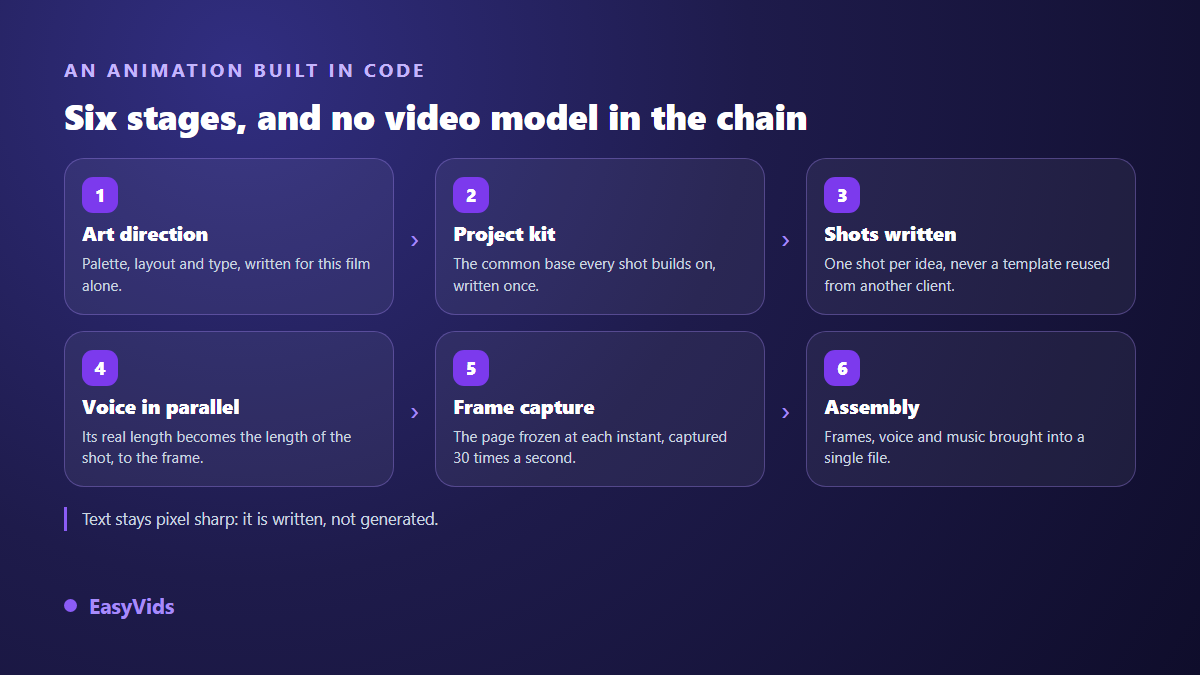
The render uses no generative video model. Every frame of the film is a capture of a page frozen at the wanted instant, and those frames are assembled at 30 per second. The consequence is concrete: text is pixel sharp, with no smearing and no deformed letters, and two renders of the same project produce identical files. No generative video model guarantees either of those today.
A final pass looks at the work instead of hoping. A still from each shot is reviewed by a model that can read an image: it flags text running out of frame, elements colliding, unreadable areas, and the affected shots are corrected before assembly. It is the automated version of the look a studio gives its own rushes.
The method, from script to finished file
Here is the exact sequence of decisions, in the order they come up. Five steps, no technical skill, and one single place where you really have to think.
- Write for the ear. The voice over script is the film. A useful benchmark from our own productions: about 110 characters of narration run for six seconds of speech.
- Let it be cut into shots. Cutting by sentence suits most scripts. You can also force one line per shot, or slices of a chosen length between 2 and 15 seconds.
- Pick the aspect ratio before writing. 16:9 for a site or a product page, 9:16 for social, 1:1 for a feed. That decision comes first, never at export.
- Hand over your brand kit. Two or three colours, one typeface and a logo are enough for the film to look like you rather than like a bought template.
- Choose the voice, then read it back. The real length of each recorded sentence sets the length of its shot, to the frame.
One note on automatic cutting: a shot is capped at eight seconds. Past that, the animation finished long ago and the picture sits frozen, which is a slide, not an animated video. When you cut the script yourself the cap does not apply, and rightly so: your intent comes before our safety net.
The four decisions that carry the film
Since everything else runs on its own, these four choices carry almost all of the perceived quality. They take a minute, and they apply to the whole film.
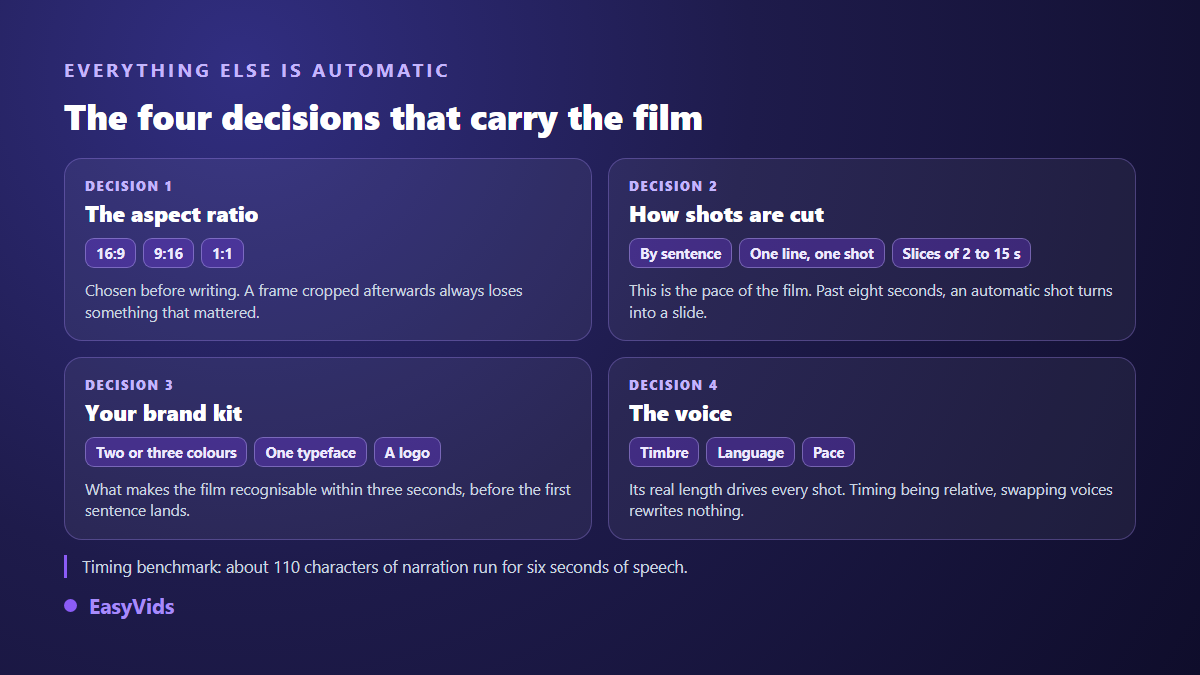
The least obvious one is the last. In a well built chain, animation timing is expressed as a fraction of the shot length, never in fixed seconds. Change the voice, fix a sentence, and the shots retime themselves instead of needing a rewrite. That invisible detail is what makes corrections painless, and it is exactly what is missing when a tool makes you redo everything over one word.
Written animation or generated clip: two different families
An animated video is not a generated video, and confusing them leads to expensive disappointment. A video model produces a few seconds of photorealistic movement from a written instruction, which our AI video generator guide walks through step by step. Written animation produces shapes, text and colour, for as long as you want, with an identical result on every render.
Three criteria settle the choice. On screen text first: if your video rests on words, figures or a logo, written animation wins outright, because generative models still cannot spell reliably. Duration next: an animation holds for one minute or ten without effort, while a generated clip is counted in seconds. Realism last: a face, a real place, a material, that is the generative model's ground. Plenty of good films mix both, an animated sequence for the explanation and a generated shot for atmosphere.
A word on budget, without figures. Written animation is computed on an ordinary processor, where a generative clip needs specialised graphics hardware. At equal length the production cost gap is real, and it explains why animation stays the most economical format for a long video. Our plans are laid out on the pricing page.
What gives a rushed animated video away
The flaws are always the same, and they show within three seconds. The good news is that every one of them is fixable before the render, and most come down to numbers you can check.
- Text glued to the edge of the frame. Keep at least 5 % clear on all four sides, or phone viewers lose letters.
- Web page type sizes. On a 1920 pixel wide frame a dominant word sits between 90 and 220 pixels tall; below 28 pixels nothing reads on screen.
- The same entrance effect everywhere. Opacity rising with a 20 pixel slide, repeated twenty times, puts the viewer to sleep.
- Three or more blocks of text in one shot. People stop reading and wait for it to pass.
- A background left white because nobody decided otherwise. A shot always carries its own material: colour, gradient or texture.
- Music at the same level as the voice. It has to sit well below, or every other word is lost.
Frequently asked questions
Can you really make an animated video without knowing how to animate?
Yes, provided you accept a trade: you give up frame by frame control and you gain speed and consistency. You keep the script, the aspect ratio, the brand kit and the voice. You hand over composition and movement. For an explainer, brand furniture or animated text, that trade is strongly in your favour.
How long does a one minute animated video take?
Writing the script takes most of the time, often half an hour for a minute of film. The build itself runs on a server while you do something else: close the page, come back to the result. Compare that with a full working day in compositing software for the same length.
Can an animated video respect my brand guidelines?
Yes, and it is the strongest argument for building in code. Your colours are applied at their exact value, your typeface is used as it is, and your logo lands pixel perfect, because nothing is repainted by an image model. A generative model always reinterprets a brand colour.
Is vertical format supported?
Yes. Vertical 9:16 and square 1:1 are produced natively, each shot being composed for the requested frame from the moment it is written. That is very different from cropping: a video designed in 16:9 and then trimmed to vertical always loses something that mattered.
Do I need a powerful computer?
No. The computing happens on our servers, your browser only shows the interface and plays the result. An ordinary laptop or a tablet is enough, which is the exact opposite of compositing software, whose render takes over your machine for hours.
The real work behind an animated video was never the animation: it is deciding what to say, in what order, and across how many shots. The rest has become execution, and execution can be delegated. To see what your next script looks like on screen, create a free account and run one short film. The EasyVids studio keeps writing, voice, animation and export in one place.