The test came back positive three days ago and you keep circling the same question: how do you tell people. A phone call delivers the news in four words and it is over. A pregnancy announcement video does something else. It builds a few seconds of waiting, lets the doubt grow, then drops the news at the exact moment you chose. Those few seconds are what separates information from a memory.
Announcement videos fail for one reason, and it is never technical: the reveal lands too early. Nobody had time to wonder what was going on. This guide gives nine ideas you can make with no camera and no installed software, the three act structure that makes them work, and how to build them from the photos already on your phone, in the same spirit as our guide to photo slideshows with music.
The short answer
A pregnancy announcement video runs in three acts and lasts thirty to sixty seconds. A clue nobody understands right away, a reveal in one full frame shot, then a long breath where you give the due date and the details. Pick the aspect ratio before the first shot: vertical if the video goes out by message, horizontal if it will play on a television. Everything else comes from your own photos, two or three animated shots and music sitting well under the voice.
Why the wait matters more than the news
An announcement works like a joke: everything happens in the time before the punchline. If the opening frame shows a pregnancy test, there is nothing left to discover and the video becomes an animated card. If it shows an ordinary scene, a breakfast table, a drawer being opened, the viewer starts looking. When the reveal lands, it lands on someone who is paying attention.
That mechanic gives you a simple structure, and you will find it in almost every announcement that travels. Three acts, three jobs, three durations, with most of the work happening in the first one.
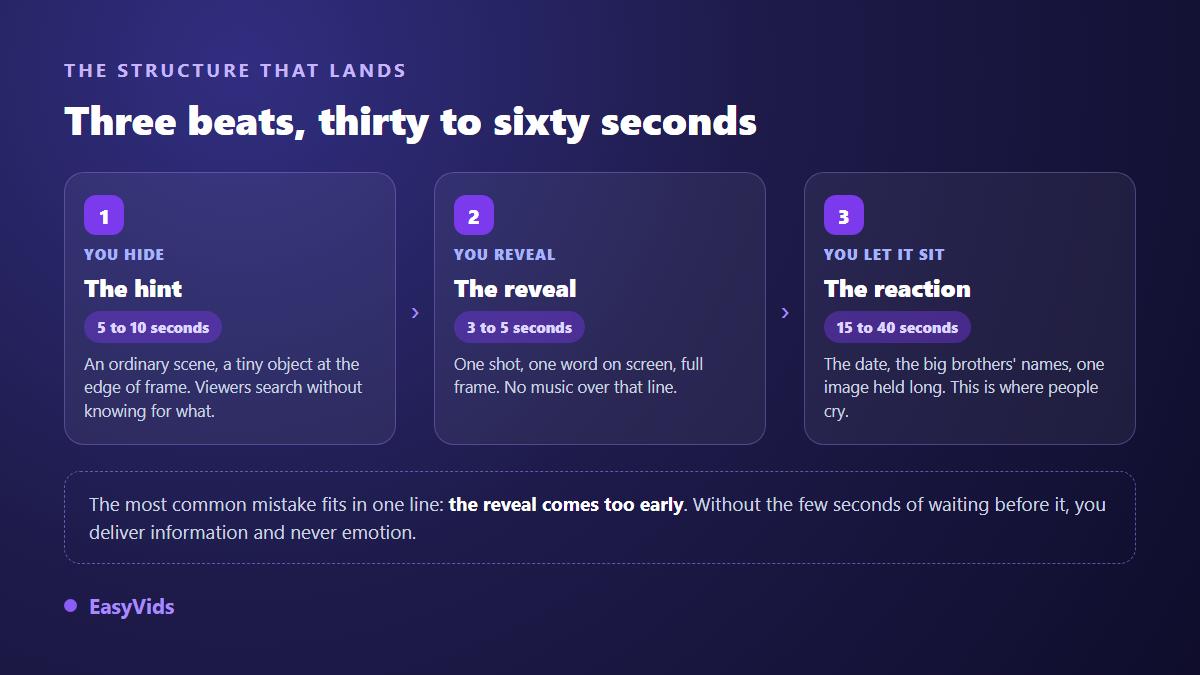
The third act is the one everyone cuts short. After the reveal, your family needs a few seconds to take it in. Hold one image, put the due date on screen in large type, add the names of older siblings if there are any. A video that stops dead right after the news feels unfinished, even though it contained everything it needed.
Three ideas built from your own photos
These three edits need nothing beyond what is already sitting on your phone. They rely on selection and rhythm, never on production.
- The month countdown. Nine photos of yourself, one per month of the past year, cutting faster and faster, then a tenth image that does not belong to the series. Each photo holds one second, the last one holds six.
- The family photo that grows. Your latest group shot, held for a few seconds, then the same frame with one extra silhouette added at the bottom and a single word. The contrast between two near identical shots does all the work.
- The calendar that moves forward. Close ups of a calendar being flipped month after month, until one date is circled. No text until then. The word arrives alone, full screen, at the end.
The edit happens in the browser: drop your images on the timeline, set their duration, then one button lays animations and transitions across the whole sequence, with a mood to pick between soft, dynamic and cinematic. To add motion to a still without generating a video clip, our seven ways to animate a photo cover the common cases, from a slow zoom to a layered parallax.
Three ideas where somebody else breaks the news
The best messenger is never the expecting parent. Handing the news to someone else moves the attention, and gives the viewer a face to watch while they work it out.
- The older child holding the sign. A three year old who reads badly, holds the card upside down and laughs at the wrong moment: keep the bad take, that is the one people share.
- The family pet. A locked off shot of the dog or cat, a message written on a bandana, and a very slow push in that reads the text. Short, funny, shareable.
- The breaking news bulletin. A fake special report, with a lower third, a voice over in anchor mode and a date in large type. The gap between the serious format and the news gets a smile straight away.
The lower third and the fake bulletin need no editing skills: the editor offers animated text blocks, stickers and a library of short sounds, including stingers and opening effects. For the anchor voice, an AI voice over reads your script at a steady pace, and you listen back before sending it to the audio track. Two sentences are enough, because the tone carries the joke, not the length.
Three ideas for announcing from far away
When the family is scattered, the video replaces the meal where the surprise would have happened. It needs more care, because nobody will be there to catch a misunderstanding or explain an image.
- One version per person. The same edit, with a different opening shot naming the person who receives it. Five versions take a few minutes, since only the first shot changes.
- The card that opens. A closed object in the foreground, an envelope or a small box, opening onto the text. It is the logic of a wedding save the date video transposed to a birth.
- The invitation to a reveal party. A short video giving the date and the place without telling the news, keeping the surprise for the day itself. The principle of an animated video invitation, with one piece of information deliberately held back.
One precaution for anything sent by message: messaging apps recompress video, sometimes heavily. Export vertical, keep the film short and set your text large. Thin type that looks fine on your screen becomes unreadable after compression, and it is usually the reveal text that suffers.
Animating a photo without wrecking the faces
This is the move that makes people ask how you did it, and the one that fails most often. In the generator you drop a photo in as a reference image, describe the motion you want, and the model returns a few seconds of video built from that still. The result depends almost entirely on how precise the instruction is, never on how long it is.
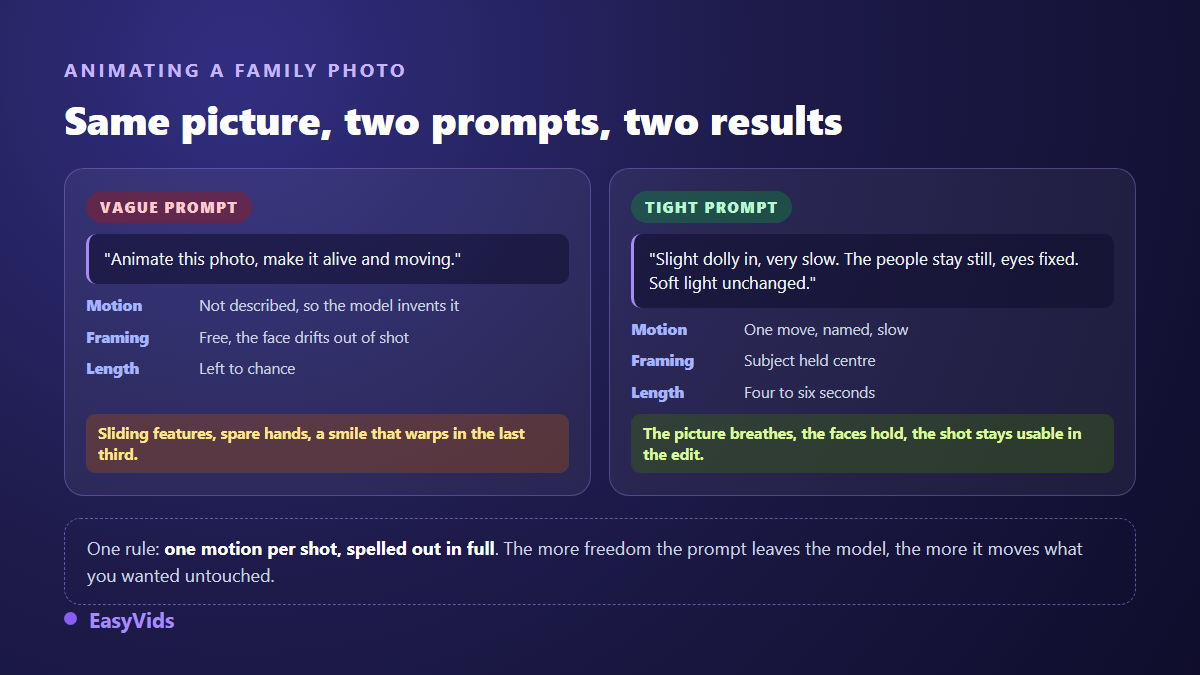
Three rules are enough. One motion per shot, spelled out: a slow push in, a breath of wind in the hair, a hand coming to rest. A short duration, four to six seconds, because warping almost always shows up in the last third of the clip. And a subject kept in the centre of the frame, otherwise the model drifts it towards an edge and loses the face on the way.
Watch every clip at full size before you keep it. Profile faces and group shots are the most fragile. When a shot slips, do not lengthen the instruction: run it again with a smaller motion. Two animated shots are plenty in an announcement, and the contrast with the stills is exactly what makes those two shots stand out.
Voice, music and three seconds of silence
The most forgotten layer is the most effective one. Thirty to forty words of voice over, around fifteen seconds, turn a nice edit into a message. Write in the present tense, speak to the person watching, and save the last sentence for the reveal. If you would rather use your own voice, record it on a phone in a room without echo and drop the file on the audio track, because nothing replaces a voice that shakes a little.
For music, one rule matters at the edit: it has to step aside for the reveal. Drop the track by half for three seconds, let the sentence stand alone, then bring it back. On the choice of song, be careful with commercial tracks. According to the YouTube Help Centre, protected music can trigger a claim that mutes the video or blocks it in some countries, and every platform applies its own rules. Music composed for the occasion avoids the question entirely, and what you are allowed to publish with generated music covers the ground.
Format and length depend on where the video lands
An announcement is not watched in the same place by everyone. Grandparents will often see it on a television or a tablet propped on a table, friends in a vertical feed between two stops. The same edit cannot serve both without being rethought.
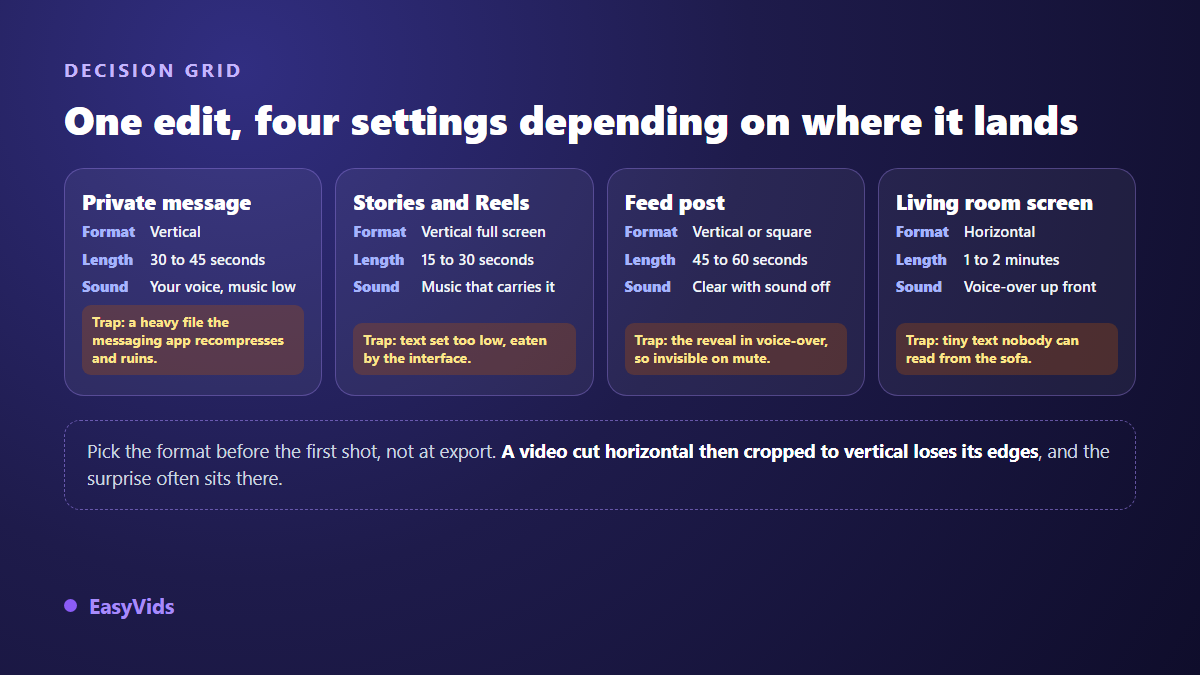
Two things are worth keeping. A video posted to a feed has to work with the sound off, so the reveal goes on screen, never in the voice over alone. And an edit built horizontal then cropped vertical loses its edges, which is exactly where the clue and the person reacting usually sit.
What to keep out of frame
An announcement gets shared, re recorded and reposted. A few things deserve one last look before you export, and that review takes two minutes.
- The details printed on a scan. The image often carries a name, a date of birth and a file number along the top edge: crop or cover that strip.
- The name of the clinic or hospital, readable on a document, a folder or a wristband.
- Children who are not yours, caught in a group photo headed for a public post.
- A street address or a number plate, visible in the background of a shot filmed outside your home.
- People you have not told yet, who would learn the news through somebody else's feed instead of from you.
That last point is the sensitive one and it has nothing to do with editing: decide the order of the announcements before you build the video, not after. Scheduling the public post two hours after the private messages gives close family the time to react first.
Frequently asked questions
How long does a pregnancy announcement video take to make?
About twenty minutes for a forty second film: five minutes to pick eight to twelve photos, a few minutes of compute for the two animated shots, and the rest in the editor. Choosing the photos takes longer than building the video.
Do I need professional photos?
No. Phone photos work very well and their imperfection serves the story. One limit applies: a very blurry or very dark image stays that way, because editing does not restore a damaged shot and enlarging it brings out the grain.
Can I do all of it from a phone?
Writing the script, generating the voice over and producing the animated shots all work from a mobile browser. The final edit is more comfortable on a larger screen, because the timeline needs precision when you line the music up with the reveal.
How do I announce to grandparents who struggle with phones?
Edit horizontal, enlarge the text, give each shot an extra second and add a voice over that says what the image shows. Then send a file they can play offline rather than a link, or ask someone nearby to put it on a television.
Can I reuse the video for the gender reveal?
Yes, and that is the right instinct. Keep the same three act structure, the same text style and the same music: the two videos will read as a series. Only the final shot and the dominant colour really change.
A pregnancy announcement video needs no equipment and no editing background. It needs three decisions: the clue that opens it, the single shot that reveals, and the time you leave afterwards for the family to react. Photos, voice, music and animation all come together in the browser in one evening. To get started, create your account and build the reveal shot first, because it decides every other one. The EasyVids studio keeps animated photos, voice over, music and editing in one place.