A visitor lands on your about page, watches for ten seconds, and leaves without knowing what you sell. A company presentation video exists to prevent exactly that: saying who you are, what you do and who it is for, before attention runs out. Most of these videos miss, because they tell the story of the company instead of speaking to the viewer.
The format follows a very stable blueprint. Ninety seconds are enough, as long as you know what each block must hold and in which order. This guide gives that blueprint, the tone to pick for each audience, and the shots to use when you have no camera and no crew. If your real need is to make a product understood in detail, our 60 second explainer video structure answers a different question and reads well alongside this one.
The short answer
An effective company presentation video holds six blocks across 90 seconds: a hook built on the viewer's problem (0 to 8 s), who you are in one sentence (8 to 20 s), what you do in three offers at most (20 to 40 s), who it is for (40 to 55 s), one checkable proof (55 to 75 s), then a single call to action (75 to 90 s). Budget around 220 words of voice over for that length. The company name never comes first. It arrives in the second block, once the viewer has a reason to listen.
Why 90 seconds beats three minutes
Length is not a matter of taste, it is a matter of placement. A presentation video is nearly always watched in a context nobody came for: the top of a home page, a cold message, the minutes before a meeting, a scrolling social feed. The viewer promised you nothing. He grants you the time it takes to check whether you deserve the rest.
Ninety seconds is the length that lets you land a proof without losing the thread. Under a minute you state what you do but never prove it, and the video reads as a slogan. Past two minutes you need a real story, characters and tension, and you have left the presentation format for the brand film. If you must convince in a single minute in front of a panel, the 60 second video pitch framework is tighter and suits you better.
One writing rule holds the length together: a minute of voice over runs about 150 words at a calm pace. For 90 seconds, aim for 210 to 230 words, breathing included. Write to that length, read it aloud against a timer, then cut. It is always the script that overflows, never the picture.
The six block blueprint, timed
Each block has one job. The moment a block takes on two, the video stretches and the viewer drops off. Here is the split that works, with the time each one can claim.
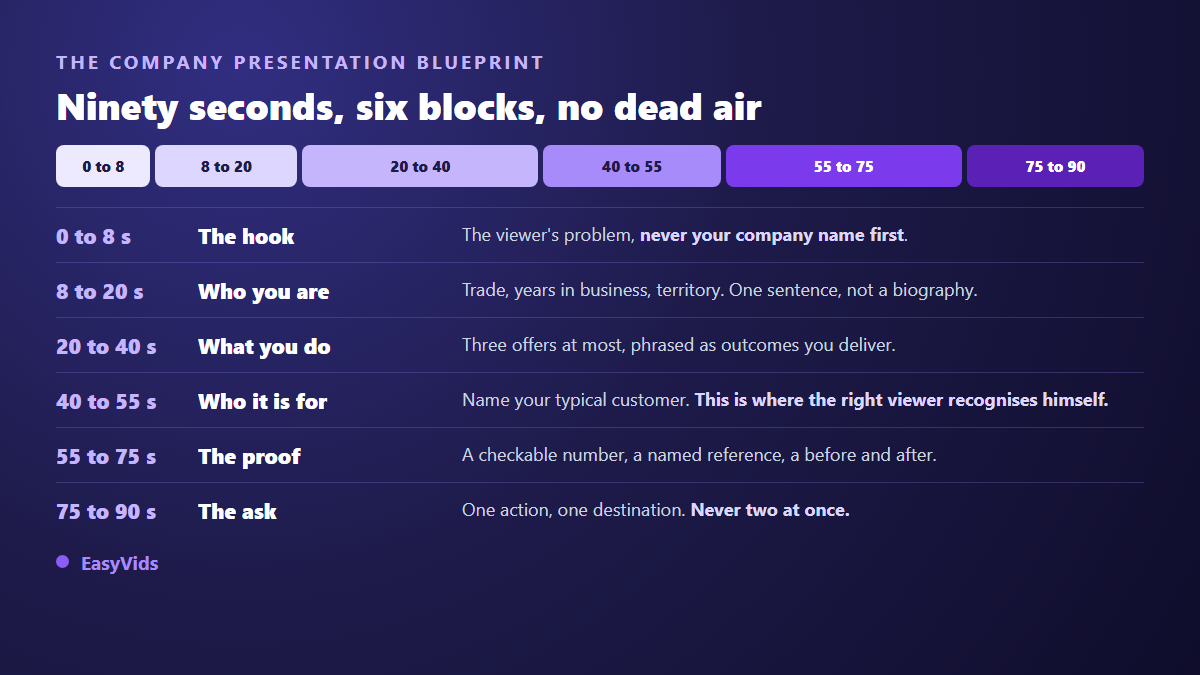
The timing is not rigid to the tenth of a second. What matters is order and proportion. Swap two blocks and the video loses its logic even though every element is still there: a proof announced before you said who you serve proves nothing to anyone.
Block 1: open on the viewer, not on yourself
The first eight seconds decide whether the rest gets watched. The usual mistake is to open with the logo, the name and the founding year. Nobody cares at that moment, because none of it answers a question the viewer is asking. Open on his situation: what he is trying to do, what is costing him time, what pushed him to look for a supplier at all. A hook that could serve a competitor is not a hook, it is filler.
Blocks 2 and 3: who you are, then what you do
The second block carries identity, and that is where the name finally appears. Three elements are enough: the trade, the size or the years behind you, the territory or the speciality. One sentence beats three minutes of company history, and every second spent on your past is a second taken away from the proof.
The third block lists three offers at most, phrased as outcomes rather than services sold. Energy audit is a service. Knowing within two weeks what your building is overspending is an outcome. This is also where pictures must finally show something: a capture of your tool, a shot of your product, a page of a deliverable. When no real footage exists, an animated corporate video in motion design covers the same ground with a deliberate graphic style.
Block 4: who it is for, the block everyone skips
This is the forgotten block, and the most profitable one. Naming your audience does two things at once: the right viewer recognises himself and feels expected, the wrong one stops there and will not waste a meeting. Name the typical customer with a sector, a size and a situation. Companies skip it for fear of excluding, which is a miscalculation. You do not lose the clients you fail to name, you win the ones you do name.
Blocks 5 and 6: the proof, then one single ask
The twenty seconds of proof are the heart of the video. A proof is checkable: a number of clients served, an average response time, a certification, a named reference you are allowed to cite, a visible before and after. What cannot be checked is not proof. Leader, recognised expert and premium quality prove nothing and cost you credibility. Set one number large on screen, hold it for three seconds, and let the voice comment on it instead of repeating it. If a client agrees to speak, the three part customer testimonial structure frames the recording you will cut down to ten usable seconds.
The ending fails the same way almost every time: three asks instead of one. Visit the site, follow us, write to us, call us. A viewer given four actions takes none. Pick the one that matters at this stage of your sales cycle, show it on screen as the voice says it, and make sure it is doable where the video is actually watched.
One blueprint, three tones
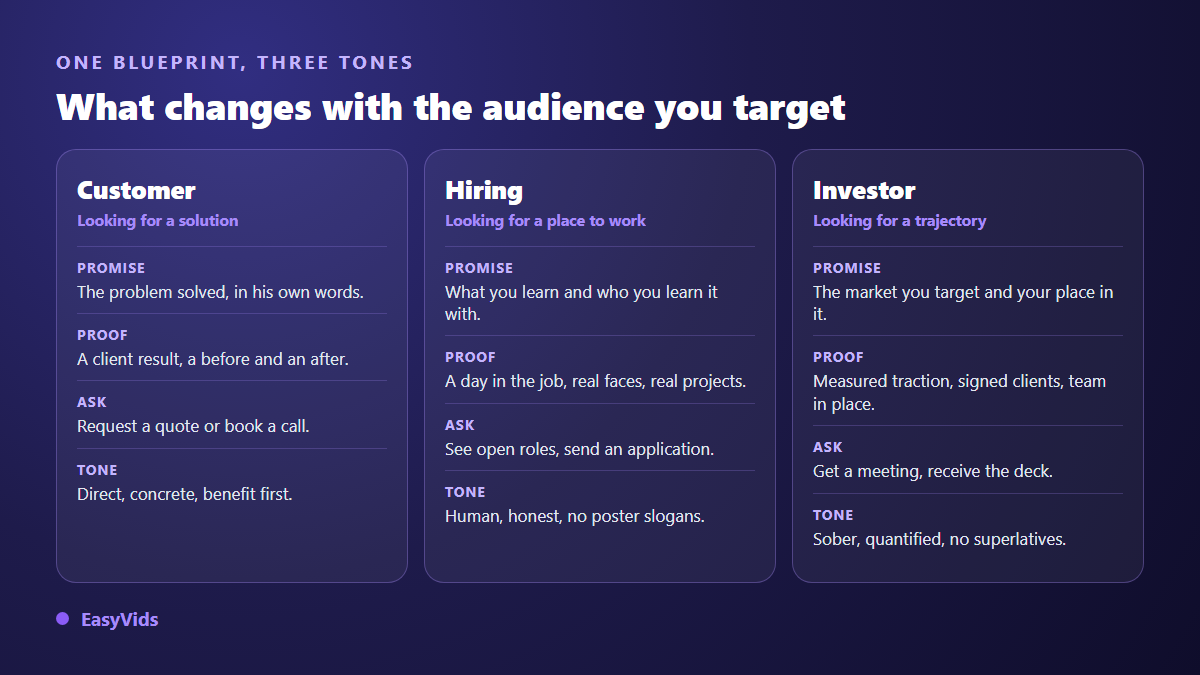
The same six blocks serve customers, candidates and investors, provided you change the register. Ask what each audience is afraid of losing: the customer fears wasting time on the wrong supplier, the candidate fears two years inside a company that lies about daily life, the investor fears funding a trajectory that does not exist. Your proof block answers that fear and no other.
The shots to use when you have no film crew
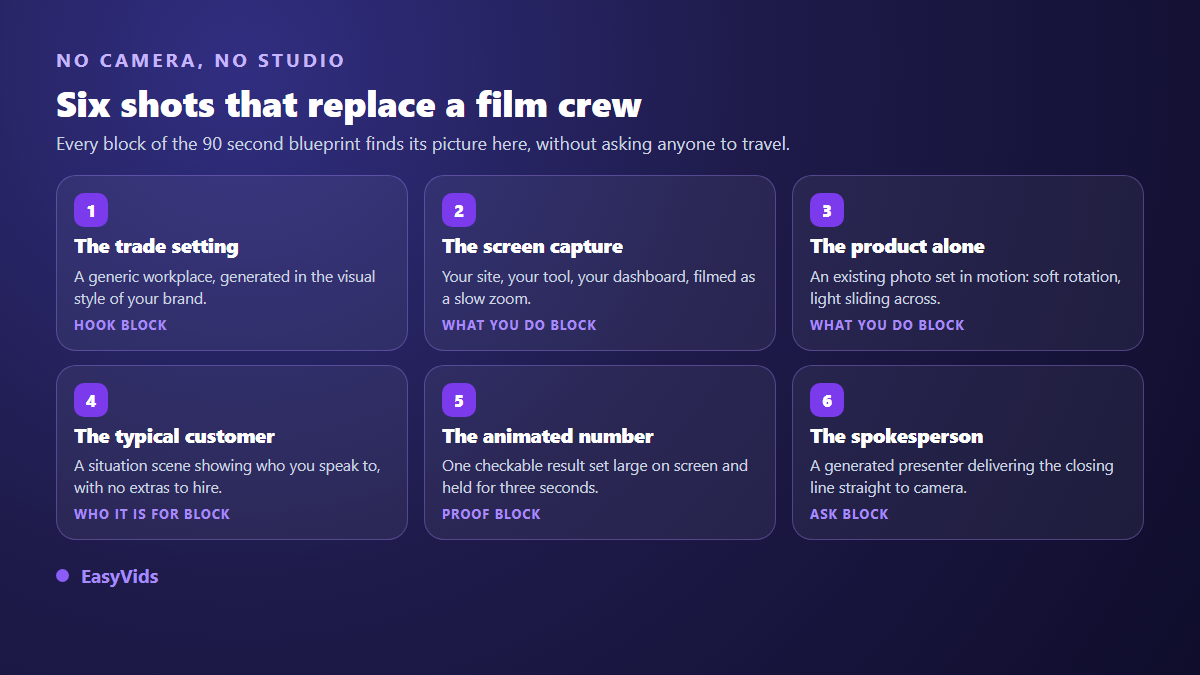
This is where most companies stall: the script is written, and there is no camera, no photogenic office and nobody comfortable on screen. Filming anyway on a phone in a corridor is not the answer. Choosing shots that need no shoot is. Our wider round up of ways to make videos without filming yourself covers the full range; these six families serve a company presentation specifically.
- The trade setting: a generic workplace scene generated in your brand's visual style, to hold the context during the hook.
- The filmed screen capture: your site, your software, your dashboard, as a slow zoom rather than nervous scrolling.
- The animated photo: an existing product or team picture set in motion with a soft rotation or sliding light.
- The situation shot: a scene showing the typical customer in his own environment, with no extras to hire.
- The number on screen: the proof set in large type and held for three seconds, with nothing competing behind it.
- The generated spokesperson: a presenter delivering the closing line to camera when nobody on the team wants to appear.
These shots are produced today with no equipment, from the script and the pictures you already own. A studio such as EasyVids writes the script, cuts the blocks into scenes, generates the missing visuals, records the voice over and assembles the edit. When a face is needed for the closing line, a generated virtual presenter takes the role with no set and no lighting rig.
Voice, music, captions and format
A company presentation lives on its voice, because that is what carries authority. Pick a calm voice with a slow delivery and keep it for the whole video. Speeding up the read to fit an overlong script is the most damaging reflex of all: it broadcasts urgency where you wanted control. Keep music well under the voice, around a fifth of its volume, and burn the captions into the picture, since a large share of views happen with the sound off.
Export a horizontal version for your site and your emails, and a cropped vertical one for social feeds and messaging apps. They are not the same video: vertical keeps on screen text far from the edges, and wide shots lose their readability. Plan the crop while writing, not after export. Give the still frame the same care, because on most surfaces the video sits paused before anyone presses play, and that frame works as a poster.
Frequently asked questions
How long should a company presentation video be?
Ninety seconds for a general presentation aimed at a website or outbound messages. Drop to 60 seconds for social feeds, where attention is shorter and sound is usually off. Go past two minutes only if you add a real narrative with people speaking. Write to roughly 150 words per minute of voice over in every case.
Do I have to appear on camera?
No. A founder who is comfortable on camera adds trust, especially with candidates and investors, but a stiff one does more harm than a neutral voice over on strong visuals. If you want a face without a shoot, a generated presenter can carry the closing seconds, where direct address matters most.
Can I make a company presentation video without filming anything?
Yes, and it has become the common case. Script, missing visuals, voice over and edit are all produced from the text, while your existing logo, product photos and screen captures are folded in. All you supply is what only you know: your offers, your typical customer and your proof.
How do I adapt the video for recruitment?
Keep the six blocks and change the answers. The promise becomes what you learn and who you learn it with. The proof becomes a day in the job, real projects and real faces rather than a list of perks. The ask points to open roles, and the tone turns human, because candidates spot poster slogans instantly.
What does a company presentation video cost?
A traditional filmed production needs a shoot, a crew and a day of editing, which stays the heaviest line. An AI assisted production moves most of the effort back to writing and shot selection. Offers vary with the number of videos and the quality you want: our pricing page shows the current state, and a free trial lets you build a first version before deciding.
Take the six block blueprint and write your 220 words today, before thinking about pictures. A company presentation is won at the writing stage: the right order, a named customer, one checkable proof, one single ask. The visuals, the voice and the edit come after, in minutes. Open a free account and produce a first version tonight, ready to be reworked once three customers have seen it.