Your listing says the cover is waterproof. The shopper wants to see water bead off it before paying. That is the whole job of a product demo video: it swaps a written promise for visible proof, in a few seconds. The doubt that was blocking the order disappears the moment the gesture appears on screen.
The idea was never the hard part. Filming a clean demo means a work surface, controlled lighting, hands that know what to do, and the whole thing starts over for every item in the catalogue. Most sellers give up after the first attempt. Yet a sharp photo of the item is now enough to produce the shot, the motion and the result. This article walks the full method, and it extends our complete guide to product video, which covers every ecommerce format.
Product demo video: the short answer
A product demo video shows an item being used: the gesture, the action, the outcome. It runs eight to thirty seconds, fits into five shots, and answers one buying question at a time. You build it from a photo of your product rather than with a camera: the image acts as a visual reference, a video model adds the motion, an editor assembles the shots with voice, on screen text and captions. A publishable first version comes out in minutes, and the format variants follow.
Demo, presentation, testimonial: three different jobs
These three formats look alike in a feed and answer completely different questions. A presentation circles the object, gives its scale and its finish: it says what the thing actually looks like. A testimonial puts a person in front of the promise. A demo shows how the item is used and what it produces. It is the only one of the three that requires a gesture and a comparison between a before and an after.
Mixing them up costs views. A shopper looking for proof of use is not reassured by a turntable shot on white, and someone worried about build quality is not reassured by a tight close up of a hand. If your item mainly needs a face and a voice, aim for creator style content instead: our method for producing presentation videos without a creator covers that route.
The five shot structure that makes a product obvious
A working demo does not improvise its order. It states a problem, shows the gesture, proves the result. Across our own generations, the videos people watch to the end almost always follow the same frame, and that frame comes down to five shots.
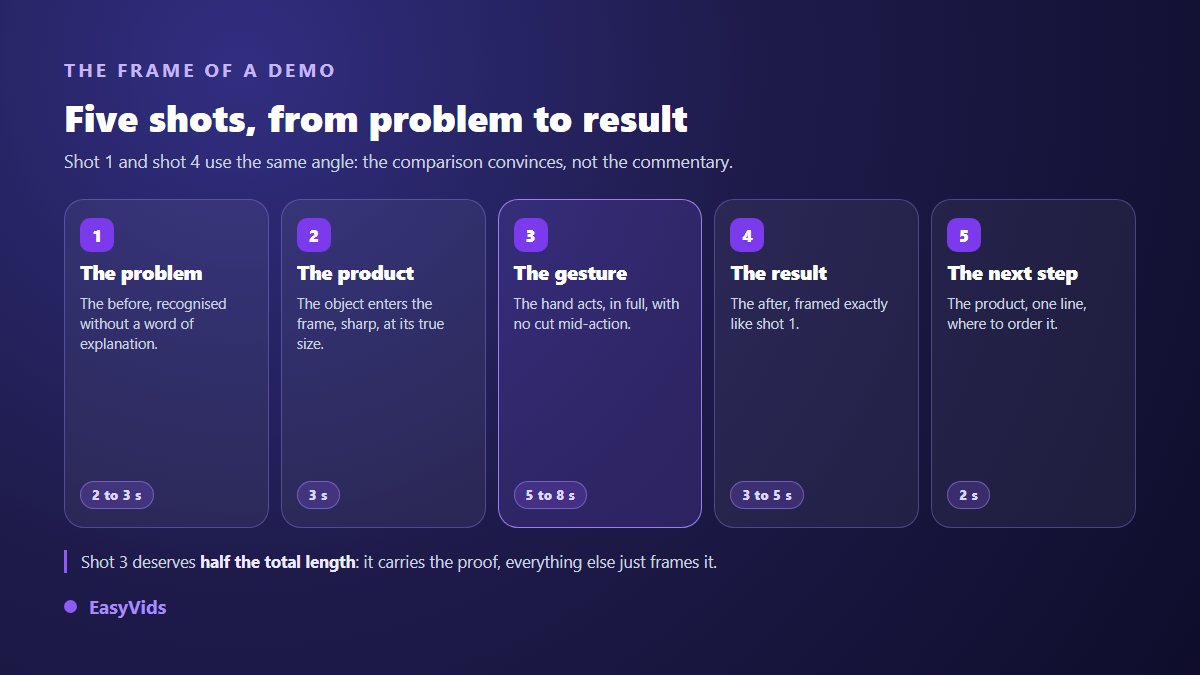
- Shot 1, the problem (2 to 3 seconds): the before state, recognised without a line of explanation.
- Shot 2, the product (3 seconds): the object enters the frame, sharp, at its real scale.
- Shot 3, the gesture (5 to 8 seconds): the hand acts. This is the core, and it deserves half the total length.
- Shot 4, the result (3 to 5 seconds): the after state, framed from the same angle as shot 1.
- Shot 5, what next (2 seconds): the product, one line, where to order.
Two rules keep the frame readable. Shots 1 and 4 share the same angle, otherwise the eye has nothing to compare and the proof evaporates. And the gesture in shot 3 plays out in full, with no cut in the middle: a truncated action plants suspicion instead of removing it.
Start from a photo, not from a shoot
The turning point fits in one sentence: current video models accept a starting image. You no longer describe your product in words, you hand it over. Shape, colour, label and proportions come from your photo, and the model only supplies the motion. That difference is what separates a credible demo from a lookalike object invented from scratch, one your customer will not find in the box.
So the source photo decides everything downstream. A sharp, evenly lit shot with the whole product in frame gives a usable clip. A dark snapshot gives mushy motion and unreadable labels. If your existing visuals are weak, fix them first: turning a phone photo into a store grade visual is the step that comes before any video.
One reference image is enough to launch a shot, and several models accept more than one. When you can, provide a front view, a three quarter view and a close up of the material. The model then keeps the product identical while it moves, instead of redrawing it frame after frame.
Writing the prompt for a demo shot
A demo prompt does not describe an object, it describes an action. The habit that changes everything is naming the actor, the gesture, the material and the visible effect, in that order, then specifying the camera. Four elements are enough.
- The actor: one hand, two hands, a work surface. Stay on hands when a face adds nothing to the proof.
- The gesture: a precise verb. Pour, screw, spread, fold, plug in, wipe. Use means nothing to a video model.
- The material and the effect: foam rising, water beading, dust disappearing, a part clicking into place.
- The camera: locked off, slow push in, top down. Slow motion holds together better than spectacular motion.
The most profitable rule is to ask for the smallest movement that still tells the story of the use. A simple slow gesture comes out clean almost every time, a chain of three actions usually comes out warped. If you need visual vocabulary for these shots, our product photo prompt formulas by item type give a base to adapt to motion.
Length and format are decided before you generate
A demo is not the same length everywhere. On a product page the visitor has already clicked: twenty to thirty seconds is welcome and detail is expected. In a vertical feed the video fights the thumb, so the promise has to land before the third second. In paid advertising the opening shot does nearly all the work. Pick the aspect ratio at generation time rather than at cropping time, and our table of formats and durations by platform gives the exact reference points.
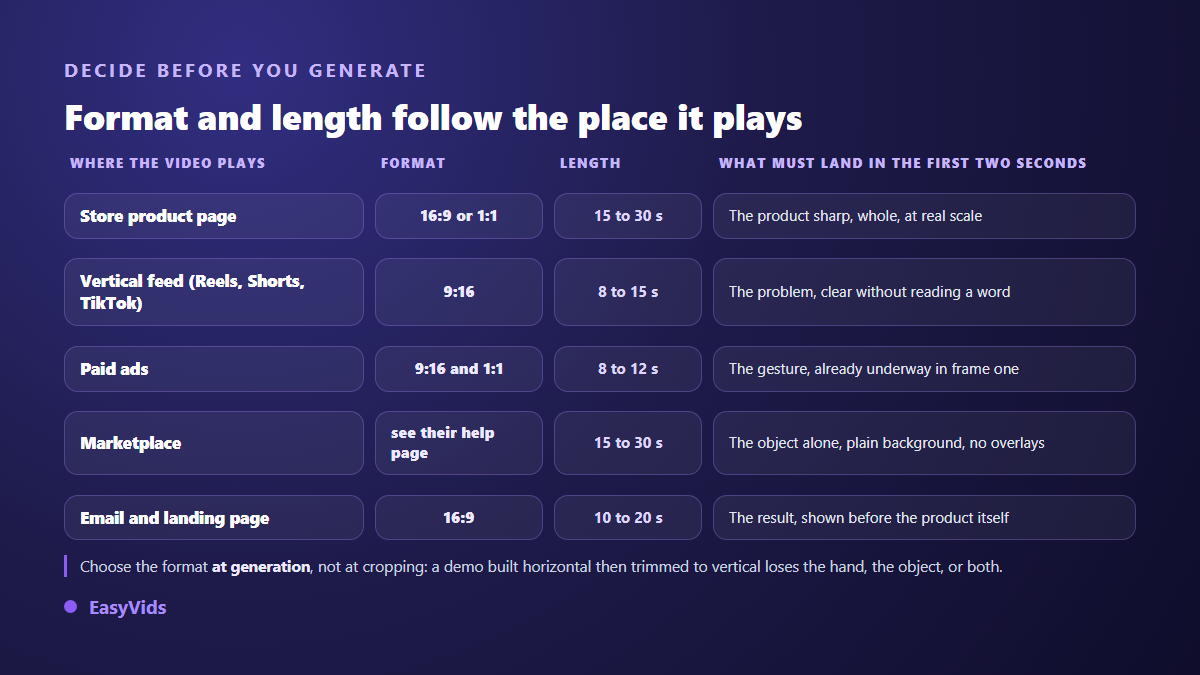
Marketplace rules matter as much as social platform rules. According to Amazon seller help, video on a product listing stays reserved for sellers enrolled in Brand Registry. Shopify merchant documentation, for its part, states that a product media gallery accepts video alongside photos. Check the help page of the platform you target before preparing exports: duration, weight and resolution limits are written there in plain language, and they change from year to year.
What AI still gets wrong on a demo
Let us be blunt: a video model is not reliable at everything. It excels at materials, liquids, fabrics and wide slow movements. It fails regularly on anything that requires exact mechanics, which is precisely where a demo earns or loses its credibility.
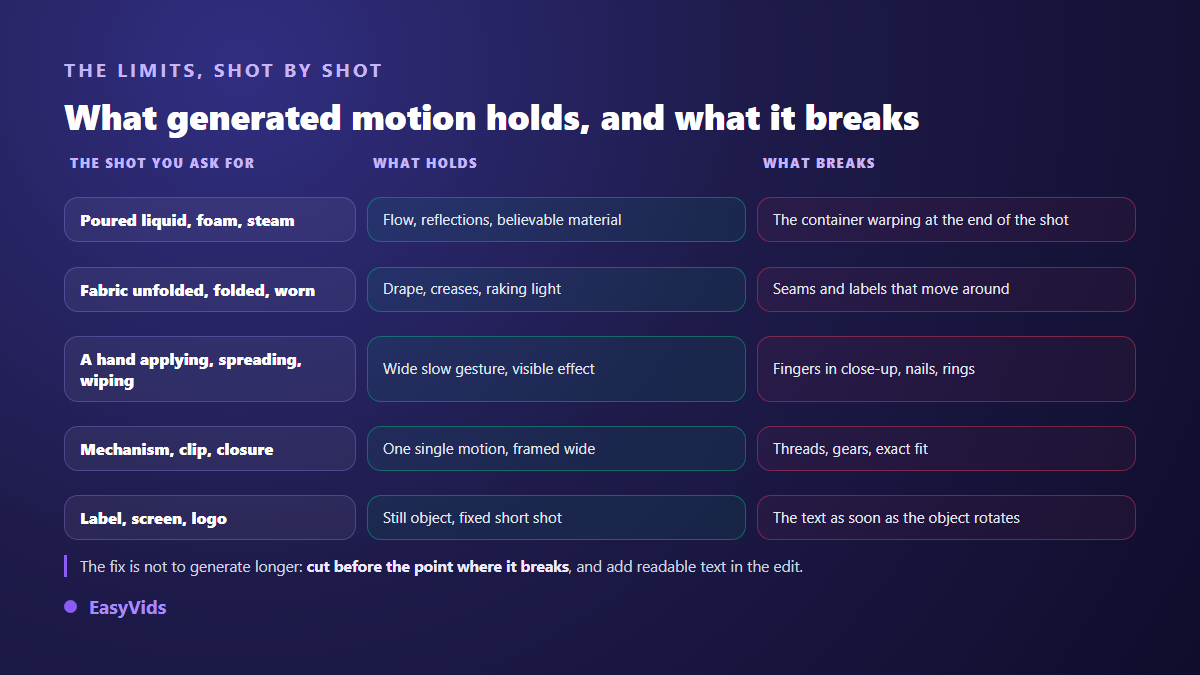
- Fingers in tight action: they merge, duplicate, change length.
- Text on labels and screens: letters warp as soon as the object moves.
- Precise mechanisms: a zip, a thread, a clip snapping shut.
- Full transformations: a product unfolding completely, a liquid changing colour.
- Logos: they drift across frames, and a distorted brand undermines the whole video.
The workaround comes down to three moves. Cut before the point where it breaks instead of generating for longer. Frame so the hand leaves the shot when it is not essential to the proof. And add readable text in the edit, as an overlay, rather than hoping a model spells your brand correctly on the packaging.
Voice, on screen text and captions
A demo is often watched with the sound off, on a commute or between meetings. On screen text therefore carries the information and the voice adds conviction. Write four to six words per shot, large and contrasted, away from the edges where platform interfaces put their buttons. The voice over names the benefit while the image shows the gesture: it does not repeat what you can see, it says what you gain.
Captions are not decoration. They make the video understandable in silence and let you release the same demo in another language without regenerating a single frame. An audio track transcribes automatically into a caption file you proofread before export, which removes line by line typing and the sync drift that comes with it.
Produce three versions instead of one perfect one
The real saving here is not the time gained on a single clip, it is being able to produce several. The same demo varies by changing the opening shot, the angle of the gesture or the first line. Publish the variants, keep the one that holds attention, drop the rest. That loop teaches you in a week what a single shoot never will.
The same logic scales to a whole catalogue. Once the five shot frame works on one item, it reapplies to the next by swapping the source photo and the verb of the gesture. A credit based system lets you dial the effort: a fast model for tests, a premium model for the version that goes into paid advertising. Plan details sit on the pricing page.
Frequently asked questions
Do I need the physical product to make the video?
No, a photo is enough, but it has to show your exact item. A catalogue image from your supplier works if it is sharp and shows the product whole. What does not work is describing the object in words and hoping the model lands it: you will get a lookalike, and the gap shows when the parcel arrives.
How long should a product demo video be?
Eight to thirty seconds depending on placement. Count eight to fifteen seconds for a vertical feed, fifteen to thirty for a product page where the visitor is already engaged. Beyond that you are narrating the product rather than demonstrating it, and it is better to split into two videos that each answer one question.
Do I have to disclose that a demo was generated with AI?
The help centres of YouTube, TikTok and Meta all ask you to disclose realistic content generated or altered by AI at upload time. The underlying rule is commercial before it is technical: your video must not show a feature the product does not have. An honest demo, disclosed where the platform requires it, raises no issue.
Can I keep exactly the same product from shot to shot?
Yes, provided you start every shot from the same reference image rather than rewriting a description. That is the only way to hold colour, shape and proportion across shots. Expect some drift on the finest details, labels and logos first, which you correct in the edit.
Does a generated demo replace the photos on my listing?
No, it complements them. Photos remain the reference for what you sell, and marketplaces police them. Video exists to show use, ground a still image cannot cover. Keep real photos on the listing, and use the video to settle doubt about the gesture and the result.
A product demo no longer needs a studio. It needs a sharp photo, a precise verb and five shots in the right order. Take your best selling item, write the gesture that removes the most doubt, and generate the first version today. Creating an account opens generation, voice over and editing in one place, and the EasyVids studio brings those steps together without juggling services.