You just generated a clip, it actually looks good, and a logo that is not yours sits in the corner of the frame. People search for AI video no watermark every day for that exact reason: the file is usable, except it carries somebody else's name. You cannot post it on a channel, hand it to a client, or run it as an ad.
The instinct is to look for a way to strip the mark off. That is the wrong question, and it leads to damaged videos. We take the problem from the other end: why these marks exist, what they cost you in reach and credibility, how to spot a tool that adds one before you waste an evening, why the four popular removal tricks all degrade the picture, and which production chain gives you a clean file on the first export.
The short answer
A video watermark is burned into the pixels. It is not a layer you untick afterwards, it is a permanent change to every frame of the file. The only reliable way to get a clean video is to produce it in a chain that never adds one, from the first generated shot to the final render. Everything else swaps one flaw for another. That is the position our AI video studio takes: nothing is stamped on at assembly, and the file you download is exactly what the preview showed.
Why a tool burns in a watermark
A burned in mark is never a technical accident. It is a commercial decision, and there are three reasons behind it, usually combined. Knowing them saves you from expecting behaviour a tool will never have.
- Conversion. The mark makes the file unusable as is, which pushes you towards a paid plan to get a clean version.
- Distribution. Every published clip becomes free advertising for the vendor's name, in the feed of people who had never heard of it.
- Usage control. On some services the mark signals that the file is a working preview rather than a deliverable, and that commercial use is not granted.
Those three reasons explain something important: the mark is not meant to come off. It is placed at the position and the scale that make removal expensive. A vendor who genuinely wanted you to strip it would not have put it across the centre of the frame or tiled it over the whole surface.
Three families of marks, three different problems
Watermarks are not interchangeable, and the shortcut that seems to work on one fails on the next. Identify what you are dealing with before you look for a fix.
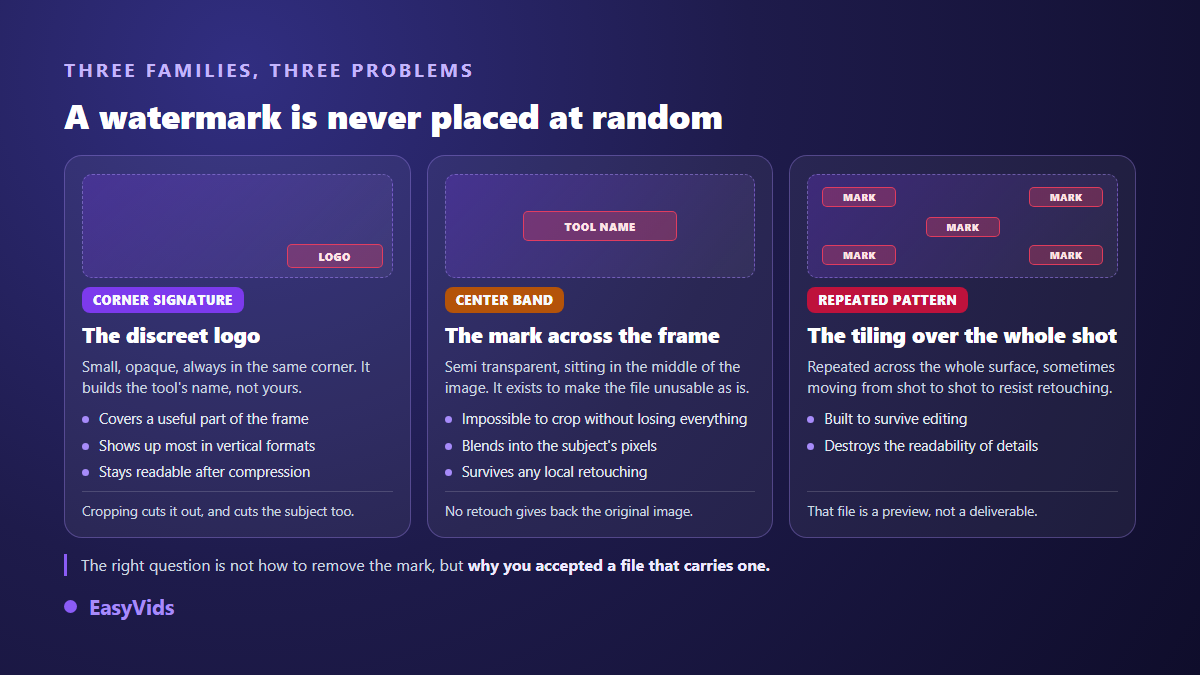
The corner signature is the subtlest, so it is the most tempting to crop away. It also traps the most creators, because the corner of a vertical video usually holds something useful: a hand, a product, the start of a caption. The centre banner exists precisely to make cropping absurd. And a pattern tiled across the surface is a plain statement that the file is a draft.
What a mark really costs you in reach
The real cost is not aesthetic. Social platforms treat a third party watermark as a recycled content signal, and you pay for it in distribution. This is not forum folklore, it is written in their own documentation.
Instagram's own guidance for creators tells them to avoid visibly recycled posts and names reels containing watermarks. TikTok's published eligibility rules exclude videos carrying a watermark or a logo from another platform from its rewards programme. YouTube, for its part, keeps content that is not your own original creation out of monetisation, which covers reuploads from elsewhere. Three platforms, one convergent rule.
The consequence is easy to state. A watermarked video is not merely less polished: it is shown less, paid less, and sometimes locked out of the programmes that keep a channel alive. If your target is a YouTube audience, our step by step guide to a published video covers the rest of the chain, from script to upload.
There is a second cost, harder to measure and longer lasting: credibility. A prospect who sees a generator's logo on your ad understands in one second that you did not take the full version of the tool. On a sales video that detail works against you for the whole watch time.
Spotting a watermarking tool before you start
The time to check is before you produce, never after. Plenty of services show a perfectly clean preview and only stamp the file at download, which costs you a full evening of work. Sorting through them is faster from a survey of the field, and our comparison of AI tools for content creators sets out what each category actually delivers.
- The browser preview is clean but the downloaded file is marked: always run one full export before committing to a real project.
- The free plan talks about personal or non commercial use: that wording almost always travels with a burned in mark.
- The terms separate preview from deliverable: search the page for the word watermark, it appears whenever the practice exists.
- The public example gallery shows marked clips: that is the most direct admission there is.
- Full resolution download sits behind a higher tier while the small format is open: the mark usually follows the same line.
When a service is honest about this, the answer takes a minute to find and it does not change at checkout. On our side, what each access level opens is described on the pricing page, and none of them adds any mark to the delivered file.
Four bad removal methods and what they break
Once the mark is burned in, four fixes circulate online. None of them restores the original picture, for a simple reason: the information the mark covered was destroyed at export. A tool can only replace it with a plausible invention.
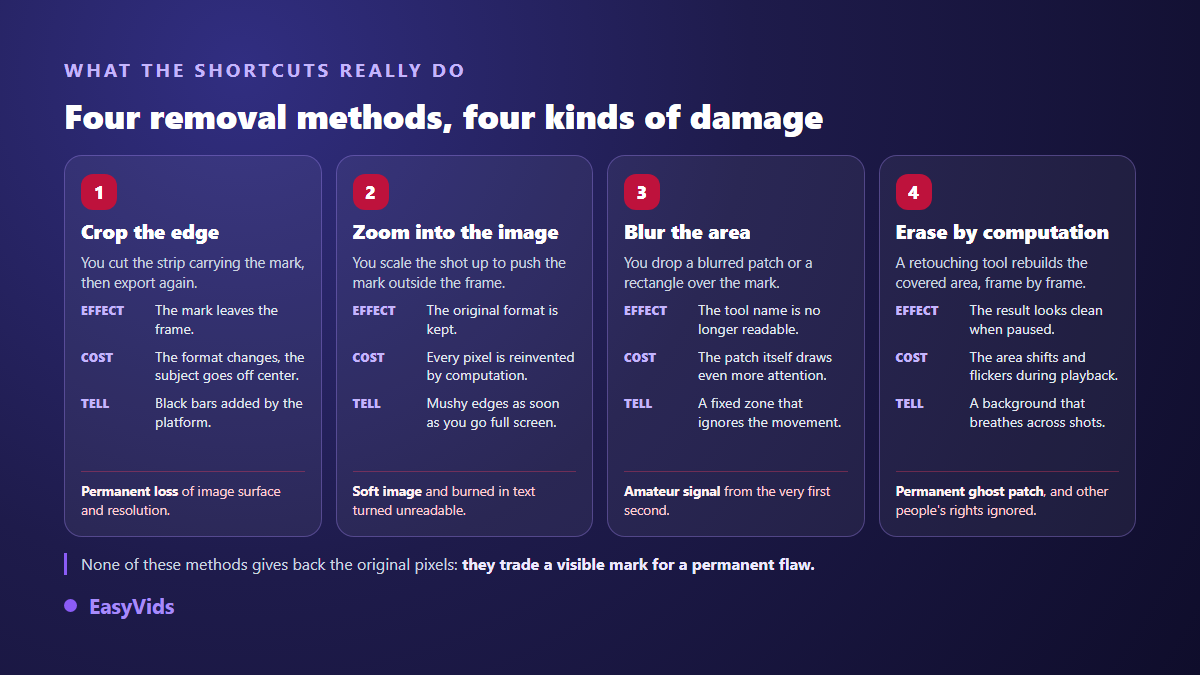
Cropping is the most common. You cut the band carrying the mark, it disappears, and you lose part of the usable surface along the way. The width to height ratio changes too, which creates a direct problem: platform formats are standardised. A vertical clip missing its bottom is no longer standard vertical, so the player adds bars or crops again, often straight across a face.
Digital zoom avoids the aspect problem but enlarges an image that holds no extra detail. Every displayed pixel is computed from its neighbours. On a static soft shot it is bearable. On a moving shot the edges turn mushy, and any burned in text, captions included, stops being readable.
Blurring the area, or dropping a rectangle over it, comes from a good intention and produces the opposite effect. The patch does not follow the motion of the picture: it sits in one place while the rest of the shot lives, and the eye finds it instantly. You have swapped a readable logo for an unexplained defect, which is worse.
That leaves automatic removers, which rebuild the covered area frame by frame. On a still image the result can look convincing. In playback the rebuilt area breathes: it shimmers, the background slides slightly, and your attention returns to it on every shot. Over a flat, motionless background it passes. Over a face, a texture or a camera move, it does not.
The mark the model invents on its own
There is a case almost nobody explains, and it has nothing to do with any vendor's commercial policy. Image and video models learned from enormous amounts of content, including a great many stock photographs carrying their own watermark. The model has therefore seen thousands of times that pictures of that kind have text across them. It sometimes reproduces that on its own, without any service asking for it. Starting from your own visuals lowers that risk, and the ways to animate a photo put movement into an image whose content you already control, with no stock library involved.
The same effect produces fake interfaces. On social media styles, some models draw a progress bar, playback buttons or a pseudo logo into the picture, because that is how the videos in their training looked. The result reads as a screen recording, usually with distorted text, and it gives away a sloppy production as surely as a real watermark does.
The answer sits in the instruction, not in retouching. In our chain every image request and every video request is completed server side with an explicit ban on burned in text, logos, watermarks and interface elements. The principle is detailed in our guide to the AI video generator. When a shot slips through anyway, it regenerates on its own rather than going to a repair tool.
Removing someone else's mark: what the law says
One point deserves to be stated plainly. Removing a watermark from a video you generated yourself, with a tool whose terms you respect, is a contractual question: the licence allows it or it does not, and you read that before you start. Removing the watermark from content belonging to somebody else is a copyright question, and the answer is far less open.
United States law prohibits intentionally removing or altering copyright management information attached to a work, a category that covers the author's name and the terms of use. Equivalent provisions exist in many countries. In other words, a watermark on a third party's work is not a technical obstacle to route around, it is protected information. The rule of thumb fits in one line: produce your own shots in a tool that does not stamp its output, and never touch anybody else's mark.
Visible watermark and provenance marker are not the same thing
One confusion comes up constantly. The commercial watermark this article is about is visible: it occupies pixels and it gets in the way. There are also invisible provenance markers, written into file metadata or into the signal itself, that record whether content was generated or modified by a machine.
Those markers belong to an open content provenance standard whose technical specification was updated in early 2026 to cover live video among other things. They do not damage the picture and they are not there to be stripped: they serve transparency, not a vendor's marketing. Several platforms rely on them to attach an AI generated label automatically. Looking for a video without a watermark therefore does not mean looking for an undetectable video, and disclosing synthetic content where a platform requires it remains an obligation. The questions we get most often about using the studio are collected in the FAQ.
The right approach: never having a mark to erase
A clean production chain has five checkpoints, and none of them can be fixed after the fact.
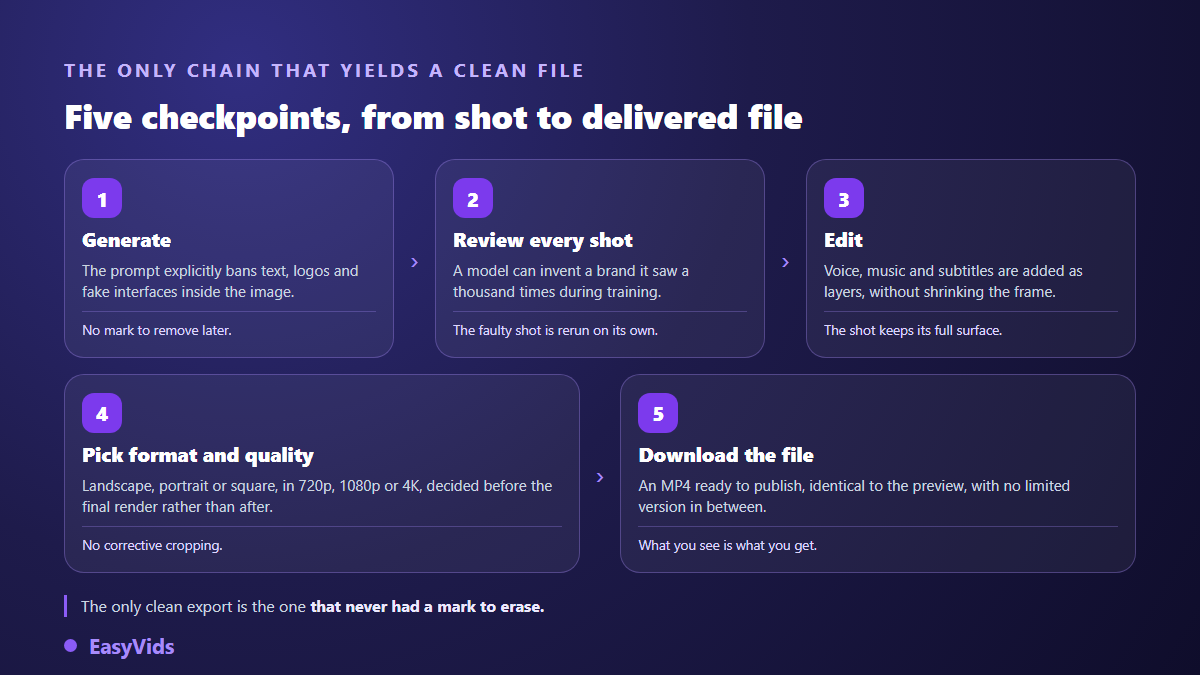
- Generate clean. The instruction sent to the model explicitly bans burned in text, logos, watermarks and interface elements.
- Review every shot. A model can invent a mark on its own: you catch it while watching, and the faulty shot regenerates individually.
- Edit in layers. Voice, music and captions sit on top of the shot without shrinking the frame, so nothing is cropped to hide anything.
- Decide format and quality before the render. Landscape, portrait or square, at 720p, 1080p or 4K: that belongs to the project, not to a rescue crop.
- Download the deliverable. What you get is an MP4 that plays anywhere, identical to the preview, with no restricted intermediate version.
Frequently asked questions
Can a watermark be removed without losing quality?
No. The mark replaced pixels at export, and that information no longer exists in the file. Cropping removes surface, zooming invents detail, and an automatic remover rebuilds an area that will move in playback. The only lossless export is the one that never carried a mark.
Can a watermarked video be monetised?
It is risky, and sometimes flatly excluded. TikTok keeps videos carrying another platform's watermark out of its rewards programme. Instagram reduces the visibility of visibly recycled reels, watermarks included. YouTube requires original content for monetisation. A visible third party mark exposes you to reduced distribution, often with no warning.
Do all free tools add a watermark?
No, but it is common, and the only check worth doing is a full export. A clean preview guarantees nothing, since several services only stamp the file at download. Check whether commercial use is granted as well: the two restrictions usually travel together. Our look at what a video production really costs explains what the different access levels actually cover.
How do I stop the model drawing a fake watermark itself?
By banning it in the instruction and by checking it on playback. An explicit line against burned in text, logos and interface elements cuts the problem down sharply. Social media styles stay the most exposed, because their training footage contained exactly that. Review those shots first.
What file format do I get on export?
An MP4, the universal format for players and platforms. The frame follows the aspect ratio chosen for the project, landscape, portrait or square, at the quality set for the render. The file downloads straight from the studio, with no third party service and no extra conversion step.
A clean video is not repaired, it is produced. Pick a tool that does not stamp its output, ban burned in text in the instruction, review each shot before assembly, and settle the format up front rather than by cutting a finished file. You get back the time retouching takes, and you keep the resolution cropping takes away. What each access level opens is set out on the pricing page, and creating an account opens the studio so you can run your first clean export.