You need to explain an offer, a service or an idea, and you have spotted the format that works: whiteboard animation, the black line drawing that builds itself on a white background while a voice explains. Then reality lands. Dedicated software locks you into its own library of characters, the output looks like everyone else's, and you cannot draw.
The effect does not come from the hand holding the marker. It comes from three things that are far easier to get: a white background, a steady black line, and an image that appears exactly when the voice names it. This tutorial takes that mechanism apart, then rebuilds it step by step. Our motion design guide covers animated video in general; this page covers one style only, the whiteboard.
The short answer
A whiteboard animation is an explanation carried by a voice over while line drawings appear progressively on a white background. To make one without specialised software: write a script in which every sentence contains something drawable, produce the voice over before any image, get your line drawings in one consistent style, then reveal each drawing at the moment the voice mentions it. The drawing hand is optional. The reveal is not: it is the only thing viewers actually notice.
Why the whiteboard holds attention
The format did not start with animation software. The studio Common Craft popularised it back in 2007 with its In Plain English series, explanations filmed with paper cutouts moved by hand on a white sheet, and the principle has not changed since. Two well documented learning mechanisms explain why it still works. The first is dual coding theory, formulated by psychologist Allan Paivio in the early 1970s: information received through the verbal channel and the visual channel at the same time is retained better than information received through one channel alone. A drawing built while a voice explains does exactly that.
The second mechanism is about time. A drawing that reveals itself stroke by stroke creates anticipation: viewers try to guess what is forming, and that tiny curiosity holds them to the end of the shot. It is what separates a whiteboard video from a slideshow of static drawings with commentary, which loses its effect by the third shot. Richard Mayer's work on multimedia learning adds a guardrail worth knowing, the redundancy principle: showing on screen, word for word, the text the voice is speaking hurts comprehension instead of helping it. On a whiteboard you write isolated keywords, never the full sentence.
The four layers of a whiteboard video
Take apart any whiteboard video that works and you will find the same stack every time. Only one of these layers used to require an illustrator, and it is the one image generators now handle.
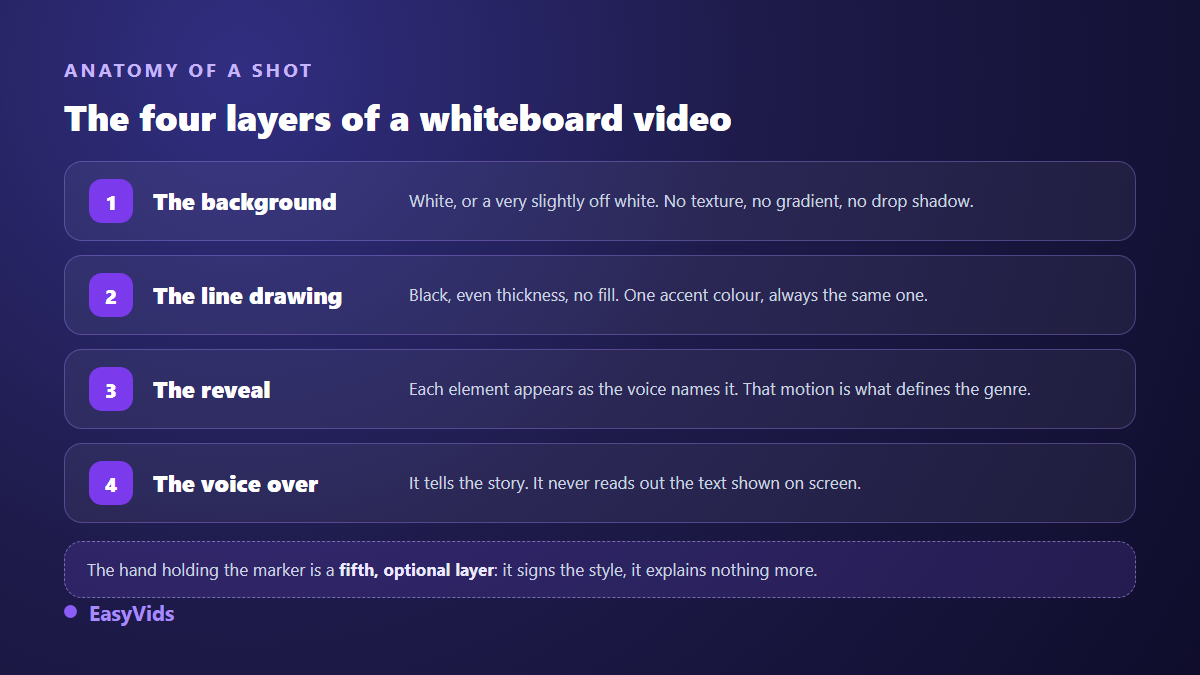
- The background: white, or very slightly off white. Pure white tires the eye on a bright screen, a faint cream tone reads better and compresses just as well.
- The line drawing: black, even stroke weight, no fill and no shadow. One accent colour only, kept for what must be seen.
- The reveal: every element enters as the voice names it. A shot where everything is already there is not a whiteboard video, it is a captioned illustration.
- The voice over: it narrates, it never reads out the text on screen.
That leaves the hand holding the marker. It signs the style, it adds no information, and many recent productions drop it because it dates the video. Keep it if your audience associates the gesture with teaching, drop it if you want a cleaner, brand led look.
The full chain, in five steps
The order of work matters more than the tool. Each step sets a constraint the next one no longer has to guess, and a step taken out of order is always paid back in hours of realignment.
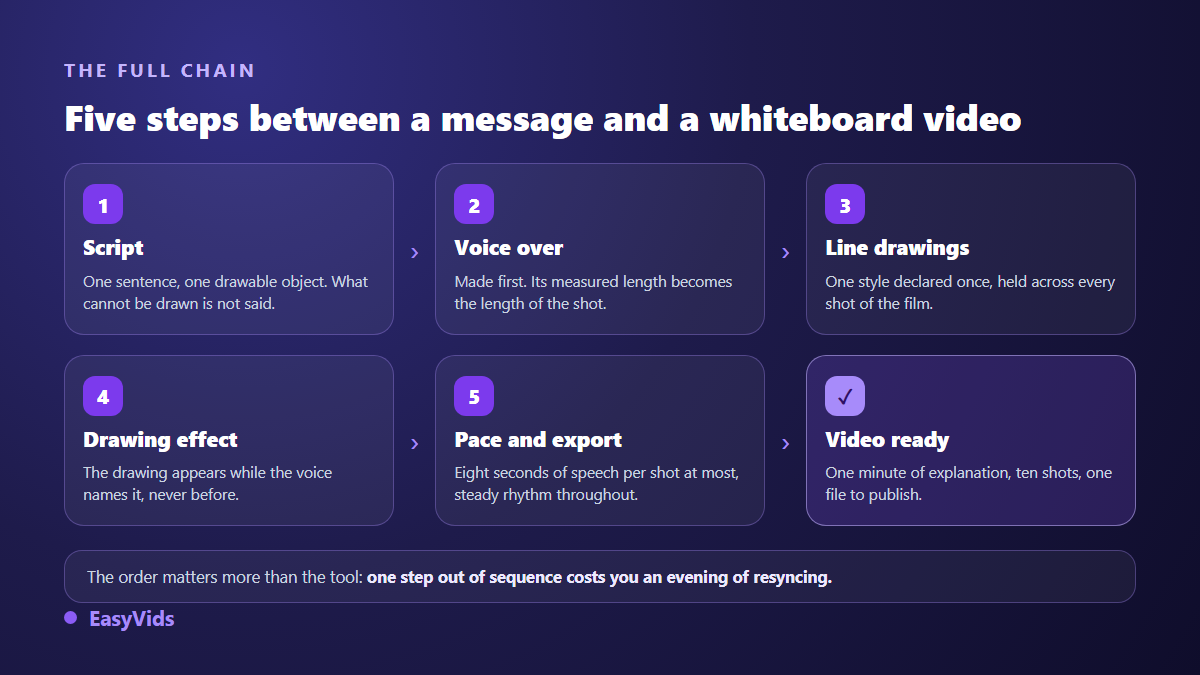
Step 1: write a script that draws
A whiteboard script follows one rule the other formats ignore: every sentence must contain something drawable. A line such as we optimise your processes shows nothing. Your orders arrive through three different channels, and one person retypes them by hand gives you three arrows, a box and an overwhelmed character. Read your text with a pencil in hand: if you see nothing to trace, the sentence needs rewriting, not illustrating. As a length marker measured across our own productions, about 110 characters of voice over run for six seconds, so a one minute explainer is roughly ten shots.
Step 2: record the voice before any drawing
This is the inversion almost every beginner makes. Animate first and the length of each shot is guesswork; the voice arrives two seconds longer and the whole timing has to be redone. The other way round, the measured length of the audio file becomes the length of the shot and nothing needs adjusting. A synthetic voice suits the format well, provided you work on punctuation and delivery, as our AI voice over guide explains. Keep the pace calm, close to someone explaining something to a colleague at a flip chart, and leave a breath after each idea. That silence is when the last stroke lands.
Step 3: get line drawings without drawing
This is the step that used to stop everyone, and the one that changed most. An image generator now produces perfectly usable line art, provided you ask for the right thing. A useful prompt describes a style, not a mood: black line illustration on a fully white background, even stroke weight, marker sketch style, no colour, no shading, no gradient, single subject centred. The wider method sits in our AI image generator guide. Consistency then matters more than the beauty of any single drawing: lock your style formula once, repeat it word for word from shot to shot, and vary only the subject.
Step 4: four ways to build the drawing effect
Now the gesture that defines the genre. Four techniques deliver the same perceived result with very different requirements. Pick according to what you already have, not according to what sounds most impressive.
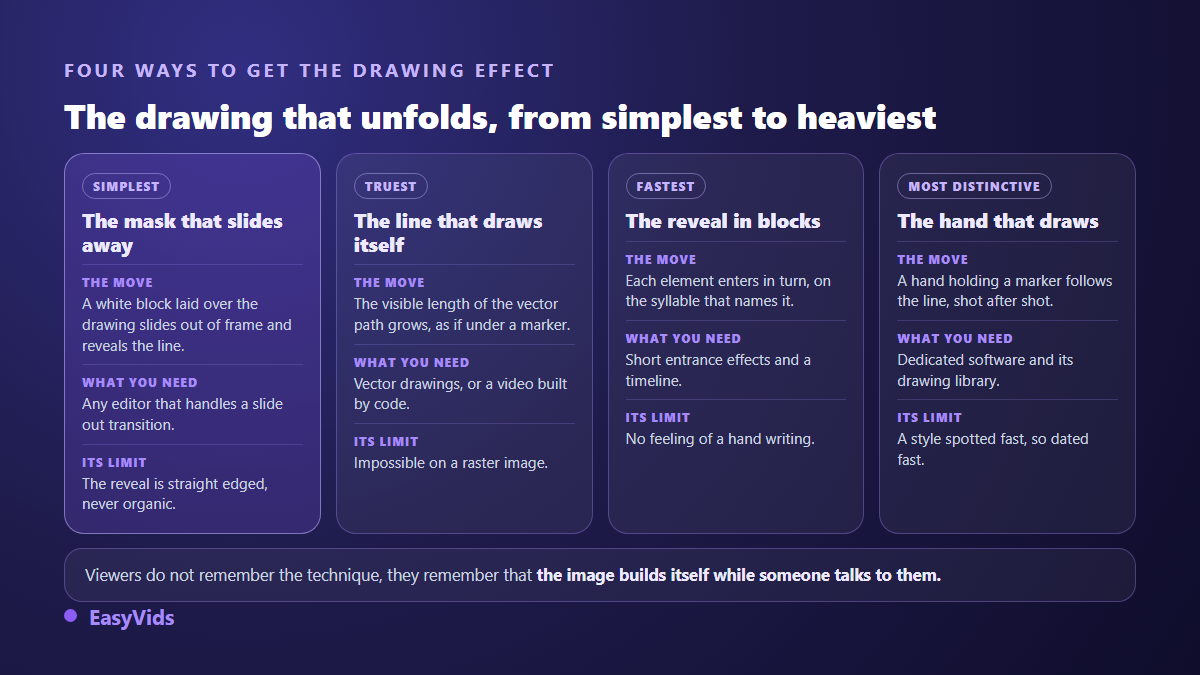
- The receding cover: place a white block over the drawing, then slide it out of frame. The line is uncovered left to right. The most accessible route, it only needs a sliding exit animation.
- The self drawing stroke: the visible length of a vector path grows frame after frame, exactly as under a marker. The truest look, but it needs vector artwork or a video built from code.
- The block by block reveal: each element of the shot enters in turn, with a short entrance timed to the syllable that names it. Fastest to assemble, and it accepts any kind of image.
- The drawing hand: a hand holding a marker follows the path, shot after shot. The historic signature of the format, popularised by dedicated tools such as VideoScribe, and it comes with their drawing library.
One piece of field advice: do not mix all four in the same film. One technique held from start to finish gives a coherent object, four alternating techniques give an effects demo. If you are starting out, use the block by block reveal, which forgives everything, and save the true stroke reveal for the two or three shots that carry your main message.
Step 5: rhythm, or how a whiteboard turns into a slideshow
A shot stops being motion design past eight seconds of speech. The animation finished long ago, the image no longer moves, and the viewer is watching a slide. Our engine applies that ceiling to its automatic splitting and only lifts it when the user splits the script themselves. Two technical details settle the rest. Export at a constant frame rate, never variable, otherwise the picture drifts from the voice on some platforms; our renders run at 30 frames per second. And compute shot boundaries in whole frames rather than rounded seconds, because rounding errors add up and the last drawing of a three minute film ends up landing well after the word it illustrates.
The five beat structure of a whiteboard video that sells
The format made its name as a teaching tool, but it sells very well, provided you follow a sales structure rather than a lesson plan. This is the one we use for our own one minute explainers.
- The problem, drawn before it is named: the first ten seconds show the situation your customer lives with, never your company.
- The cost of that problem: what the situation takes from them in time, customers or energy. A drawn figure beats an adjective.
- The turn: the moment the line changes direction. Your solution enters there, not a second earlier.
- The proof: a mechanism, a three step demonstration, something checkable. A whiteboard is unbeatable at showing how something works.
- The action: one only, spelled out on screen and held while the voice says it.
That structure fits in about a minute, roughly ten shots, and it converts to a vertical version without effort provided you choose the frame before writing the first shot rather than at export. On budget, a one minute explainer has no reason to cost what a brand film costs, and our pricing page lists our plans, free trial included.
Frequently asked questions
Do I need to be able to draw?
No. Drawings are generated from a written description, or picked from a line art library. The useful skill is not drawing, it is splitting: knowing which idea deserves its own shot, and which simple object stands for that idea in one image.
How long should a whiteboard video be?
Between 60 and 90 seconds for a sales explainer, up to three minutes for training content. Past that the format tires: a white background and a black line offer little visual variety, and attention drops. If your subject needs more, split it into short episodes instead of stretching one film.
Does whiteboard animation work in vertical format?
Yes, and the style suits it well, because a black line on white stays readable on a small screen. Decide the frame before writing, never at export: a composition designed in landscape and cropped to vertical always loses something, usually the bottom element.
Is the drawing hand essential?
No, and many recent productions do without it. The hand is a visual convention, not an attention engine. What holds viewers is the image being built while someone talks to them. A clean reveal with no hand works just as well, and ages better.
How is it different from a regular explainer video?
An explainer video is an intention, whiteboard is a style. An explanation can use animated characters, flat colour, annotated screen captures or a whiteboard. What sets the whiteboard style apart is how little it asks for: a background, a line, a reveal, and nothing else to decide.
Whiteboard animation rewards method far more than drawing talent. A script where every sentence draws itself, a voice recorded first, one stroke style held throughout, a reveal timed to the words: the rest is assembly. To write your first script and generate its drawings straight away, creating an account opens the full studio, and the EasyVids toolset keeps writing, images, voice and editing in one place.