
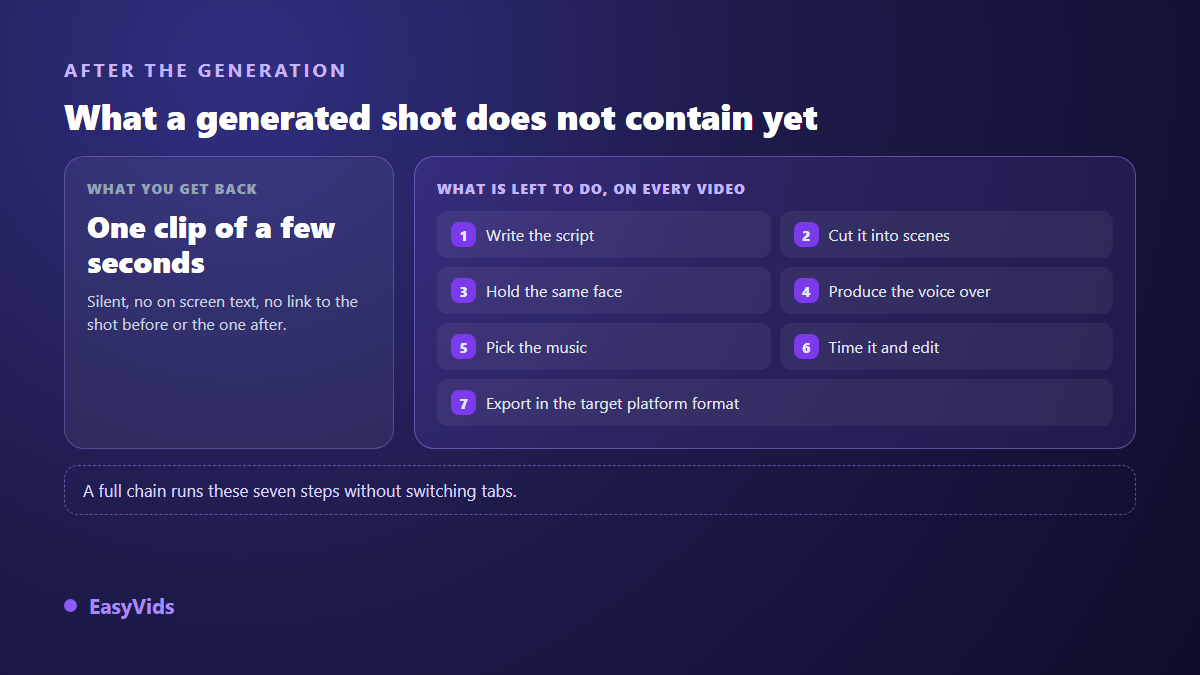
You generate one shot. It looks great. You generate a second one, and the set has drifted into another style. A third, and your character no longer has the same face. Put end to end, those clips tell nothing: no voice, no rhythm, no edit. That is almost always the moment people start looking for Runway alternatives. Rarely because the tool disappoints at what it does. Usually because a shot generator and a video production chain are two different jobs.
This page offers no benchmark and no scored ranking: we have not tested these tools one by one, and a table of invented scores would not help you decide. What helps is seeing the landscape sorted by what each family of tools actually delivers, then checking it against six concrete criteria. If you first want to know what Runway does well and what it leaves on your plate, our detailed Runway review covers that. Here we start one step later: the choice itself.
The short answer
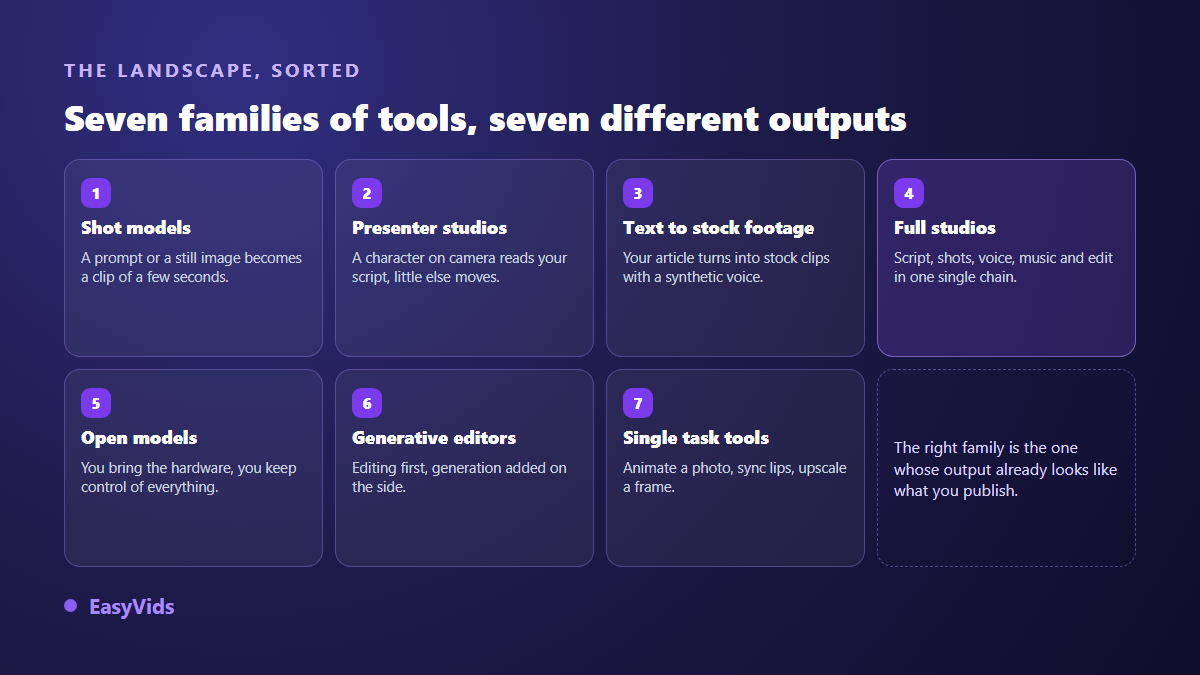
There is no single Runway alternative. There are seven families, and they do not aim at the same work. The rule fits in one line: pick the family whose output already looks like what you publish, not the one with the most spectacular demo reel. If you want shots to drop into an edit you build yourself, stay with a generation model. If you want a finished video, with narration, music, captions and characters who keep their face from one scene to the next, you want a full studio, and the EasyVids studio belongs to that second family.
The word alternative hides three different requests
Before opening any comparison, work out which of these three is yours. The first is a like for like replacement: the same service somewhere else, because another model renders your shots better or because your credits ran out faster than planned. The second is simplification: you no longer want to write prompts, you want to describe an intention in one sentence. The third, the most common among creators who publish on a schedule, is expansion: you are not after a better shot, you are after not doing the six steps that follow the shot by hand.
According to Runway public documentation, the tool produces sequences from a text prompt or a still image and offers editing features around those generations. That is an honest starting point for sorting the rest: shot generation is a brick, not a chain. The list below therefore sorts alternatives by what they hand you at the end, because that is the only criterion that survives a new model version every quarter.
Family 1: models that produce shots
This is Runway own family. You give a prompt or a starting image, the model returns a clip of a few seconds, silent, with no on screen text. Competition is fierce and the pecking order shifts with every release, which makes any ranking perishable. The only stable information sits in each service public documentation: maximum shot length, allowed output formats, and whether trial modes stamp a watermark. Open those three pages before committing.
This family stays the right pick if you can edit, if you need illustrative shots for an existing project, or if exploring looks is the job itself. It becomes exhausting the moment you publish regularly: every video means generating, downloading, renaming, importing, stitching and scoring. The time does not go into creating, it goes into handling files.
Family 2: presenter studios
Here a character shot in close up reads your script to camera with synced lips. It is the right answer for training, an internal announcement, a product demo or any message carried by speech. The voice and language catalogue matters far more than image quality. These tools are covered in our roundup of Synthesia alternatives. What they do not do: tell a story with sets, scenes and a narrative edit.
Family 3: text to video built on stock footage
You paste an article, the tool cuts it into scenes, pulls images or clips from a library, adds a synthetic voice and captions. The result is clean, fast and well suited to a news summary or an article recap. The limit is structural: the footage is not yours, and the same stock clip travels through thousands of videos. For information content that hardly matters. For a brand, a fiction or a recurring character, it shows immediately.
Family 4: full studios, from script to edit
This family starts from an idea stated in one sentence and returns a file ready to publish. It chains writing for the ear, cutting into scenes, generating visuals, voice over, music, an edit timed on the real length of the voice, then an export in the format of the target platform. The point is not that every brick is best in class. The point is that the bricks talk to each other, so fixing one sentence does not force you to redo everything else.
This is the EasyVids family, and it is worth saying plainly: it is not the same promise as a shot model. A full studio hands you the whole chain and characters who keep their face from scene to scene, which changes everything as soon as a video is more than an isolated clip. In exchange you accept a frame: the studio proposes, you correct, you regenerate one scene instead of starting over. Our AI video generator guide walks the six steps of that chain.
Free modes, trials and paid plans differ wildly between families and change faster than the articles describing them, which is why you will find no figures on this page. On our side everything sits on the pricing page, and each vendor terms of service remain the only reliable source on the commercial rights attached to what you generate.
Family 5: open models running on your own machine
Several video generation models are published openly and install on a computer with a serious graphics card. You gain full control: no data sent to a service, no credit ceiling, every setting open to tinkering. You pay for it in hardware, setup time and compute hours. A real option for a technical profile or a studio with volume, a dead end for someone who wants to publish tonight.
Family 6: editors that turned mildly generative
This family takes the problem from the other end: editing first, generation added on the side. You get full timelines, automatic captions, effects, and a few generative features layered in over time. The right pick when you already have footage, filmed or generated elsewhere, and assembly is the real job. If that sounds like you, our comparison of CapCut alternatives covers that family, while this page stays on generation.
Family 7: single task tools
Animate a photo, sync lips to a voice, upscale a blurry frame, swap a background, extend a shot by a few seconds: these tools do one thing well, and some cover a need no studio replaces. The trap is accumulation. With four specialised tools on one video you have rebuilt a manual production chain, with four accounts, four exports and four chances to lose visual consistency.
The six criteria that actually decide
A useful comparison does not compare tools, it compares answers to precise questions. Ask the following six of any service you consider, and the decision mostly makes itself.
- Shot length: how many seconds per generation, and how far can a shot be extended without a visible seam? That number sets how much stitching you will do by hand.
- Character consistency: does the same face survive from one shot to the next, and through what mechanism? Repeating a description in the prompt never does it.
- Sound and voice: do voice over and music come from the same tool, or does it take a second service and a second export?
- Built in editing: can you assemble, caption and export in place, or do you go back to an editor for every fix?
- Formats: do vertical and wide come out native, or will you crop and lose the edges of every shot?
- Learning curve: how long until your first publishable video? A powerful tool that needs a week of training costs more than its subscription.
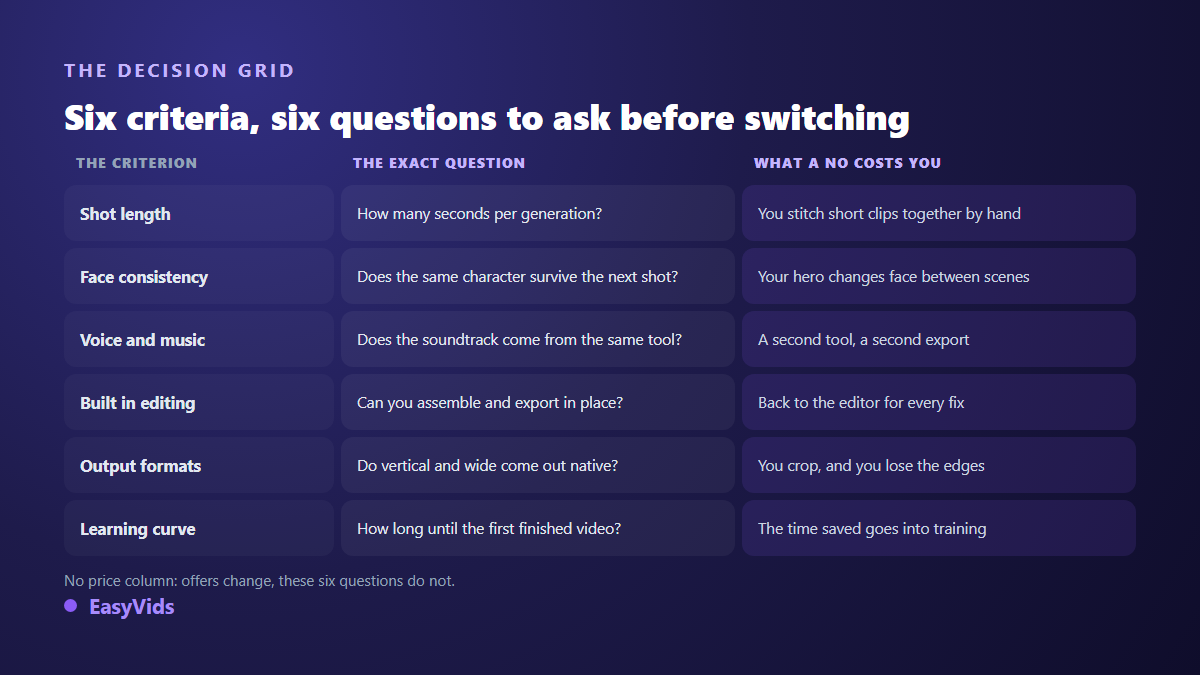
Price is missing from that grid on purpose. A headline figure says nothing until you know how many failed generations it takes to get one usable shot, and how many extra tools you will pay for to finish the video. Real cost is measured per published video, never per pricing line.
Character consistency, the criterion that splits the field
This is where most projects stall. While you produce independent shots the question never comes up. As soon as the same person must appear in three scenes it becomes central, and the naive answer fails: describing the character again in each prompt yields three different people, because the model reinvents a face on every call. That is not a flaw of one tool, it is how a model called without memory behaves.
The fix is visual references reused from one shot to the next, locked at project level rather than in the prompt. That mechanism is what makes a series, a recurring narrator or a brand face possible, as our guide to creating a virtual influencer shows. When you evaluate an alternative, ask explicitly how it holds a character: nothing separates the seven families faster.
Three traps when switching tools
- Judging on demo reels. They are picked from dozens of attempts. Judge on your subject, on an ordinary shot rather than your most inspiring one.
- Switching when the real problem is the script. One failed shot out of two comes from a vague intention, not from the model. Text written for the ear improves the result before you change anything else.
- Stacking subscriptions. Three overlapping specialised tools cost more than one chain, and they cost you visual consistency between shots of the same video.
Test an alternative in one evening
The only test worth anything runs on your real work. Take a video you already published, the one that cost you the most handling, and rebuild it elsewhere. Four moves are enough: keep the same script without polishing it for the new tool, time the whole run from blank page to exported file including every switch between apps, watch the result on a phone with sound off and then on, and count how many shots you had to regenerate and why. That last number predicts your real cost far better than any pricing table.
Frequently asked questions
Which Runway alternative suits a creator who publishes often?
A full studio, without hesitation. When regularity is the constraint, the winner is not the prettiest shot, it is the lowest number of manipulations per video. A chain that runs from script to exported file gives back the hours manual stitching takes.
Is there a genuinely free Runway alternative?
Several services offer a free mode or a free trial, often with a watermark, a shorter shot length or a queue behind paying accounts. Open models are free to use but need a machine able to run them. Always check those limits on the official page of the service, they move often.
Can the same character be kept across shots elsewhere?
Yes, provided the tool offers a reusable visual reference and not merely a description field. That is exactly what a consistent character studio does: the face is locked once, then replayed in each scene instead of being reinvented.
Can generated videos be published and monetised?
Commercial rights depend on each vendor terms of service, and sometimes on the plan: the official page is what counts. On the platform side, the YouTube help centre has required since 2024 that realistic content made or altered with AI be disclosed at upload. A generated video stays monetisable when it brings its own value, a script, a crafted voice, a point of view.
Do these tools need a powerful computer?
No, as long as generation happens on the service servers: your device only displays an interface, and a phone is enough to launch a production. Local power matters again only if you choose the open models family.
Looking for a Runway alternative is really deciding which part of the work you still want to do yourself. Generating beautiful shots got easy; assembling them into a video that holds together, with a convincing voice and a recognisable character, is the real job. To see what a full chain does with your own idea, create a free account and rebuild your last video from script to edit without switching tabs.