A video scrolls past. Words assemble themselves, a number swells at the right moment, an arrow connects two ideas, and you have understood an entire offer in forty seconds without reading a line. Then the question arrives: what is motion graphics, exactly, and how does it differ from a cartoon, a well cut edit, or footage produced by an AI model?
The confusion comes from how loosely the term is sold. The same label covers a series title sequence, a logo animation, the video that explains an app, and the animated figures in an annual report. So you know neither what you are commissioning nor where to start if you want to make it yourself. This article sets out the definition, the vocabulary and the markers that let you recognise motion graphics within three seconds. For the production method itself, our complete motion design guide takes over once these basics are in place.
The short answer
Motion graphics means animating graphic elements, text, shapes, icons, curves or a logo, in order to carry information. Nothing is filmed and nothing tries to imitate reality: everything is composed, then set in motion on a timing you decide in advance. Three signs give it away instantly. The text is perfectly sharp, the colours clearly belong to a brand, and elements arrive one after another instead of appearing all at once. Its usual job is to explain, not to tell a story carried by characters.
Where the term comes from
The phrase is tied to Motion Graphics Incorporated, the studio founded in the early 1960s by the American filmmaker John Whitney, one of the first to produce computer generated imagery for film title sequences. The word design is not decoration: it says the work starts with an intent to communicate, never with an effect. Which leads to the most useful idea in this article. Motion graphics is not a technique, it is an intent applied to several techniques. The same shot can come out of a professional animation suite, an online editor, a template library or code running in a browser. What makes it motion graphics is that graphic elements carry the message, and that their appearance is timed to be understood.
Motion graphics, animation, VFX: the map of neighbours
Four disciplines travel together in conversation and get mixed up constantly. Telling them apart is not a vocabulary exercise: it is what stops you commissioning one thing when you needed another.
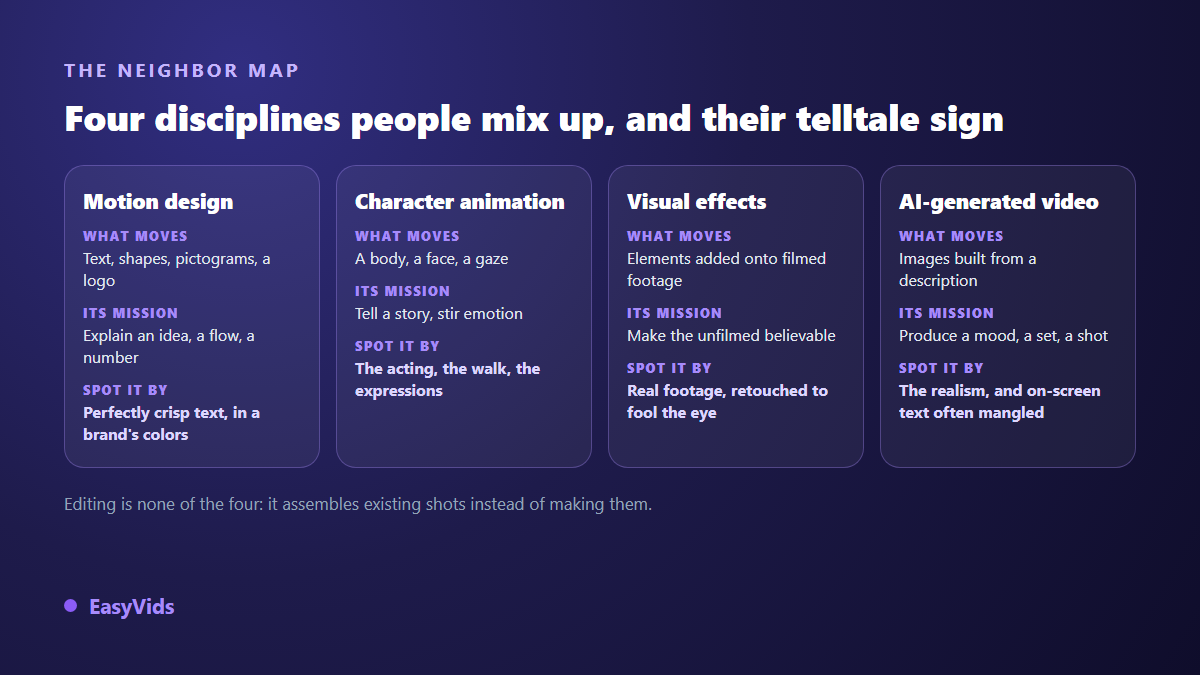
The most useful distinction in daily work sets motion graphics against generated footage. A video model builds a believable scene from a description, but it renders on screen text badly and will not hold your brand colours to the pixel; our AI video generator guide walks through that chain and its limits. Motion graphics does the exact opposite: every pixel is decided, so the type stays sharp and the palette is yours, but nothing appears that you have not composed. For a how to, a figure to highlight or a product explanation, the second approach wins. For atmosphere, a setting or a face, the first takes the lead again.
The anatomy of an animated shot
A motion graphics shot reads like a poster with time added to it. Five layers stack up, and the order matters, since each one serves the layer in front of it. Reading a shot by layers is what lets a beginner fix a failed frame without starting over, by naming the layer at fault first.
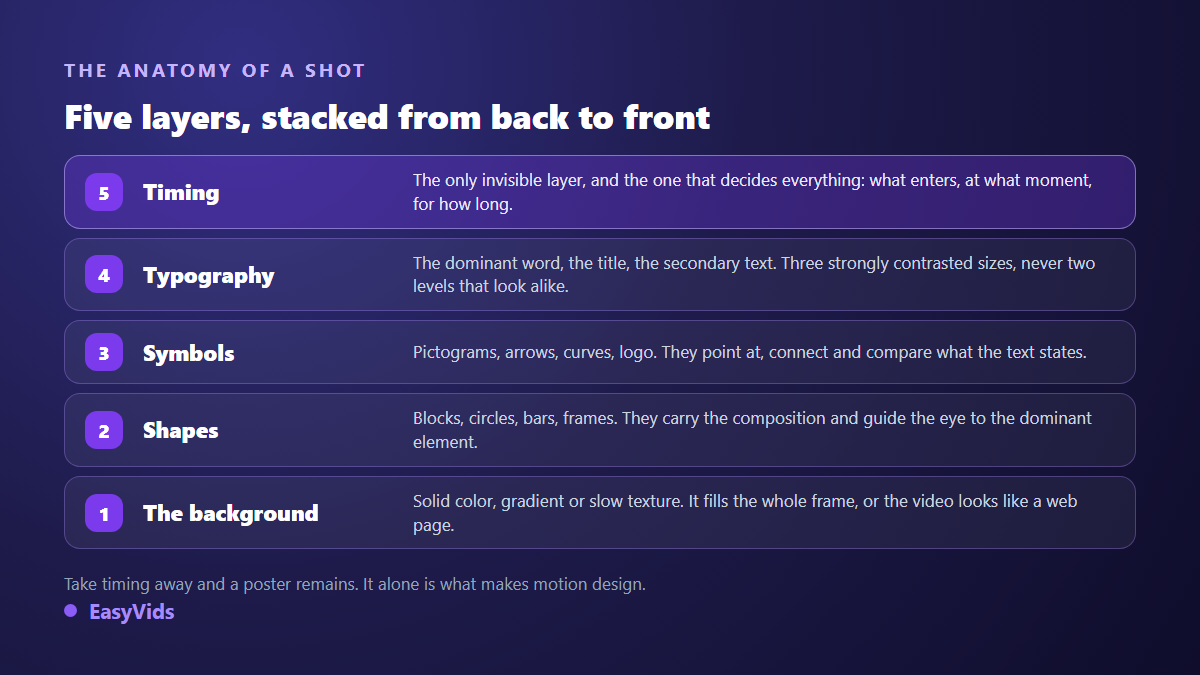
The fifth layer is the only one that belongs to the discipline alone. Remove the timing and a perfectly respectable poster remains. Add it and the same content becomes a demonstration: the eye follows an order, one thing is understood before the next, and the viewer no longer has to choose where to begin. It is also the layer beginners neglect, because it never shows up in a screenshot.
The vocabulary you actually need
Ten words are enough to follow a production conversation, read a quote without being impressed by it, and ask for a precise correction.
- Keyframe: the position, size or opacity of an element at a given instant. The tool calculates everything between two keyframes.
- Easing: how a movement starts and stops. Constant speed reads as mechanical; a move that leaves firmly then brakes on arrival reads as a gesture.
- Anticipation: the small pull back before the push, borrowed from the twelve principles of animation published by Disney animators Frank Thomas and Ollie Johnston in The Illusion of Life, in 1981.
- Storyboard: the sequence of still frames that locks each composition before any animation. The step everyone skips, and the one that costs the most time when skipped.
- Style guide: palette, typefaces and shapes imposed on every shot. This is what gives a film its unity and makes a brand recognisable from one video to the next.
- Lower third: the panel that shows a person's name and role in the bottom third of the frame.
- Package: the recurring animated elements of a channel or a show, opener, transitions, cards, end screen.
- Safe area: the margin nothing important may cross. Keep at least five percent from every edge, or the app interface will cover your text.
- Frame rate: images per second, 24, 25 or 30 depending on the destination. Decided before you compose, never at export.
- Loop: an animation whose end matches its start exactly, essential for a background, a waiting icon or a banner.
One neighbouring term deserves its own definition. Kinetic typography treats words as the graphic material itself, with sharply contrasted sizes and deliberate line breaks, instead of laying them over an image as a caption: we devoted a full article to it.
Where you see it every day without naming it
The fastest way to lock in a definition is to spot the thing in the wild. A news broadcast is saturated with it: the opener, the panels introducing guests, maps that unfold, curves that climb. A sports broadcast displays scores, line ups and animated statistics. An advert almost always ends on a logo that assembles itself in one second. A mobile app slides, bounces and dismisses its elements according to rules written by a motion designer.
You also meet it in the least spectacular places: a device manual, a software home page, a quarterly company update, the tutorial explaining how to fill in a form. The best motion graphics goes unnoticed. When a viewer leaves saying the animation was beautiful, the animation took the place of the message. When they leave having understood, the work succeeded, even if they could not describe a single move.
The five deliverables clients ask for most
The term covers productions that differ widely in length, effort and expected effect. Starting from the need rather than the format avoids the classic mistake: commissioning a logo animation while nobody yet understands what the company sells.
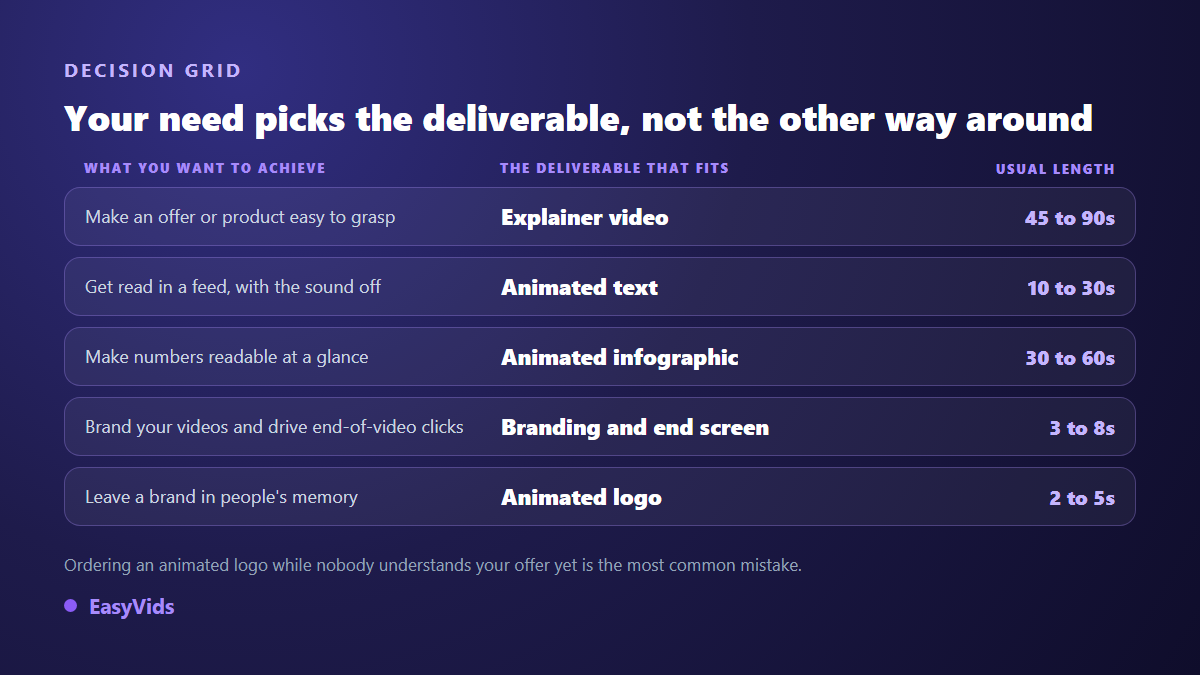
If you only ever produce one, make it the explainer video: it is the only format that works while you sleep, sitting at the top of a sales page or answering the question every customer asks. The other four follow, each with its own constraints. Animated text lives or dies on legibility and rhythm, as our nine text animation effects show. Figures need their own staging, covered in our piece on animated infographics. And a channel package almost always starts with the end screen that leads into the next video.
What separates pleasant motion from painful motion
A failed animation rarely fails for technical reasons. It fails because everything moves the same way, at the same time, at the same speed. Rhythm comes first: a shot has one accent, one thing enters early and catches the eye, a second arrives after a pause, a third barely moves. Three elements starting at regular intervals feel like a list unrolling, the opposite of an intention. Easing comes next: a move that leaves firmly then brakes gains a weight nothing else will give it. Hierarchy closes the set: at any instant one element dominates and everything else is visibly subordinate to it.
One more lever gets forgotten, reading time. Text must sit still long enough to be read twice before it leaves. On our own shots we treat roughly eight seconds as a ceiling: past that point the animation died long ago and the shot has become a slide, so the text is split into two shots instead. Size decides the rest. On a 1920 pixel wide frame, a dominant word sits between 90 and 220 pixels tall, a title between 64 and 140, secondary text between 32 and 56. Below 28 pixels nothing survives platform compression. The same thresholds govern the still frame that decides the click before playback even starts, since a thumbnail built around your own face turns on the same levers: a large subject, a background that steps back and three words at most.
Your first animated video, in one week
None of these steps calls for graphic skill. They call for order, and order is exactly what beginners invert when they open a tool before writing a sentence.
- Pick one question, the one your customers ask most. One video, one message, never two.
- Write the script before anything else and read it aloud. One minute of voice over is roughly 150 words.
- Cut that text into shots carrying a single idea each. A shot that must explain two things explains neither.
- Lock three colours and two typefaces, no more, and hold them from the first shot to the last.
- Sketch each composition as a rough thumbnail before animating anything at all.
- Animate last, with one accent per shot and a movement that brakes on arrival.
- Watch the film on a phone with the sound off before publishing. Anything unreadable in those conditions goes back on the table.
Who makes it, and with what
Motion designer is a full profession, usually coming out of graphic design, practised in studios and freelance alike. It has also become a skill many creators, trainers and marketing teams exercise without holding the title. Three routes lead to the same deliverable. Template libraries have you replace the text of an animation already built: fast and reassuring, but your video will look like every other customer's. Online editors let you compose your own shots with animated titles, shapes and transitions: freer, and more than enough for packages and animated text. Code generation writes every shot for that particular film, then renders it frame by frame.
That third route is the one we are building at EasyVids: an art direction written for the project, a shared rule set that gives the film its unity, and timings expressed as a fraction of each shot's duration, so that fixing a sentence or changing the voice over never means rewriting the animation. One honest note: this part is still under construction and is not open to every account yet. The rest of the chain, writing, images, voice over, music and editing, is available from signup on the EasyVids studio, and the plans are detailed on the pricing page.
Frequently asked questions
Is motion graphics the same as 2D animation?
No, though the two overlap constantly. 2D animation names a production technique, frame by frame drawing or rigged vector puppets. Motion graphics names an intent, making something understood through graphics in movement. A video can be both, but a 2D cartoon about a rabbit is not motion graphics, and a number growing on a coloured background is, with no drawing involved.
Do I need to draw or code to make it?
Neither. The discipline works with simple shapes, typography and colour, not with illustration. What counts is a sense of composition and rhythm, and both are built by watching a lot of video, then holding yourself to the legibility rules above. Code is only one production route among several, and invisible to whoever commissions the film.
How long does one minute of motion graphics take?
It depends mostly on the route and the number of shots. Animated text built in an online editor can be wrapped in a day, while an explainer composed shot by shot takes several days. One constant holds whatever the method: writing and cutting take most of the time, and animation comes last and moves faster than people fear.
Does motion graphics work in vertical format?
Yes, and that is one of its advantages over filmed video. Since everything is composed, nothing forces you to crop: the same message is redrawn for a vertical frame, with larger text and fewer elements visible at once. The only rule is to decide the format before composing, never at export.
Can I make motion graphics in a browser?
Yes. Online editors cover animated text, channel packages and intros, and tools that render server side ask nothing of your machine. Installed software keeps the edge on long projects and fine effects, but it is no longer a required step to publish a decent first animated video.
Keep the short sentence: graphics set in motion to make something understood. Everything else, the software, the schools, this year's trends, follows from that intent. The best exercise to absorb it needs no budget and no equipment: take the question your customers ask most, write the answer in a hundred and fifty words, cut it into eight shots and give each one a single idea. You will have made motion graphics before opening any software at all. Creating an account then gives you a place to write, illustrate, voice and edit that first minute.