Every December the same scene plays out. You buy a box of cards, copy the same sentence thirty times, post them, and never find out whether anyone read them. A video greeting card flips that mechanic. Twenty seconds of film, sent inside a conversation, with a first name spoken out loud, two photos that mean something and one line that sounds like you. The person on the other end watches, smiles, and usually replies within the minute.
The question that stops everyone is what goes inside, and how long it takes to build. Failed greeting videos all look alike: too long, too generic, unreadable on a phone screen. This guide gives the structure that works, the five production steps and the sending settings per channel. The logic is close to an animated video invitation, with one difference: your recipient has nothing to organise, only something to receive.
The short answer
A video greeting card takes about half an hour, with no camera and no editing software to install. You write a three sentence message, gather five to eight photos or let the shots be generated, add a voice and a music bed, then place two on screen texts. Everything assembles in the browser, phone included, and exports as a vertical file ready to send. The EasyVids studio brings those pieces together in one place, so you are not juggling an editor, a music library and a voice service.
What a paper card cannot do
A printed card keeps one real advantage: it sits on a shelf and survives the year. It also carries three limits that video removes at once. It does not speak, so your tone disappears behind neat handwriting. It shows nothing, so the year that just passed stays abstract. And it arrives whenever the post decides, sometimes after the date.
Video supplies exactly what is missing. Sound carries intent, and a voice saying a first name is worth ten written lines. Images show what you are talking about: a place, a child who grew, a team all together. Delivery is instant and you can see the message was opened. The price is one serious constraint. A video gets closed in two seconds, while an opened card is almost always read to the end. Everything is decided at the very start.
Anatomy of a video greeting card people finish
The right length sits between fifteen and thirty seconds for a personal send, and rises to forty seconds for corporate wishes that have to name a team. Past that, drop off climbs without adding anything. The structure that works has four beats, and each one has a job.
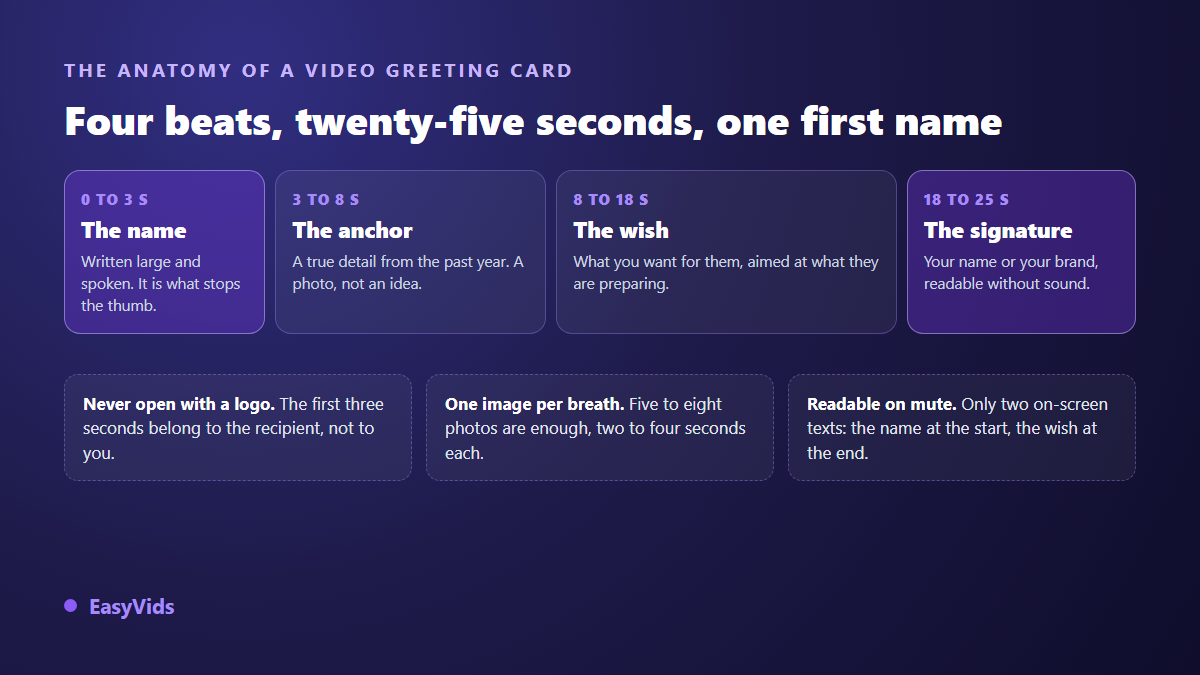
Look at where the name sits. It lands in the first three seconds, written on screen and spoken. That is what turns a general video into an addressed message, and what holds the thumb above the screen. Everything after it can stay identical across your whole list without anyone noticing, which changes the workload completely once that list grows.
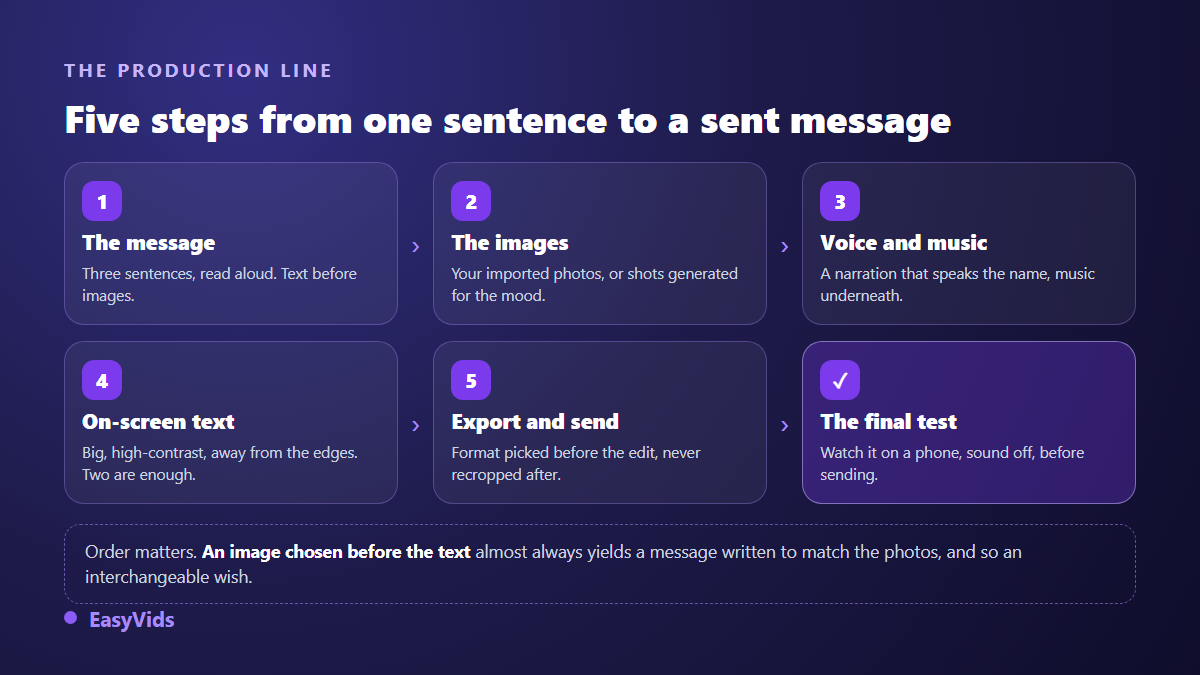
Step 1: write the message before touching any image
The common mistake is to open an editor, stack photos, then look for something to say over them. It always rings hollow, because the text ends up describing pictures instead of addressing a person. Write first, in three sentences, and read them out loud. If you run out of breath, they are too long.
One simple frame works for almost every occasion, from year end wishes to a new baby.
- One sentence naming the person and the occasion, with no preamble.
- One sentence looking back, with a concrete detail rather than a catch all word: a move, a trip, a project you ran together.
- One sentence of good wishes, pointed at what the person is preparing, not at health and happiness in general.
- A signature, spoken or written, with your first name or your company name.
Writing assistance saves time on phrasing, provided you feed it something real: the bond between you, a precise memory, the tone you want. Without that, it will produce exactly the ready made line you were trying to avoid. The detail only you know is the part that cannot be automated, and that is a good thing.
Step 2: your photos, generated shots, or both
Two routes exist, and they mix well. The first uses your own photos, imported into the project and given a slow camera move so they stop feeling frozen. That is the route for family and friends, because the emotion comes from the content and not from the craft. Five to eight images cover twenty seconds comfortably, and our guide to building a photo slideshow with music covers how to pick them and in what order.
The second route generates the shots from a description: a festive table, a snowy street, a city at night under fireworks. It earns its place when you have no usable photo, or for corporate wishes that must stay neutral. Two rules keep it away from cheap postcard territory. Lock one visual style for the whole video, and keep faces out of the generated shots: an invented face among real photos is spotted instantly, and it chills the message.
A measured mix usually gives the best result. A generated opening shot to set the mood, your photos in the middle, one neutral shot at the end to carry the signature. You get a video that looks made with care, without an edit that feels like a template used a hundred times.
Step 3: voice, music, or a full song
Three levels are available, from fastest to most memorable. The first adds music alone, under on screen text. The second adds a voice over reading your message, which changes everything the moment a name is spoken. The third replaces the voice with a song written for the occasion, name included in the lyrics.
That third level is the one that surprises people, and often the one they keep. A personalised Christmas song laid over your photos makes a card people still mention in January. Two precautions are worth repeating. Keep music well under the voice when both run together, around a fifth of its level. And check the track length before editing, otherwise your twenty second video cuts the song mid word.
Step 4: on screen text, because the sound is off
A large share of videos received in a messaging app start with no sound, at the office and on public transport alike. Your message has to survive in silence. Two texts are enough: the person's name at the start, the wish at the end. The rest can live in the voice, for whoever turns it on.
The settings that matter never change. Type noticeably larger than looks sensible on a big monitor, because reading happens in a palm. Hard contrast, light text over a darkened area or the reverse. A safety margin at the top and bottom, because a status or story interface covers the edges of the frame. If you add captions over the voice, keep them low in frame but never against the border.
Step 5: export and delivery, where videos quietly die
Aspect ratio is decided before editing, not at export. A card sent as a private message or a status is designed vertical from the first shot to the last. A card meant for a business email or a lobby screen is designed horizontal. Cropping afterwards always cuts a head or a line of text, and our guide to video formats by platform gives the ratios to aim for.
On delivery, a few limits are worth knowing. According to the WhatsApp help centre, a file shared in a chat can reach 2 GB, which is never a concern for a twenty second video. The app does recompress videos sent from the gallery though, and small type degrades first: one more reason to write large. Status posts are limited by duration rather than weight, and they disappear after twenty four hours.
For email, skip the attachment. According to the Gmail help centre, a message cannot exceed 25 MB of attachments, and many corporate mail systems enforce a lower ceiling. Host the video at a link instead, or publish it as an unlisted video: according to the YouTube help centre, an unlisted video does not appear in search or on your channel, and stays viewable by anyone holding the address.
Four recipients, four ways to write
The same frame is not written the same way depending on who receives it. Tone, length and closing all shift, and that is what separates a sincere video greeting card from disguised bulk mail.
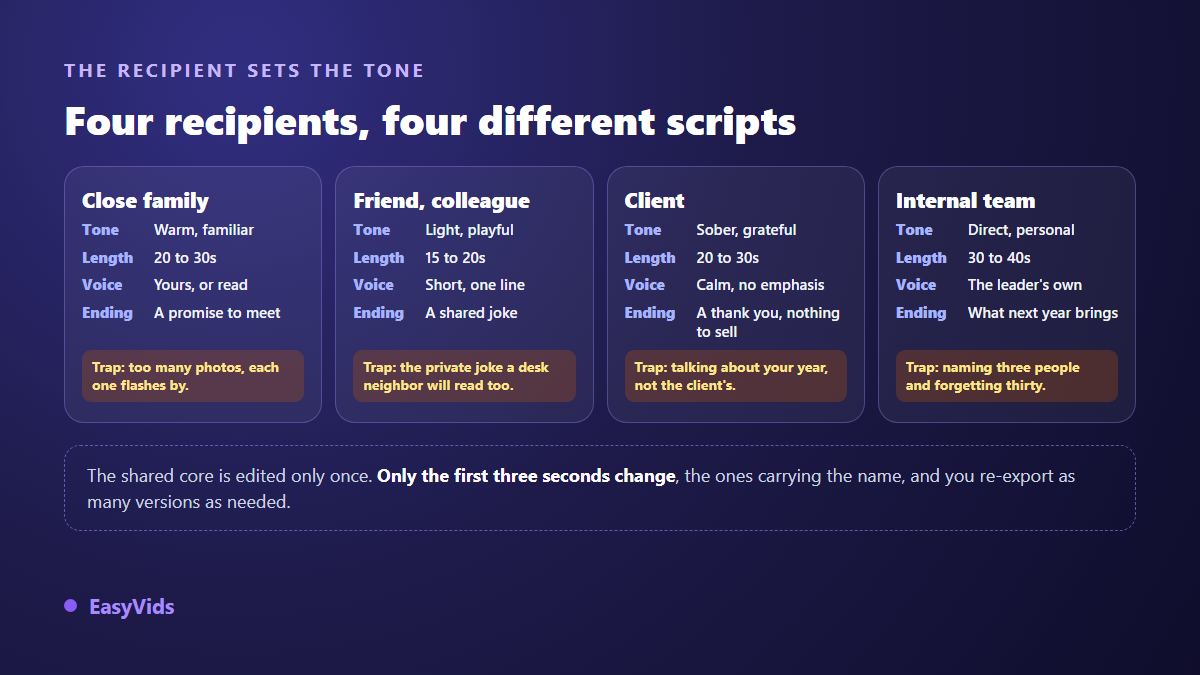
The business case needs extra care. Corporate wishes that mostly talk about the company are watched badly and shared even less. Talk about your client's year, not yours, and save any commercial line for another message. On volume, one video declined into several versions stays far more economical than printing and postage, and our plans are laid out on the pricing page.
Sending the same card to a hundred people without sounding hollow
Personalisation at scale is the real subject of corporate wishes. The right method is not to rebuild a hundred videos, but to split the film in two. A common trunk of fifteen seconds, edited once, with your images and your music. Then a three second opening, the only part that changes, where the name appears on screen and is spoken in the voice.
In practice you keep the edit project open, swap the first shot and the first line of narration, then export again. Each version renders in moments. One lesson from experience: twenty recipients treated well beat two hundred identical sends. A reasonable list leaves room for one true detail per person, and that detail is what triggers a reply.
Mistakes that make people close a greeting video
They show up in roughly the same order every time, and all of them are fixable before export.
- Opening on a logo or a fade: the first three seconds belong to the recipient, not to you.
- Running past forty seconds on a personal message, which turns a kind gesture into a chore.
- Stacking fifteen photos into twenty seconds: every image passes too fast to register.
- Writing an interchangeable wish, the health and happiness kind, which proves the message was generic.
- Forgetting the signature, and leaving the recipient to guess who sent it.
- Exporting horizontal for a status, then cropping in a hurry.
One last check earns its time. Watch your edit on a phone, sound off, before sending it to anyone. That ten second test catches nearly every readability problem, and it saves you the follow up message that spoils the surprise.
Frequently asked questions
How long does a video greeting card take to make?
Around half an hour for the first one, half of which goes into writing the message and picking photos. The next ones drop to roughly ten minutes, because the frame and the edit are reused year after year. Generation itself is a matter of minutes.
What is the ideal length for a greeting video?
Fifteen to thirty seconds for a personal send, up to forty for corporate wishes that name a team. The only case that justifies more is a memory film, which is no longer a card but a year in review, and belongs in a different context.
Can I make a video greeting card from a phone?
Yes. The studio runs in the browser, generation happens on servers and your device only displays the interface. Photos upload straight from the gallery. Fine editing stays more comfortable on a wide screen, but nothing forces you onto a computer to get a sendable video.
Do I have to appear on camera?
No, and plenty of successful cards show nobody. Your photos, readable text and a voice are enough. If you want a human presence without filming yourself, a generated opening shot and a calm narration do the job, as long as you stay restrained with effects.
Can people tell an AI made greeting card?
They can when the style changes with every shot, when the text is too small and when the wish is interchangeable. They cannot when your real photos carry the film and a real name is spoken. What you bring matters more than the tool used to assemble it.
A video greeting card needs no camera, no crew and no production budget. It needs three honest sentences, five good photos and real care on the first three seconds. The rest assembles in the browser in a single sitting. To prepare yours before the next deadline, create an account and build one short version: ten minutes are enough to know whether the tone is right.