You publish one video, then nothing for three weeks. The next one eats a whole weekend, and it looks nothing like the first. YouTube automation exists to solve exactly that. The phrase is misleading, so let us settle it now: it does not mean a robot uploading while you sleep. It means a production line you assemble once, which then turns out one episode after another, in the same shape, without ever starting from a blank page.
The gap between a channel that lasts two years and one that dies at video eight rarely comes from the software. It comes from the system: what was decided once, what gets replayed identically, and what genuinely remains to be done each week. If you want the wider picture of the no camera model first, our complete guide to the invisible creator covers it end to end. This article builds the machine itself, piece by piece.
The short answer
YouTube automation rests on four layers, built in this order. A channel bible first: niche, promise, target length, voice and visual direction, decided once and left alone. Then a frozen episode template where only the body changes. Then a calendar kept ahead, never day by day. Finally a feedback loop, read weekly on two numbers. AI produces the script, the voice over, the visuals, the captions and the thumbnail variants. You keep the niche, the hook, the fact checking and the final watch through. Your first month buys you a backlog, not views.
Automated does not mean without you
Three different ideas hide behind the same word. First, a channel that publishes entirely on its own. It does not exist, and the attempts end up as archives nobody watches. Second, a channel where every asset comes out of a generator with no human eye on it. That is the one platforms penalise. Third, the only one that works: a channel whose manufacturing is industrialised while the decisions stay human. Creators describe the same setup when they talk about a dark YouTube channel, the same model under another name.
This is not a semantic point. It decides what you automate first. Automating manufacturing saves hours per episode and costs you nothing in quality. Automating judgement saves ten minutes and costs you the channel. Everything below follows that line: mechanical work goes to the machine, anything requiring an opinion stays with you.
The four layers of the system
An automated channel is not a long task list. It is a stack. Each layer sits on the previous one and lightens the next. Building the calendar before the channel bible means publishing at random, on a very neat schedule.
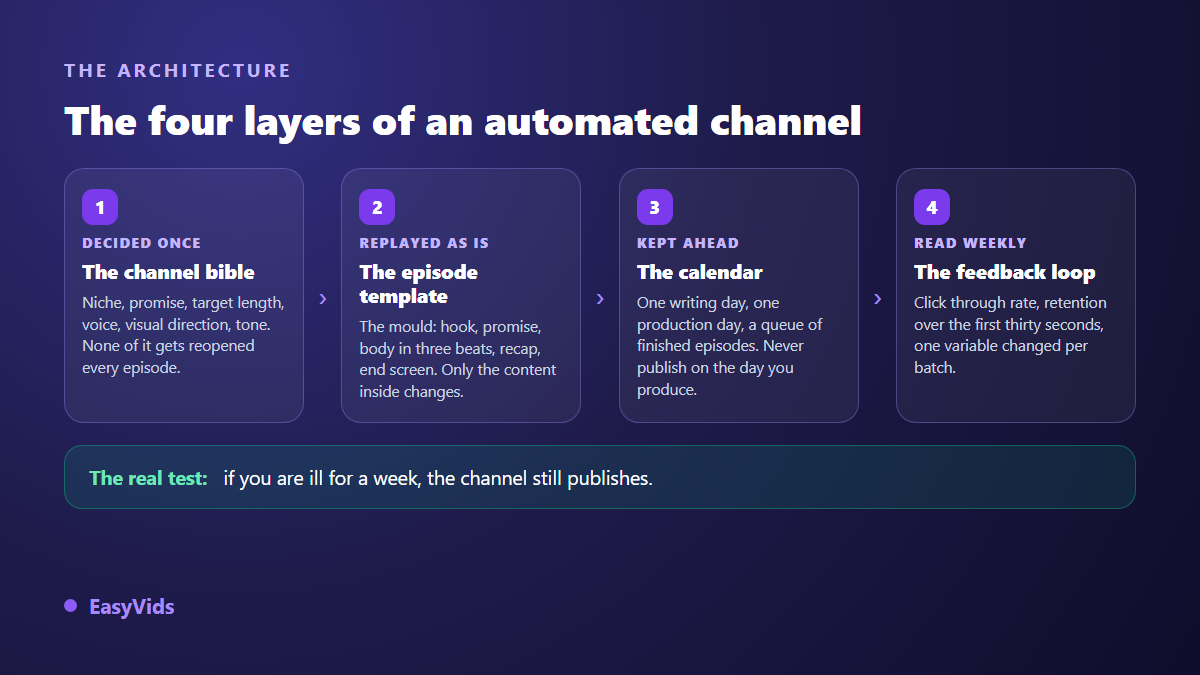
The test is simple. If you are ill for a week and the channel still publishes, you have a system. If everything stops, you do not have YouTube automation, you have a busy diary.
Layer 1: the channel bible
The channel bible fits on one page. It holds the decisions you will not reopen unless you deliberately change course. Its value is not beauty, it is banning weekly second guessing. A creator who reargues thumbnail fonts every episode loses more time than a creator writing twice as much.
- The niche, in one sentence, with the target viewer and what they came for.
- The channel promise: what the viewer gets every single time they click.
- The format and target length, to the minute, because length drives everything else.
- The voice: tone, pace, register, and above all the same one every episode.
- The visual direction: palette, image style, recurring character or none at all.
- The title and thumbnail template, with two or three approved variants, no more.
- The publishing rhythm, chosen for your worst month of the year, not your best.
Write that page before the first video, and reread it before every batch. Across our own generations, the speed gap between a first episode and a fifth comes far more from decisions already made than from the power of the models involved.
Pick a niche you can sustain a hundred times
The niche is the only decision that is genuinely expensive to undo. It drives the voice, the visuals, the audience and the recommendations you will get. So the right test is not which niche gets the most views, it is which one lets you produce a hundred topics without repeating yourself. Our review of profitable niches for an automated channel covers the ones still open and the ones already crowded.
One exercise settles it. Sit down for thirty minutes and write thirty episode titles in your intended niche. If you dry up at fifteen, the niche is too narrow or you do not know it well enough yet. If you reach thirty easily and ten of them would make you click, you have your subject. Half an hour now saves you quitting at episode ten.
Layer 2: the episode template
An episode is not a blank page, it is a mould you fill. The template fixes the order of the parts, their length and their job. Once it exists, writing changes: you no longer wonder how to open, you fill five slots, four of which never move.
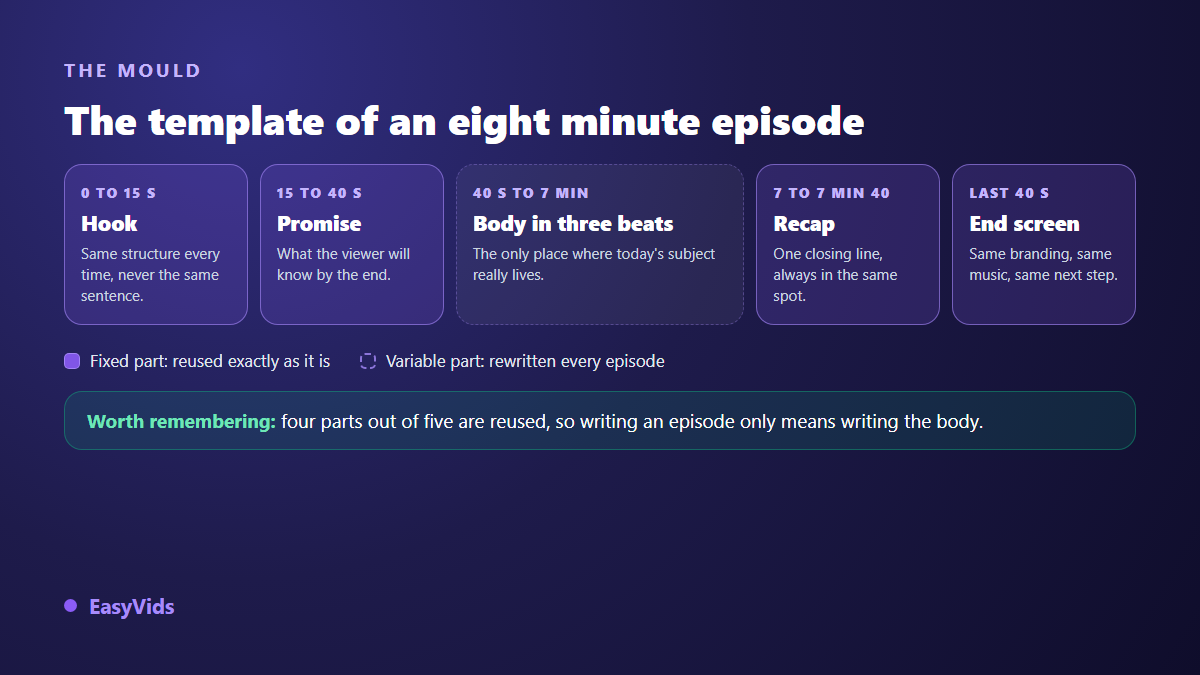
The hook keeps its structure, never its wording: a situation, a tension, a promise, in fifteen seconds. The promise states what the viewer will know by the end. The body splits into three two minute beats, each with its own small relaunch to hold retention. The recap closes in one line. The end screen, the branding and the music are made once, then reused as they are.
That template also becomes your brief to the AI. You stop asking for a script about a topic and start asking for a script that follows this mould, at this length, in this tone. Generated text improves noticeably the moment the brief describes a structure instead of a theme.
Layer 3: the calendar and the backlog that saves you
Here is the rule that separates channels that last: never publish what you have just produced. You produce in batches, you store, you publish from the queue. Three finished episodes ahead absorb a hard week, a trip or a failed render.
A typical week splits into single purpose days, because switching from writing to editing every hour costs more than the work itself.
- Monday, writing: the batch topics, the hooks, full scripts, read out loud.
- Tuesday, production: scene breakdown, visuals, voice over, music, export of the whole batch.
- Wednesday, packaging: titles, thumbnails, descriptions, chapters and proofread captions.
- Thursday, scheduling: private uploads, dates set, episodes queued.
- Friday, reading: fifteen minutes of numbers, and one single decision for the next batch.
Batching is where AI truly changes the scale: writing four scripts back to back and launching four productions right after takes barely longer than a single episode. The step by step route from idea to uploaded file is laid out in our complete flow for making YouTube videos with AI.
Layer 4: the feedback loop
An automated channel without measurement becomes a factory producing the same mistake in series. Two numbers are enough at the start. Click through rate tells you whether the title and thumbnail earn the click. Retention over the first thirty seconds tells you whether your hook keeps its promise. Everything else can wait.
Change one variable per batch. One batch with clearer thumbnails, the next with a shorter hook. Change the title, the thumbnail and the format at once and you will never know what worked. It is slow, and it is the only way to learn anything from your own videos.
Reusing characters, sets and voice
A recognisable channel runs on elements that come back: an illustrated narrator, a mascot, a set, a palette. The trap is well known. From one episode to the next, a generated character changes face, hair or age, and the channel loses its unity. The fix is to freeze reusable references instead of describing the character again each time, the method detailed in our guide to keeping the same character across videos.
Build a small asset library from the first batch: two or three reference portraits per character, three sets, an intro, an end screen, one music bed. Those files are never remade, only recalled. That stock is what makes an episode look like the last one without you thinking about it, and it is also what makes a channel hard to copy.
What genuinely automates
Anything mechanical can go to the machine, provided you check the output. Splitting a script into scenes, generating shot by shot visuals, the voice over, the music, the captions, the export in the right format and the thumbnail variants can all be delegated without regret. A full studio such as EasyVids chains those steps inside one job, which spares you carrying files between five apps, the real time sink for a solo creator.
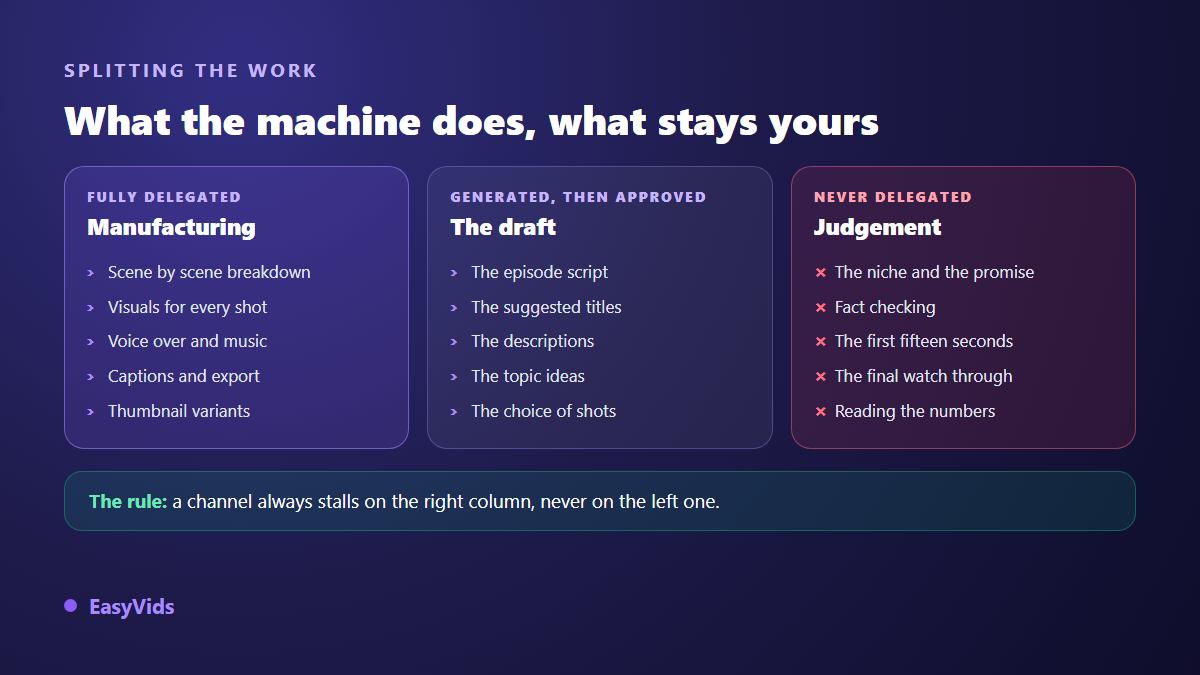
Between the two extremes sits the zone behind most failures: the draft. Scripts, titles, descriptions and topic ideas generate very well, and none of them should go out unread. A script generated and published as is gives itself away within three sentences, through its fake energy and its empty transitions. The same script, reread and cut by twenty per cent, becomes good.
What never automates
Four things stay yours, and they take under an hour per episode. Choosing the topic and the angle, because a machine does not know what your audience has already seen. The first fifteen seconds, where half your views are decided. Fact checking, especially in history, health or personal finance niches. And the final watch through, headphones on, before scheduling.
Add reading your numbers and answering comments. Those are the only two places where you meet your audience. Delegating them means flying blind. Keep them and you run an automated channel. Drop them and you run an abandoned channel that still uploads.
What YouTube expects from a channel produced in series
Producing in series is allowed. Producing filler is not. According to the YouTube Help Centre, the monetisation rule that used to target repetitious content has been called inauthentic content since July 2025, and it aims at mass produced material with nothing added, not at the use of AI itself. That distinction is the whole point: your angle, your writing and your edit are what you add.
Two habits cover the rest. First, disclosure of realistic synthetic content: according to YouTube Help, YouTube Studio has offered a declaration checkbox at upload since March 2024, for scenes a viewer could mistake for real footage. Second, never build a channel on footage or voices that are not yours. The entry thresholds of the YouTube Partner Programme remain reachable for a faceless channel, as long as each episode brings something the viewer could not already find elsewhere.
The first month, week by week
- Week 1: the channel bible and the thirty titles test, nothing else.
- Week 2: one pilot episode, produced slowly, until the template feels right.
- Week 3: a batch of four episodes, made with the template frozen, renegotiating nothing.
- Week 4: packaging, scheduling the four, publishing the first, reading the numbers seven days later.
After that month you own a backlog, a mould and an asset library. That is where the rhythm becomes sustainable, and it is also the point where most creators would have quit had they worked video by video.
Mistakes that stall the system
- Choosing a niche for its assumed earnings instead of your ability to write a hundred episodes.
- Publishing what you have just produced, with no backlog, so the first busy week stops the channel.
- Changing the template every three episodes, which cancels the entire benefit of the mould.
- Generating and publishing without rereading, the one habit that really looks like inauthentic content.
- Starting three channels before proving the system on one.
One practical limit remains: batching consumes generations. Set your rhythm against what your plan allows, keeping room for retries. The available volumes are listed on the pricing page, and a free trial is enough to time a real episode before you commit to a calendar.
Frequently asked questions
Can an automated YouTube channel be monetised?
Yes. Nothing forbids a channel made with AI. According to the YouTube Help Centre, what blocks monetisation is inauthentic content, mass produced with nothing added, not the tool you used. An episode written, edited and checked by you meets the rule even when the voice and images are generated.
How long does one episode take once the system exists?
Around one hour of human work for an eight minute episode: topic choice, script proofing, hook, final watch through. Manufacturing runs while you do that. The very first episode takes a full day, and that is normal: you are not making a video, you are making the mould.
Should a channel stick to one niche?
Yes, at the start. A channel that alternates topics stops the platform from knowing who to recommend it to, and stops your viewer from knowing what they came for. Open a second channel rather than a second niche, and only once the first one runs without eating your weekends.
Can you run several automated channels at once?
Yes, in this order: one proven channel, a written system, then a clone. The second channel reuses the template, the calendar and the asset library, and only the bible changes. Launching three at once mostly multiplies the workload.
Do you need to use your own voice?
Not necessarily. A well chosen synthetic voice, kept identical across episodes, does the job. Consistency matters more than timbre: viewers recognise a channel by its voice before its logo. Switching voices every five episodes costs you more than picking a decent one and sticking with it.
Build the bible this week, the template next week, then produce a first batch of four episodes instead of one lonely video. It is the backlog that makes a channel sustainable, not the speed of a tool. If you want to make that batch without switching apps between script, voice, visuals and edit, create an account and start your first episode: the free trial is enough to check that your template holds before you schedule a whole month.